The last mileof reporting.
Any source to any channel, on a schedule you set.
Reports die in the gap between where the data lives and where the team actually works. Omni Relay pulls from a source on one schedule and delivers to a channel on another, with a stored snapshot in between.
The last mile
The report exists. It just never arrives.
- A person becomes the pipeline
- Someone filters, exports and pastes every morning, and it stops the week they are on leave.
- The link goes unopened
- Giving someone access is not the same as getting their attention. A login is a wall.
- Nobody can prove what went out
- When a distributor says they never got the numbers, there is no record to check.
The hard part was never producing the report. It was the last mile.
How it is built
One seam in the middle, so both ends can move.
Ingestion is the only thing that ever touches the live source. Delivery only ever reads the snapshot. That split is what makes both ends swappable, so the adapters below are examples, not a fixed set.
- Google Sheet
- Uploaded file
- SQL database
- REST API
- Excel Online / SharePoint
- BI tool export
- CRM, ERP or an internal system
Dashed: adapter shape, not shipped
Stored snapshot
What you preview while building a schedule is exactly what gets sent. A source that breaks at 6am degrades to yesterday's data instead of a broken send.
- WhatsApp group
- Slack
- Microsoft Teams
- Telegram
Dashed: adapter shape, not shipped
Every run leaves a receipt
- Sent
- Rendered and delivered to the group.
- Skipped
- No rows matched, and you chose silence.
- Stopped
- A filter column vanished from the source.
The alternatives
What teams do instead.
Who does the work
- Someone posts it by hand
- A person filters, screenshots and pastes, every single morning.
- A link to a dashboard
- Nobody, until someone chases the team to go and look.
- Omni Relay
- A schedule, at the same time every day.
Whether it gets read
- Someone posts it by hand
- Usually. It lands where the team already is.
- A link to a dashboard
- Only by those who click through and sign in.
- Omni Relay
- In the chat, as a table. No login.
What you can prove later
- Someone posts it by hand
- Nothing. No record of what went to which group.
- A link to a dashboard
- At best who logged in, not what they saw.
- Omni Relay
- An append-only run log for every send.
When the source changes
- Someone posts it by hand
- Silently wrong until somebody happens to notice.
- A link to a dashboard
- Charts break, or worse, quietly mislead.
- Omni Relay
- The schedule flags itself and stops sending.
Moving to a different source or channel
- Someone posts it by hand
- Start over. It lived in one person's habits.
- A link to a dashboard
- A new integration project, priced accordingly.
- Omni Relay
- One adapter. The snapshot in the middle is unchanged.
The product
Six screens, in the order you would use them.
Captured from a running instance. Source names, destinations and rows are demo data.
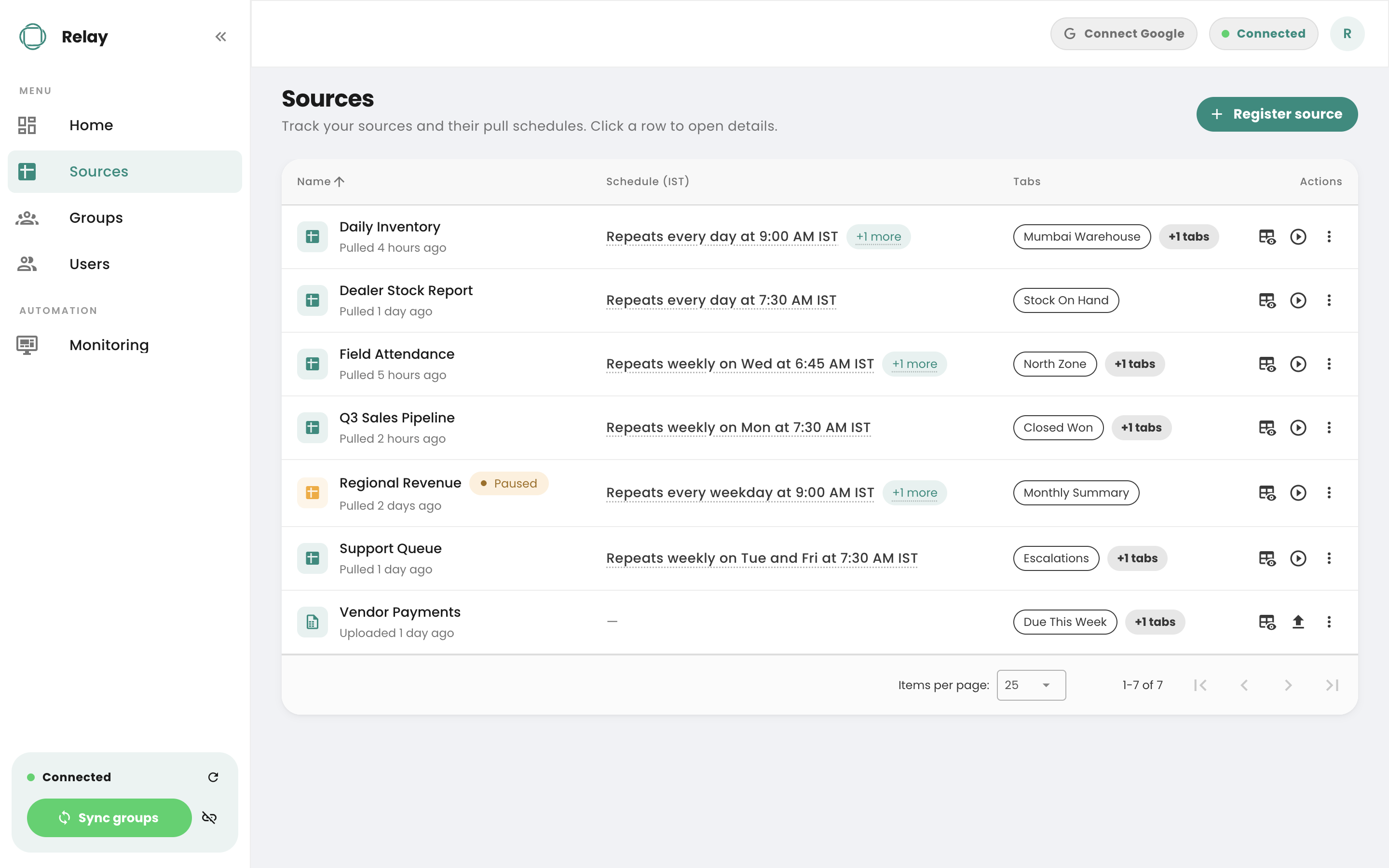
Every source, with its own cadence
Sources pull on their own schedules, in IST. Note the last row: it was uploaded rather than linked, so it carries a file icon and no pull schedule, and everything downstream treats it exactly like the rest.
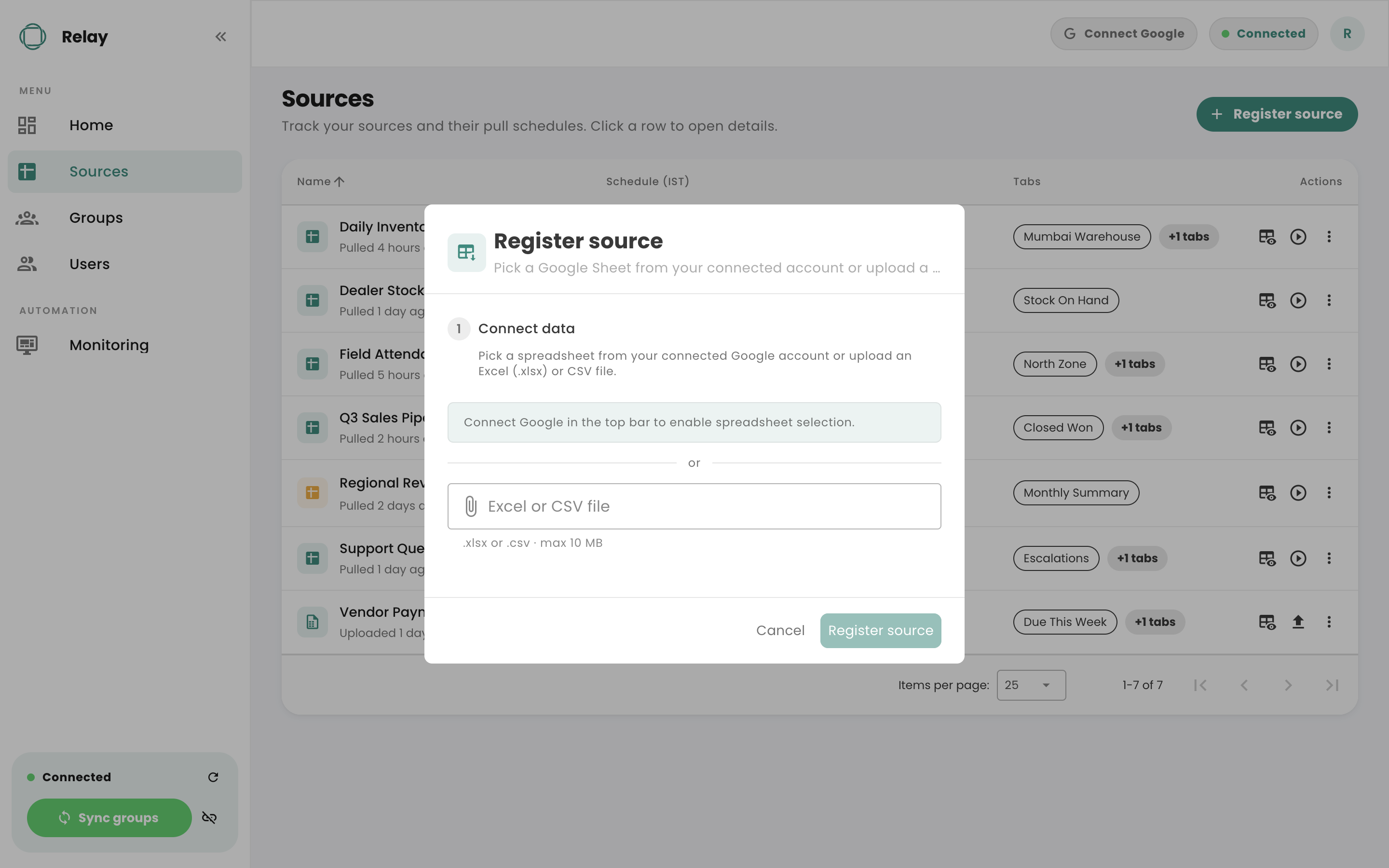
Two ways in, one destination
Register a source by picking a spreadsheet from a connected Google account, or by uploading an .xlsx or .csv. Both land as the same structured rows. This is the source end being an adapter rather than a hard-coded integration.
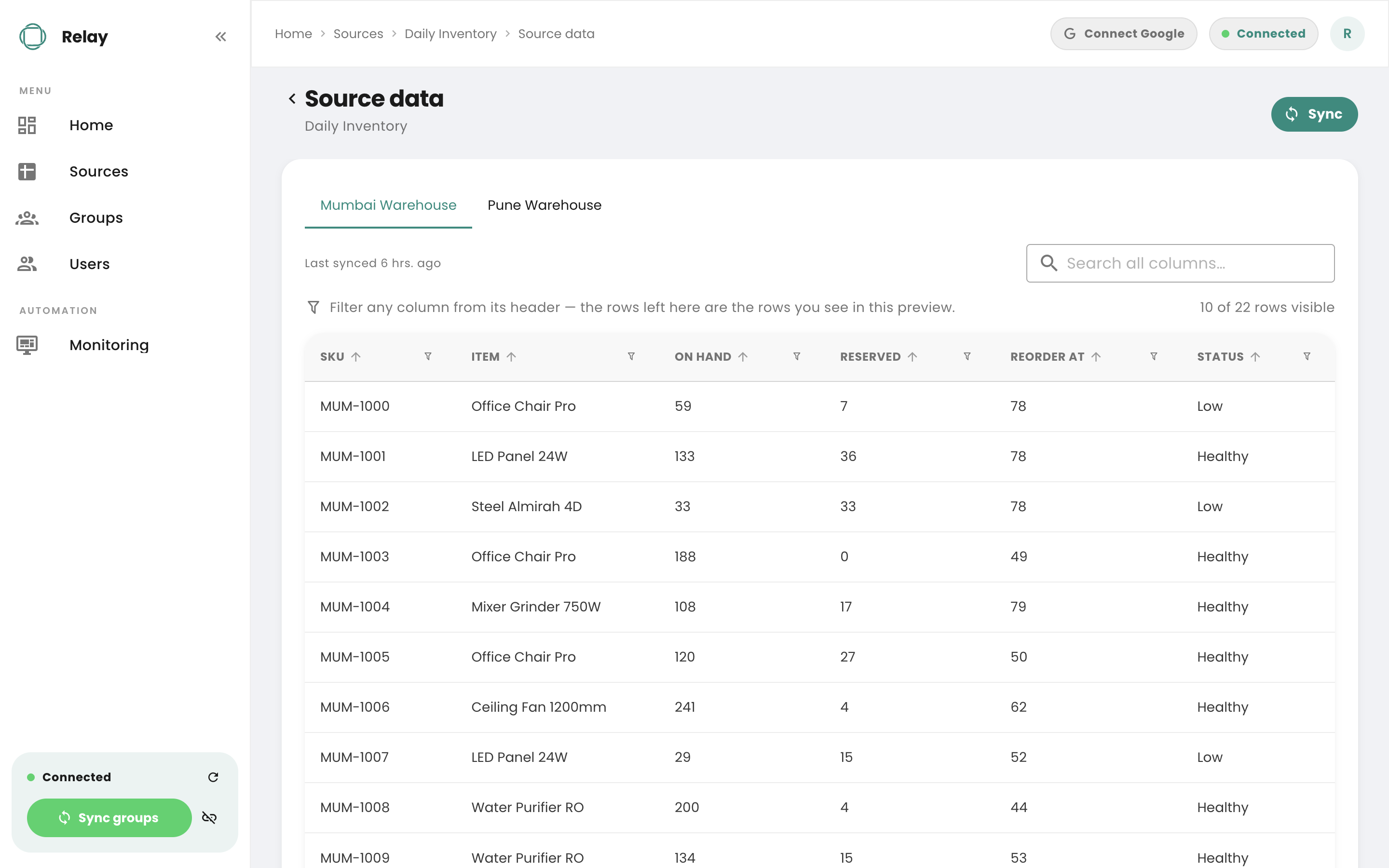
The stored snapshot
What was pulled, when it was last synced, and how many rows survived the filters. Delivery reads this and never the live source, which is the seam that lets both ends move independently.
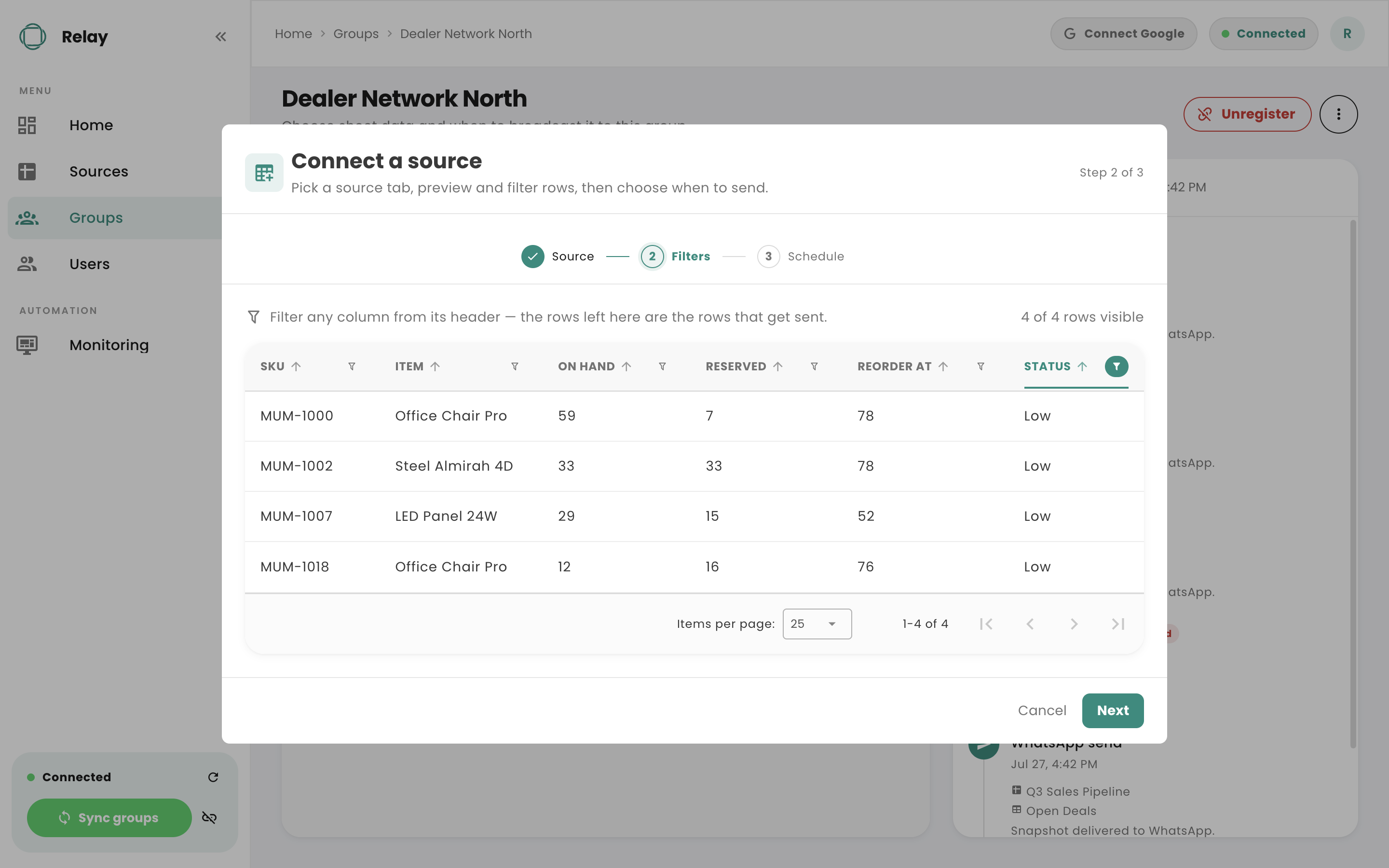
The rows this audience gets
Filter any column, and what is left is what will be sent. The same tab can feed a warehouse audience and a regional team completely different rows, on different days.
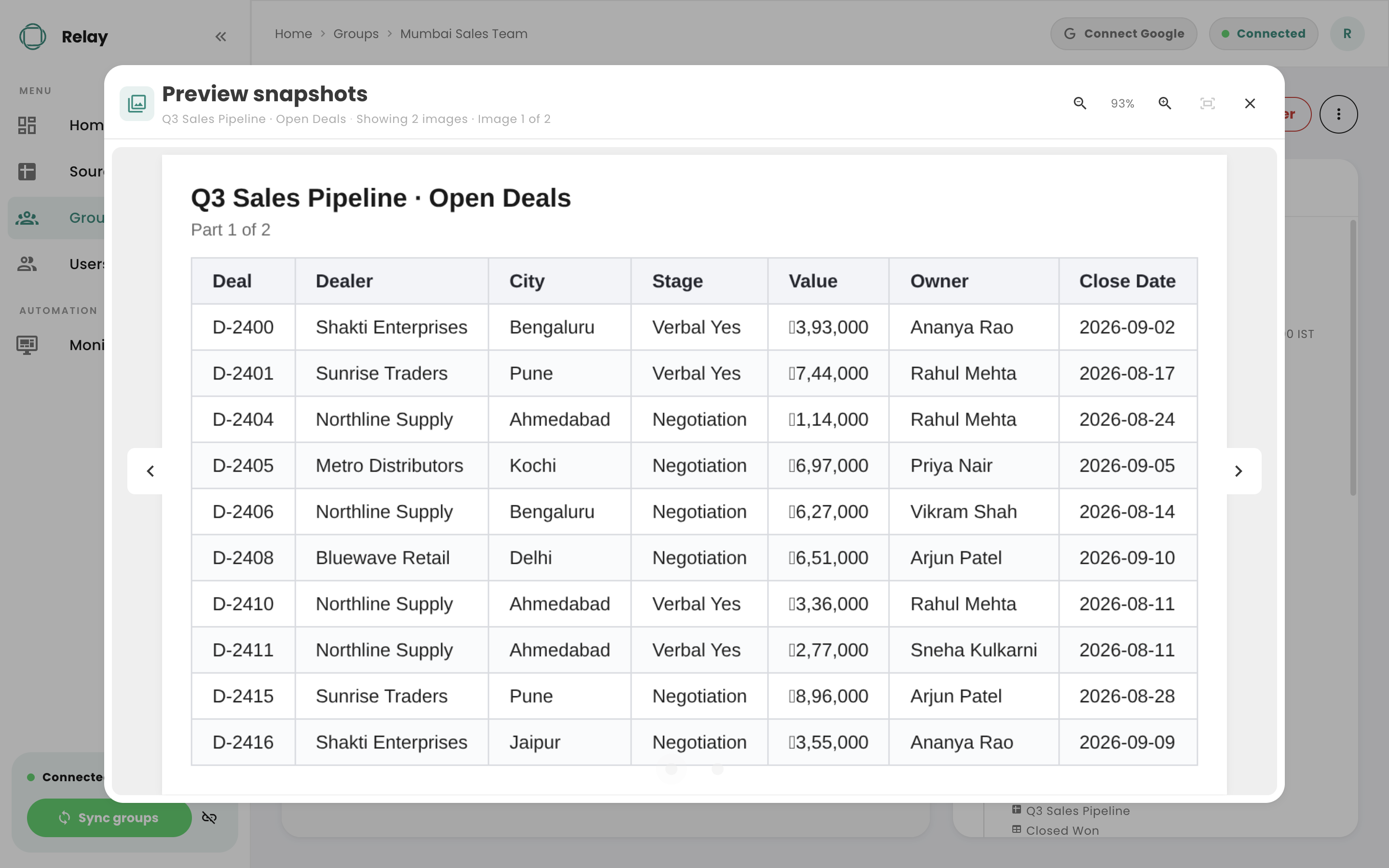
What actually arrives
The rendered table, captioned with its source and tab, split into part one of two because the result set was too long for one readable image. This is the artifact, before any channel is involved.
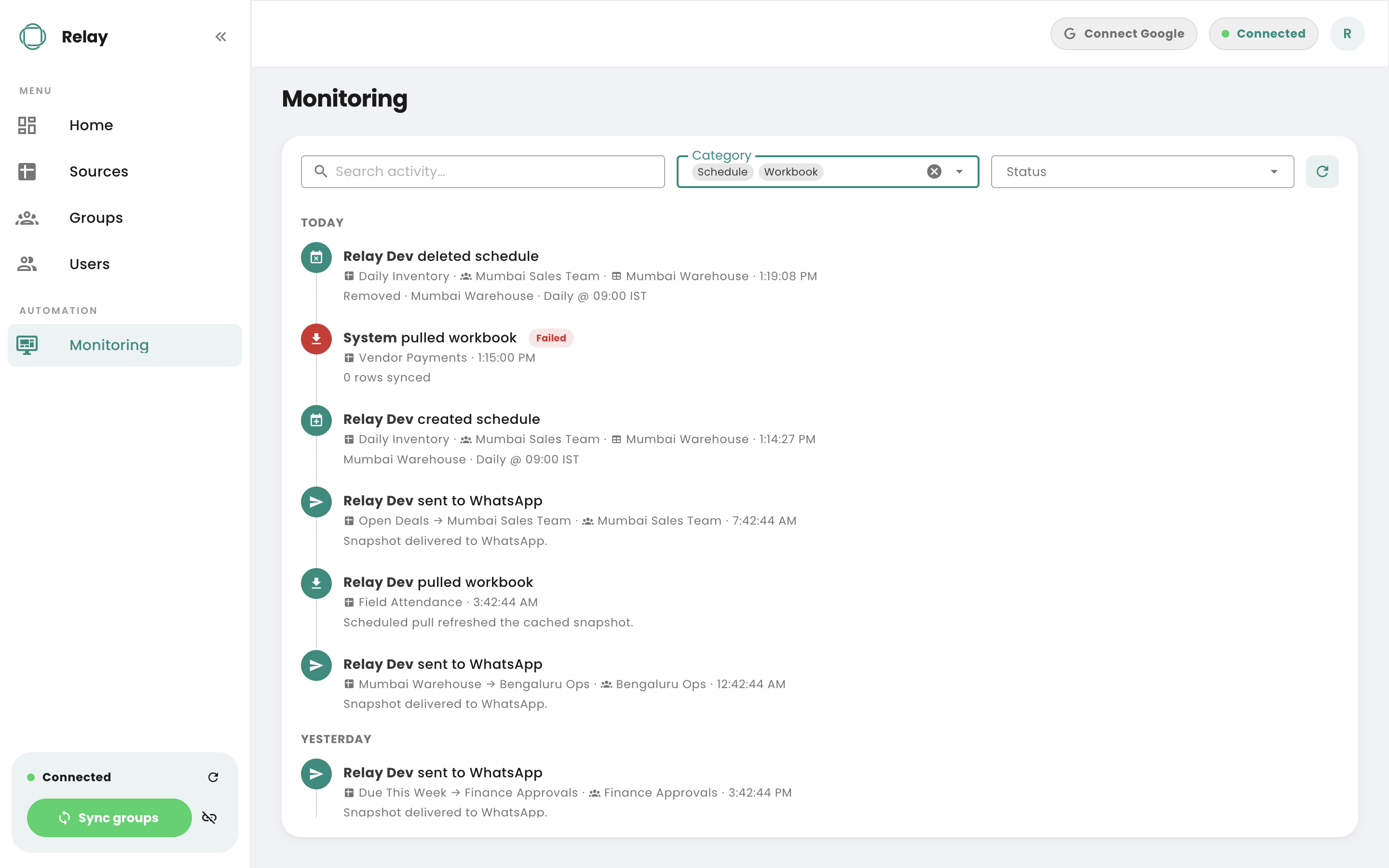
Every run, including the bad ones
Pulls, sends, schedule changes and failures in one feed, each with what it touched and when. The failed pull here is the point: it is recorded rather than silently absorbed.
Questions
What teams ask before starting.
What do the people receiving this have to install?
Nothing. They stay in the WhatsApp group they are already in, and the table arrives in the chat. There is no app, no portal and no account for them.
What can it read from, and what can it send to?
Today it reads from Google Sheets and from .xlsx or .csv files you upload, and it sends to WhatsApp groups. Those are the adapters that ship. The design keeps ingestion and delivery apart, meeting only at a stored snapshot, so adding a source or a channel is work at one end rather than a rebuild. If you need a specific system on either end, that is the conversation to have with us.
Can it change our sheet?
No. Relay connects with read-only access through a service account, so it can pull the tabs you nominate and nothing else. It never writes back.
What actually gets posted to the group?
A rendered table of the rows that matched your filters, captioned with the source, the tab, which filters were applied and the time it was generated. Long result sets are split into several images labelled part one of three rather than compressed until they are unreadable.
Can different groups get different slices of the same sheet?
That is the normal setup. Filters are saved per group and per schedule, so a north region group and a warehouse group can read the same tab and receive completely different rows, on different days, at different times.
What happens on a day when nothing matches?
You choose, per schedule. It can stay quiet and record the run as skipped, or post a short notice saying there is nothing outstanding. Which one is right depends on whether silence would be reassuring or worrying for that group.
How does it connect to WhatsApp?
By linking a WhatsApp account once through a QR code, the same way WhatsApp Web does. It posts to groups rather than to individual contacts.
Product teams and technology leaders who ship with us.















Talk to us
Start with one report and one audience.
Pick the report someone on your team rebuilds by hand every morning, and the group that needs it. That is enough to see whether this belongs in your operation, and it is the fastest way to find out what your real last mile looks like.
Senior engineers reply within one business day.