Every request in the group chat,with an owner.
Your partners keep using their chat. Your team stops losing the thread.
Omni Desk sits in the group chats you already run with clients and partners, and turns the real requests into tracked tasks. Your team works them from a dashboard and replies straight back into the thread.
The group chat problem
The request is in there somewhere.
- It gets buried
- A request at nine in the morning is forty messages back by lunch.
- Nobody owns it
- Three people see it, each assumes one of the others replied, and nobody did.
- The file disappears
- The invoice was attached to a message that no one can find again.
You cannot manage work that only exists as a scroll-back.
How it works
One conversation becomes one task.
Extracting tasks from conversation is easy to demo and hard to get right. Most of the work here is in what happens before and after the model runs.
The group
- Good morning sir
- Sharing the invoice for last week's orderINV-40218.pdf
- Two strips were short in this batch, please check
- Noted, checking
Replied from the dashboard
The task
Proposed by the model
- Title
- Short supply against INV-40218
- Priority
- High
- Request type
- Supply complaint
Read from the messages
- Attachment
- INV-40218.pdf
- Raised by
- Partner side
- Group
- Northwind Distribution
The model proposes wording. It does not decide the facts.
The alternatives
What teams do instead.
Where the partner works
- Scrolling the group
- The group chat they already use, which is why the requests are there.
- Asking partners to raise tickets
- A portal they were asked to adopt, and mostly did not.
- Omni Desk
- The same chat. Nothing on their side changes.
What happens to a request
- Scrolling the group
- It stays a message, handled if somebody sees it.
- Asking partners to raise tickets
- A ticket, on the days someone remembers to raise one.
- Omni Desk
- A task with an owner, a priority and a status.
Where the files end up
- Scrolling the group
- In the chat history, found by scrolling and hoping.
- Asking partners to raise tickets
- On the ticket, when the ticket exists at all.
- Omni Desk
- Pulled from the message onto the task automatically.
Knowing what is outstanding
- Scrolling the group
- Ask people. Compare answers. Hope.
- Asking partners to raise tickets
- Accurate for tickets raised, blind to everything else.
- Omni Desk
- A filterable list per group, with owners.
The product
What your team actually works in.
Captured from the product. The companies and people shown are demo data, not a real customer's network.
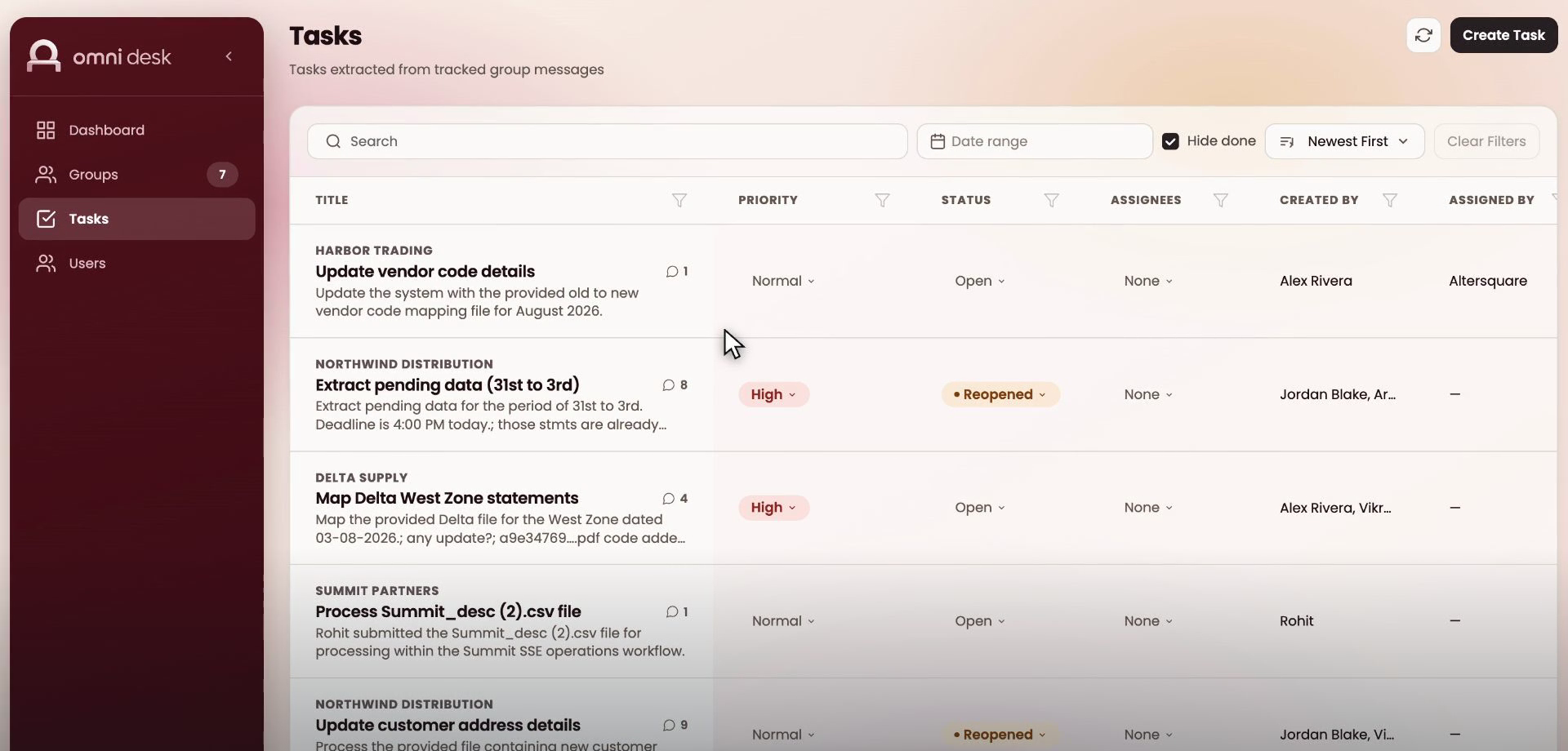
One list, every group
Everything outstanding across all tracked groups, with the priority, status and owner on each row. Filter by group, assignee or date, and hide what is done.
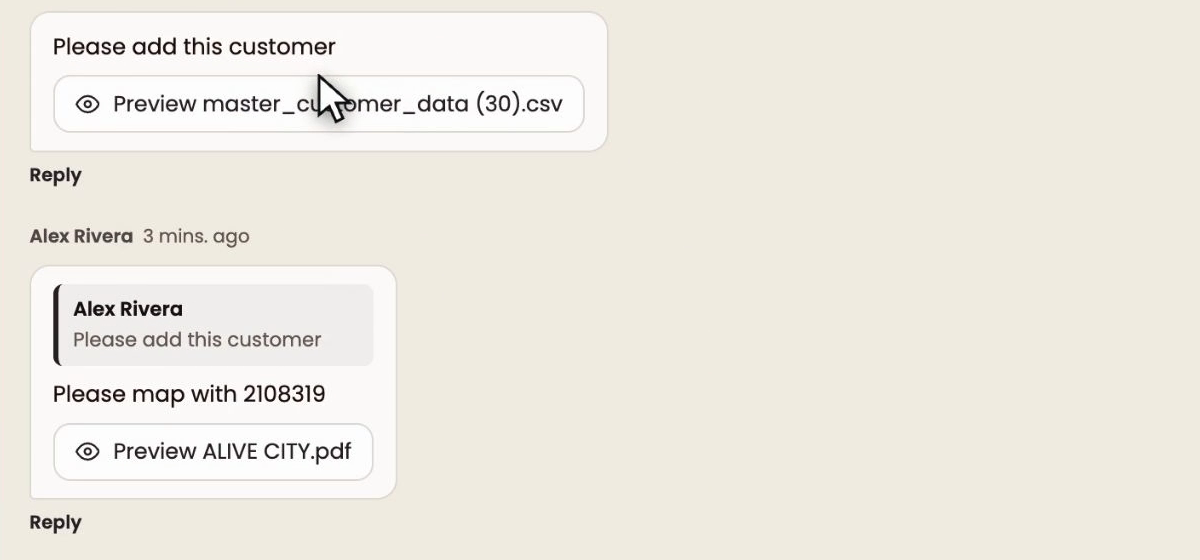
The conversation behind the task
The messages that produced the task, threaded, including the quoted reply and every file that came with it. This is the case where somebody sends a file and explains it in the next message.
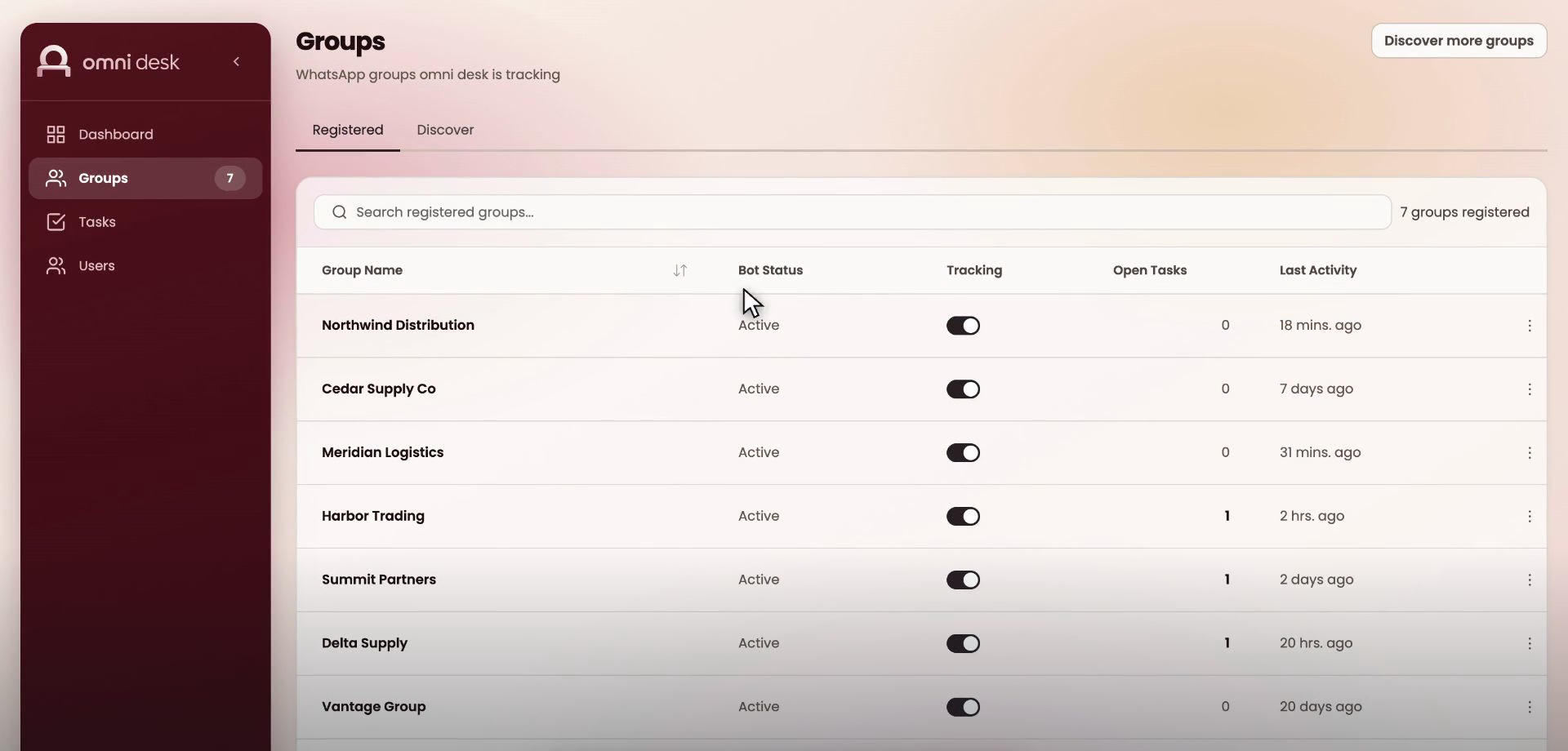
Groups you have registered
Each group with its bot status, whether tracking is on, how many tasks are open and when it last saw activity. Groups you have not registered are left alone.
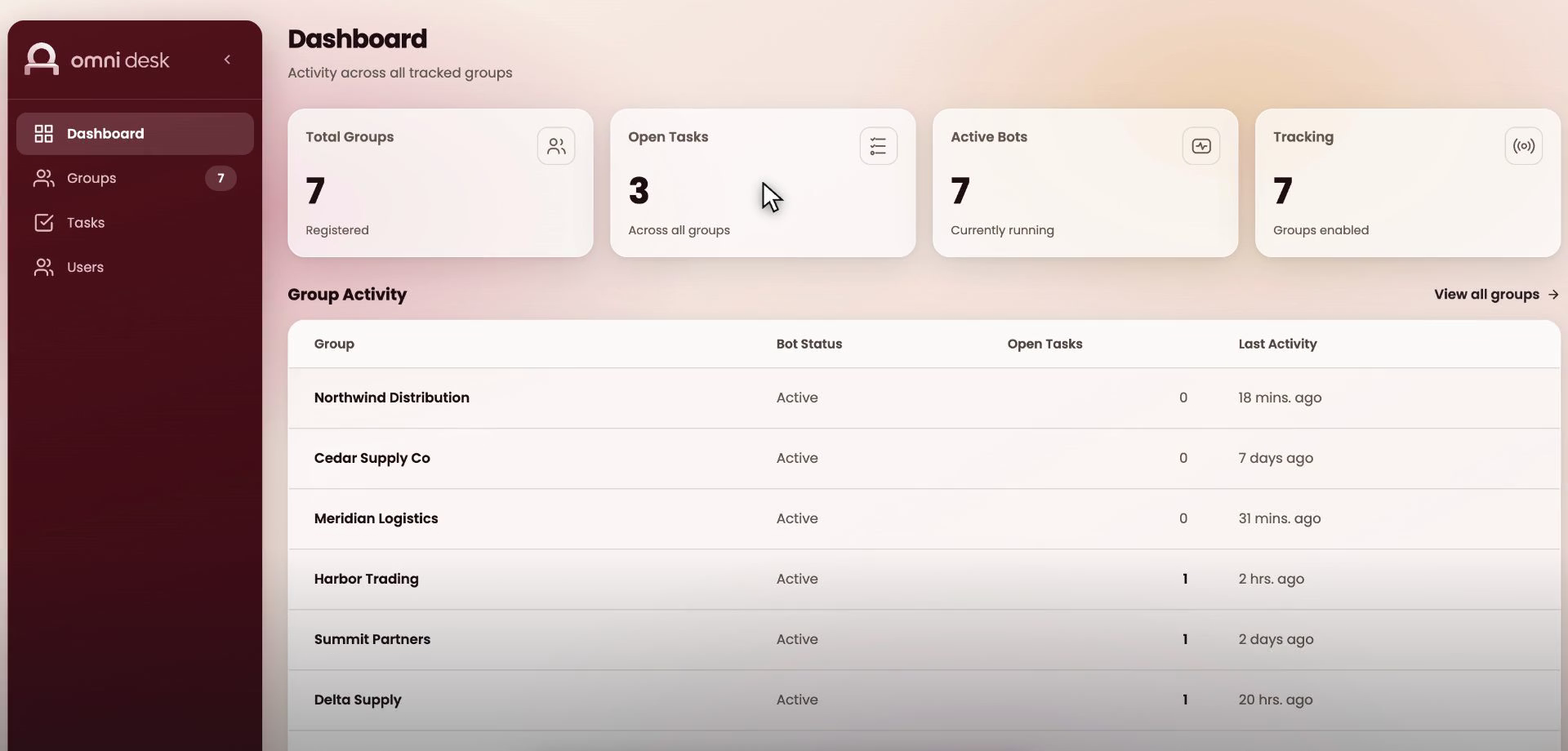
Where things stand
Open tasks across every group, which bots are running and how recently each group has been active.
Questions
What teams ask before starting.
Do our clients and partners have to do anything differently?
No. They keep posting in the same group in the same way. They do not install anything, do not create an account, and in day to day use they simply receive replies in the chat as they always have.
Can Omni Desk turn Slack messages into tasks?
Slack is the same shape of problem. The conversation is exposed to an app, so everything after the message arrives is identical to WhatsApp, and Slack Connect is already how most teams run channels with clients and partners outside their own workspace. WhatsApp is what Desk runs on today and Slack is the shortest connector to add. The difference from the Slack ticketing tools already in the marketplace is that nobody on your side has to react with an emoji or type a slash command to create the task. The request that gets missed is the one nobody flagged, which is exactly the one a reaction-based tool never sees.
Does it work with Microsoft Teams?
Yes, technically, and the plumbing is worth knowing before you plan it. Microsoft Graph exposes channel and chat messages, and a subscription streams them in real time rather than polling. Your IT will ask two things. The app has to be registered and consented in your tenant. And reading messages in shared or private channels, which is where an external partner usually sits, needs a tenant-wide permission rather than per-channel consent, so it is an admin decision rather than a team one. There is no per-message fee from Microsoft; that charge was removed in August 2025.
Is this a ticketing system for WhatsApp, Slack or Teams?
No, and the difference is the whole point. A ticketing system waits for a ticket, so it only ever knows about the requests somebody remembered to raise. Omni Desk reads the conversation that is already happening and produces the task from it, which means the list it gives you includes the requests nobody logged. If you already run a helpdesk, this feeds it rather than replaces it.
What does the AI decide, and what does it not?
It proposes the title, a short summary, the priority and what kind of request it is. It does not decide the facts. Attachments, links and the people tagged in the conversation are read from the messages themselves. Anything genuinely ambiguous is marked for review so a person looks at it.
Does it read everything in every group?
Only groups you explicitly register, and within those, only people who have been classified. Messages from your own team are excluded from task creation by default, and you can turn them on per group if internal requests should be tracked too.
How quickly does a message become a task?
This runs on a cycle rather than instantly. The default is every ten minutes during working hours, and both the frequency and the active window are set per group. A group that only matters during the morning order window can be configured that way.
What happens if we pause tracking and come back?
You choose what to do with the gap. It can process everything that was missed, start clean from the moment you resume, or work forward from a date you pick. The messages themselves were still captured either way.
Can we limit which groups a team member sees?
Yes. Access is granted per user per group, so someone handling one region's partners does not see conversations from another region.
Product teams and technology leaders who ship with us.












Talk to us
Start with one group.
Pick the group that generates the most chasing, and let it run for a cycle. The list it produces is usually the argument.
Senior engineers reply within one business day.