Blog20 min read
Strangler Fig in Practice: The Mistakes Teams Make in the First Three Months That Undo the Whole Plan
By Huzefa Motiwala · Co-Founder & Chief Product Officer
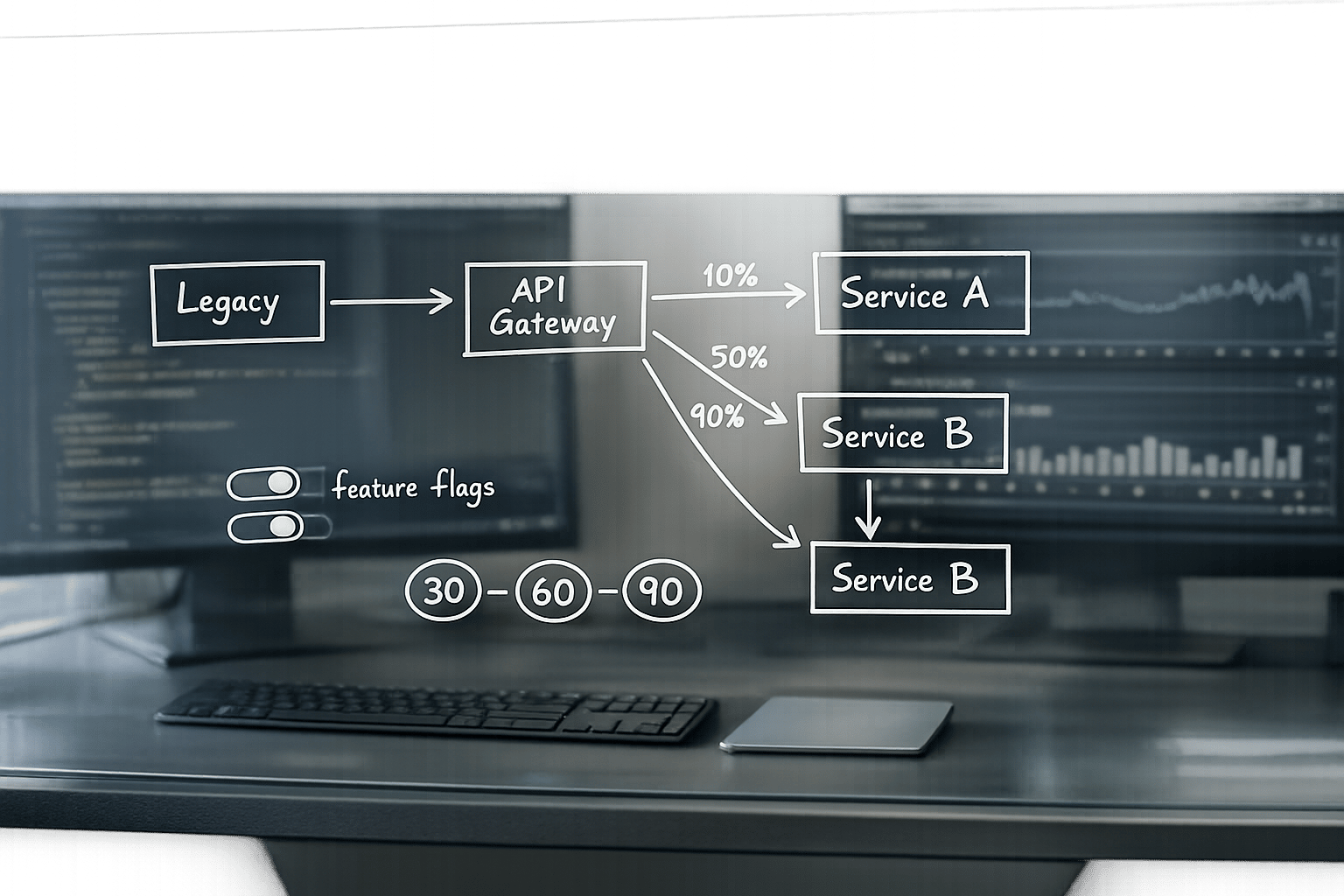
The first 90 days of a Strangler Fig migration are critical. While this approach has a higher success rate (76%) than "Big Bang" rewrites (50%), 68% of projects stall early, with most failing to replace even a single monolith component. These early failures often stem from small missteps that compound over time, leading to bloated costs (median $2.1M for failed efforts) and stalled progress.
Here’s what you need to know to avoid these pitfalls:
- Key Milestones:
- By day 30: Routing layer live, one endpoint migrated, rollback within 5 minutes.
- By day 60: 10% of shadow traffic, response divergence under 0.5%.
- By day 90: 5% of functionality retired, one component fully migrated.
- Common Failures:
- "Parallel Everything, Retire Nothing": Migrating functionality without decommissioning legacy code.
- "UI-Only Strangler": Replacing the UI but leaving backend tied to the monolith.
- Overcoupled routing layers that include business logic.
- Misplaced boundaries causing legacy systems to grow instead of shrink.
- Poor team coordination and unmanaged feature flags.
- Fixes:
- Use a health scorecard to track progress (e.g., divergence rate, latency, functionality retired).
- Simplify routing layers and close bypass paths.
- Define migration boundaries by business capabilities, not technical layers.
- Maintain clear ownership and documentation for feature flags and migration decisions.
- Use shadow traffic and observability tools to ensure legacy and modern systems stay aligned.
Early momentum is the strongest predictor of success. Focus on shrinking the legacy system and hitting milestones to avoid the common traps that derail migrations.
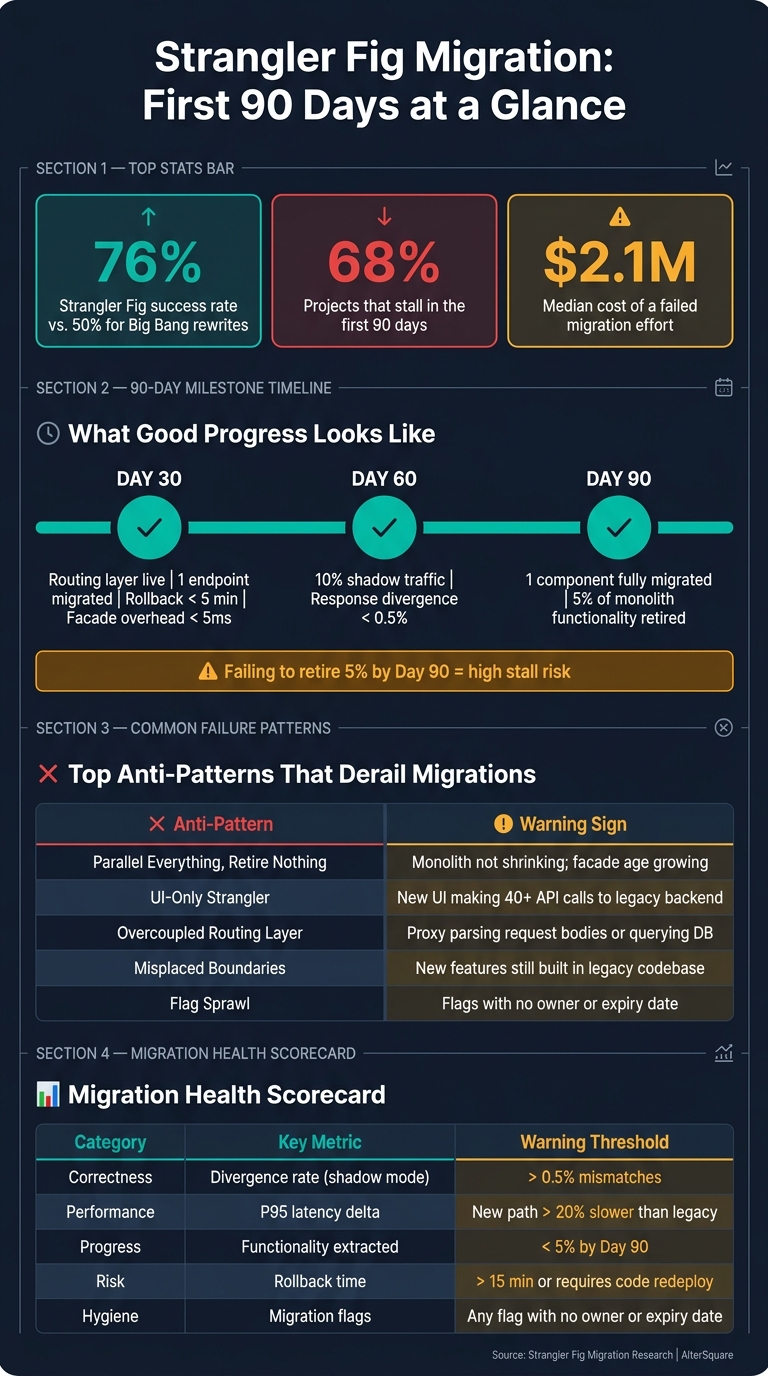
Strangler Fig Migration: 90-Day Milestones, Failure Rates & Key Metrics
How to Spot Early Failure Patterns in a Strangler Fig Migration
What Good Progress Looks Like at 30, 60, and 90 Days
A successful migration isn’t just about moving parts of a system - it’s about ensuring the old system is steadily shrinking. During the first 90 days, specific milestones help gauge whether you’re advancing or just treading water.
By day 30, your routing layer should be live and fully transparent. Every request should flow through the facade with minimal overhead - less than 5ms. At least one small slice, like a low-complexity, read-only endpoint, should already be migrated. Importantly, a kill switch should be in place to allow you to roll back routed paths within five minutes, without needing to redeploy code [9].
By day 60, shadow traffic should account for at least 10% of production requests. At this stage, the response divergence rate between the legacy and new systems should stay under 0.5% [9]. By day 90, one complete component should be fully handling 100% of its production traffic, and at least 5% of the monolith’s overall functionality should be retired [1][9]. If this 5% mark isn’t hit, the risks of the migration stalling increase significantly [1].
When these targets aren’t met, specific failure patterns often start to surface.
Common Anti-Patterns and Their Warning Signs
Two recurring patterns can derail migrations, often without being immediately obvious.
The first is "Parallel Everything, Retire Nothing." In this scenario, functionality gets migrated, but the legacy code isn’t decommissioned. The monolith doesn’t shrink, and operational overhead grows. A telltale sign is the increasing "Temporary Layer Age" - routing facades and anti-corruption layers linger for months without a clear plan for removal [8]. Metasphere Engineering sums up the issue perfectly:
"Strangler fig migrations that never finish are worse than big-bang failures… You didn’t migrate. You doubled your operational burden and called it progress." [5]
The second is the "UI-Only Strangler." Here, teams replace the frontend but leave the backend untouched. The new UI ends up making excessive API calls to the monolith, dragging its performance and reliability issues into the modernized system. In one case, a React admin panel needed 47 API calls to the legacy monolith for a single page load. The project was abandoned after four months, with $680,000 wasted [1]. Modernization Intel captures the problem in one line:
"UI is the tip of the iceberg. Strangling a UI without owning backend logic creates a distributed frontend - worst of both worlds." [1]
Building a Simple Migration Health Scorecard
To keep your migration on track, you need a clear way to measure progress. A simple health scorecard can help answer the critical question: Is the legacy system shrinking? Focus on metrics like Correctness, Performance, Progress, and Risk, and make the dashboard visible to the entire team. As The Art of CTO warns, "The migration dies in the dark" [9].
| Category | Key Metric | Warning Threshold |
|---|---|---|
| Correctness | Divergence rate (shadow mode) | > 0.5% mismatches [9] |
| Performance | P95 latency delta | New path > 20% slower than legacy [9] |
| Progress | Functionality extracted | Less than 5% by day 90 [1] |
| Risk | Rollback time | > 15 minutes or requires code redeploy [9] |
| Hygiene | Migration flags | Any flag with no owner or expiry date [9] |
Two metrics stand out as especially important. Tracking "legacy code retired" (measured in lines of code or endpoints decommissioned) tells you whether the monolith is actually shrinking or just being duplicated. Meanwhile, rollback time reflects how much control you have - if rolling back takes longer than deploying a hotfix, your safety net is weak.
Strangler Things: How to De-risk Legacy Code Migrations
Routing Layer Mistakes That Recreate Monolith Dependencies
The routing layer is meant to be the nerve center of your migration process - the place where decisions are made about what traffic stays with the legacy system and what moves to the new one. But when it’s poorly designed, it stops being a tool for progress and becomes yet another source of headaches.
What Overcoupled Routing Looks Like and Why It Happens
Overcoupling happens when teams gradually pile on extra duties - like authorization, rate limiting, or business logic - onto the routing layer for convenience. The warning sign? When the routing layer starts needing to understand the content of a request, not just its URL or headers, to decide where to send it. If your proxy is parsing request bodies or even querying the monolith’s database to make routing decisions, it’s gone beyond its purpose. The routing layer should act as a traffic controller, not a processor for business logic.
"The facade becomes a god object - routing, authorization, logging, rate limiting all tangled in one middleware that nobody wants to touch." - Naren, Founder & Principal Engineer, TheCodeForge [11]
"If you leave the facade in place indefinitely, you’ve added indirection without removing complexity - a distributed monolith with extra latency." - Samuel Jackson, Senior Java Back End Developer, Trinity Logic [7]
On top of that, problems arise when traffic bypasses the centralized routing layer altogether.
The Problem with Multiple Entry Points Bypassing the Facade
Even a well-constructed routing layer can’t do its job if traffic bypasses it entirely. This happens more often than you’d think - internal services hitting legacy endpoints directly, batch jobs accessing the database, or mobile apps using an outdated API host that skips the facade.
Every bypass creates a blind spot. You lose visibility into how much traffic the new system is handling, and your migration metrics become unreliable. A good early test is the "Choke Point Test": can 90% or more of all calls be intercepted at a single layer? [9] If not, closing those bypass paths becomes a top priority.
A practical way to tackle this is by tagging every response with an X-Served-By header that shows whether the legacy or modern system handled it [4]. This makes bypass traffic easy to spot in logs and bug reports, helping you systematically close those gaps. Once these gaps are sealed, you can move forward with a more streamlined and effective routing strategy.
How to Keep Routing Logic Simple and Modifiable
The best routing layers are simple by design. Tools like Nginx, Envoy, or YARP succeed because they prioritize predictability and clarity. Start with basic URL-path routing - for example, send /api/catalog/ to the new system, and everything else to the legacy one - and only introduce complexity when absolutely necessary [4].
For more nuanced control, use feature flags at the routing boundary instead of hardcoding conditional logic into the proxy configuration. Static configuration files that require a full infrastructure redeploy for every change create deployment coupling, making updates as risky as deploying new code [4][11]. Feature flags, on the other hand, allow for incremental traffic shifts and near-instant rollbacks without redeployment.
Another smart practice is treating every route as temporary. Mark legacy routes with a clear "DELETE BY" date in your configuration [4][7], and monitor the number of active routes over time. If the route count keeps growing, it’s a sign your facade is becoming a permanent fixture rather than a stepping stone - exactly the opposite of what the Strangler Fig pattern is supposed to achieve.
Boundary Definition Errors That Let the Legacy System Grow Instead of Shrink
Even with a flawless routing layer, misplaced migration boundaries can derail your efforts. This issue doesn’t cause dramatic failures like outages or broken deployments. Instead, it sneaks up on you - months into the project, you realize the legacy system hasn’t gotten any smaller.
Signs Your Migration Boundaries Are in the Wrong Place
Misplaced boundaries can quietly undermine progress. One of the most obvious red flags is shared database tables. If your new service is still reading from or writing to the same tables as the legacy system, you haven’t truly separated anything. Instead, you’ve just added another user to the same data model. This makes independent schema evolution impossible and keeps the legacy system firmly in the picture [3][12].
Another clue is more subtle: new features are still being developed in the legacy codebase. This usually happens because it feels "faster" or "safer" at the moment. But once this pattern sets in, the legacy system grows instead of shrinking.
"If new work keeps flowing into the legacy code, you’re not strangling it. You’re feeding it vitamins." - Steve Kinney [12]
A third sign is coordination overhead. If delivering a single feature requires synchronized deployments or constant alignment between the legacy and modern teams, your boundaries are likely drawn along technical layers rather than domain-specific ones [12][9].
To make real progress, it’s crucial to rethink these boundaries using domain-driven principles.
Using Domain Language to Draw Better Boundaries
Boundary errors often come from slicing horizontally - migrating technical layers instead of entire business capabilities. This approach moves infrastructure but leaves the legacy system holding onto the business logic. As a result, the system’s most critical parts remain untouched.
The solution? Slice vertically by business capability. Each migration unit should represent a complete workflow, such as "checkout", "subscription renewal", or "invoice generation", rather than a technical layer [2][12]. Domain-Driven Design provides tools like bounded contexts and aggregates to help identify where one business concept ends and another begins.
For example, Shopify tackled this challenge in 2020 by carving 37 components out of its massive 2.8 million-line Rails codebase. Each component was tied to a specific commerce subdomain, and they used a tool called Packwerk to enforce these boundaries and prevent backsliding [2].
"The migration unit should be a vertical capability with clear business meaning… Not ‘all persistence,’ not ‘all utilities,’ not a technically neat but operationally irrelevant slice." - Steve Kinney [12]
Adding an Anti-Corruption Layer (ACL) at the boundary between old and new systems can also help. The ACL acts as a translator, converting legacy semantics - like overloaded fields or ambiguous identifiers - into clean, domain-specific types. This prevents the new system from inheriting the conceptual mess of the old one [8][10].
Finally, it’s crucial to measure progress in a way that reflects actual legacy reduction.
Measuring Legacy Shrinkage vs. Strangler Growth
Growth in the new system doesn’t mean much if the legacy system isn’t shrinking. To ensure your migration milestones lead to real progress, track both sides of the equation: how much traffic is routed to the new system (an objective metric [3]), how many legacy endpoints are retired, how much legacy code is deleted, and whether new services still depend on the legacy system.
Here are some key metrics to monitor:
| Metric | What It Measures |
|---|---|
| % of traffic served by new system | Shift of real-world load away from legacy |
| Number of retired legacy endpoints | Progress in reducing the migration surface |
| Lines of legacy code deleted | Actual reduction in monolith code |
| Legacy dependency fan-in | Whether new services still rely on the legacy system |
One practical way to enforce progress is by marking replaced legacy code with // DELETE BY [DATE] comments. Automated scripts can then generate tickets for any code that outlives its expiration date [3][4]. Without such a forcing mechanism, outdated code often lingers in production far longer than intended.
Team Coordination Failures When Legacy and Modern Code Have Different Owners
When legacy systems and modern codebases are managed by separate teams, maintaining alignment becomes a challenge. Separate managers, backlogs, and definitions of "done" often result in conflicting priorities, slowing down migration efforts and introducing inefficiencies.
Why Split Ownership Without a Single Migration Lead Fails
Dividing ownership between teams focused on stability and those driving new functionality often leads to conflicting goals.
"The replacement team has every reason to declare victory early; the legacy team has every reason to keep the lights on and avoid change. They will pull in opposite directions, and the routing layer becomes a political battle instead of an engineering tool." - Palakorn Voramongkol, Software Engineer [4]
Without a migration lead to unify efforts, decisions about routing, cutover timing, and endpoint retirement are made in silos. This lack of coordination results in duplicated work, inconsistent assumptions, and decision-making bottlenecks. A single migration lead can resolve these issues by taking ownership of the migration map, defining cutover criteria, and ensuring legacy code is retired only after the new system is fully validated. While individual teams can still manage their respective codebases, the migration itself needs one person to steer the ship and maintain accountability.
How Context Gets Lost Across Teams and How to Prevent It
Long migrations often involve developer turnover and frequent handoffs, which can erode institutional knowledge. Each transition risks losing critical context, such as why certain boundaries exist or why specific fields were mapped in a particular way. Without clear documentation, new developers are left guessing - and those guesses often lead to compounding mistakes.
To combat this, adopt two documentation practices:
- Maintain a root-level
migration.mdfile that lists every route, database table, and integration, along with its status and owner. - Use concise Architecture Decision Records (ADRs) to document the reasoning behind key decisions. These don’t need to be lengthy - just a few sentences explaining the "why" behind a choice can save hours of future rework.
Another effective strategy is the "scream test", which involves temporarily disabling a legacy connection to uncover undocumented dependencies. While blunt, this method reliably exposes hidden integrations that written records often miss. By addressing these gaps, teams can make better migration decisions that prioritize what matters most to the business.
Making Migration Decisions Based on Business Impact, Not Just Tech Debt
While technical debt is a useful internal concept, it’s not always the best guide for migration sequencing. Focusing on the messiest or oldest code first often results in teams spending significant time on endpoints that provide little business value. The migration appears active, but its impact goes unnoticed.
A more effective approach is to evaluate endpoints using a weighted matrix based on three factors: business value, change frequency, and complexity [6]. This method highlights high-value endpoints that are frequently updated and relatively simple to migrate - areas where improvements will be felt immediately. For example, a Series B e-commerce company applied this approach after a $2M failed rewrite. By focusing on their product catalog, search, and checkout APIs, they completed the migration in 8 months for roughly $400,000, achieving zero downtime [6].
To secure ongoing support, migration efforts should be tied to measurable business outcomes. Metrics like revenue impact and churn reduction should drive sequencing decisions, rather than focusing solely on code age or complexity. When a migration lead can demonstrate improved business performance tied to specific changes, it helps build trust and ensures continued funding for the project.
Testing and Observability Gaps That Let Legacy and Modern Paths Drift Apart
Even the best-planned migrations can stumble when teams lose visibility between legacy and modern systems. Without precise testing and observability, legacy quirks can sneak into the new system, causing unexpected issues. Behavioral drift - when the old and new systems start behaving differently - often leads to late-stage migration problems.
Why Unit Tests Alone Aren’t Enough for Strangler Fig Migrations
Unit tests have their place, but they’re limited - they only confirm what developers already anticipate. Legacy systems, however, are full of surprises: hidden edge cases, outdated fixes, and undocumented behaviors like rounding quirks or timezone handling.
"Behavioral equivalence testing is not optional. Legacy systems have accumulated years of implicit behavior - edge cases, timezone handling, rounding rules, null value treatment - that documentation does not capture." - Wolf-Tech [13]
Here’s the problem: your new service might pass every unit test with flying colors, but still fail to replicate critical behaviors of the legacy system. This is where contract tests and integration tests come in. These tests compare outputs from both systems using the same inputs, ensuring the new system produces the same results. To dig even deeper, shadow traffic can help uncover subtle differences that unit tests miss.
Using Shadow Traffic to Catch Behavioral Differences Early
Shadow traffic offers a smart way to validate the new system without putting users at risk. By duplicating production requests to both systems simultaneously, you can compare their outputs without affecting the actual user experience. Tools like Nginx’s mirror directive make this process straightforward: the legacy system handles the user response, while the new system’s outputs are logged and analyzed.
This approach has been used successfully by major companies. In 2015, Twitter’s engineering team, led by Puneet Khanduri, introduced Diffy, a tool that sends requests to three instances - primary, secondary, and candidate - to spot inconsistencies [2]. Similarly, GitHub’s Scientist library, launched in 2016, allowed them to run legacy and new code side-by-side for critical paths, ensuring correctness without impacting users [2].
The differences caught by shadow traffic are often small but important - think decimal rounding in pricing, timestamp formats (UTC vs. local), or an empty array instead of null. To stay on track, set a clear threshold for acceptable divergence - many teams aim for less than 0.1% [9]. Gradually increase live traffic (e.g., 1% → 5% → 25% → 100%), holding at each step for at least one business cycle. This method ensures parity issues are addressed early, avoiding surprises during a full cutover.
Setting Up Shared Observability Across Both Systems
Observability is the glue that connects insights from both systems. Equip both the legacy and modern systems with tools to monitor request rates, error rates, latency, and domain-specific metrics (like matching order totals or search result counts). Add an X-Served-By header to identify which system processed a request, and use shared correlation IDs in structured logs to trace individual requests end-to-end through either system.
As Palakorn Voramongkol aptly said: "You cannot migrate what you cannot compare." [4] A real-time divergence dashboard, showing drift rates for each capability, keeps everyone informed - not just the engineers. This visibility ensures the migration stays on track and reduces the risk of unexpected failures.
Feature Flag Misuse That Adds Risk Instead of Reducing It
Managing feature flags effectively is key to minimizing risks during a Strangler Fig migration. While they’re meant to act as a safety net - helping teams route traffic to new services and quickly revert if issues arise - feature flags can easily spiral out of control. Mismanagement often turns them into a source of instability, undermining the very migration they aim to support.
Flag Sprawl: When No One Owns the Flag Registry
Flag sprawl typically begins innocently. One team sets up a migration flag, another adds a kill switch, and yet another introduces an experimental flag for a UI update. Without clear ownership or documentation, these flags accumulate, leading to overlapping scopes and operational confusion. When no one is accountable for a flag or its purpose, the system can become unpredictable.
Nested flags - where one flag’s behavior depends on another - make things even worse by creating tangled dependencies that are difficult to debug. A simple classification system can help prevent this chaos. For example:
- Migration flags route traffic between legacy and modern systems and have a defined lifespan.
- Experiment flags support A/B testing and are temporary by design.
- Ops kill switches are managed by SRE teams for emergency use.
By clearly defining and managing these categories, teams can avoid unnecessary complexity.
"If you treat flags like permanent infrastructure, they will behave like permanent technical debt." - Jordan Mitchell, Senior SEO Content Strategist [14]
Why Flags Should Stay at Routing Boundaries, Not in Business Logic
Flags are far easier to manage when they’re placed at the routing layer - like an API gateway or proxy facade. In this setup, flipping a flag impacts a single, well-defined boundary, making its behavior predictable and changes straightforward.
On the other hand, embedding flags deep within business logic - such as in pricing algorithms or order validation - creates a nightmare. Conditional logic spreads across multiple files, making removal tedious and error-prone. Testing and rollback efforts also become more complex and time-consuming when flags are buried in core logic. As Abhinav Thakur explains:
"The facade owns the routing table, not the services themselves. This gives you a single control plane to manage the migration." [16]
The Danger of Flags Without Expiry Dates
Flags that lack expiry dates often turn into permanent dead code, posing serious risks. A striking example is the Knight Capital Group incident in August 2012. A dormant flag named "Power Peg", unused for eight years, was inadvertently reactivated during a deployment. This triggered a legacy code path on just one server, leading to a runaway order loop that cost the company $460 million in only 45 minutes [2].
To avoid such disasters, every migration flag should have a removal date set before it’s introduced. Automated "time-bomb" tests can enforce this by failing builds when a flag exceeds its lifespan. Once a migration reaches 100% rollout, teams should follow a clear decommissioning process: remove the legacy code path, delete the flag configuration, and update all related documentation.
"The strangler fig only works if the host actually dies. Add a ticket the day you reach 100% rollout: remove the flag, and remove the conditional." - Marcus Johnson, Staff Engineer [15]
Conclusion: How to Diagnose and Fix Early Strangler Fig Mistakes Before They Compound
By the 4-8 week mark of your Strangler Fig migration, small but telling signs often emerge. These can include vague sync meetings, expanding project scope, post-cutover bugs, or unowned feature flags. Each of these hints at one or more of the five major failure areas. For instance, if you notice increased entry-point latency, it may point to an overloaded facade. Similarly, introducing new features into the legacy codebase suggests boundary misalignment. Endless sync meetings that lead nowhere? That’s a clear sign of unclear ownership. And if feature flags are left unmanaged, it’s likely due to missing cleanup plans. Catching these red flags early allows you to pinpoint the problem before it jeopardizes the entire migration.
"Temporary adapters and compatibility layers are never deleted, leaving the system in a permanent half-migrated state. Schedule the cleanup. Put it on the roadmap. If it’s not scheduled, it won’t happen." - Steve Kinney [12]
Failing to prioritize scheduled cleanups only worsens technical debt. Consider this: 68% of enterprise projects stall within the first 90 days, and a staggering 92% fail when less than 5% of the monolith is replaced [1]. These numbers underscore the importance of early intervention.
To tackle these challenges head-on, tools like AlterSquare‘s AI-Agent Assessment and Core Squad Augmentation can make a difference. The AI-Agent Assessment performs a deep dive into your codebase, uncovering hidden architectural bottlenecks, bypass paths, and areas of technical debt that might otherwise go unnoticed during daily development. From there, the Principal Council adds business context, delivering a clear Traffic Light Roadmap that highlights what’s urgent versus what’s under control. Meanwhile, Core Squad Augmentation solves coordination and context-loss issues by providing a dedicated, cross-trained team. This team operates without rotation and follows structured handoff protocols, ensuring that migration decisions remain consistent across sprints and ownership transitions.
Armed with these strategies, you can address early mistakes before they snowball, keeping your migration on track and aligned with long-term goals.
FAQs
How do we prove the monolith is actually shrinking?
To show that the monolith is actually shrinking, start by pairing automated parity validation with the removal of unused code. Begin with a shadow phase: allow both the new service and the legacy system to process the same requests, then compare their outputs for any inconsistencies. If traffic remains stable for 30 days without issues, you can confidently delete routing rules and the corresponding legacy code.
Keep an eye on legacy system usage to pinpoint unused paths. Once identified, permanently delete the unnecessary code to ensure the monolith is genuinely shrinking.
What’s the fastest way to find facade bypass traffic?
To spot traffic that bypasses your facade effectively, make sure your routing layer acts as the sole entry point for all incoming requests. Implement a high-performance proxy like Nginx, Envoy, or Kong to handle and inspect the majority of calls. If any requests reach your legacy backend or new services without passing through the facade, log and investigate them immediately - these could signal possible bypass attempts.
How do we pick the first component to extract?
When selecting a domain, focus on one with high business impact and well-defined boundaries - not just the simplest option. Aim for components that have stable caller contracts, limited data dependencies, and outputs that can be easily measured. Additionally, prioritize domains with sufficient traffic to test performance under realistic conditions. These criteria make it easier to validate the new implementation through parallel runs, ensuring reliability before fully transitioning traffic.