Voice Agent Production Readiness Checklist: 11 Things to Stress Test Before Enterprise Deployment
By Taher Pardawala · Co-Founder & Chief Executive Officer
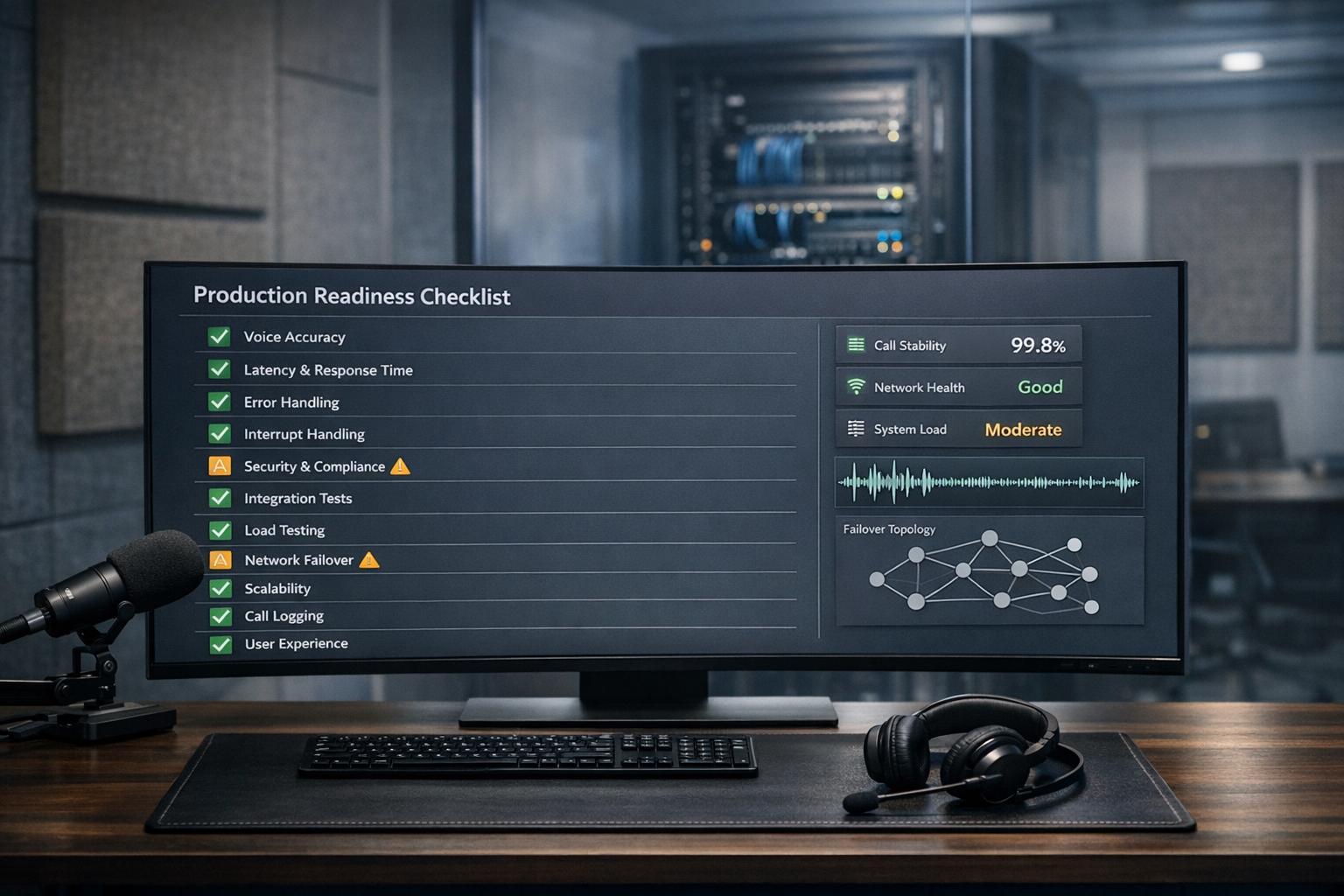
When preparing a voice agent for enterprise deployment, stress testing is non-negotiable. Without rigorous testing, your agent might fail in unpredictable scenarios like noisy environments, interruptions, or network issues. This checklist outlines 11 critical stress tests to ensure your agent performs reliably under real-world conditions:
- Background Noise Handling: Test speech recognition across varying noise levels (e.g., busy streets, offices) to ensure consistent performance.
- Interruption Management: Evaluate how the agent handles users speaking over it and recovers conversation flow.
- Silence and Pauses: Ensure the agent differentiates between intentional pauses and disconnections, maintaining session continuity.
- Low-Bandwidth Networks: Assess performance under poor network conditions (e.g., packet loss, jitter) to avoid degraded audio or dropped calls.
- Accent and Dialect Coverage: Verify the agent’s ability to understand diverse accents within your target audience.
- Out-of-Scope Queries: Confirm the agent gracefully deflects unsupported questions without fabricating answers.
- PII Detection and Redaction: Ensure sensitive information (e.g., credit card numbers) is accurately detected and redacted across all logs and transcripts.
- Concurrent Session Load: Stress test for high traffic, identifying system limits and ensuring stable performance under peak loads.
- Failover Readiness: Simulate outages in key components (e.g., STT, LLMs) and test fallback mechanisms for uninterrupted service.
- Session Recovery: Test how well the agent resumes conversations after network interruptions, retaining context and avoiding repetition.
- Audit Logging: Verify complete, immutable logs for compliance with regulations like GDPR and HIPAA.
These tests are crucial to avoid issues like user abandonment, compliance risks, and operational failures, all of which can erode trust and increase costs. For example, 42% of practitioners cite PII leakage as a top concern, and 67% of voice AI projects fail due to inadequate testing. By systematically addressing these areas, you can deploy a voice agent that’s reliable, responsive, and ready for enterprise use.
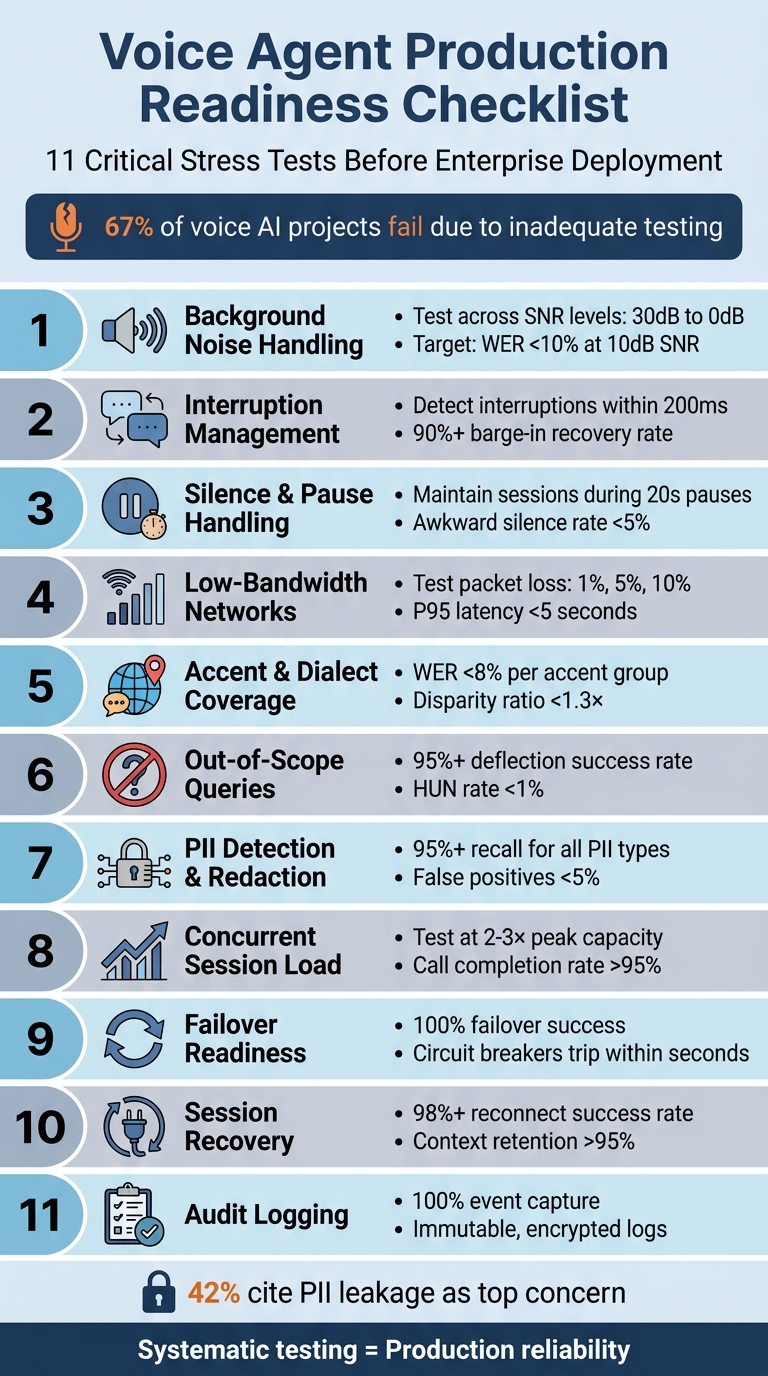
11 Critical Stress Tests for Enterprise Voice Agent Deployment
1. Background Noise Handling at Different SNR Levels
What to Test
The goal is to evaluate how well the agent recognizes speech in noisy environments like cars, coffee shops, busy streets, or open offices. Signal-to-Noise Ratio (SNR) measures how much louder the user’s voice is compared to background noise, expressed in decibels (dB). For instance, a 10 dB SNR means the speech power is 10 times greater than the noise level - common in places like coffee shops [10]. Test Word Error Rate (WER) and intent recognition accuracy across various SNR levels: 30 dB (clean), 20 dB (light noise), 10 dB (moderate), 5 dB (heavy), and 0 dB (extreme). Use real-world noise profiles such as highway noise (65-75 dB), restaurant chatter (around 80 dB), or office ambient sound (40-50 dB) for testing [10].
How to Test
Start by running your test suite in ideal acoustic conditions to establish a clean baseline, which serves as your 100% performance benchmark. Then, introduce calibrated noise samples at the desired SNR levels by mixing them with your test speech recordings using audio processing tools. The formula for calculating SNR is:
SNR (dB) = 10 × log₁₀(Signal Power / Noise Power) [10].
Next, plot performance metrics at each SNR level to find "cliff points" - where accuracy drops significantly. Analyze Noise-Adjusted WER (NA-WER), which is the ratio of WER in noisy conditions to WER in clean conditions. For example, if a system’s clean WER is 3% and increases to 15% in noisy conditions (a 5× jump), it’s less robust than one with a clean WER of 8% that rises to 12% (a 1.5× increase) [10]. These metrics help define performance thresholds.
"Background noise is the silent killer of voice agent deployments. Teams show me their test results - 95% accuracy, perfect task completion - and I ask one question: what was the SNR? Usually they don’t know. That’s when I know they’ll have production issues." - Sumanyu Sharma, CEO, Hamming [10]
Passing Criteria
To pass, the system should maintain a WER below 10% at 10 dB SNR and under 20% at 0 dB SNR. The NA-WER ratio should stay under 2.0× at 10 dB SNR, meaning if the clean WER is 5%, the noisy WER shouldn’t exceed 10%. Intent recognition accuracy should degrade by no more than 15% at moderate noise levels, and task completion rates should remain above 75%. Watch for red flags like retry rates exceeding 15% at moderate noise or abandonment rates doubling the clean baseline. For context, agents that achieve 94% accuracy in quiet lab settings can drop to 58% in a moving car, which can erode user trust [10].
2. Overlapping Speech and Interruption Handling
What to Test
This test focuses on how well the voice agent handles interruptions during conversations, ensuring it remains effective in dynamic, real-world scenarios. Specifically, it assesses the agent’s ability to manage "barge-in" situations - when a user interrupts mid-sentence. The agent must detect when a user speaks over it, stop its own audio output, and shift to address the new input without losing the context of the conversation. A key challenge is distinguishing between actual interruptions and non-disruptive sounds, such as "mm-hmm" or background noise. The agent should suppress its text-to-speech (TTS) output upon detecting an interruption and seamlessly acknowledge the user’s input to maintain a smooth interaction flow [13].
How to Test
To evaluate interruption handling, run automated tests simulating interruptions at different points - 100ms, 200ms, and 500ms - within the agent’s response. Tools like WebRTC or automated testing frameworks can help generate these precise overlaps. Create scenarios where users correct themselves or change topics mid-conversation (e.g., "Actually, I meant Wednesday, not Tuesday" or "Wait, I also need to cancel my other booking") to ensure the agent updates its state and routing appropriately. Additionally, test the Voice Activity Detection (VAD) system across various noise environments, such as office chatter, traffic sounds, or café ambiance, to confirm it avoids false positives [13][14].
| Symptom | Likely Cause | Recommended Fix |
|---|---|---|
| Agent keeps talking over user | VAD not detecting speech over TTS | Enhance echo cancellation (AEC) or adjust VAD threshold |
| Agent stops for noise | VAD false positives | Increase VAD threshold or apply noise filtering |
| Agent stops for "mm-hmm" | Lack of backchannel detection | Add a backchannel classification model |
| Agent repeats itself after stop | Loss of conversation state | Save partial response states and refine prompt logic |
Gather performance data to measure whether the agent meets the required thresholds.
Passing Criteria
The agent should detect interruptions within 200ms (P50) and stop speaking within 300ms (P50). For higher reliability, the P95 thresholds are set at 500ms for detection and 700ms for stopping [13]. The barge-in recovery rate must exceed 90%, meaning the agent should successfully respond to new input in at least 90% of cases [7][11]. Context retention is also critical, with a target of over 95%, ensuring the agent maintains the conversation flow after an interruption [13]. The detection system should achieve 95% True Positives, keeping False Positives (stopping for noise) and False Negatives (missing genuine interruptions) below 5% [14]. A recovery rate below 75% risks creating a disjointed user experience.
3. Silence and Long Pause Handling Without False Disconnection
What to Test
After addressing noise and interruption handling, it’s important to ensure the agent can interpret silence correctly without prematurely disconnecting. This is crucial for maintaining stability in unpredictable, real-world scenarios.
Your voice agent must differentiate between a user taking a deliberate pause and one who has disconnected. While natural pauses in conversation usually range from 200 to 500 milliseconds [8], users may pause for much longer - sometimes up to 15-20 seconds - when searching for information, checking their calendar, or considering a response.
The challenge lies in configuring the ASR endpointing to recognize these thoughtful pauses while avoiding false session drop-offs [4][16]. Additionally, the VAD should be tuned to prevent stationary noises, like background traffic or a TV, from being misclassified as speech during long pauses [3]. The system must also distinguish between genuine silence (an "empty transcript" error) and actual disconnection signals from telephony hang-ups [3].
How to Test
To test silence handling, simulate various scenarios that include:
- Immediate silence: The user doesn’t respond at all after a prompt.
- Extended pauses: Introduce delays of 15-20 seconds in user responses.
- Intermittent silence: The user pauses mid-conversation, resumes, and pauses again.
Incorporate background sounds, such as traffic or a TV, to ensure the VAD doesn’t mistake these for speech during prolonged silences [3].
Tools like Hamming’s Voice Agent Simulation Engine or the LiveKit CLI (lk perf agent-load-test) can help run concurrent test sessions with synthetic participants [1][3][16]. Adjust endpointing settings based on the nature of the interaction. For instance, use aggressive settings (200-300 ms) for quick, transactional tasks and more conservative settings (700-1,000 ms) for complex queries where users might hesitate [17]. These tests help establish reliable silence-handling benchmarks.
| Endpointing Setting | Latency | Cutoff Risk | Best Use Case |
|---|---|---|---|
| Aggressive | 200-300 ms | Higher | Quick Q&A, transactional tasks |
| Balanced | 400-600 ms | Moderate | General conversation |
| Conservative | 700-1,000 ms | Lower | Complex queries, hesitant users |
Passing Criteria
- The system must maintain session continuity during pauses of up to 20 seconds. After extended silence, it should issue a natural prompt, like "Are you still there?", instead of disconnecting abruptly [3].
- The awkward silence rate - the percentage of turns with pauses over 2 seconds - should stay below 5% [11].
- Turn-taking efficiency should exceed 95%, meaning smooth transitions (gaps under 200 ms) dominate the conversation [11].
- The P95 turn latency, which measures the time from the end of the user’s speech to the agent’s response, should remain between 3.5 and 5 seconds [1][11].
4. Low-Bandwidth and Packet-Loss Network Conditions
What to Test
After addressing audio quality in earlier tests, it’s time to evaluate how your voice agent performs under challenging network conditions like low-bandwidth connections and packet loss. Think scenarios like struggling WiFi, congested 4G networks, or restrictive corporate firewalls. The goal? Ensure the system stays clear and responsive even as the network falters.
Key conditions to test include low bandwidth (~100 kbps), varying levels of packet loss (1%, 5%, and 10%), and jitter. For reference:
- Packet loss below 0.5% is excellent, but anything over 3% can make voices sound robotic. At 10%, audio becomes nearly impossible to understand [13].
- Jitter under 10 ms is optimal, but once it surpasses 50 ms, expect choppy audio and cut-off words [13].
These network problems don’t just affect audio - they can snowball into larger issues. For instance, a 3% increase in Word Error Rate (WER) due to bad audio might disrupt the Natural Language Understanding (NLU) and Language Model (LLM) processes, leading to incorrect responses from the agent [16]. This test expands on earlier audio evaluations by focusing on how the system handles deteriorating network conditions.
How to Test
To simulate poor network conditions, tools like tc-netem on Linux can throttle bandwidth and introduce packet loss during live test calls [7]. Try replicating real-world scenarios using 3G, 4G, and WiFi networks. For more extensive testing, the LiveKit CLI (lk perf agent-load-test) can run multiple sessions at once, helping you pinpoint when audio quality breaks down [16].
Use the getStats() API to monitor real-time RTP metrics like packet loss, jitter, and round-trip time (RTT) [13]. To counteract issues, configure the system to use the Opus codec, which performs well at lower bitrates, and enable Forward Error Correction (FEC) to address packet loss without needing retransmissions [13]. Adaptive jitter buffers (usually 100-500 ms) can also help smooth out packet delays while keeping latency manageable [13].
It’s also essential to test ICE restart capabilities to confirm the system can recover from a "connected" to "failed" state [13]. For users behind strict firewalls, ensure TURN fallback over TCP (port 443) works as a backup, even with a slight latency increase (20-50 ms) [13].
Passing Criteria
For a system to pass, it needs to meet specific benchmarks under degraded conditions:
- P95 end-to-end latency should remain under 5 seconds, with P50 latency around 1.5 seconds [7][13].
- STT Word Error Rate (WER) must stay below 10% during moderate packet loss.
- The system should notify users of issues (e.g., "I’m having trouble accessing that right now") instead of going silent [15].
Network RTT under 100 ms is ideal, while anything above 300 ms is unsuitable for real-time voice interactions [13]. Here’s a quick summary of acceptable thresholds:
| Metric | Excellent | Good (P50) | Acceptable (P95) | Poor/Critical |
|---|---|---|---|---|
| Packet Loss | <0.5% | <1% | <3% | >5% |
| Jitter | <10 ms | <20 ms | <50 ms | >50 ms |
| Network RTT | <50 ms | <100 ms | <200 ms | >300 ms |
| End-to-End Latency | <1 s | ~1.5 s | ~5 s | >8 s |
If the system encounters severe network issues, it must handle them gracefully by alerting users rather than leaving them in the dark.
5. Accent and Dialect Coverage for Target User Base
What to Test
Ensuring your voice model performs well across diverse accents is crucial for effective enterprise deployment. Voice recognition systems often struggle with accent variability - a model with a 5% Word Error Rate (WER) for standard American English might jump to 15% for Indian accents, highlighting a significant gap [19]. To address this, analyze production call data to pinpoint the accents and dialects most commonly spoken by your users [19][2]. Your support team can also provide insights into specific regional dialects that frequently lead to errors or require human intervention [19]. Build a test persona matrix that reflects your audience, considering factors like accent profiles (e.g., US Southern, Indian English, British RP), age groups, and speaking speeds [19].
How to Test
Once network stress tests are completed, shift your focus to testing linguistic diversity. Gather a comprehensive dataset of real-world utterances from native speakers of your target dialects. Authentic recordings are ideal for this purpose, while text-to-speech samples should only be used temporarily if necessary [19]. Conduct batch transcription tests and calculate the WER separately for each accent group. Alongside average performance, pay close attention to the disparity ratio, which compares the WER of the worst-performing accent to that of the best-performing one [19]. Utilize shadow mode to replay historical production audio through updated model versions, allowing you to predict performance across different demographics before deployment [14]. Document any accent-related issues as regression test cases [11].
Passing Criteria
As with earlier tests, metrics play a central role here. Your system should maintain a WER below 8% for each accent group under clean conditions, with a spread of no more than 5% across all target accents [19][14]. For regions with distinct accent characteristics, aim for the following benchmarks:
- WER under 10% is considered excellent.
- WER between 10%-15% is good.
- WER over 25% is unacceptable [14].
Keep the disparity ratio below 1.3×, meaning the worst-performing accent should not exceed 30% worse than the best [19].
| Accent Condition | Excellent WER | Good WER | Acceptable WER | Poor WER |
|---|---|---|---|---|
| Clean Audio | <5% | <8% | <10% | >12% |
| Strong Accents | <10% | <15% | <20% | >25% |
| Office Noise | <8% | <12% | <15% | >18% |
In addition to WER, track ASR confidence scores by accent group. Aim for scores above 0.85, and investigate any groups with averages below 0.7 [18]. Embed accent testing into your CI/CD pipeline, and set automatic blocks for deployments if a model update increases the WER for any accent group by more than 5% [19][7].
6. Out-of-Scope Query Handling and Graceful Deflection
What to Test
This step focuses on ensuring the agent can handle queries outside its scope without overstepping boundaries or providing misleading information. The goal is to confirm that the agent recognizes when a query is beyond its capabilities and responds appropriately, avoiding fabricated answers or unrealistic promises [3]. The agent should also identify when a user veers off-topic and deflect smoothly, especially for sensitive or adjacent domains like legal issues, social engineering attempts, or complex complaints [12].
Before testing, establish clear boundaries by creating a "Do Not Handle" list. This list should cover topics like VIP escalations, legal threats, self-harm concerns, and sensitive customer complaints, all of which should trigger an immediate handoff to a human representative [12]. Additionally, ensure the agent consistently classifies user intent throughout the conversation to detect when users stray from supported topics [3][14]. The aim is to keep the Hallucinated Unrelated Non-sequitur (HUN) rate low. This metric tracks responses that are fluent but irrelevant or disconnected [14].
How to Test
To evaluate the agent’s handling of out-of-scope queries, create a test set with over 100 adversarial prompts. These should include off-topic questions, profanity, prompt injection attempts, and queries from nearby but unsupported domains [11][3]. Track how the agent handles these scenarios and analyze trends in its deflection attempts. Implement a "two misses then transfer" rule - if the agent provides two low-confidence responses, it should escalate the conversation to a human [12][2].
Use automated tools, like LLM-based scorers, to assess whether the agent’s deflections maintain the right tone and comply with safety standards. Additionally, monitor sentiment changes after each deflection to ensure the agent’s refusal is polite and professional [2][16].
Passing Criteria
To pass, the agent must meet the following benchmarks:
- Deflection Success Rate: At least 95%, ensuring the agent declines out-of-scope queries without generating inaccurate or unrelated responses [3].
- HUN Rate: Below 1% under normal conditions and under 2% in challenging environments, preventing disconnected or nonsensical replies [14].
- Fallback Rate: Less than 5% for supported intents, reducing reliance on generic responses like "I don’t understand" [11].
- Downstream Propagation: 0%, ensuring no hallucinated responses lead to unintended or unauthorized actions.
| Metric | Target Threshold | Purpose |
|---|---|---|
| Deflection Success | 95%+ | Avoids hallucinations on out-of-scope queries |
| HUN Rate | <1% | Prevents fluent but irrelevant responses |
| Fallback Rate | <5% | Keeps the agent focused on supported intents |
| Downstream Propagation | 0% | Ensures no hallucinations lead to bad outcomes |
After deflecting an out-of-scope query, the agent should quickly redirect the user toward an in-scope action [3]. Despite implementing deflection protocols, the containment rate - conversations resolved without human involvement - should stay above 70% [11][14]. This balance ensures the agent remains effective while gracefully managing its limitations.
7. PII Detection and Redaction in Transcripts
What to Test
Effective detection and redaction of personally identifiable information (PII) is critical to maintaining production compliance. Voice agents capture everything callers say, including sensitive details that may not have been explicitly requested. This could range from Social Security numbers to credit card details, medical conditions, or home addresses. To ensure compliance, the system must identify and redact such information across all storage layers - transcripts, audio recordings, debug logs, OpenTelemetry traces, and analytics exports [20][22].
Testing should cover both structured PII (like Social Security numbers and credit card details) and context-sensitive information (such as names, addresses, and health data). The challenge lies in ensuring the system identifies nuanced cases - like distinguishing the name "John" from the casual use of "the john" as a term for a bathroom [20]. In healthcare settings, test scenarios should include medications with similar-sounding names, such as "Celebrex" and "Celexa", to avoid potential clinical errors [24]. For payment processing, ensure DTMF (touch-tone) capture is handled correctly so that sensitive card details never reach the transcription layer [23].
"Voice agents capture everything the caller chooses to say - including PII you never asked for." - Hamming.ai [23]
Dual-channel synchronization is another area to test. For instance, if an agent repeats a caller’s Social Security number for confirmation, both audio channels must be redacted to avoid sensitive data leakage [20][21]. For real-time streaming, the system needs to buffer 2-3 transcript chunks to catch PII that spans multiple packets, such as "123" in one chunk and "-45-6789" in the next [20][22]. All these scenarios must be tested across every storage layer.
How to Test
Start by creating a dataset with 100 test cases containing known PII. This should include examples like names, Social Security numbers, credit card numbers (validated using the Luhn algorithm), email addresses, phone numbers, and medical conditions. To make the tests more robust, include edge cases, such as users spelling out alphanumeric IDs using the NATO phonetic alphabet (e.g., "Alpha-Bravo-Charlie-1-2-3").
Run these test cases through the entire processing pipeline, examining outputs in transcripts, logs, and analytics exports. Verify redaction across all storage layers, including UI transcripts, databases, logs, telemetry, and analytics exports. Use pattern-matching tools (e.g., grep) to scan for unredacted PII, as even a single failure can have costly consequences. For reference, the average cost of a U.S. data breach rose to $9.36 million in 2024, with 53% involving customer PII [20].
Evaluate system performance by measuring recall (the ability to identify all instances of PII) and precision (avoiding unnecessary redactions of non-sensitive terms). Machine learning-based Named Entity Recognition (NER) models typically achieve F1 scores of 94-96%, compared to 60-80% for regex-based approaches [20]. For credit card numbers, use the Luhn algorithm to validate 16-digit sequences, reducing false positives to below 5% [21].
Passing Criteria
To meet compliance standards, the system must achieve at least 95% recall for all PII types while keeping false positives under 5% [21]. Redacted content should use structured labels (e.g., [CREDIT_CARD] or [SSN]) instead of generic symbols like asterisks. This approach preserves the context of conversations for debugging purposes while still protecting sensitive information. Additionally, real-time redaction should not add more than 10-50ms of latency per transcript chunk.
| PII Type | Detection Method | Target Accuracy |
|---|---|---|
| Credit Card Numbers | Pattern Matching + Luhn | 95%+ |
| Social Security Numbers | Pattern Matching | 98%+ |
| Names | ML-based NER | 94-96% |
| Addresses | ML-based NER | 92-95% |
| Medical Conditions | ML-based NER | 88-94% |
Ensure nightly automated scans verify that no PII appears in logs or traces. The system must handle both caller and agent channels simultaneously, scrubbing PII before it reaches central storage. If redacted content is displayed in the UI but raw data remains in the logs, this creates "redaction theater" rather than true compliance [20].
8. Concurrent Session Load Testing
What to Test
A voice agent that handles 10 calls without issue might completely fall apart with 100 simultaneous sessions. That’s where load testing comes in - it pinpoints the exact moment your system starts to buckle, so you can address issues before customers feel the impact. The goal? Identify the "degradation threshold", the point where latency spikes, errors increase, or calls start dropping [28].
To prepare for the unexpected, test at 2-3 times your expected peak traffic. For instance, if you expect 200 concurrent calls during peak hours, push your system to handle 400-600 sessions. This approach reveals the "inflection point", where performance begins to unravel [6]. For context, a 5-minute call generates about 4.8 MB of raw audio, so 10,000 concurrent calls would result in roughly 48 GB of audio data. At the same time, you’d be processing around 8 million LLM tokens per minute [26]. Testing at this scale ensures your system can handle extreme conditions.
"A voice agent that handles 10 concurrent calls flawlessly can disintegrate at 100. Not because the technology is bad, but because load reveals bottlenecks that functional testing hides." - Coval [28]
During testing, monitor latency across different stages - speech-to-text (STT) processing, large language model (LLM) inference (Time to First Token), text-to-speech (TTS) generation, and network delays. Typically, LLM inference is the biggest contributor, accounting for 60-70% of total latency [6]. Use percentile metrics like P95 and P99 instead of averages. For example, while average latency might be 1.2 seconds, P99 latency could exceed 8 seconds, meaning 1 in 100 users experiences a disrupted conversation [28][14].
Sustained "soak tests" lasting 8-24 hours at around 80% capacity can reveal hidden issues like memory leaks or connection pool exhaustion that shorter tests might miss [26][28]. Additionally, simulate sudden traffic spikes - 200-300% increases - to ensure the system degrades gracefully instead of crashing outright.
How to Test
Tools like Artillery can simulate millions of concurrent calls, helping you test performance at massive scale [25].
A five-phase testing methodology works best:
- Baseline Profiling: Start small with 10-25 sessions.
- Ramp Testing: Gradually increase load by about 25% every few minutes.
- Spike Testing: Simulate sudden traffic bursts.
- Soak Testing: Maintain a sustained load for 8-24 hours.
- Scale to Target: Push the system to its maximum capacity [26].
For large-scale tests involving over 10,000 calls, you’ll need 50-100 machines to ensure realistic conversational timing and handle the heavy bandwidth demands of bidirectional audio [26].
Go beyond simple script replays by using AI-driven synthetic callers. These callers can mimic realistic turn-taking, interruptions, and contextual responses. Don’t rely on "clean" synthetic audio; include background noise and diverse accents to push the ASR (Automatic Speech Recognition) engine to its limits [6]. Always test the full production protocol stack - WebSockets for audio streaming, SIP for signaling, and RTP for media transport [26].
"Voice AI load testing is fundamentally different from HTTP load testing… A load test that does not exercise the actual protocol stack is testing a fiction." - Coval.dev [26]
Keep an eye on CPU, GPU, and memory usage. If usage exceeds 80%, your system lacks the necessary headroom [28]. Also, monitor external integrations like CRMs or booking systems, as these can become bottlenecks before your voice infrastructure does [27][28]. Use separate LLM API keys during testing to avoid hitting production rate limits [29].
Passing Criteria
To pass, your system should meet these benchmarks under peak load [1]:
- Failure Rate: Below 1%.
- P95 End-to-End Latency: Under 1.5 seconds (users perceive delays beyond 2 seconds as unresponsive) [26][28].
- P99 End-to-End Latency: Below 4.0 seconds.
- Call Completion Rate: Above 95%.
- Word Error Rate (WER): Below 5% [6][7].
| Metric | Target Under Load | Critical Threshold |
|---|---|---|
| P95 End-to-End Latency | < 1.5 s | > 3.5 s |
| P99 End-to-End Latency | < 4.0 s | > 5.0 s |
| Packet Loss | < 0.5% | > 3.0% |
| Call Completion Rate | > 95% | < 90% |
| Jitter | < 30 ms | N/A |
Even a small packet loss of 1% can cause noticeable audio issues, while a 3% loss makes speech nearly unintelligible [26]. Configure auto-scaling to activate at around 70% of the degradation point to maintain adequate headroom [6]. Finally, ensure the system gracefully rejects new calls with a courteous "high volume" message once capacity is maxed out, instead of crashing or dropping active sessions.
9. Failover Behavior When STT or LLM Components Are Unavailable
What to Test
When deploying enterprise voice agents, it’s crucial to ensure that the system can handle failures in critical components like STT (speech-to-text), LLM (large language models), or databases. Simulating these outages helps verify whether the system can maintain functionality or fail gracefully without disrupting the user experience.
One key area to evaluate is the circuit breaker logic. This mechanism stops calling a failing service after a set number of failures (usually five), redirecting the call to a fallback flow instead [30][31]. For instance, if a RAG (retrieval-augmented generation) knowledge base becomes unavailable, the system should continue operating in a limited capacity rather than shutting down entirely [30]. Additionally, ensure that health checks do more than just confirm a 200 OK response - they should validate live connections to upstream services, such as OpenAI‘s Realtime API, within the last 10 seconds [30].
"Voice failures are extremely visible and they cascade fast: one stuck WebSocket can back up 50 concurrent calls." - CallSphere Team [30]
Another critical test involves multi-region failover. Simulate outages in the primary region to confirm that inbound calls reroute to a backup region using telephony-level fallbacks like Twilio <Dial> [30]. Remember, upstream changes - like LLM provider updates - account for 40% of voice agent regressions, making this type of testing vital [8].
How to Test
Use chaos engineering tools like Gremlin to introduce controlled failures, such as HTTP 503 errors, dropped database connections, or throttled STT responses. Monthly "chaos drills" are a great way to test the system’s resilience. These could involve killing pods, dropping carriers, or throttling LLM tokens to observe if failover mechanisms activate correctly [30].
During these drills, monitor how quickly circuit breakers trip and whether fallback prompts are triggered. For example, a fallback might be a pre-recorded message apologizing for high demand and offering an SMS callback option [30]. Keep retry attempts short - 1 to 2 seconds - since excessive delays can frustrate users more than a clean disconnection [30].
In 2025, CallSphere implemented a two-region standby model with circuit breakers for OpenAI’s Realtime API (gpt-4o-realtime-preview-2025-06-03). When the circuit breakers trip, inbound calls automatically shift to a backup flow that logs the failure and offers an SMS callback. Their health checks ensure live connectivity to OpenAI and Twilio before marking any pod as ready to handle traffic [30].
After simulating failures, verify that system probes and retry mechanisms are functioning. Liveness probes should restart crashed pods, while readiness probes should ensure only pods with active connections to AI providers handle calls [30]. Additionally, retries should use exponential backoff with random jitter to avoid overwhelming a recovering service [30].
Passing Criteria
To pass, the system must demonstrate 100% failover success, ensuring no active sessions are dropped or conversation context is lost. Circuit breakers should activate within seconds after five consecutive failures and remain in cooldown for at least 30 seconds before resetting [30]. If a critical component fails, the agent must deliver a fallback prompt within 1.5 seconds and either transfer the call to a human, offer a callback, or end the session cleanly - silence is not an option.
| Severity | User Impact | Technical Signals | Response SLA |
|---|---|---|---|
| SEV-1 Critical | Complete inability to task | >50% call failures, API down | <5 minutes |
| SEV-2 Major | Significant degradation | P90 latency >2s, WER >15% | <15 minutes |
| SEV-3 Minor | Noticeable but functional | P90 latency >1s, WER >10% | <1 hour |
Proactive monitoring is essential to detect failures before users do. If you’re relying on customer complaints to identify issues, your observability isn’t fast enough [31]. Use synthetic "heartbeat" calls every 5-15 minutes to test critical paths and catch "silent" outages where infrastructure appears operational but the agent is not functioning [31][6]. Additionally, set DNS Time-to-Live (TTL) to 30-60 seconds to enable rapid failover to standby regions during regional outages [30].
These tests are a critical part of ensuring uninterrupted service for enterprise deployments.
10. Session Recovery After Connection Drop
What to Test
Network interruptions happen - whether it’s switching Wi-Fi networks, a brief signal loss, or something longer. The key is making sure your agent can recover seamlessly. Test different scenarios: short drops (under 5 seconds), medium interruptions (5-30 seconds), and longer outages (over 30 seconds). Each situation calls for a tailored recovery plan. For instance, short drops should feel invisible to users, thanks to local audio buffering. For longer interruptions, the system needs to rely on the database to restore session state [34].
And here’s the bottom line: context retention is non-negotiable. Your agent must remember what was said before the drop.
"If your only strategy is ‘close connection, user redials’, you’ve built a toy, not a product." - Sayna.ai [34]
To make this happen, tools like LangGraph or DBOS can help by checkpointing the conversation state at critical points. This way, instead of starting over, the agent can pick up where it left off [33]. Also, implement an "anti-repeat rule" so users don’t have to repeat their name or issue after reconnecting [12]. On the technical side, monitor ICE connection state transitions to ensure WebRTC moves smoothly from "checking" to "connected" after a drop [13].
How to Test
Simulate various disconnection scenarios using network throttling tools. For medium-length interruptions (5-30 seconds), terminate WebSocket connections mid-conversation, introduce packet loss, and test what happens when tokens expire during a call [15][35]. Your WebRTC reconnect mechanisms should handle this gracefully, using exponential backoff delays like 250 ms, 500 ms, and 1,000 ms [15][34].
For drops under 5 seconds, verify that local audio buffering works as intended. The client should maintain a 5-second buffer and replay audio to the server to ensure transcript continuity [34]. If the interruption lasts longer, confirm that your backend generates a new short-lived session token instead of reusing expired credentials [15]. Also, make sure old audio elements are detached and cleaned up to avoid resource leaks during retries [15].
Configure WebSocket ping/pong intervals to be shorter than your load balancer’s idle timeout. For instance, if the load balancer times out after 60 seconds, set pings to every 20-30 seconds [34]. Tools like chrome://webrtc-internals or the getStats() API can help you monitor ICE gathering and ensure fallback options like TURN relay candidates are available [13]. Always test with full-stack WebRTC audio to catch timing and turn-taking issues that don’t appear in text-only simulations [36].
Passing Criteria
To meet enterprise-grade standards, your system must demonstrate strong recovery capabilities across various scenarios. Here’s what success looks like:
- Reconnect success rate: Over 98%, with full session history restored.
- Context retention: At least 95%, ensuring the agent remembers user inputs and avoids repeating questions [13][16].
- First response post-reconnection: Completed within 1.5 seconds, without noticeable latency spikes [16].
| Interruption Duration | Recovery Strategy | User Impact |
|---|---|---|
| < 5 Seconds | Local audio buffering and replay | Minimal/Invisible |
| 5-30 Seconds | Restore session state from DB; accept minor audio loss | Brief pause; context preserved |
| > 30 Seconds | Start new session; inject history from previous thread | Noticeable restart; history restored |
Keep an eye on your connection drop rate. Anything above 5% should raise concerns, and rates over 15% signal critical infrastructure issues [16]. Whether the agent resumes smoothly or acknowledges the interruption, it should never repeat the last turn from scratch. Use request ID correlation across all components - STT, LLM, and TTS - so the backend can rebuild conversation history when reconnecting [13].
11. Audit Logging Completeness for Compliance
What to Test
In large-scale enterprise systems, having a solid audit logging process is just as important as ensuring smooth operations. Once sessions are successfully recovered, it’s critical to verify that audit logs are thorough enough to meet compliance requirements and provide a complete record of activities.
Audit logs should document every interaction, decision, and event to align with regulations like SOC 2, GDPR, and HIPAA. Each log entry must include essential identifiers such as Call ID, Session ID, User ID, Agent Version, and Tenant ID to ensure traceability across multi-tenant systems [37][41]. Logs should also capture access attempts, authorization details, tool usage (including arguments and results), and external API calls [37][38].
For GDPR compliance, logs must record instances of personal data access and support the "right to explanation" for automated decisions [37][38]. This involves logging not only the agent’s output but also details like the prompt version, model version, and reasoning traces behind the output.
"If you can’t answer ‘what happened on that call?’ you don’t have adequate logging." - Hamming AI [40]
A staggering 83% of organizations are unable to reconstruct a full sequence of tool calls and inputs when an AI agent fails [38]. To address this, structured JSON schemas should replace free-form text to make logs more searchable and compatible with SIEM platforms [38]. In environments with heightened privacy concerns, consider storing hashed versions of inputs and outputs instead of raw data to avoid creating additional sensitive data repositories [38].
The next step is to evaluate logging accuracy and responsiveness through controlled testing.
How to Test
Conduct test sessions designed to trigger every possible event your agent might produce - successful operations, failed authentications, tool calls, PII detection, and error scenarios. Compare the resulting log entries against predefined JSON schemas and use OpenTelemetry tracing to standardize event tracking by converting tasks into traces and actions into spans [37][38][40].
Replay production recordings in shadow mode to ensure logs are generated accurately without affecting live systems [17]. Introduce PII and PHI during these tests to confirm that redaction engines properly mask sensitive data before it is stored [40][41]. Verify that logs employ append-only storage or cryptographic chaining, where each entry includes a hash of the previous one, to prevent tampering [38][41].
Measure the time between an event’s occurrence and its availability in your query platform. Properly implemented asynchronous logging should add minimal latency - typically under 5ms per request [37]. During high-concurrency stress tests, ensure no log entries are lost by using durable buffers like Kafka, Amazon Kinesis, or Google Pub/Sub to bridge the gap between runtime logging and the aggregation pipeline [38][40].
Passing Criteria
A compliant logging system must capture 100% of events without any gaps in the audit trail. Logs should be immutable, searchable, and retained for at least 90 days to meet SOC 2 standards [37]. For healthcare applications, HIPAA requires logs to be retained for a minimum of six years [37][41]. Ensure logs are encrypted with TLS 1.2+ during transit and AES-256 at rest, using Key Management Services (KMS) for added security [42][41].
| Category | Key Data Points | Compliance Driver |
|---|---|---|
| Identity | User ID, Session ID, Agent Version, Tenant ID | SOC 2, GDPR |
| Access | Authorization method, Permissions used/denied, Timestamps | SOC 2, HIPAA |
| Activity | Tool names, API endpoints, Input/Output hashes, File paths | SOC 2, GDPR |
| Privacy | Consent status, Data classification, Affected data subjects | GDPR, CCPA |
| Integrity | Immutability proof, Error details, Status codes, Latency (ms) | SOC 2 |
Adopt automated tiered retention strategies: Hot storage (30-90 days) for quick access, Warm storage (3-12 months) for analytics, and Cold storage (1-7+ years) for long-term compliance [40][41]. Forward logs to a SIEM platform in real time to maintain a backup outside the agent’s environment [38][41]. Keep a "golden call set" of at least 50 reference calls with known outcomes as a baseline for log accuracy regression testing [2][1].
"Compliance isn’t something you bolt on. It’s something you build from the foundation." - Hamming AI [39]
How to REALLY test your Voice AI Agent
Conclusion
Moving from a demo to a production-ready voice AI system isn’t about having the most advanced language model - it’s about thorough, systematic stress testing. The 11 stress tests outlined earlier provide a clear roadmap for success, addressing a crucial statistic: 67% of voice AI projects fail in production due to insufficient testing [32]. Each test tackles a specific failure point that could erode user trust or cause critical business setbacks.
"The difference between a voice AI demo and a production-ready system isn’t the language model - it’s how systematically you test for chaos." - Hamming [3]
These tests are essential for turning internal prototypes into reliable enterprise solutions. The stakes are high: a poor voice AI experience can increase customer churn by 23%, and incorrect escalations to human agents can drive support costs up by 180% [32]. Companies that adopt robust testing frameworks have seen remarkable results. For example, NextDimensionAI achieved 99% reliability in production and cut end-to-end latency by 40% [5][8].
Voice AI systems face unique challenges compared to text-based platforms. A delay that might go unnoticed in a chat interface can feel unbearably long during a phone call. Errors in voice interactions are also irreversible - there’s no backspace button in a conversation [9]. Even minor infrastructure issues can snowball: background noise can lower ASR (Automatic Speech Recognition) accuracy, leading to misidentified intents, incorrect actions, and ultimately, failed business outcomes [1][7].
FAQs
What should we measure in production to catch voice quality regressions early?
To stay ahead of voice quality issues, keep a close eye on critical metrics that reveal how the system performs under actual usage conditions. Pay special attention to Word Error Rate (WER) in both normal and noisy environments, as it can highlight problems in speech recognition accuracy. Additionally, track latency metrics, such as P50 and P95, to identify potential delays that could impact user experience. Lastly, monitor packet loss rates to ensure audio quality remains consistent. Together, these metrics provide valuable insights to maintain the voice agent’s performance and keep users satisfied.
How do we choose pass/fail thresholds that match our users and use cases?
Defining pass/fail thresholds means setting clear success criteria that match what your users need and align with your business objectives. To do this, focus on measurable metrics such as task success rates, latency, and error rates. Start by building test sets that accurately represent real-world scenarios. Then, establish realistic thresholds based on both user expectations and industry benchmarks. Finally, refine these thresholds over time by incorporating feedback and ongoing monitoring to ensure they reflect actual performance limits.
What’s the fastest way to build a realistic stress-test dataset for our domain?
To get results quickly, start by examining large-scale, real-world call data. This helps pinpoint common failure points and recurring conversation patterns. Then, recreate these scenarios under typical conditions, such as background noise, overlapping dialogue, or unexpected questions. You can make the simulations even more realistic by using data augmentation techniques - like introducing synthetic noise or adjusting speech speed. This method ensures your dataset mimics real-world variability, making stress tests more thorough and reliable.
Related Blog Posts
- Voice Agent Latency: Where the 2-3 Second Delay Actually Lives in the Pipeline and How to Reduce It
- Multi-Language Voice Agent Architecture: How We Structure Prompts and Fallbacks Across 8 Languages
- The Evaluation Framework We Use When a Client Asks Us Which Agent Stack to Build On
- Why Most Agent Framework Benchmarks Don’t Predict What Happens in Production