Blog19 min read
Multi-Language Voice Agent Architecture: How We Structure Prompts and Fallbacks Across 8 Languages
By Taher Pardawala · Co-Founder & Chief Executive Officer
Building a voice agent for multiple languages is complex, but essential for global markets. Here’s why: 72% of consumers prefer information in their native language, and businesses see up to 40% higher engagement when they support non-English languages. However, challenges like speech-to-text (STT) errors, code-switching, and regional accents make this task harder.
Key takeaways:
- Language detection: Use pre-session, runtime, or hybrid methods to identify user language accurately. Hybrid detection works best for dynamic, high-stakes scenarios.
- Prompt design: Maintain a single logic framework with language-specific outputs to simplify updates and ensure consistent user experiences.
- STT models: Choose models based on language complexity and use case. Whisper Large-V3 excels in accuracy, while Vosk works well offline.
- Fallback strategies: Implement a three-tier system - retry with backup models, switch to English or text, and escalate to a human agent if needed.
- Testing: Measure Word Error Rate (WER), latency, and task completion rates. Involve native speakers to catch regional nuances.
This guide breaks down how to handle these challenges step-by-step, ensuring your voice agent performs reliably across languages like Hindi, Tamil, and Bengali while keeping response times under 1,000ms.
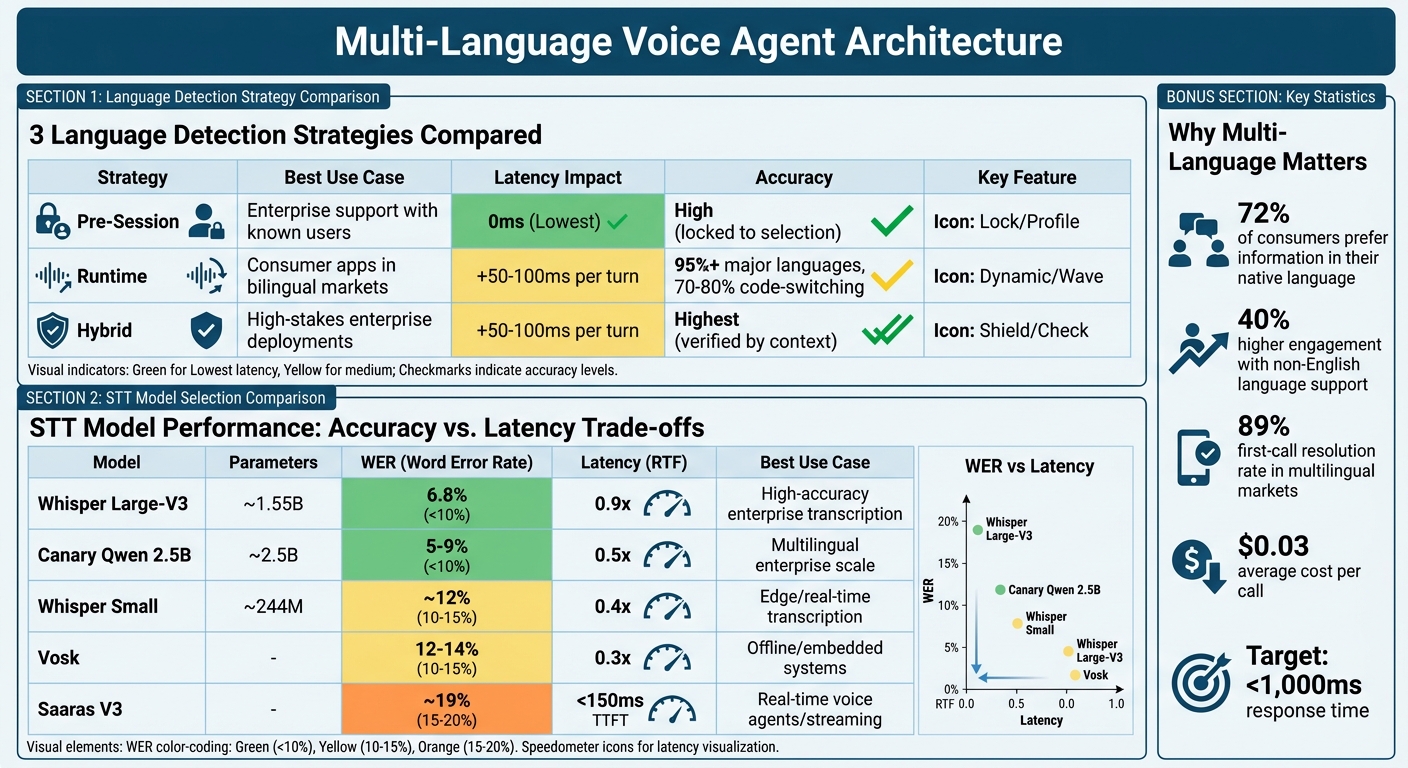
Multi-Language Voice Agent Architecture: Language Detection Strategies and STT Model Comparison
Building Multilingual Voice AI Agents? This AI Makes It Easy
Language Detection Strategies: Pre-Session, Runtime, and Hybrid
When it comes to detecting a user’s language, the timing of this detection is a critical choice. You have three main strategies to consider, each with its own balance of speed, accuracy, and user experience.
Pre-Session Declaration
With pre-session declaration, the language is determined before the interaction begins. This is often done via IVR systems, where users select a language by pressing a number, or through user profile data that routes calls to assistants configured for specific languages [1]. The key advantage? No latency penalty - the system is ready with the correct Speech-to-Text (STT) and Text-to-Speech (TTS) models as soon as the call connects.
But there’s a downside: it’s inflexible. If a user selects English but starts speaking in Hindi, the system will struggle to adapt. The STT model will attempt to interpret Hindi words as English, leading to garbled transcripts [1]. For IVR timeouts, it’s common to default to English after 10 seconds of inactivity [1]. This method works best in enterprise environments where user language preferences are already stored in CRM systems.
If there’s uncertainty about the user’s preferred language, runtime detection offers a more dynamic alternative.
Runtime Detection
Runtime detection takes a different approach. Instead of relying on user input, multilingual STT models analyze speech patterns and word usage within the first few seconds of conversation [4]. This method creates a smooth experience, especially for bilingual users who might switch languages spontaneously.
However, runtime detection isn’t without its challenges. It introduces a latency of 50-100ms per turn and can cause a 1.5-2 second delay when switching languages mid-call, as the system reconfigures models. While accuracy is high for major languages (95%+), it drops to 70-80% in cases of code-switching [1]. To avoid mistakes caused by background noise, it’s important to:
- Require a minimum 3-word phrase match.
- Ensure a confidence score greater than 0.85 before switching languages [1].
- Use a 500ms debounce window to filter out interruptions and false positives [1].
For scenarios where both speed and reliability are critical, hybrid detection is the best fit.
Hybrid Detection
Hybrid detection blends the strengths of pre-session and runtime methods. It starts with a pre-session guess - based on factors like phone number region codes or user profile data - and continuously verifies the language during the interaction. If transcription confidence dips below a set threshold (usually 0.7), the system reassesses and adjusts the language configuration as needed [1].
This strategy excels in environments where accuracy is crucial. For example, in banking, a language mismatch could lead to a failed transaction. To minimize delays, pre-warm assistants in a routing map so they’re ready to switch instantly, and use streaming TTS to keep response times smooth [1]. This method offers the best balance of reliability and flexibility, making it ideal for high-stakes enterprise applications.
| Strategy | Best Use Case | Latency Impact | Accuracy |
|---|---|---|---|
| Pre-Session | Enterprise support with known users | Lowest (0ms) | High (locked to selection) |
| Runtime | Consumer apps in bilingual markets | +50-100ms per turn | 95%+ (major languages), 70-80% (code-switching) |
| Hybrid | High-stakes enterprise deployments | +50-100ms per turn | Highest (verified by context) |
"Most voice agents break when customers switch languages mid-call - ASR misses context, TTS pronunciation fails, and NLU can’t handle code-switching." - Misal Azeem, Voice AI Engineer, CallStack.tech [1]
For multilingual markets like India or the US Hispanic population, where code-switching is common, runtime or hybrid detection paired with multilingual STT models (such as Deepgram‘s multi mode) delivers the best results [2]. Pre-session is a solid choice when language preferences are predictable and switching is rare. Hybrid detection, however, is the go-to option when both speed and accuracy are non-negotiable.
With these language detection strategies outlined, the next section will explore how to design prompts for consistent performance across multiple languages.
Prompt Architecture for Multi-Language Consistency
Managing multiple prompt files for different languages can quickly become a maintenance nightmare. Imagine needing to tweak a single piece of logic - doing so across dozens of language-specific files could easily result in inconsistencies or even errors creeping in over time. Instead, a better approach is to use one unified prompt with built-in language-conditional content filtering.
Here’s how it works: keep the internal logic in English, but define the output strings for each language using language tags. This way, the logic remains consistent, and the output adapts to the user’s language. For example, the prompt could instruct, "Ask for the user’s phone number" in English, but provide the actual user-facing string as <language:es>¿Me puede dar su número de teléfono?</language:es> for Spanish speakers [5].
Beyond Literal Translation
Localization isn’t just about translating words - it’s about understanding cultural nuances. A two-step process can help:
- Literal Translation: Start by translating the content word-for-word to retain the technical meaning.
- Cultural Adaptation: Adjust the phrasing to align with cultural norms and expectations. For instance:
- In Japanese, prompts should avoid direct imperatives, instead favoring keigo (polite language).
- In German, clarity and formality are key, with the use of Sie (formal "you") in professional contexts.
"Prompts carry implicit assumptions about sentence structure, formality registers, and cultural framing that do not survive literal translation" [8].
Cultural Guidelines by Language
| Language | Cultural Guideline | Formality Level |
|---|---|---|
| Japanese (ja) | Use keigo (polite form); avoid direct imperatives; prefer indirect suggestions | High (Honorifics) |
| German (de) | Use Sie (formal you); prioritize precision and structured clarity | High (Formal) |
| Spanish (es) | Distinguish between Latin American and European Spanish; use Usted for service contexts | Context-dependent |
| French (fr) | Use vous for formal contexts; prioritize elegant phrasing over brevity | High (Formal) |
Best Practices for Multi-Language Prompts
- Protect Template Variables: Use regex validation to ensure placeholders like
{user_name}or{order_id}remain intact during translation. - Glossary Maintenance: Keep a per-language glossary of technical terms to ensure consistent terminology across all interactions.
- Context Preservation: When a language switch is detected mid-conversation, inject the last 3-5 conversation turns into the updated prompt. This helps maintain the flow and avoids confusion [6].
This unified prompt approach not only simplifies maintenance but also ensures smoother, culturally sensitive interactions. It also lays the groundwork for advanced features like STT model selection and fallback mechanisms, which we’ll explore in the next sections.
STT Model Selection for Indian Languages
Choosing the right Speech-to-Text (STT) model for Indian languages involves balancing accuracy, speed, and the linguistic challenges posed by the diversity of these languages. For instance, Indo-Aryan languages like Hindi, Marathi, Bengali, and Gujarati tend to perform better than Dravidian languages such as Tamil, Telugu, and Kannada. This is because the agglutinative nature of Dravidian languages increases vocabulary size and, consequently, the Word Error Rate (WER) [9][13].
STT Model Options
Whisper Large-V3 stands out with a WER of 6.8%, offering the highest accuracy. However, it comes with a latency of 0.9x real-time factor (RTF), making it ideal for applications where transcription quality is the priority [10]. For a balance between accuracy and speed, Canary Qwen 2.5B is a solid choice, achieving 5-9% WER and a latency of 0.5x, which makes it suitable for large-scale multilingual tasks [10].
If speed is critical, Vosk is a reliable option. It operates at a latency of 0.3x RTF with a WER of 12-14%, making it a good fit for offline or embedded systems where network connectivity might be limited [10]. For real-time applications, Saaras V3 from Sarvam AI delivers a WER of 19.31% on the IndicVoices benchmark, with a time to first token under 150 milliseconds in its Fast Mode. This makes it a great choice for voice agents handling live interactions [12].
For low-resource languages, combining acoustic models with language models (LM) can significantly improve transcription. For example, IndicWav2Vec + LM reduced Gujarati’s WER from 20.5% to 11.7% and Telugu’s from 22.9% to 11.0% [11].
Accuracy vs. Latency Trade-offs
| Model | Parameters | WER | Latency (RTF) | Best Use Case |
|---|---|---|---|---|
| Whisper Large-V3 | ~1.55B | 6.8% | 0.9x | High-accuracy enterprise transcription [10] |
| Canary Qwen 2.5B | ~2.5B | 5-9% | 0.5x | Multilingual enterprise scale [10] |
| Whisper Small | ~244M | ~12% | 0.4x | Edge/real-time transcription [10] |
| Vosk | - | 12-14% | 0.3x | Offline/embedded systems [10] |
| Saaras V3 | - | ~19% | <150ms TTFT | Real-time voice agents/streaming [12] |
When deciding on a model, consider the deployment environment. For edge devices in rural areas with limited bandwidth, lightweight models like Whisper Small or Vosk are more practical. On the other hand, cloud-based systems can leverage the superior accuracy of Whisper Large-V3 or Canary Qwen.
Code-Switching and Regional Accents
Beyond model selection, addressing challenges like code-switching and regional accents is essential for Indian languages.
Code-switching, where users alternate between English and regional languages within the same sentence, presents a unique challenge. Traditional models trained on formal datasets often struggle with these natural conversational patterns [13]. Transformer-based architectures with language-agnostic encoders are better suited for this task, as they can identify phoneme patterns across multiple languages.
Activating a code-switch mode during transcription can help models adapt to language shifts seamlessly. Early language detection - identifying primary and secondary languages within the first few seconds - further enhances transcription accuracy [13]. For Dravidian languages, subword tokenization methods like BPE or SentencePiece are effective in handling complex suffix formations [9][13].
"Code-switching - where users naturally shift between Hindi, English, and regional dialects mid-sentence - is the single hardest challenge to solve in Indian Voice AI." - Rootle.ai [13]
Regional accents add another layer of difficulty. Fine-tuning models with datasets like Svarah, which includes 9.6 hours of speech data from 65 districts, can improve performance on Indian-accented English [12]. Techniques like Parameter-Efficient Fine-Tuning (PEFT) or Low-Rank Adaptation (LoRA) can further customize large models for specific accents and vocabularies [10].
With these considerations in mind, the next step is managing Text-to-Speech (TTS) voice quality across various languages.
TTS Voice Quality Management Across Languages
Once you’ve optimized speech recognition, it’s just as important to ensure your voice agent sounds natural across all supported languages. TTS (Text-to-Speech) quality can differ significantly - what sounds smooth and lifelike in English might come across as mechanical in Telugu or Marathi. The secret lies in creating a solid fallback system with multiple providers and leveraging SSML (Speech Synthesis Markup Language) to maintain consistency. Let’s break down how to choose the right providers, refine output, and set up fallback mechanisms.
TTS Provider Selection
No single TTS provider delivers top-notch results for every language. For example, ElevenLabs stands out for its multilingual v2 model, which supports 29 languages with impressive realism and latency as low as 100 ms in production environments. However, customization options are limited [14]. Google Cloud TTS, on the other hand, supports over 40 languages and offers robust SSML features, though its voice quality (rated 9/10) slightly lags behind ElevenLabs (9.5/10) [14]. For Indian languages, Sarvam TTS excels with native accents across major languages but struggles with brand names and technical jargon [14].
To ensure consistent quality, consider a tiered fallback approach:
- Use ElevenLabs for premium voice quality.
- Rely on Azure TTS, which supports 140+ languages, for broader coverage.
- Employ Google Cloud TTS as the final fallback option [1].
It’s also a good idea to configure separate assistant profiles for each language instead of relying on dynamic switching. This prevents issues like Hindi phonemes accidentally showing up in English responses [1].
Maintaining Consistent Voice Output
SSML is a game-changer when it comes to fine-tuning TTS output. It lets you control intonation, insert pauses, and emphasize specific words, helping avoid robotic or monotonous speech [14]. For instance, SSML can ensure a date like "March 15, 2026" is read as "15. März" in German rather than following the English format [2].
Custom lexicons are another essential tool. Standard TTS models often mispronounce brand names, product codes, or industry-specific terms. By creating a custom dictionary with accurate phonetic mappings, you can eliminate these errors [14]. Additionally, rephrasing structured data into conversational language - like transforming "name: John, age: 30" into "John is 30 years old" - improves clarity and user experience.
Streaming TTS can also boost responsiveness by starting audio playback as soon as the first words are generated, cutting perceived latency by 30-40% [4]. This is crucial because users often find response times over 1,500 ms unnatural [4].
"If your agent starts responding quickly - even with ‘Let me check that for you’ - users perceive faster service than an agent that stays silent for 800 ms then gives a complete answer."
- Kelsey Foster, Growth, AssemblyAI [4]
When achieving high-quality voice output isn’t possible, fallback patterns become indispensable.
English TTS Fallback Pattern
If native high-quality voices are unavailable for a specific language, defaulting to English TTS requires transparency. Avoid silent switches that could confuse users or damage trust. Instead, notify users with a message like, "I will continue in English to provide better clarity", before transitioning [1].
For deployments in rural areas or low-connectivity settings, lightweight embedded TTS libraries like flutter_tts can serve as an offline fallback. While the voice quality may not match online systems, it ensures basic functionality without internet access [15]. Additionally, avoid silent fallbacks entirely. If language detection fails and the system defaults to English, log the event for analysis to identify gaps in native voice support. A 500 ms debounce can also help prevent false language switches triggered by background noise [1].
Natural-sounding voice agents aren’t just a bonus - they can increase customer satisfaction by 15-20% [14].
"The key isn’t just making AI talk - it’s making it communicate naturally and meaningfully."
Fallback Strategy for Unprocessable Languages
Even with advanced language detection and reliable STT (speech-to-text) models, there will be moments when your voice agent struggles to process user input. This could happen due to low confidence scores or unsupported dialects. To prevent the conversation from breaking down, you can implement a three-tier fallback system that keeps the interaction flowing.
Tier 1: Retry with Alternative Models
If the primary STT model produces a confidence score below 0.7, the system should attempt transcription using a backup model. Adjust the confidence thresholds for retries - for example, lowering it from 0.65 to 0.55 for users with heavy accents. However, keep retries limited to one or two attempts within a short time frame to avoid awkward pauses.
Set up a fallback chain of STT providers to ensure consistent performance. A typical configuration might look like this: ElevenLabs (for high-quality transcription) → Azure (for broad language support) → Google (for stability) [1]. This approach ensures that if one provider fails - due to an outage or lack of support for a specific dialect - your system can still function effectively.
"Without a fallback plan configured, your call will end with an error in the event that your chosen voice provider fails."
If retrying works, the conversation resumes normally. If it doesn’t, move on to Tier 2.
Tier 2: Switch to Text or English Mode
If retries fail after 10 seconds or the system identifies an unsupported language, the next step is to switch to English or text-based communication. However, it’s important to notify the user before making this switch - don’t transition silently.
To ensure smooth operation, introduce a 500ms debounce window before committing to the language switch. This helps avoid rapid toggling caused by background noise [1]. Additionally, clear audio buffers immediately to prevent overlapping responses [1][6]. Maintain a unified conversation history that includes language tags like [EN] or [HI]. This way, the system retains context from the last 3-5 interactions, so users aren’t forced to repeat themselves [6].
If the issue remains unresolved, proceed to Tier 3.
Tier 3: Human Handoff
When retries and mode switching fail, escalate the situation to a human agent. The handoff should be a "warm transfer", meaning the system passes along the full conversation transcript, the detected language, and the user’s intent [17][4].
"The system should smoothly hand off the call to a human representative while preserving context, conversation history, and language preference so the caller doesn’t have to start over."
Every fallback event - whether successful or not - should be logged for analysis. Track metrics such as how often fallbacks occur for each language, the average confidence scores before fallback, and how long the system spends in each tier. These insights can help refine your voice agent over time.
This structured fallback system is a crucial part of ensuring reliability, especially when testing for multi-language quality.
Testing Methodology for Multi-Language Quality
Once fallback mechanisms are in place, it’s essential to thoroughly test multi-language quality to ensure the system performs reliably in real-world scenarios. This testing helps solidify the prompt architecture and fallback strategies.
Automated Benchmarking
Start by measuring the Word Error Rate (WER) using the formula:
(Substitutions + Deletions + Insertions) / Total words in reference.
For each language, establish clear WER baselines. For example, English should remain below 8%, while Hindi might fall between 18% and 22% [3][7]. Additionally, verify that intent recognition accuracy exceeds 95% across all languages. The system should also handle mixed-language inputs (e.g., "Hinglish" or "Spanglish") with a task completion rate of at least 80% [7].
Keep an eye on Time to First Word (TTFW), ensuring non-English languages maintain latency levels within 20% of the English baseline. To simulate real-world conditions, test under Signal-to-Noise Ratio (SNR) settings of -10dB, -5dB, and 0dB [3].
| Language | Excellent WER | Good WER | Acceptable WER | Critical Threshold |
|---|---|---|---|---|
| English | 5% | 8% | 10% | 15%+ |
| Spanish | 8% | 12% | 15% | 20%+ |
| Hindi | 12% | 18% | 22% | 28%+ |
| German | 8% | 12% | 15% | 20%+ |
Set up alerts for any WER variance exceeding 2% from the baseline as an early warning system for performance issues [19]. After automated testing, involve native speakers for a deeper evaluation.
Human Evaluation for Dialect Nuances
Automated tests often miss subtle regional and linguistic details that only native speakers can catch. To address this, collect a dataset of 100 real-world conversations from native speakers. Use this data to benchmark WER, measure pause durations, and track interruption frequency [2]. Reviewers can identify awkward phrasing, regional vocabulary differences, and appropriate levels of formality, such as whether to use "Tú" or "Usted" in Spanish customer interactions [2][7].
For Indian languages, human evaluation is especially critical due to frequent code-switching and significant regional variations. Create 10-20 code-switched test cases for each language pair and measure task completion rates [7].
"Native speakers bring natural phrasing, regional variants, and realistic code-switching that non-native speakers miss. They also know formality levels… and local vocabulary differences."
Additionally, test how the system handles bidirectional language mixing, ensuring smooth transitions during mid-sentence switches [3].
Once qualitative evaluations are complete, move on to testing system performance under noisy conditions.
Noise and Interruption Testing
Real-world environments can be unpredictable, so it’s crucial to test across various noise levels. Use SNR ranges like 20dB (quiet), 10dB (moderate), 5dB (noisy), and 0dB (very noisy) [22][3]. For example, office noise may increase WER by 3-5%, while car or hands-free scenarios could add 10-20% [3][7].
To reduce false interruptions in noisy settings, adjust the Voice Activity Detection (VAD) interrupt_duration_ms to 300-500ms [21]. Experiment with different barge-in modes such as:
-
interrupt: Stops immediately. -
append: Completes the current sentence. -
ignore: Finishes the full response.
This helps determine the most effective mode for each language [21].
| Environment | SNR Range | Expected WER Impact |
|---|---|---|
| Office | 15-20 dB | +3-5% |
| Café / Restaurant | 10-15 dB | +8-12% |
| Street / Outdoor | 5-10 dB | +10-15% |
| Car / Hands-free | 5-15 dB | +10-20% |
Use real-world audio recordings from target regions instead of relying solely on simulated noise [20]. Aim for a barge-in recovery rate above 90% and keep the P95 latency (the slowest 5% of responses) under 5 seconds in production [22].
Implementation Summary
Creating a production-ready, multi-language voice agent requires careful planning and precise architectural choices. A modular pipeline is key - it allows for language-specific optimizations, better cost management, and easier debugging [23]. This approach is especially important when managing the accuracy of languages with very different phonetic systems.
Language-specific configurations are a must. Avoid building a single assistant that dynamically switches between languages. Instead, design separate setups for each language, using pre-validated speech-to-text (STT) and text-to-speech (TTS) pairings. This prevents issues like cross-language phonetic interference [1]. Assign a specific transcriber to each language for the duration of a session, and use pre-session routing to match the assistant to the user’s preferred language.
When it comes to prompts, scaling for production requires more than just translation. A robust prompt architecture must include thousands of structured lines to handle state tracking, reduce hallucinations, and incorporate domain-specific vocabulary - all while respecting cultural differences [23]. For example, ByondLabs reported in February 2026 that their voice agents for truck drivers in Rajasthan used over 2,700 prompt lines. This meticulous setup lowered hallucination rates from 15-20% to nearly zero [23].
Fallback strategies and continuous testing are crucial for turning a demo into a reliable production system. Tiered fallback mechanisms - like retrying with alternate models, switching to a default language when confidence drops below 0.7, or transferring the user to a human agent - are essential. Additionally, set unique word error rate (WER) baselines for each language and log every failure to fuel ongoing improvements [1]. Pradeep Jindal, Co-founder of ByondLabs, highlights the importance of this rigorous approach:
"The gap between demo and production in voice AI is measured in months, not days" [23].
These strategies ensure reliability while keeping costs manageable. With production costs averaging about $0.03 per call [23] and first-call resolution rates reaching 89% in multilingual markets [1], the structured architecture delivers strong returns. To future-proof your system, plan for additional languages even before launching the second one, ensuring smooth scalability across markets.
FAQs
How do I pick the right language-detection approach for my use case?
When deciding how to handle language preferences, consider these three options:
- Runtime Detection: This method enables real-time, automatic language switching during conversations. It’s ideal for dynamic scenarios where users might switch languages mid-conversation.
- Pre-Session Declaration: Here, users specify their language preference upfront. While this simplifies detection and setup, it doesn’t allow for changes during the interaction.
- Hybrid Approach: This combines the best of both worlds. Users can set their preferences initially, but the system can also adapt dynamically during the conversation.
Your choice should align with your priorities - whether you value flexibility, real-time adaptability, or straightforward simplicity.
How can I keep one prompt logic while outputting 8 languages correctly?
To handle 8 languages with a single prompt setup, implement a language-conditional prompt architecture. This involves crafting a single prompt that uses conditional logic or variables to tailor responses based on the identified language. This method keeps things consistent, simplifies maintenance, and allows the system to scale efficiently by adapting outputs in real time - no need for separate prompts for each language.
What’s the best way to set confidence thresholds and fallbacks in production?
To configure confidence thresholds and fallbacks for multi-language voice agents, start by focusing on three key areas: language detection, performance tracking, and threshold optimization.
Detect the user’s language as early as possible to ensure the system processes input in the correct context. Use empirical data to establish confidence thresholds that balance accuracy and usability. During operation, keep an eye on confidence scores to identify potential issues.
When confidence scores are low, implement fallback strategies such as prompting the user for clarification, switching to a fallback language, or escalating to a human agent. It’s also essential to regularly test and fine-tune thresholds to accommodate accents, dialects, and changes in system performance over time.
Related Blog Posts
- 5 AI Prompts Every Developer Should Master (Copy-Paste Ready)
- Voice Agent Latency: Where the 2-3 Second Delay Actually Lives in the Pipeline and How to Reduce It
- Why VAD End-of-Speech Detection Is the Hardest Problem in Production Voice Agents
- The Evaluation Framework We Use When a Client Asks Us Which Agent Stack to Build On