Document AI Fails at Extraction, Not at the Model
By Taher Pardawala · Co-Founder & Chief Executive Officer

When Document AI systems fail, the problem often isn’t the AI model - it’s the extraction layer. Here’s the issue: enterprise documents like scanned contracts or multi-column reports are messy. If the extraction process corrupts the data (e.g., misreading $38,000,000 as $88,000,000 or scrambling table structures), the model produces flawed outputs, not because it’s broken, but because it’s working with bad data.
Key takeaways:
- Bad input = bad output: Errors in OCR, layout parsing, or chunking lead to unreliable results.
- Quiet failures: These issues don’t trigger alarms, so flawed data quietly disrupts analytics and decisions.
- Testing blind spots: Teams often test clean PDFs but ignore real-world complexities like handwritten notes or scanned documents.
The solution? Invest in a strong extraction pipeline that handles OCR, reading order, table structures, and metadata properly. A modular, validated pipeline ensures reliable data for AI models, reducing errors and boosting accuracy.
How to Evaluate Document Extraction
What the Extraction Layer Does in Document AI Systems
The extraction layer acts as a bridge between raw documents and AI models. Its job is to take inputs like PDFs, scans, and Word files and turn them into structured, logically organized data. For instance, if a contract is formatted in two columns, the extraction layer ensures that text from one column doesn’t get mixed up with the other. Similarly, when handling a table showing quarterly revenue, it preserves the link between headers and their corresponding data cells. Without this structure, the language model would be working with messy, unreliable input. This process lays the groundwork for a solid extraction pipeline, which is explored further in the following sections.
Core Components of the Extraction Pipeline
The extraction pipeline involves several key steps, each building on the other to ensure accuracy:
- OCR (Optical Character Recognition): This step identifies individual characters and their positions in scanned documents. For digital PDFs, text can often be read directly, but scanned PDFs (which are just images) require OCR to extract text by creating bounding boxes around each character.
- Layout analysis: This process determines the document’s structure, identifying elements like headers, footers, tables, body text, and sidebars [8][4].
- Reading order reconstruction: Spatial relationships are translated into a logical reading flow, ensuring that content from adjacent columns or sections doesn’t get mixed up [4][2].
- Semantic chunking: Large documents are divided into meaningful sections based on boundaries like headings or table structures.
- Metadata extraction: Information such as page numbers and text coordinates is attached to each data segment, making it traceable and auditable [9][2].
For hybrid PDFs - which combine selectable text with scanned images - special logic is applied to run OCR only where needed. As Sid and Ritvik from the Pulse Team explain:
"Reading order dominates perceived quality. Humans are tolerant of light OCR noise but will reject outputs that read out of order" [4].
How Extraction Errors Cascade Through the System
Even small improvements in OCR accuracy can have a big impact. For example, a 5% boost in OCR accuracy through better preprocessing can improve overall extraction accuracy by 15-20% [8]. On the flip side, minor mistakes can quickly snowball. If the text in a table is correct but its structure is flawed, the relationship between headers and data breaks down. The language model might then process a column of numbers without understanding what they represent, leading to flawed reasoning.
Some errors are particularly dangerous because they go unnoticed. For instance, issues with table structure - like a numeric column shifting by one position - can slip through text similarity checks but still disrupt analytics pipelines [4]. The system might produce outputs that look fine on the surface, but if revenue figures are misaligned or contract terms are misattributed, it can lead to major problems in analytics and decision-making.
Common Extraction Failures and Their Impact on Model Performance
OCR Quality Problems and Tokenization Failures
OCR errors can trigger a domino effect throughout an entire system. For example, when the Character Error Rate (CER) is 0.7% (equivalent to 99.3% accuracy), tokenization accuracy drops to 97.9%, and sentence detection accuracy falls to 94.7% [6]. This cascading effect can create a 14% performance gap in Retrieval-Augmented Generation (RAG) systems when compared to results based on ground-truth data [6].
The real risk lies in how errors distort critical information. A single misread character can transform "38,000,000" into "88,000,000", which could lead to disastrous financial outcomes. Essential fields like tax IDs or totals become unreliable [1][6][5]. Poor OCR output often results in a "word salad", which pollutes embeddings and disrupts exact-match retrieval for key identifiers like SKUs or percentages [11][2]. Large language models (LLMs) don’t invent errors out of thin air - they respond to corrupted input. As OptyxStack puts it:
"The model is usually reacting to damaged evidence, not inventing from nothing" [11].
| Metric | Accuracy at 99.3% CER | Impact on System |
|---|---|---|
| Tokenization | 97.9% | Corrupts LLM input units and embeddings |
| Sentence Detection | 94.7% | Breaks context windows and chunking logic |
| POS Tagging | 96.6% | Degrades semantic understanding and extraction |
| RAG Output Gap | -14% (vs Ground Truth) | Increases hallucination and reduces faithfulness |
These issues with OCR extend to other components as well, compounding problems with document structure and chunking that further erode model performance.
Document Structure Variations That Break Parsing
Structural challenges can undermine system performance even when OCR accuracy is high. Complex layouts, like multi-column formats or borderless tables, can confuse parsing algorithms. Processing pages in a simple left-to-right order often merges unrelated text blocks, creating incoherent input for LLMs. As Sid and Ritvik from the Pulse Team explain:
"A page can have perfect OCR but a broken reading order that renders text incoherent to any LLM in a retrieval system" [4].
When table headers are lost during extraction, the associated data becomes meaningless. For example, "24 hours" loses its significance if it’s no longer tied to a header like "Response SLA."
Hybrid PDFs, which combine digital text with scanned images, add another layer of complexity. Pipelines that rely solely on embedded text may miss critical handwritten annotations or image-based content [2]. Similarly, footnotes and sidebars that are improperly integrated into the main text can disrupt context, confusing the model’s reasoning.
Chunking Strategies That Lose Context
Effective chunking is just as important as OCR and layout analysis for maintaining semantic coherence. Fixed-size chunking often damages document structure by splitting tables, lists, or paragraphs into disconnected pieces. This fragmentation makes it impossible for the model to link values with their corresponding headers [12][11]. If answers span multiple chunks without sufficient overlap, neither chunk will contain enough context to support accurate retrieval [12].
Smaller chunks (128-256 tokens) frequently lack the context needed for coherent answers [12][13]. As EngineersOfAI highlights:
"Chunking is consistently the most underestimated decision in RAG system design, and bad chunking defeats every other optimization you can make" [12].
One common mistake is using character counts instead of token counts for chunking. This approach often produces chunks much smaller than intended - sometimes up to four times smaller. For example, a 512-character chunk might only contain 100-150 tokens, which is far below the optimal size for embedding models [12].
Missing Metadata That Breaks Filtering and Attribution
Metadata is another critical piece of the puzzle. When metadata extraction fails - losing page numbers, section headers, or document types - the system’s ability to filter and trace information collapses. Without accurate metadata, production workflows may struggle to route documents properly, verify sources, or maintain audit trails. This makes it difficult to answer basic questions like "Which page contained this figure?" or "What section does this clause belong to?"
Errors in metadata can also lead to misattributions. For instance, if rows split across chunks or blend with unrelated data, the system might cite the wrong row or assign data to the wrong entity. These errors can appear correct on the surface but fail under close examination [11].
Why Teams Underinvest in Pre-Processing Pipelines
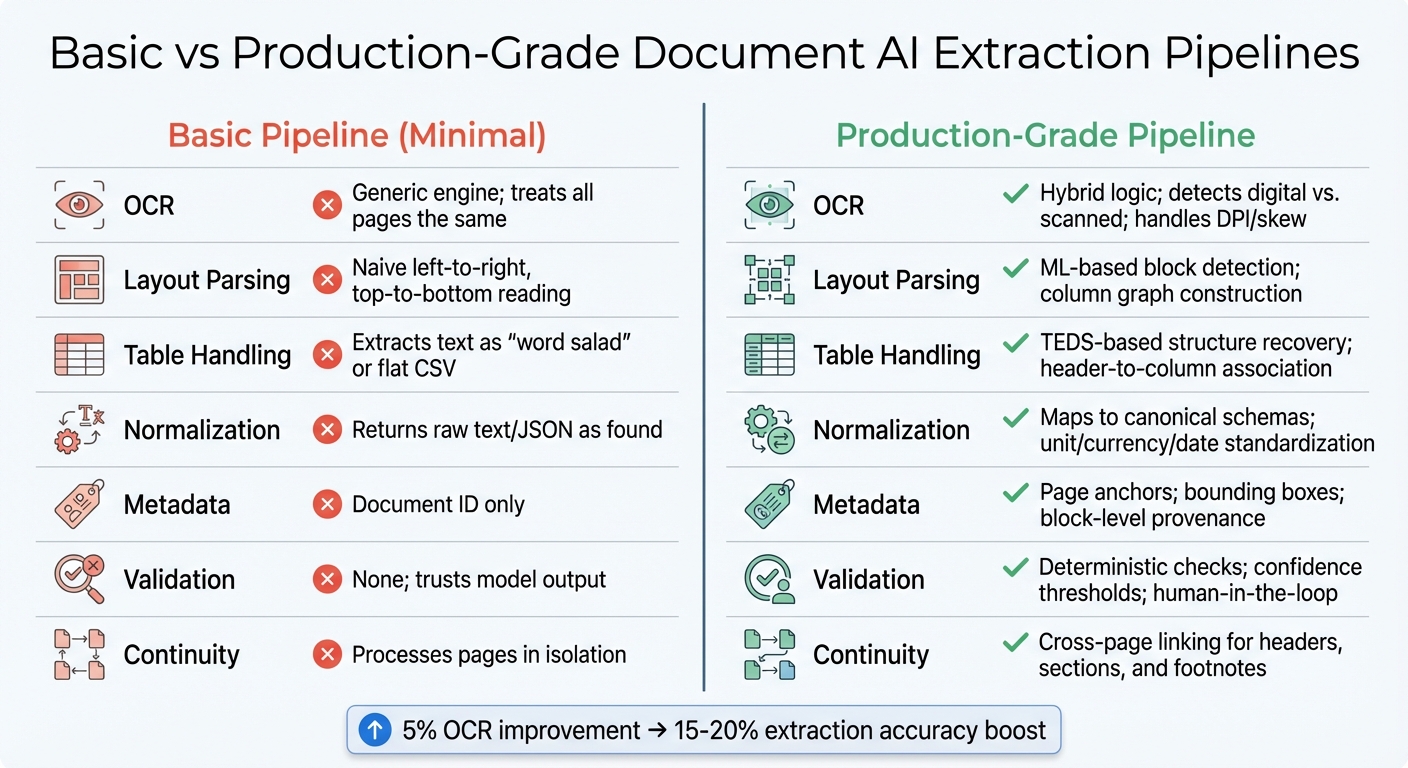
Basic vs Production-Grade Document AI Extraction Pipelines Comparison
When it comes to document AI, many teams overlook the importance of investing in robust pre-processing pipelines. This often stems from a mistaken belief that document ingestion is a straightforward, solved problem - just upload, chunk, and embed. However, this oversimplification can lead to critical oversights.
Pipeline Components Most Teams Skip
Teams frequently neglect essential steps like layout-aware parsing, reconstructing table structures, and integrating validation layers. Instead, they rely on basic processes that treat all document elements equally. This approach forces valuable data to compete with irrelevant details such as logos, borders, or boilerplate text [10]. The result? Key information gets lost in the shuffle.
Another common issue is processing pages in isolation. This breaks the continuity across pages, which can lead to losing table headers or misinterpreting multi-page sections [4]. A striking example of this comes from Yenwee Lim’s experience in February 2026. Lim’s team initially used a single-pass pipeline for scanned invoices, achieving less than 40% accuracy. By switching to a modular workflow that processed smaller, relevant chunks of documents, they boosted accuracy to over 90% and reduced token costs [10]. This example highlights how modular, step-by-step processing can make a huge difference.
Skipping these components doesn’t just lead to inefficiencies - it can also cause systems to enter what Shlomo Stept refers to as "silent failure mode":
"A 99% accurate system that silently fails on the other 1% is worse than a 95% accurate system that flags its uncertainties" [7].
Without features like confidence scores or validation rules, even small extraction errors can snowball into incorrect answers, gradually eroding user trust [2].
Table: Basic vs Properly Engineered Pipelines
To understand the gap, here’s a comparison between basic pipelines and production-grade ones:
| Component | Basic Pipeline (Minimal) | Properly Engineered Pipeline (Production-Grade) |
|---|---|---|
| OCR | Generic engine; treats all pages the same | Hybrid logic; detects digital vs. scanned; handles DPI/skew |
| Layout Parsing | Naive left-to-right, top-to-bottom reading | ML-based block detection; column graph construction |
| Table Handling | Extracts text as "word salad" or flat CSV | TEDS-based structure recovery; header-to-column association |
| Normalization | Returns raw text/JSON as found | Maps to canonical schemas; unit/currency/date standardization |
| Metadata | Document ID only | Page anchors; bounding boxes; block-level provenance |
| Validation | None; trusts model output | Deterministic checks; confidence thresholds; human-in-the-loop |
| Continuity | Processes pages in isolation | Cross-page linking for headers, sections, and footnotes |
This comparison makes it clear: a properly engineered pipeline isn’t just about adding bells and whistles. It’s about creating a system that can handle real-world complexities while maintaining accuracy and reliability.
How to Diagnose Extraction vs Model Problems
When document AI systems fall short, extraction errors are often the main culprit. The tricky part is figuring out where the issue lies. Without a clear diagnostic approach, you might waste weeks tweaking prompts or swapping models, only to find the real problem was OCR errors or a scrambled reading order.
Diagnostic Checklist for Pinpointing the Root Cause
The first step is to separate the extraction layer from the model layer. To do this, conduct an ablation study using clean, manually corrected data from problematic production documents. If the model performs well on this clean data but struggles with pipeline output, you’ve identified an extraction problem [10].
Examine the raw chunk sent to your model. Does it include table headers, or is it a chaotic "word salad" where column relationships have broken down? [4][11].
For financial documents, run mathematical cross-validation. For example, if line_total ≠ quantity × price, but the characters appear to be read correctly, the issue lies in structural interpretation rather than OCR. Additionally, look for character-level errors like misread IDs, missing decimal points, or vanished currency symbols - clear signs of OCR failures [3][11].
Check for continuity across pages. Ensure table headers detected on one page are correctly linked to data rows on subsequent pages. If you find rows without identifying labels, your chunking strategy might be disrupting the semantic context [4][11]. Also, confirm that every extracted text span includes metadata like page numbers and bounding box coordinates. Without this, the provenance of extracted text is compromised [2].
Using these findings, you can apply a decision tree to trace the problem back to its source.
Decision Tree for Identifying Failures
This decision tree expands on the checklist above, focusing on extraction-layer issues. Follow these steps to isolate the fault:
- Run a noise sensitivity test. Introduce controlled distortions (e.g., lower resolution, JPEG artifacts, skew) into clean documents. If performance drops significantly, your preprocessing pipeline lacks robustness and needs improvement [4].
- Compare digital and scanned versions. Process both a clean digital PDF and a messy scan through your pipeline. If the digital version works but the scan fails, the issue lies in the OCR or layout detection layer, not the model [2].
- Assess structure preservation. Use metrics like TEDS (Tree Edit Distance-based Similarity) for tables and ROAcc (Reading Order Accuracy) for multi-column layouts. These metrics can reveal if your parser is scrambling document flow or losing row-column relationships. For example, in a 2026 benchmark, a single-pass pipeline using Gemini 3 Pro achieved under 40% accuracy on complex documents due to attention allocation problems, while an adaptive graph approach focusing on extraction quality reached over 90% [10].
| Diagnostic Test | What It Reveals | Root Cause Indicator |
|---|---|---|
| Ablation with Clean Data | Does the model work when extraction is perfect? | If yes, the problem is extraction; if no, it’s the model [10]. |
| Noise Injection | How fragile is the preprocessing pipeline? | A sharp performance drop indicates brittle extraction [4]. |
| Digital vs. Scanned | Is OCR the bottleneck? | If digital works but scanned fails, it’s an OCR issue [2]. |
| Mathematical Validation | Are numbers structurally coherent? | If math fails but characters are correct, it’s a structure loss [3]. |
| TEDS/ROAcc Metrics | Are tables and reading order preserved? | Low scores point to layout parsing failures [4]. |
Finally, implement confidence scoring for each field. Assign confidence levels (e.g., very_low, very_high) to identify where your parser struggles. Low-confidence fields often highlight specific issues, such as unusual table formats, problematic fonts, or complex layouts [3]. This approach pinpoints the exact extraction component needing attention, helping you address the root cause instead of chasing symptoms.
Building Production-Grade Extraction Pipelines
Creating a reliable extraction pipeline starts with a modular design. Each stage - ingestion, OCR, layout parsing, chunking, and validation - works independently, allowing for easy updates, debugging, or replacements without disrupting the entire system.
Modular Pipeline Architecture
A robust pipeline includes four main stages: Ingestion/Preprocessing → Document Parsing → Extraction → Validation [8][14]. Keeping these stages independent minimizes the risk of cascading failures and simplifies troubleshooting.
Here’s how each stage contributes to a production-ready pipeline:
Ingestion and Preprocessing
This stage prepares files for processing by normalizing formats (PDF, DOCX, images) and improving quality through techniques like deskewing, noise reduction, and CLAHE (Contrast Limited Adaptive Histogram Equalization) [8]. File type validation should rely on magic bytes rather than client headers for better accuracy [3]. For lossy formats like JPEGs, upscaling can prevent OCR errors, while high-quality PNGs and PDFs often require minimal adjustments [3].
Document Parsing and Classification
At this stage, the document type, language, and layout complexity are identified. This helps route files to the correct extraction method - whether it’s digital text extraction for clean PDFs or OCR for scanned documents [15][2]. Proper routing ensures accuracy across the pipeline.
OCR and Visual Parsing
OCR converts images to text while retaining spatial metadata, such as bounding boxes, which are crucial for understanding relationships like headers and their associated values [8][2]. Using self-hosted open-source OCR on GPU infrastructure can significantly cut costs - down to $0.09 per 1,000 pages, making it up to 16 times cheaper than cloud-based solutions for large-scale processing [14].
Layout Interpretation
This step reconstructs the logical reading order of the document, using column graph construction and semantic stitching to avoid errors where multi-column text becomes jumbled [4][2]. For lengthy documents, continuity checks ensure that table headers and section titles carry over across pages, reducing the risk of fragmented information [4].
Structural Extraction
Complex elements like tables, lists, and hierarchies are targeted here. Metrics such as TEDS (Table Extraction Discrete Structural Similarity) help maintain data integrity [4]. For financial documents, mathematical cross-validation (e.g., ensuring total = sum(items) + tax) can flag inconsistencies without automatically altering the data [3][8].
Field Extraction
A hybrid approach is used here: template-based extraction works for predictable formats, while LLM-based methods handle more variable layouts [14][8]. Routing decisions are made based on document complexity to optimize results.
Validation and Confidence Scoring
Extracted data is subjected to schema checks and business logic, with low-confidence results flagged for human review [14][8]. A five-level confidence scoring system is applied [3]. Start with a 95% confidence threshold for automatic processing, routing anything below that for manual review. Over 4-8 weeks, thresholds can be fine-tuned based on real-world performance [14]. Feeding error details back into the AI pipeline can correct about 85% of validation issues on the first retry [3].
"Achieving 95%+ accuracy in production isn’t about finding a perfect model. It’s about layering validation mechanisms, embracing uncertainty through confidence scoring, and building systems that self-correct." - VisionParser Team [3]
Every extracted text span should include metadata like document ID, page number, and bounding box. This ensures traceability and simplifies debugging [2].
This modular design equips each stage to handle diverse real-world documents, ensuring reliable performance.
How AlterSquare Diagnoses and Fixes Document AI Systems

AlterSquare takes a systematic approach to diagnosing and improving underperforming document AI systems, leveraging modular designs to pinpoint and address weaknesses.
The process starts with an AI-Agent Assessment, where proprietary AI agents analyze the codebase and produce a detailed System Health Report. This report highlights architectural coupling, security vulnerabilities, performance bottlenecks, and areas of technical debt. For document AI, it specifically evaluates modularity, OCR quality, layout parsing, and metadata handling.
Next, the Principal Council - Taher (Architecture), Huzefa (Frontend/UX), Aliasgar (Backend), and Rohan (Infrastructure) - delivers a Traffic Light Roadmap. Issues are categorized as Critical, Managed, or Scale-Ready. For example, if OCR errors are significantly affecting extraction accuracy, the team prioritizes preprocessing improvements.
AlterSquare uses its Variable-Velocity Engine (V2E) framework to stabilize pipelines according to a company’s growth stage:
- Early-stage companies focus on Disposable Architecture, rapidly building pipelines with modular components using a Golden Path stack (Node/Go/React/Mongo).
- Growth-stage companies adopt Managed Refactoring, incrementally upgrading components without disrupting production.
- Scale-stage companies prioritize Governance & Efficiency, implementing SOC2-ready validation, optimizing performance, and tracking costs per transaction.
The Principal Council doesn’t just provide recommendations - they actively oversee fixes. For example, if preprocessing is lacking, they implement deskewing, noise removal, and CLAHE. If chunking strategies are flawed, they replace flat chunking with tree-based pruning to better preserve document structure.
Clients work directly with AlterSquare’s technical founders, who have real-world experience solving challenges like memory leaks for 15,000+ concurrent users and optimizing codebases for 10x efficiency. This hands-on approach ensures that issues are addressed at their core, not just patched over. Every project begins with a Principal Council review before any changes are made.
Conclusion
When document AI systems fail, the culprit is often flawed or incomplete data from the extraction layer, not a lack of sophistication in the model itself. Issues like tables losing their grid structure, multi-column layouts being read incorrectly, or scanned pages being skipped can all lead to outputs that sound fluent but are factually wrong.
The core problem? Insufficient investment in pre-processing pipelines. Even a small boost - like a 5% improvement in OCR accuracy through better preprocessing - can lead to a 15-20% improvement in final extraction accuracy [8]. Production-grade pipelines are designed to handle these challenges by incorporating features like field-level confidence scoring, self-correction mechanisms, and layout-aware extraction that retains the spatial relationships critical for accurate reasoning. Ignoring these areas often causes extraction issues to snowball into larger problems.
Before pouring resources into more advanced models or additional training data, focus on diagnosing and refining your extraction pipeline. Ensure it preserves the correct reading order, keeps table structures intact, and flags low-confidence fields for manual review. If errors persist despite coherent text, the extraction layer is likely the weak link. As Shlomo Stept aptly puts it:
"A 99% accurate system that silently fails on the other 1% is worse than a 95% accurate system that flags its uncertainties." [7]
Fixing these extraction issues not only improves model accuracy but also strengthens the overall reliability of the system. Building robust, modular pipelines, maintaining page geometry for traceability, and prioritizing confidence scoring are critical steps in transforming flashy demos into dependable, production-ready solutions. After all, a model is only as good as the data it processes.
FAQs
How can I tell if my issue is extraction or the model?
To figure out if the problem stems from extraction or the model, begin by examining the quality of your extracted data. Signs of poor OCR quality - like jumbled text, missing information, or layout issues - indicate an extraction problem. On the other hand, if the extracted data is accurate but the outputs are flawed or include fabricated details, the issue is likely with the model. Always review the raw extraction quality first for a clear diagnosis.
What extraction checks prevent table and reading-order mistakes?
Ensuring the proper structure of a document is crucial for avoiding errors in tables and reading order. This involves accurately identifying rows, columns, and headers. Validation processes use schema-driven approaches and confidence scoring to confirm the correct reading sequence. These measures ensure the document’s structure remains intact during data extraction.
What metadata is required for reliable citations and auditing?
For dependable citations and thorough auditing, some key metadata to focus on includes provenance, version history, document source, and structural context. These elements play a crucial role in ensuring that the information extracted is not only accurate but also traceable and easy to audit. This reduces the risk of errors and boosts reliability across enterprise document workflows.