LangGraph State Management: What the Documentation Doesn’t Cover Until You’re Already Committed
By Taher Pardawala · Co-Founder & Chief Executive Officer

LangGraph works great in demos, but production use often reveals serious state management issues. Here’s what the documentation doesn’t fully prepare you for:
- State Loss: Using
MemorySavermeans all conversations disappear when a container restarts. - Token Overload: Long conversations can exceed the model’s context window, driving up costs and breaking workflows.
- Schema Updates: Redeploying with updated schemas can corrupt or break existing threads.
- Database Costs: Storing unbounded states can inflate storage needs and token costs significantly.
- Concurrency Risks: Without proper reducers, parallel updates can corrupt state.
Solutions:
- Use durable checkpointers like
PostgresSaverfor persistence and scalability. - Define strict schemas (e.g., Pydantic models) to avoid state corruption.
- Cap list sizes and prune old data to prevent unbounded growth.
- Version your schema and migrate old states during updates.
- Debug with tools like
get_state_historyto track state changes and fix issues.
This guide explores these challenges and provides practical fixes to ensure your LangGraph agents are production-ready.
LangGraph Tutorial: Mastering State and Memory Management for AI Agents
Checkpointer Configuration for Cross-Session Persistence
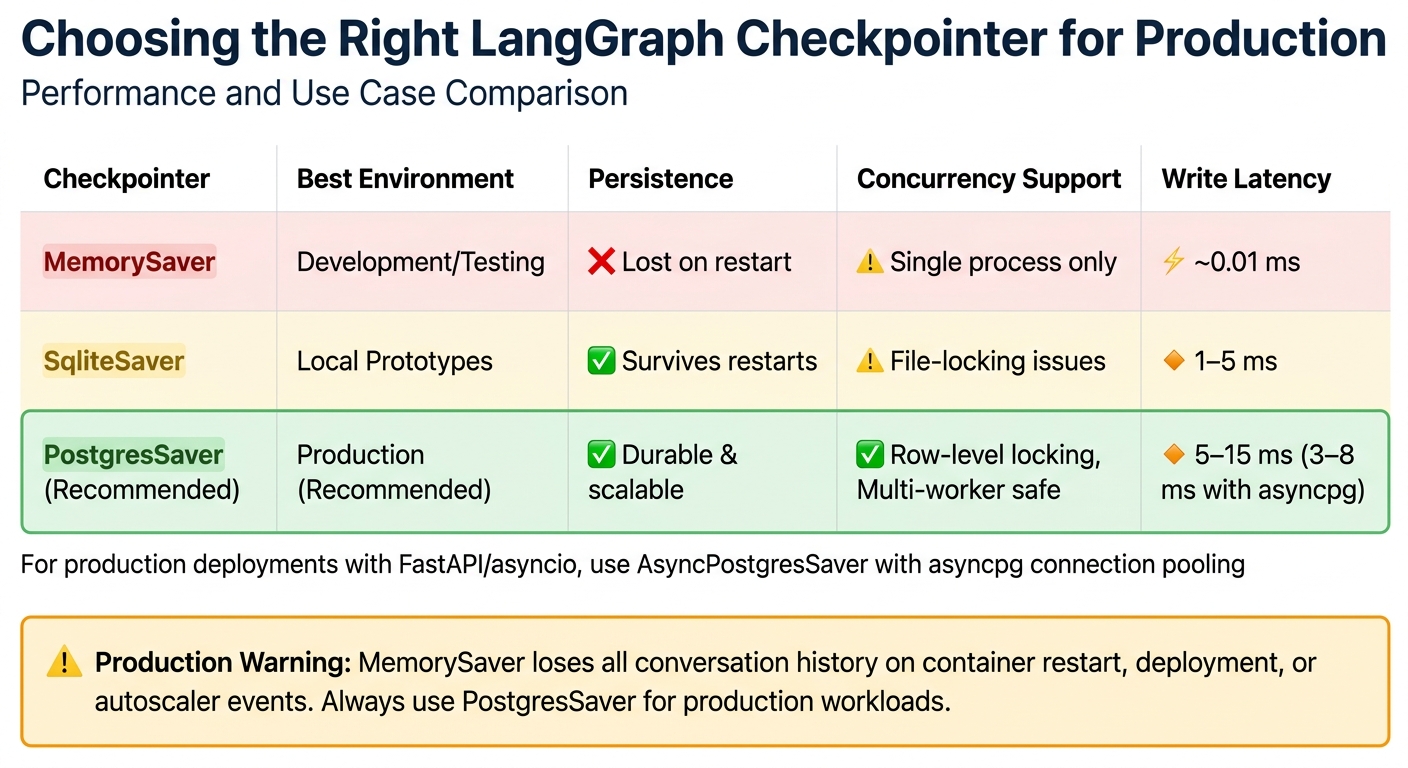
LangGraph Checkpointer Comparison: MemorySaver vs SqliteSaver vs PostgresSaver
The choice of checkpointer directly impacts whether your agents can maintain their state after a container restart. Here’s the breakdown: MemorySaver stores everything in RAM, meaning a single deployment wipes out all active conversations. On the other hand, SqliteSaver writes to a local file but comes with a drawback - file-level locking, which can cause deadlocks during concurrent writes. For production environments, PostgresSaver is the way to go. It supports row-level locking, scales horizontally, and handles multi-worker coordination efficiently. Typical write latencies range from 5-15 ms [5], but integrating connection pooling with asyncpg can bring this down to 3-8 ms.
PostgresCheckpointer vs SQLiteCheckpointer: When to Use Each
For multi-instance deployments, PostgresSaver is the clear winner. It manages concurrent writes with ease thanks to row-level locking and scales as traffic increases. SqliteSaver, on the other hand, works well for single-process prototypes or local command-line tools. It offers persistence without the need for concurrent access. While SqliteSaver can be faster (1-5 ms per write), its file-locking issues make it unsuitable for heavier workloads.
| Checkpointer | Environment | Persistence | Concurrency | Write Latency |
|---|---|---|---|---|
| InMemorySaver | Development/Testing | Lost on restart | Single process only | ~0.01 ms |
| SqliteSaver | Local Prototypes | Survives restarts | Locking issues | 1-5 ms |
| PostgresSaver | Production | Durable | Row-level locking; Multi-worker safe | 5-15 ms |
Once you’ve chosen the right checkpointer, configuring it for asynchronous operations is key to meeting high-availability requirements.
Setting Up Async Checkpointing for High-Availability Workflows
In production environments using FastAPI or asyncio, the AsyncPostgresSaver paired with an asyncpg connection pool is ideal. This setup ensures the event loop remains unblocked. Always initialize the schema by calling checkpointer.setup() during deployment or as part of your CI/CD pipeline. Running this at runtime can lead to permission errors. Additionally, set autocommit=True in your Postgres connection to prevent long-running transactions from holding locks during LLM calls. If you’re using PgBouncer, configure prepare_threshold=0 to optimize performance.
To isolate and resume state, assign unique thread_id values (e.g., user-{id}-session-{timestamp}). This makes tool calls idempotent by tying them to a deterministic key, such as a combination of thread_id and step_count. This approach ensures that if a crash occurs after a tool call but before the checkpoint is written, the operation can be retried safely. For example, an online retailer used PostgresSaver to manage customer tickets by encoding customer_id and ticket_id into the thread_id. This strategy led to an 18% improvement in first-contact resolution rates, as the agent avoided repeating steps like password resets that the user had already attempted [5].
Why In-Memory Checkpointers Fail in Production
In-memory checkpointers store all state in the RAM of the Python process. This makes them unsuitable for production because any container recycling, deployment, out-of-memory termination, or autoscaler spin-down will erase all conversation history. In addition, in-memory storage limits horizontal scaling since the state is tied to a single worker. If that worker fails, other instances can’t pick up the conversation, and all context is lost. For production, it’s essential to replace the in-memory checkpointer during the compile() stage and ensure every graph invocation includes a unique thread_id to properly namespace the state.
With persistence in place, the next challenge is preventing graph corruption during partial state updates.
Partial State Updates Without Graph Corruption
In LangGraph, when a node returns a dictionary, it updates only the specified keys in the state. The executor merges these updates into the existing state without altering untouched keys. This approach works well until you mix immutable and mutable fields or misunderstand how reducers operate. For example, a node returning {"count": state["count"] + 1} modifies only the count field, leaving everything else intact. However, without a clear schema, the risk of state corruption increases. To avoid this, it’s essential to establish a solid schema before diving into granular updates.
Typed State Schemas: Separating Immutable Context from Mutable Fields
To maintain consistency across nodes, define your state using tools like TypedDict or Pydantic models. This helps separate immutable data - such as user_id or database connections - from fields that require updates. Use Runtime[Context] for immutable parameters to ensure nodes don’t accidentally modify them.
Be cautious with mutable defaults. For instance, avoid defining messages: list = [] in a TypedDict, as this creates a shared default list across all graph runs, which can lead to cross-thread data corruption. Instead, initialize mutable fields explicitly during graph.invoke().
"In LangGraph, state is a contract. Each node acts as a function that reads from this contract and writes back to it." - Vishal Lad, Engineer & Architect [1]
Reducers play a key role in merging new values with existing ones. Use Annotated types with functions like operator.add or add_messages to define how updates should behave. Without a reducer, LangGraph defaults to a "last-write-wins" approach, which can overwrite data unexpectedly. If multiple nodes update the same non-reducer key in a single superstep, you’ll encounter an InvalidUpdateError. To reset a field with a reducer (e.g., clearing a message list), use the Overwrite() wrapper to bypass reducer logic. A well-structured schema prevents accidental overwrites during updates.
Delta-Only Updates with StateGraph.update_state()
Nodes should return only the fields they intend to modify, ensuring updates are precise and avoiding unintended side effects. However, using update_state() on historical (non-head) checkpoints requires special care. Partial updates can lead to "context leakage", where fields inherit values from the current thread head instead of the intended snapshot. A technical analysis in February 2026 revealed that this issue could cause new checkpoints to incorrectly inherit future values. The solution? Retrieve the full state snapshot with get_state(), make a copy, apply updates, and submit the complete dictionary to graph.update_state() [2].
For temporary fields, use an underscore prefix (e.g., _temp_field) to signal that they are node-specific and not meant for downstream reliance. When evolving schemas, use state.get("field_name", default_value) to maintain compatibility with older checkpoints that may lack new fields. This practice reinforces schema boundaries and helps avoid reducer conflicts.
While precise updates are necessary, improper use of reducers can lead to unintended state growth.
Anti-Pattern: Unbounded Message List Growth
Appending to message lists without limits can cause rapid state expansion. Reducers like add_messages keep adding entries indefinitely, leading to bloated states. For example, storing 200 retrieved documents (at 2KB each) results in a 400KB checkpoint per node. In a graph with 50 nodes and 1,000 concurrent agents, this can create massive storage demands and drive up database costs [1]. Worse, every field in the state is serialized and sent to the LLM, doubling inference latency and significantly increasing token costs.
"Putting hundreds of retrieved documents into messages not only breaks your schema, but also increases the size of every LLM call, costing you more and slowing things down." - Vishal Lad, Engineer & Architect [1]
To prevent this, use custom reducers that cap list lengths (e.g., return merged[:20]) or leverage LangChain’s trim_messages utility to keep conversation history within the LLM’s context window. For fields like retrieved documents, create custom reducers that deduplicate items by hashing content, reducing redundant data. Additionally, split complex graphs into subgraphs with scoped states. This ensures that internal working data is discarded once the subgraph completes, rather than being appended to the global state.
State Schema Evolution as Your Agent Changes
As your agent develops, managing changes to its state schema becomes a crucial task. New fields may be added, older ones might no longer be relevant, and renamed data can cause confusion. When threads resume after a redeployment, outdated checkpoints can lack new fields, fail to recognize removed ones, or misinterpret renamed data [9]. Just as partial state updates require careful planning, maintaining the integrity of your schema across deployments is equally important.
Think of state as a contract between nodes. Breaking this contract without a migration strategy can lead to production failures [1]. The best way to avoid this is to adopt schema versioning from the start and include migration logic that updates older checkpoints to match the current structure before any node interacts with the data. This approach ensures smooth transitions and lays the groundwork for backward-compatible changes, which can be managed effectively using Pydantic versioning.
Backward-Compatible Schema Changes with Pydantic Versioning
To track schema changes, include a schema_version field in your state schema [1]. When adding new fields, always set a default value so older checkpoints load without issues [9]. For example, introducing a step_count: int = 0 field ensures old checkpoints can still function by assigning a default value.
"Schema versioning is like database migrations. When you change a Postgres table… you write a migration script to update old rows. LangGraph state needs the same discipline." - Vishal Lad, Engineer & Architect [1]
Pydantic’s @field_validator (with mode='before') is a powerful tool for handling type changes. It intercepts old data formats during deserialization and converts them to the updated format [9]. For instance, if a date was previously stored as a list [2026, 4, 24] but is now represented as a date object, the validator can handle this transformation when restoring checkpoints. Similarly, using Enum types for fields like status or mode prevents inconsistencies caused by free-form strings [1].
In March 2026, Engineer Vishal Lad implemented a versioned migration system for a LangGraph research agent. The system used a migrate_state function to check the schema_version field. For example, moving from v0 to v1 involved injecting a missing trace_id (generated via uuid4()), while v2 initialized a new step_count field to 0. Thanks to this approach, threads checkpointed months earlier could resume seamlessly under the updated schema [1].
Once new fields are integrated, migration strategies can be applied to update legacy checkpoints.
State Migration During Graph Redeployment
When redeploying, wrap graph.invoke() in a migrator that verifies the schema_version and incrementally updates the state to match the current structure [1].
For existing checkpoints, use graph.get_state_history(config) to retrieve historical StateSnapshot objects [8]. Iterate through these snapshots, transform the legacy data to align with the updated schema, and apply updates using graph.update_state() [8]. This method enables targeted migration for specific threads without altering the original checkpoint history.
To ensure compatibility, nodes should access new state fields using .get() with a fallback default. For instance, state.get("step_count", 0) prevents crashes when processing older checkpoints that lack the step_count field [9]. Additionally, graph.get_state_history() can help you understand how the state was structured in earlier versions and confirm that migration logic works as intended [5].
Anti-Pattern: Breaking Schema Changes Without Rollback Plans
Not all schema changes are safe. Renaming fields, making incompatible type changes, or adding required fields without defaults can lead to data loss or deserialization errors [9]. Threads paused mid-execution cannot resume if the node they depend on has been renamed or removed [9]. While completed threads are less affected by such changes, interrupted threads remain tied to specific node names.
| Change Type | Safety Level | Behavior |
|---|---|---|
| Add field with default | Safe | Prevents errors [9]. |
| Remove unused field | Safe | Old checkpoint data is ignored [9]. |
| Rename field | Unsafe | Data is lost [9]. |
| Change field type | Unsafe | Causes runtime errors [9]. |
| Add required field | Unsafe | Existing checkpoints will error [9]. |
For changes that cannot be reconciled, allow existing threads to finish before deploying the new schema [9]. Setting a Time-To-Live (TTL) for checkpoints can help clean up old threads that might eventually become incompatible with the evolving schema [9][5]. This approach ensures outdated checkpoints don’t linger and cause problems months down the line. Without a rollback plan, you risk disrupting workflows or requiring manual intervention to recover corrupted state.
Memory Management in Long-Running Workflows
Managing memory in long-running workflows is no small feat, especially as checkpoint sizes can grow exponentially without proper pruning. For example, checkpoint sizes can inflate from 400 KB per node to several gigabytes over the course of a month [1][5].
"If your state contains 200 retrieved documents, each averaging 2KB of text, that’s 400KB per checkpoint. Multiply by 50 nodes… Multiply by 1000 concurrent agents." - Vishal Lad [1]
Separating and Optimizing State
One key strategy is distinguishing between ephemeral state (temporary results) and durable state (final outputs). For instance, you can use custom reducers to limit list sizes - like return merged[:20] - to avoid unbounded growth [1].
Another tip is to strip out nonessential metadata before persisting state. Retain only critical fields such as page_content and source_url to keep the serialization payload minimal [1]. When dealing with message-heavy states, utilities like trim_messages can help by retaining only the most recent tokens or conversation turns. This approach prevents context overflow and reduces checkpoint sizes. Additionally, a nightly cron job can clear out older checkpoints to save database space. For example:
DELETE FROM checkpoints WHERE created_at < NOW() - INTERVAL '30 days' This ensures older, unnecessary checkpoints don’t exhaust storage [5].
Field-Level Retention Policies
Custom retention policies tailored to specific state components can also help. For example, LangGraph 0.2+ offers selective checkpointing via the checkpoint_during flag, which skips writing checkpoints for nodes processing only temporary data [5].
For long-term data, use deterministic keys (like "user_plan") instead of UUIDs. This ensures updates overwrite older data instead of creating duplicates [6]. Additionally, deduplicating memories on write - by identifying semantically similar entries - can prevent "memory bloat." Summarization nodes can also condense older message histories into a single summary, reducing token counts while preserving context [5].
Checkpoint Pruning at Superstep Boundaries
LangGraph creates checkpoints at every superstep boundary, providing a natural point for pruning unnecessary data [10]. Custom reducers can trim list lengths before states are serialized, keeping only the most relevant items (e.g., the top 20 documents) [1]. Marking ephemeral fields with an underscore signals that they don’t need to be stored long-term [1]. You can also use checkpoint compaction, such as get_state_history, to retain only the most recent snapshots, saving storage while maintaining the ability to resume recent tasks [5].
Comparing Retention Strategies: Messages vs. Structured Schemas
When it comes to managing state, two approaches stand out: messages-based and structured schemas. Each has its strengths and weaknesses:
| Feature | Messages-Based State | Structured Schema State |
|---|---|---|
| Growth Pattern | Linear (Append-only) | Controlled (Replace or Capped Append) |
| Memory Efficiency | Low (Accumulates history) | High (Discards ephemeral data) |
| Rollback Safety | High (Full history preserved) | Variable (Depends on reducer logic) |
| Context Usage | High (Entire history often sent to LLM) | Selective (Only relevant fields sent) |
| Primary Pruning Tool | trim_messages / Summarization |
Custom Reducers / Subgraph boundaries |
Messages-based states, while straightforward, can lead to linear growth and potential context window overflow. They work well for scenarios like chatbots that require full transcript history [4]. On the other hand, structured schemas offer tighter control over memory. Techniques like capping reducers or using subgraphs to discard temporary "scratchpad" states after task completion make this approach ideal for task-oriented workflows, such as research or data extraction [11][1].
These strategies highlight the importance of tailoring memory management techniques to specific use cases, ensuring workflows remain efficient and scalable.
Debugging State Corruption in Multi-Node Graphs
State corruption in multi-node graphs can be tricky to identify. Errors in one node often ripple through the system, making it difficult to trace back to the root issue. The best approach? Work backward methodically to isolate the problem.
Inspecting State with Snapshots and History
To figure out where things went wrong, start by examining state snapshots. Use the graph.get_state_history(config) function to retrieve all StateSnapshot objects in reverse-chronological order. Each snapshot includes metadata with a writes key that identifies the node responsible for the update [8]. This helps you locate the exact moment state values began to deviate.
"The get_state_history call is invaluable for debugging: you can see exactly what state the graph held at every step, spot where a node introduced bad data, and replay from any prior checkpoint to test a fix." - Abstract Algorithms [5]
Each StateSnapshot contains several key elements:
values: The current state of the graph.next: Nodes scheduled for execution next.metadata['step']: Tracks the superstep progression.
If your graph is stuck in a loop, check the last few snapshots. Repeated identical next values across multiple steps often indicate infinite recursion.
Tracing State Transitions with LangSmith
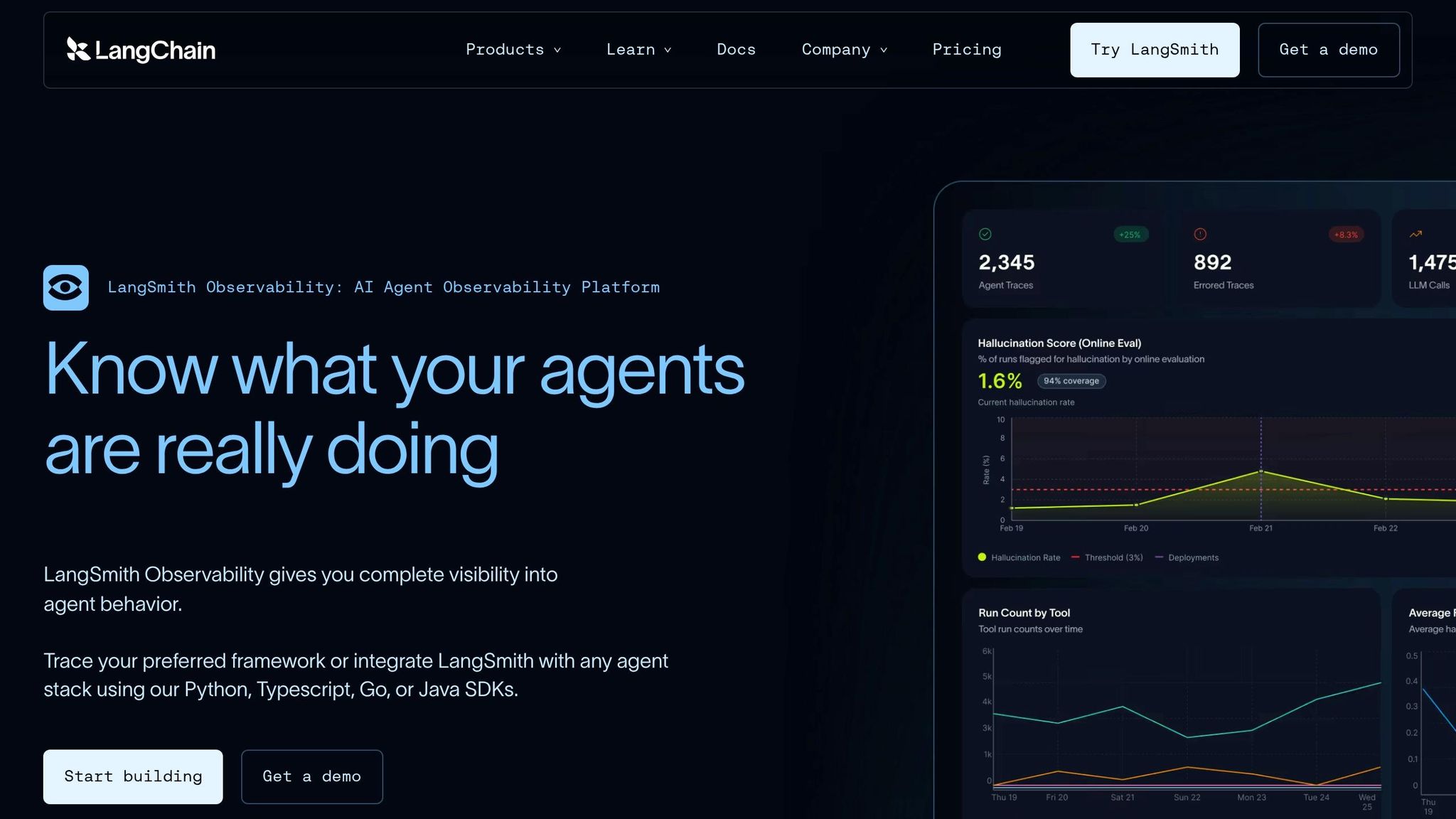
While snapshots provide a static view, visual trace tools like LangSmith add another layer of insight by illustrating dynamic state changes. LangSmith visualizations highlight race conditions that raw logs might miss [12]. These traces show node timings, state transitions, and the exact points where errors occur.
For instance, if two nodes in the same superstep update the same state key without a reducer function, you’ll encounter an InvalidUpdateError [12]. LangSmith’s trace view makes it clear which nodes executed concurrently and where their updates clashed. To avoid runaway graphs and infinite loops, you can set a recursion_limit in your configuration (e.g., config={"recursion_limit": 50}) [12]. These tools emphasize the importance of proper synchronization to manage collisions effectively.
Anti-Pattern: Parallel Execution Without Superstep Synchronization
In production-grade multi-node graphs, unsynchronized parallel updates are a common culprit behind state corruption. When nodes run in parallel without reducer functions, issues like state bloat and errors arise. LangGraph addresses this by saving checkpoints only at superstep boundaries - after all scheduled nodes have finished execution [8]. To safely merge outputs when concurrent nodes update the same state key, use an Annotated reducer function like operator.add [12].
Another pitfall involves using TypedDict instead of Pydantic’s BaseModel. While TypedDict allows fields to grow unchecked, potentially leading to context overflow and serialization failures [3], Pydantic enforces validation at the node boundary, catching these issues early.
When fixing historical state ("time traveling"), steer clear of partial updates. Instead, use graph.get_state(config) to load the full target snapshot, make your changes locally, and pass a complete dictionary to update_state(). This ensures the new checkpoint doesn’t inherit unexpected values from the current thread’s head state [2].
Conclusion
State management in LangGraph isn’t something you can afford to figure out later - it needs to be part of your plan from the very beginning. The decisions you make during your first production deployment - like choosing the right checkpointer, designing reducers, and versioning your schema - will dictate whether your agent performs smoothly or buckles under pressure. As Vishal Lad aptly puts it, "State is a contract" [1]. If you break that contract, your graph might not throw errors, but it could still produce corrupted data.
Let’s revisit the stakes: poor planning leads to skyrocketing costs and degraded performance. Without a proper pruning strategy, database expenses can spiral out of control, and your system’s efficiency will tank in no time. On top of that, sloppy state management can make token costs soar, transforming what seemed like an affordable solution into a financial headache.
What does effective state management look like? It starts with durable checkpointers like PostgresSaver (and avoiding temporary options like MemorySaver), idempotent reducers that can handle crash recovery, and Pydantic BaseModel validation at every node boundary. Add to that a schema_version field paired with migration functions from day one, and you’re setting yourself up for success. These practices are non-negotiable if you want to avoid the nightmare scenario Isuru Chathuranga warns about: "When a microservice crashes, you get a 500. When an agent crashes, you get a confident wrong answer. That’s worse" [7].
Ultimately, the difference between a flashy demo that wows stakeholders and a reliable production system boils down to state discipline [3]. If you plan for complexity from the start, you’ll save yourself from months of expensive and frustrating refactoring later on.
FAQs
How do I migrate old thread state after a schema change?
When dealing with a schema change in LangGraph, migrating old thread state requires careful planning to maintain compatibility. Using a schema evolution strategy is key here. For instance, adding new fields with default values is generally safe and doesn’t disrupt existing data.
However, changes like renaming fields, removing them, or altering their types can lead to errors. To address these unsafe changes, you’ll need to implement migration logic. This ensures old data is correctly mapped to the updated schema, preserving the integrity of your state and preventing deserialization issues.
How do I keep state small without losing needed context?
To keep state size under control in LangGraph, prioritize smart memory management. Implement checkpointers to save only the most crucial state data, and routinely remove unneeded information to avoid clutter. Additionally, use techniques like summarization to handle context overflow efficiently. By retaining only the essential details and cutting down on excess, you can preserve relevant context while preventing your state from becoming unmanageably large.
How can I pinpoint which node corrupted the state?
Tracking down a node responsible for state corruption in LangGraph requires a systematic debugging approach. Here’s how you can tackle it:
- Set Recursion Limits: Infinite loops can wreak havoc on your system. By adding recursion limits, you can identify and stop these loops before they spiral out of control.
- Inspect Node Execution Order: Carefully review the sequence in which nodes execute. This can reveal patterns or anomalies that point to the problematic node.
- Use Breakpoints: Breakpoints are invaluable for observing state changes. You can implement dynamic tools like
NodeInterruptor static pauses to monitor how the state evolves before and after each node runs. - Leverage Checkpointers and Persistent Memory: These tools allow you to track the state over time, providing a clear picture of where things go wrong. By examining state snapshots, you can pinpoint when and where the corruption begins.
Combining these strategies gives you a better chance of identifying and solving the issue effectively.
Related Blog Posts
- Your AI Coding Tool Has No Memory of the Bug That Broke Prod Last Quarter
- LangGraph vs CrewAI vs AutoGen: How We Evaluated All Three Before Recommending One for a Production Deployment
- The Evaluation Framework We Use When a Client Asks Us Which Agent Stack to Build On
- Why Most Agent Framework Benchmarks Don’t Predict What Happens in Production