Blog17 min read
Tool Calling Reliability Across Agent Frameworks: What We Measured and What It Means for Your Architecture
By Huzefa Motiwala · Co-Founder & Chief Product Officer
When AI agents execute tools, errors can quickly escalate, causing issues like duplicate charges or data corruption. Tool-calling reliability is critical, especially in multi-step workflows where failure rates compound. A single tool call might succeed 85-90% of the time, but a 10-step process drops success rates to just 35%.
This article compares the reliability of four agent frameworks - LangChain/LangGraph, CrewAI, AutoGen, and LlamaIndex - focusing on how they handle tool selection, parameter accuracy, error recovery, retries, and observability. Key findings include:
- LangChain/LangGraph: Strong error-handling and deterministic routing with low latency and costs.
- CrewAI: Emphasizes resilience with agent-driven error recovery and hooks for human intervention.
- AutoGen: Relies on self-correction but shows higher overhead and costs.
- LlamaIndex: Treats agents as workflows, offering state persistence and fallback mechanisms.
Quick Comparison
| Framework | Median Latency | Token Overhead | Cost per 1,000 Tasks | State Persistence | Retry Mechanism |
|---|---|---|---|---|---|
| LangGraph 0.3 | 14.1 s | +9% | $41.70 | Native (Checkpoints) | Granular RetryPolicy |
| CrewAI 0.80 | 18.4 s | +18% | $48.20 | Partial (Flows) | Task-level manual |
| AutoGen 0.4 | 22.7 s | +31% | $67.40 | Limited (History) | Manual/Conversational |
| LlamaIndex | Varies | Varies | Varies | Context-based recovery | Iterative agent loops |
Framework choice directly impacts error rates, costs, and debugging ease. For complex workflows, LangGraph offers the most reliable structure, while AutoGen sacrifices efficiency for flexibility. Each framework has strengths depending on your architecture needs.
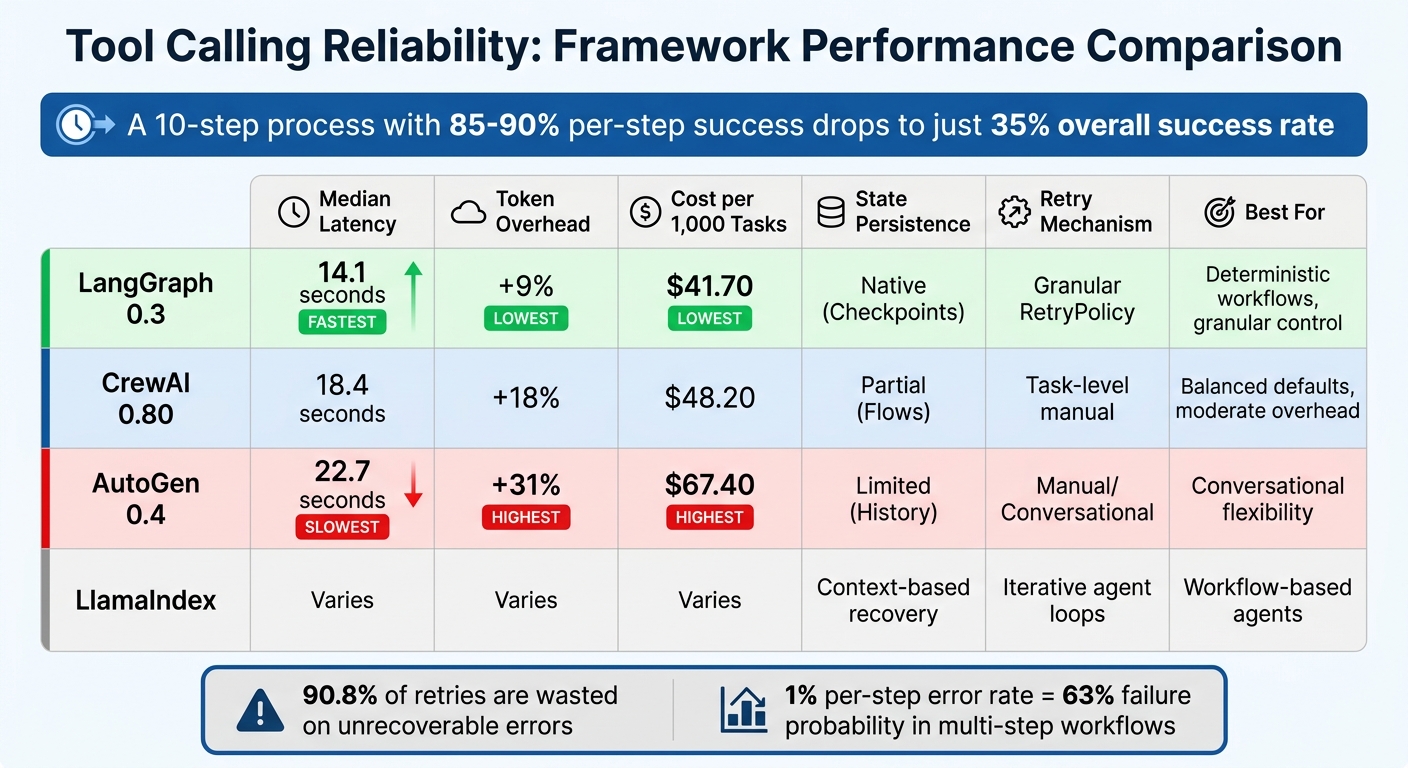
Agent Framework Performance Comparison: Latency, Cost, and Reliability Metrics
AI Agent Mastery: Comparing Agent Frameworks
1. LangChain/LangGraph
LangChain, with over 100 million monthly downloads, has faced challenges in debugging due to its original AgentExecutor "black box" design. LangGraph addresses this by offering low-level orchestration, giving users granular control and full visibility into every state transition [7][9].
Tool Failure Handling
LangGraph’s ToolNode is designed to handle exceptions during tool execution efficiently. It automatically converts exceptions into ToolMessage objects, which are then relayed back to the LLM [6]. By default, the handle_tool_errors=True setting ensures that a single failed API call won’t disrupt the entire agent graph [9]. Instead of raw Python exceptions, the framework encourages wrapping tool functions in try/except blocks and returning descriptive error messages like "ERROR: API Timeout" to help guide corrective actions [8].
For workflows that require specific recovery paths following a tool failure, LangGraph supports conditional edges. These allow routing to "retry nodes" or "fallback nodes" after a set number of attempts [8]. This approach ensures a smoother degradation process, providing alternative responses when a live API becomes unavailable. Such features are essential for maintaining reliability in production environments where failures can’t be avoided.
Retry Mechanisms
Building on its error-handling capabilities, LangGraph incorporates advanced retry strategies to address temporary failures. The ToolRetryMiddleware uses configurable exponential backoff parameters, including max_retries, backoff_factor, and jitter (introducing a ±25% random delay to avoid simultaneous retries). You can specify which exceptions should trigger retries using the retry_on parameter and decide post-retry actions with on_failure, such as returning an error message, re-raising the exception, or using a custom function [10][11].
To make retries more efficient, LangGraph recommends creating an error taxonomy to distinguish between transient (RETRYABLE) and permanent (NON_RETRYABLE) errors. This approach reduces unnecessary retries, cutting step variance from 1.36 to 0.46 [5].
"Retrying only makes sense for errors that can change. A hallucinated tool name cannot change. Therefore, retrying it is guaranteed waste." - Dataforcee Digital [5]
LangGraph also offers per-tool circuit breakers, which prevent a single failing service from exhausting the entire retry budget [5]. Additionally, by using MemorySaver for checkpointing, the graph can resume from the last successful node if a process crashes mid-execution [8]. These capabilities are crucial for ensuring stability in demanding production scenarios.
Deterministic vs. Non-Deterministic Patterns
To minimize hallucination risks, LangGraph supports deterministic routing. By mapping task steps to specific tool functions through Python dictionaries, it avoids errors like "Tool Not Found" that can arise from dynamically generated tool names [5].
"You cannot hallucinate a key in a dict you never ask the model to produce." - Dataforcee Digital [5]
This deterministic approach allows for precise routing while enabling detailed parameter extraction. LangGraph’s architecture also blends deterministic state-machine logic with flexible agentic reasoning [7]. To avoid infinite loops caused by repeated failures, it’s recommended to set a recursion_limit, such as config={"recursion_limit": 10} [9].
Observability and Debugging
LangGraph integrates seamlessly with LangSmith for enhanced tracing and observability. Each agent run is broken down into a structured timeline, capturing every state transition [7]. This makes it easy to identify where tool calls fail and to examine the inputs and outputs. For example, Klarna’s AI assistant achieved an 80% reduction in case resolution time using LangSmith, while C.H. Robinson automated 5,500 orders daily, saving over 600 hours of manual work [7].
LangSmith also traces concurrent tool calls via ThreadPoolExecutor, assigning unique correlation keys. Input validation is handled by Pydantic‘s args_schema to catch malformed arguments early [9]. Since ToolNode doesn’t enforce timeouts by default, external API calls should be wrapped with explicit timeout parameters to prevent delays from blocking the entire graph [9].
| Scenario | LLM Calls | Tool Calls | Approx. Latency |
|---|---|---|---|
| Direct answer (no tools) | 1 | 0 | ~0.8s |
| Single tool call | 2 | 1 | ~2.0s |
| Two tools, sequential | 3 | 2 | ~3.5s |
| Two tools, parallel (one step) | 2 | 2 | ~2.2s |
2. CrewAI
CrewAI handles an impressive 450 million workflows each month and is utilized by 60% of Fortune 500 companies as of April 2026 [18]. Its design focuses on ensuring resilience in production environments, even under high-stakes conditions. Instead of relying on framework-level retries, CrewAI takes a different approach by using agent-driven error recovery, which prevents tool failures from derailing complex multi-step workflows.
Tool Failure Handling
When a tool fails, CrewAI doesn’t let it disrupt the entire workflow. Instead, it captures the error as an observation, giving the Large Language Model (LLM) a chance to reflect on the issue and attempt a fix, rather than crashing the process [17]. A key feature ensures that tools marked with result_as_answer=True don’t prematurely end tasks due to errors. This flag is only honored when a tool completes successfully, requiring the agent to continue reasoning through failures [17].
CrewAI also supports the use of before_tool_call and after_tool_call hooks to manage tool calls effectively. These hooks provide options to:
- Block risky operations by returning
False. - Fix malformed inputs directly within the pipeline.
- Sanitize outputs to avoid downstream errors [13][14].
For high-stakes operations, the request_human_input method can require human approval before proceeding [15]. When modifying inputs, it’s crucial to edit them in place using context.tool_input to ensure the execution engine recognizes the changes [13][15].
This error-handling approach integrates smoothly into CrewAI’s retry mechanisms.
Retry Mechanisms
CrewAI’s retry system hinges on the agent’s reasoning loop. The ToolUsage class monitors attempts and triggers error events through an internal event bus, enabling real-time tracking [16].
For transient API errors, such as 500 responses or rate limits, external libraries can handle deterministic backoff strategies [2]. To avoid duplicate actions - like sending multiple emails - when retries occur, always use idempotency keys for tools performing write operations [2]. PwC reported a striking improvement in code-generation accuracy, jumping from 10% to 70%, by leveraging CrewAI’s agent-driven workflows [18].
Observability and Debugging
CrewAI pairs its error-handling and retry systems with powerful observability tools. It integrates seamlessly with platforms like Arize Phoenix, Langfuse, Datadog, Honeycomb (via OpenLIT), and Braintrust for debugging [13]. The ToolCallHookContext object provides detailed insights, including the tool name, adjustable inputs, the agent and task involved, and the final output [13][15]. Additionally, CrewAI’s event bus emits specific events, such as ToolValidateInputErrorEvent, allowing custom monitoring systems to identify where tool chains typically fail [16].
"Tool Call Hooks provide fine-grained control over tool execution during agent operations. These hooks allow you to intercept tool calls, modify inputs, transform outputs, implement safety checks, and add comprehensive logging or monitoring." - CrewAI Documentation [13]
CrewAI also supports crew-specific hooks (@before_tool_call_crew) to apply safety protocols for particular teams of agents without altering global configurations [13]. To prevent infinite retry loops, iteration limits can be set within LLM call hooks, ensuring agents don’t exceed a specified number of attempts (e.g., 10-15 iterations) [14].
3. AutoGen
AutoGen adopts a self-correction approach to tool failures, treating errors as opportunities for improvement. When a tool fails, the framework captures the error and returns it as a FunctionExecutionResult with is_error=True. This allows the model to analyze the issue and generate a corrected call [19][20]. Unlike traditional retry loops, AutoGen enables the LLM to actively reason about failures instead of blindly repeating actions. Below, we explore AutoGen’s methods for handling failures, retry logic, deterministic routing, and observability.
Tool Failure Handling
In version 0.4.x, AutoGen introduces structured exceptions for issues like invalid arguments, missing tools, and execution errors [19][20]. The framework provides two key components: minimal Core API tools (such as BaseTool and CancellationToken) for custom agent logic and a higher-level AgentChat API with pre-configured behaviors for faster deployment [20]. This design ensures resilience in production environments where quick error correction is crucial.
The tool_agent_caller_loop alternates execution between the tool agent and the model client until the model determines no further tool calls are needed [21]. For write operations, idempotency keys are recommended to avoid duplicate actions [2].
Retry Mechanisms
AutoGen prioritizes LLM-based self-correction over traditional retry loops, focusing on production reliability. When a tool execution fails, the error is sent back to the model, which generates a corrected call [20][19]. Standard implementations, however, often rely on a global retry counter in ReAct-style loops, leading to wasted resources on non-recoverable errors.
Data shows that 90.8% of retries in ReAct-style agents are wasted on errors like hallucinated tool names [5]. With a 28% hallucination rate for tool-call errors in GPT-4 class models [5], smarter retry strategies are essential. Errors should be categorized into "Retryable" (e.g., API timeouts, rate limits) and "Non-Retryable" (e.g., invalid inputs, non-existent tools) to optimize retry budgets [5].
For transient issues like API timeouts, use exponential backoff with libraries like tenacity within the tool’s execution logic [5]. To prevent a single failing service from draining retries, wrap tools in per-tool circuit breakers [5].
Deterministic vs. Non-Deterministic Patterns
To reduce inefficiencies, replace naive ReAct loops with deterministic tool routing using Python dictionaries. This approach lowers step variance from 1.36 to 0.46 [5], eliminates tool-name hallucinations, and ensures predictable execution costs.
Strict schema validation with Pydantic should be implemented for tool arguments. This provides structured feedback on argument errors, which is more useful for self-correction than raw Python tracebacks [2]. By combining deterministic routing with error taxonomy, workflows achieve 3x lower step variance and 0% wasted retries compared to naive ReAct setups [5].
Observability and Debugging
AutoGen logs detailed execution data, including tool call suggestions, arguments, and responses [19]. It also integrates with tracing tools like traceAI-autogen [22]. Debugging malformed inputs is easier by inspecting llm_config["tools"] or tool.schema to verify JSON schemas generated from Python type hints and docstrings [20][19].
The reflect_on_tool_use toggle in version 0.4 determines whether agents return raw ToolCallSummaryMessage results (helpful for debugging pipelines) or perform an additional LLM call to analyze tool outputs [23]. For monitoring in production, track metrics like tool call latency, token usage, and failure rates. To avoid infinite retries, set a limit using max_tool_iterations [23].
4. LlamaIndex

LlamaIndex takes a unique approach to tool reliability by treating agents as workflows rather than simple request-response systems. When a tool encounters an error, the framework returns it as a "tool" role message in the chat history, allowing for efficient error correction. For instance, if a draft_id is missing, the error message will prompt the use of the context-stored ID to resolve the issue [25][27][29]. This design minimizes costly retries, which is crucial in production environments.
Tool Failure Handling
LlamaIndex offers two execution models to manage tool failures effectively. The first is the FunctionAgent, which operates in an automatic loop. Here, tool outputs are fed back into the LLM until it determines no more tool calls are necessary [25]. The second option is building "Manual Agents", where developers use custom while tool_calls: loops. These allow for error logging and handling at each step [25].
The framework also includes a return_direct=True parameter, which acts as a circuit breaker. When enabled, this parameter immediately returns the tool’s output to the user, bypassing the reasoning loop and avoiding infinite retries [26].
A standout feature of LlamaIndex is its ability to maintain state across agents. Using the Context object (ctx.store), it preserves the state even if one agent fails, enabling recovery or review by a supervisor agent [24]. Additionally, tools like LoadAndSearchToolSpec help manage large outputs - such as Wikipedia search results - by indexing them for querying rather than injecting the entire dataset into the prompt. This prevents context window overflows [26].
Retry Mechanisms
Retries in LlamaIndex are managed through iterative agent loops, controlled by a max_iterations value (e.g., 10) to prevent excessive retries and runaway costs [1][28]. The framework also supports fallback mechanisms. If a primary tool fails repeatedly, agents can switch to alternative responses or states to maintain workflow continuity [28].
To reduce the likelihood of unpredictable failures, LlamaIndex encourages using deterministic helper tools. For example, instead of relying on the LLM to infer the current date, developers can provide a get_date function for the agent to call. This grounds the agent’s reasoning and ensures accurate execution of more complex tools [29]. Input validation layers further enhance reliability by offering specific suggestions when inputs fail validation, guiding the model to correct errors in subsequent attempts [1][29]. The overarching goal is to keep retries minimal while ensuring workflows remain uninterrupted.
Deterministic vs. Non-Deterministic Patterns
LlamaIndex supports two agent types: FunctionAgent and ReActAgent. The FunctionAgent uses native tool-calling capabilities from providers like OpenAI, offering structured tool selection. On the other hand, the ReActAgent relies on specific prompting strategies, which can lead to hallucinated tool names if not carefully managed [25].
The importance of well-defined tool parameters is emphasized in the documentation. Using Annotated types or Pydantic to set clear descriptions and constraints ensures valid inputs [26][1]. As noted:
"Spending time tuning these parameters [tool name and description] can result in large changes in how the LLM calls these tools." - LlamaIndex OSS Documentation [26]
Including negative examples in tool descriptions, such as specifying that "The search query should be a concise phrase, not a full sentence", can further improve first-call accuracy and reduce retries [1]. This deterministic approach is critical for production systems where errors can have tangible consequences.
Observability and Debugging
LlamaIndex complements its failure and retry mechanisms with robust observability features. The handler.stream_events() function captures real-time ToolCall and ToolCallResult events, including tool names, arguments, and outputs [24]. Setting verbose=True during agent initialization provides instant console feedback on active steps [30]. For debugging schema issues, developers can use tool.metadata.get_parameters_dict() to inspect the exact JSON schema sent to the LLM, helping to refine poorly defined parameter descriptions [26].
The framework integrates with OpenTelemetry-compatible platforms like Langfuse, which processes billions of observations monthly and is trusted by major enterprises [12]. For more complex workflows, Llamatrace offers visual tracing, making it easier to pinpoint issues in multi-step chains [30]. To avoid infinite loops caused by tool failures or model confusion, always set a timeout or max_iterations value (e.g., 120 seconds) in production environments [30][1].
Framework Comparison: Strengths and Weaknesses
When it comes to production systems, where even minor tool failures can have a big impact, the differences between frameworks become much more than theoretical. According to April 2026 benchmarks from agent-harness.ai, LangGraph stood out with the lowest latency, clocking in at a median of 14.1 seconds for research tasks. In comparison, AutoGen lagged behind at 22.7 seconds. Token overhead also varied significantly: LangGraph added just 9%, while CrewAI and AutoGen showed higher overheads at 18% and 31%, respectively [34]. This difference translates directly into costs - LangGraph costs $41.70 per 1,000 tasks, whereas AutoGen jumps to $67.40.
Reliability becomes even more critical in multi-step workflows, where errors can quickly spiral out of control. Jackson Wells from Galileo puts it plainly: "A 1% per-step error rate accumulates into a 63% failure probability" [32]. This compounding effect underscores the importance of a robust retry mechanism. Without it, task complexity can lead to systems failing 70-90% of the time [32].
Here’s a closer look at how these frameworks stack up:
| Framework | Median Latency | Token Overhead | Cost per 1,000 Tasks | State Persistence | Retry Mechanism |
|---|---|---|---|---|---|
| LangGraph 0.3 | 14.1 s | +9% | $41.70 | Native (Checkpoints) | Granular RetryPolicy |
| CrewAI 0.80 | 18.4 s | +18% | $48.20 | Partial (Flows) | Task-level manual |
| AutoGen 0.4 | 22.7 s | +31% | $67.40 | Limited (History) | Manual/Conversational |
When it comes to debugging and observability, the differences are just as stark. LangGraph integrates seamlessly with LangSmith, offering full checkpoint-based replay for precise debugging. In contrast, AutoGen relies on conversation history, which offers limited state recovery [31][33]. Rome Thorndike from the Prompt Engineer Collective sums it up well: "Most applications don’t need multi-agent systems. A single agent with good tools and a clear system prompt handles 80% of real-world use cases" [31]. But for the remaining 20%, where multi-step reliability is non-negotiable, your framework choice can mean the difference between smooth debugging and a frustrating lack of insights.
- LangGraph shines in deterministic workflows, offering granular retry control and checkpoint-level recovery.
- CrewAI provides solid, balanced defaults with moderate overhead and task-level orchestration.
- AutoGen prioritizes conversational flexibility but demands significant manual intervention for reliable production use.
The framework you choose will directly shape your architecture and determine how your system handles complexity and failure.
Conclusion
After examining key frameworks, it’s clear that achieving reliable production systems requires a focus on architecture rather than relying solely on any single framework. Even the most advanced tools can’t compensate for poorly designed tool wrappers.
A 200-task benchmark revealed a striking issue: 90.8% of retries were wasted on unrecoverable errors due to hallucinated tool names [5]. This isn’t just a problem with frameworks - it’s an architectural flaw. By shifting tool routing into code (using deterministic methods like Python dictionaries instead of relying on LLM-generated strings), such failures can be avoided. The findings emphasize that retries are only effective for errors that can change, highlighting the importance of deterministic tool mapping [5]. When combined with Pydantic strict validation, practices like deterministic routing, strict schema enforcement, and strong observability form the backbone of reliable production systems.
For critical tasks, such as database updates or financial transactions, implementing Two-LLM Verification can drastically reduce errors. This approach uses a faster model (e.g., GPT-4o-mini) for generating outputs and a more conservative model (e.g., Claude Opus 4.5) for verification, cutting hallucination rates from 23% to just 1.4% [4]. For instance, in early 2024, a failure to verify an agent’s work led to an $8,400 fraudulent refund, requiring three weeks to rebuild customer trust [4].
As noted by whoisrade in the Agentic Field Manual, "a system’s reliability depends on its weakest observable tool." To ensure reliability, log every tool call with details like trace ID, input hash, latency, status, and retry count. Errors should be categorized into retryable (e.g., timeouts, rate limits) and non-retryable (e.g., validation failures) to conserve retry budgets. Additionally, set hard limits on retries and execution time - 30 to 60 seconds is a practical maximum [3]. Without these safeguards, even a 95% per-step reliability can drop to 77% over five steps [3].
FAQs
How do I classify tool errors as retryable vs. non-retryable?
Understanding the nature of a failure is crucial when handling tool errors. Here’s how errors generally break down:
- Retryable Errors: These are temporary issues that might resolve themselves if given some time. Examples include timeouts, rate limits, or temporary API outages. In these cases, retrying the operation after a delay often works.
- Non-Retryable Errors: These are more permanent problems where retries won’t help. Common examples include malformed inputs, schema violations, or permanent changes to an API.
To manage these effectively, implement validation layers to catch argument errors early. Additionally, set clear policies to decide whether errors should trigger retries or lead to an immediate abort.
What’s the best way to prevent duplicate side effects during retries?
To avoid duplicate side effects during retries, it’s important to use idempotency mechanisms. This involves assigning a unique idempotency key to each tool call. By doing so, repeated calls using the same key will produce the same result without triggering the side effects again.
On top of that, tools should have clear contracts and structured error handling. This approach helps reduce the risk of unintended duplicates, particularly in critical tasks like API requests or changes to a database.
What should I log for every tool call to debug failures fast?
Logging is all about capturing the right details to make debugging a breeze. Here’s what you should focus on:
- Arguments Sent: Record the inputs or parameters passed during the tool call. This helps retrace the steps leading to an issue.
- Response Received: Log the output or data returned by the tool, whether successful or not.
- Success or Failure Status: Clearly indicate whether the call succeeded or failed. This provides instant clarity on the outcome.
- Error Messages or Exceptions: Capture any errors or exceptions thrown during the process. These are often the key to diagnosing problems.
- Metadata: Include details like timestamps to track when the event occurred and retry counts to monitor repeated attempts.
By keeping these logs detailed but concise, you’ll have a solid foundation for quickly identifying and resolving issues.
Related Blog Posts
- LangGraph vs CrewAI vs AutoGen: How We Evaluated All Three Before Recommending One for a Production Deployment
- The Evaluation Framework We Use When a Client Asks Us Which Agent Stack to Build On
- Why Most Agent Framework Benchmarks Don’t Predict What Happens in Production
- How to Stress Test an Agent Framework Before You’re Too Deep to Switch