How to Identify Which AI Features in Your Product Can Be Served by an SLM Without Degrading UX
By Huzefa Motiwala · Co-Founder & Chief Product Officer
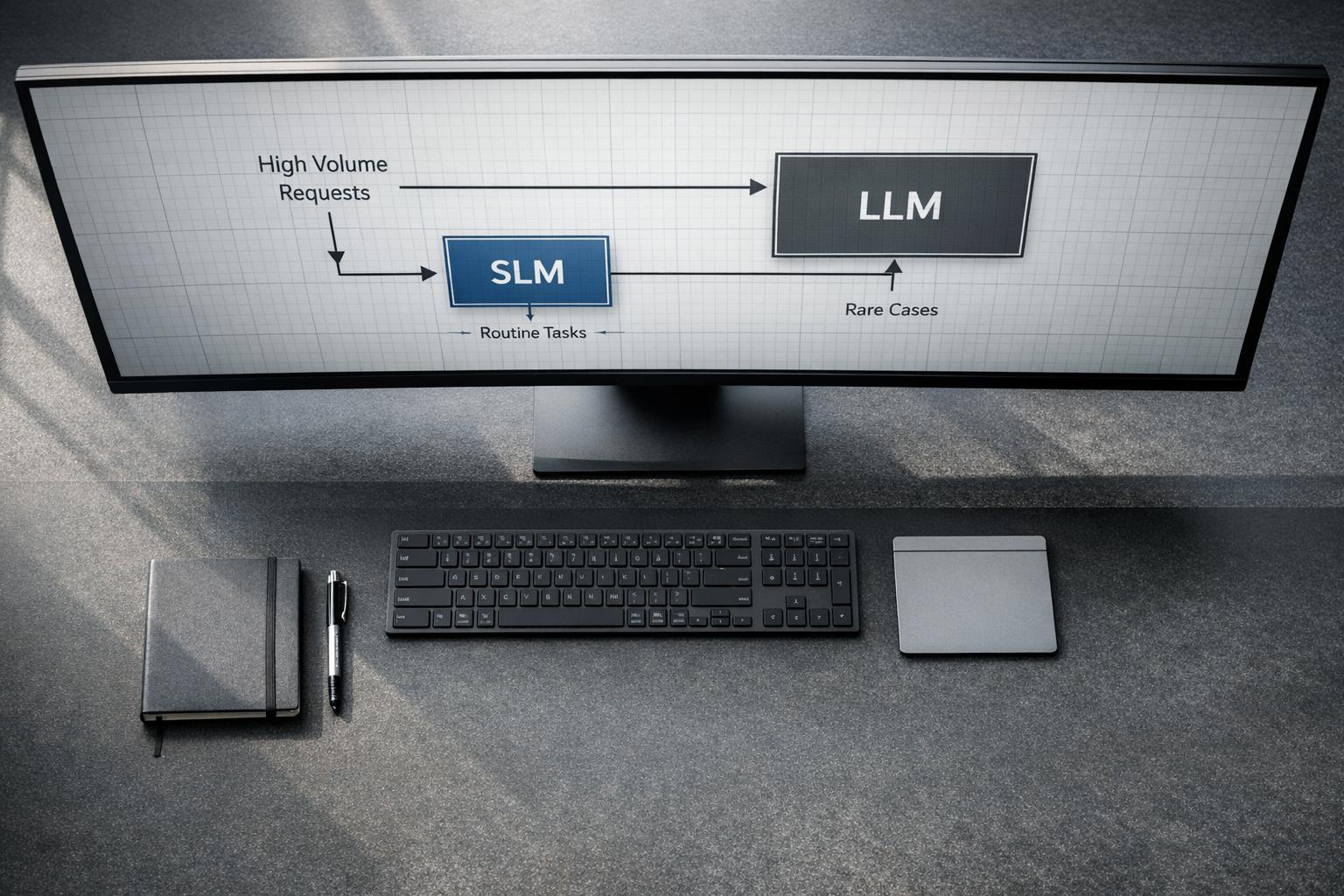
Want to cut AI costs without sacrificing quality? Many teams use expensive models like GPT-4 for every task - even when smaller language models (SLMs) could handle simpler jobs at a fraction of the price. The trick? Knowing which features to migrate without hurting user experience.
Here’s the key takeaway: SLMs are perfect for tasks requiring speed, predictability, and structured outputs - like autocomplete, classification, or query routing. They’re faster, cheaper, and often just as effective for these use cases. However, tasks needing complex reasoning or creativity should stick with larger models.
To migrate successfully:
- Audit your AI features: Identify simple, high-volume tasks.
- Define success metrics: Focus on user outcomes like task completion rates and latency.
- Test in shadow mode: Compare SLMs against current models without user impact.
- Monitor post-migration: Track quality, costs, and user behavior to catch issues early.
Small Language Models Explained: The Future of Business Transformation
What Quality Dimensions Actually Matter to Users
When it comes to user experience, not all quality metrics hold the same weight. The task completion rate stands out as the most important. It measures whether users can achieve their intended goals. If this rate dips below 60%, it’s a red flag for quality problems. A rate under 30%? That’s a clear sign to disable or roll back the feature entirely [8].
Another key factor is perceived latency, which often matters more than the actual processing time. For example, users notice delays in Time to First Token (TTFT) beyond 200-300 milliseconds in conversational interfaces. Meanwhile, a 2-second delay in autocomplete feels broken, even though that same delay might be acceptable in a background summary task [7][10]. The takeaway? Responsiveness should match the task at hand.
Groundedness and consistency are also crucial for maintaining user trust. Users can lose confidence quickly - just one bad response can lead them to abandon a feature, even if it performs well 90% of the time [8]. Hallucinations are particularly damaging because users often can’t tell they’re incorrect without external verification [11]. For factual tasks, consistent answers across multiple uses are critical since high variability signals unreliability.
Quality Factors That Impact User Experience
Understanding these dimensions is crucial when evaluating AI features during an SLM migration audit. Three factors directly influence whether users can complete their tasks successfully: accuracy, contextual relevance, and consistency.
- Accuracy: This means outputs are correct within the given context, rather than relying on aggregate metrics like BLEU or ROUGE. If users override the AI’s output more than 40% of the time, it’s clear the system is only serving as a rough starting point [8].
- Contextual relevance: The AI must maintain the right tone, completeness, and precision for the task. For instance, when extracting data into JSON, adherence to the schema is more important than polished language [7]. In customer support routing, accurately identifying user intent is critical. Products with an Intent Resolution Rate above 70% show much stronger 30-day retention compared to those below 55% [13].
Quality Factors Users Don’t Notice
Some metrics, while important for cost or infrastructure, don’t directly affect user experience. For instance, token efficiency is irrelevant as long as the output solves the user’s problem effectively [11].
Similarly, median latency often takes a backseat to tail latency. As Tian Pan explains:
"If you set your SLO based on your median, you are making a promise to the median user while silently abandoning the rest" [10].
Users are far more attuned to occasional long delays. A system that’s fast 50% of the time but occasionally freezes for 5 seconds will frustrate users, even if the median response time stays under 500 milliseconds.
These dimensions provide a solid framework for auditing AI features, helping determine which functionalities are ready for migration to SLMs.
Which AI Features Work Well with SLMs
When considering migrating to Small Language Models (SLMs), it’s essential to focus on tasks that align with their strengths: speed, predictability, and efficiency. SLMs with 1B-30B parameters thrive in areas requiring high-volume processing and consistent outputs, as highlighted by Alex Cloudstar:
"The frontier model is doing more work than the task needs. The small model is doing exactly what the task needs." [9]
The Strengths of SLMs
SLMs shine when speed is critical. With response times ranging from 20-80ms - compared to the 200-800ms typical of frontier models - they’re ideal for interactive tasks like autocomplete or real-time routing. This speed transforms user interactions from frustrating delays to seamless, instant responses [14].
Their "sweet spot" lies in tasks with clear boundaries and structured outputs, such as classification, extraction, and routing. These tasks don’t require extensive world knowledge or complex reasoning. In fact, with domain-specific training, a 7B or 8B model can often outperform larger frontier models in these scenarios [9].
To determine if a feature is suitable for SLMs, look for these characteristics:
- Predictable inputs and outputs
- Sub-200ms response time requirements
- Fixed labels or structured outputs
- High traffic volumes
On the other hand, tasks requiring complex reasoning, processing of long contexts (beyond 8K tokens), or open-ended creativity are better suited for frontier models [9][14].
Autocomplete and Predictive Text
Autocomplete is a textbook example of where SLMs excel. Users expect suggestions to appear in under 200ms [7][12], and SLMs consistently deliver sub-100ms responses. While frontier models might offer slightly more sophisticated suggestions, the speed of SLMs makes them the better choice for this "critical path" feature. Users often tweak autocomplete suggestions anyway, so perfect precision isn’t necessary [9].
Classification and Categorization
Tasks like sentiment analysis, intent tagging, or content categorization are tailor-made for SLMs. These rely on fixed label sets and prioritize schema compliance over linguistic flexibility [7]. For example, a 7B model, specialized for classification, often matches or outperforms larger models in both speed and accuracy [9].
In these workflows, the output is binary - either correct or incorrect - leaving no room for ambiguity. For high-volume tasks, SLMs provide faster, more consistent results without compromising user experience.
Summarization of Structured Content
SLMs perform well in summarization tasks that involve reformatting structured data. Examples include converting emails into bullet points, summarizing meeting notes into action items, or distilling product specifications into feature lists. These tasks are straightforward and don’t demand deep reasoning [9].
For structured summarization, SLMs can achieve 85% to 95% of the quality of frontier models while being far more cost-effective [5]. Their ability to handle predictable outputs makes them a practical choice for such tasks.
Query Routing and Intent Detection
Routing and intent detection are foundational tasks that occur with every user query, making them ideal for optimization [9]. These tasks require rapid decisions - often under 20ms - to avoid slowing down the overall pipeline [3][15]. SLMs handle these simple binary or multi-class decisions with ease, offering 5x-10x faster response times compared to frontier models [3].
From a cost perspective, the savings are substantial. A single routing call costs approximately $0.0002 with an SLM, compared to $0.03 with a frontier model [3]. When scaled to millions of requests per day, the difference is enormous. These tasks typically ask questions like "Is this query relevant?" or "Which tool should handle this?" - making them perfectly suited for SLMs.
These examples highlight how SLMs can deliver speed, consistency, and cost efficiency for specific tasks. They also pave the way for a systematic review of features that could benefit from SLM migration.
How to Audit Your AI Features for SLM Migration
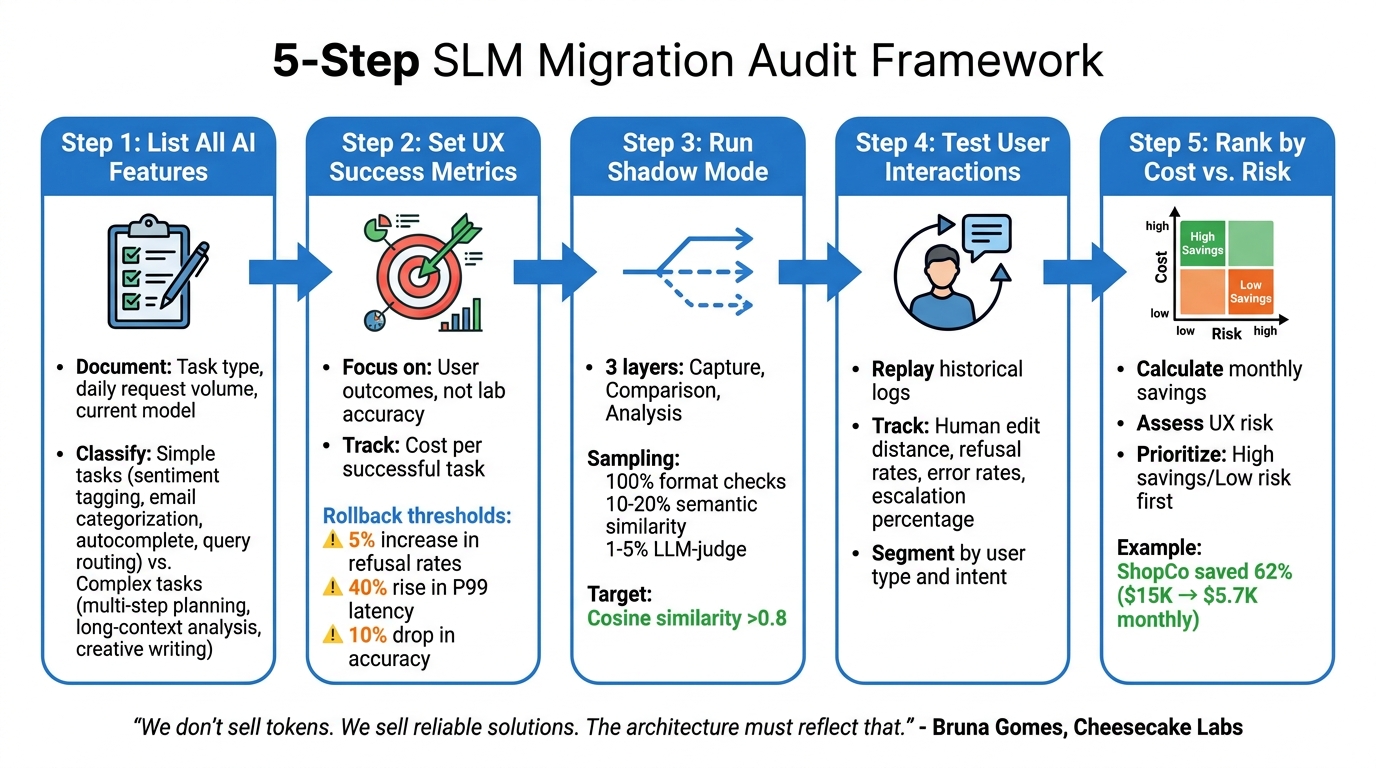
5-Step Framework for Auditing AI Features for SLM Migration
When migrating to smaller language models (SLMs), the key is to do it selectively - focusing on areas where SLMs can deliver similar outcomes at a lower cost without compromising user experience. To get started, create a baseline scorecard that tracks metrics like quality, groundedness, cost per successful task, and P95 latency for each feature. This will serve as your reference point throughout the process [2].
The audit process involves five key steps: identifying simple versus complex tasks, defining user-focused success criteria, performing parallel testing, simulating real-world use cases, and developing a migration roadmap. As Bruna Gomes from Cheesecake Labs explains:
"We don’t sell tokens. We sell reliable solutions. The architecture must reflect that." [6]
This principle should guide every decision, ensuring reliability while cutting infrastructure costs. Below is a detailed breakdown of the five-step framework.
Step 1: List All AI Features and Their Workloads
Start by creating a comprehensive inventory of all AI features. For each feature, document the task type (e.g., classification, summarization, generation, routing), the average daily request volume, and the current model in use. This step helps identify simpler tasks that are ideal candidates for migration.
Classify each feature based on complexity. Simpler tasks, like sentiment tagging, email categorization, autocomplete suggestions, and query routing, are often high-volume and low-complexity - making them perfect for SLMs. On the other hand, complex tasks like multi-step planning, long-context analysis, or creative writing require deeper reasoning and may not be as suitable for migration [6][18].
Step 2: Set UX Success Metrics for Each Feature
Define what "success" means for each feature - focusing on user outcomes rather than just lab-based accuracy. Metrics should include response speed, user satisfaction, and task completion effectiveness. Instead of measuring cost per request, focus on cost per successful task [2].
Establish clear rollback thresholds to safeguard user experience. For example, you might set limits like a 5% increase in refusal rates, a 40% rise in P99 latency, or a 10% drop in accuracy. If these thresholds are exceeded, the system should automatically revert to the original model [17][18].
Step 3: Run Shadow Mode Comparisons
Shadow mode testing allows you to compare SLM performance against real traffic without exposing users to potential risks. Implement a three-layer system:
- Capture Layer: Duplicates incoming requests.
- Comparison Layer: Logs outputs from both the production model and the SLM.
- Analysis Layer: Calculates similarity metrics [16].
To manage evaluation costs, use a tiered sampling strategy. For instance:
- Run deterministic checks (e.g., format validation) on 100% of traffic.
- Perform semantic similarity checks on 10-20% of traffic.
- Use more expensive LLM-as-judge evaluations on only 1-5% of traffic [16].
A cosine similarity score above 0.8 typically indicates the SLM’s output is comparable to the current model’s.
Step 4: Test with Simulated User Interactions
Once shadow mode testing is complete, simulate real user interactions to assess how users engage with the outputs. Replay historical production logs to mimic actual user sessions [2][16]. This helps uncover edge cases and usage patterns that synthetic tests might miss.
Track metrics that reflect user behavior, such as human edit distance - which measures how much users need to revise the SLM’s output [4]. Other important metrics include refusal rates, error rates, and the percentage of tasks escalated to a human or a more advanced model. Segment data by user type, intent, or document category to identify specific areas where quality may vary [2][19].
Step 5: Rank Features by Cost Savings vs. Risk
Finally, use the data to prioritize features based on cost savings and risk. Calculate the monthly cost savings for each feature by comparing current spending on frontier models to the expected costs with SLMs. Assess UX risk by considering each feature’s importance and observed quality variations.
For example, ShopCo reduced monthly AI costs from $15,000 to $5,700 - a 62% savings - by routing 65% of simple queries to Claude Haiku 4.5 and only 10% of complex queries to Opus 4.5. This shift maintained an 87% accuracy rate [18]. To guide your prioritization, create a risk matrix with four quadrants:
- High savings/low risk
- High savings/high risk
- Low savings/low risk
- Low savings/high risk
Start with features in the high savings/low risk quadrant before addressing others. This approach ensures you maximize cost efficiency while maintaining quality.
How to Set Up Shadow Mode Testing
Shadow mode testing lets you compare how GPT-4 and an SLM handle the same requests without altering what users see. The idea is to create a parallel system for SLM execution that doesn’t disrupt or delay live responses [20]. This ensures a smooth user experience while testing cost-saving alternatives.
Build Parallel Inference Pipelines
To get started, configure your system so every incoming request triggers two separate inference calls - one to GPT-4 (your production model) and another to the candidate SLM. The user will only see GPT-4’s response, while the SLM’s output gets logged for later analysis.
Make sure shadow requests are asynchronous and non-blocking. This means the SLM inference happens in the background, after the GPT-4 response is sent [20]. Even if the SLM is slower or encounters errors, it won’t affect the user experience. To keep things running smoothly, isolate the shadow model by using separate compute resources such as different containers, pods, or hosts. This prevents memory spikes or failures in the shadow model from interfering with the production environment [20][21].
You can mirror traffic at the application level (using background tasks or thread pools) or through infrastructure tools like Istio or Envoy [20][16][23]. To avoid unintended consequences - like triggering emails or modifying production databases - use read-only replicas and simulated APIs [21]. Run shadow mode testing for at least seven days to capture both weekday and weekend traffic patterns [20].
Measure Output Similarity Automatically
Once both models process the same request, you’ll need to measure how similar their outputs are. To manage costs, use a tiered sampling approach:
- Perform basic format checks (e.g., JSON validation or regex patterns) on all traffic.
- Use embedding-based semantic similarity for 10-20% of requests.
- Reserve more resource-intensive evaluations, like LLM-as-judge assessments, for 2-5% of requests [16].
For semantic similarity, convert the outputs into vectors and calculate cosine similarity. Scores above 0.8 generally indicate semantic equivalence [16]. To handle formatting differences - such as markdown fences around JSON - use robust regex-based parsers before comparing outputs [22]. Set clear benchmarks upfront, like requiring the SLM’s P99 latency to stay within 20% of the production model’s or flagging shadow error rates above 0.1% for review [20].
Add Human Review for Edge Cases
Automated metrics can miss subtle quality differences, especially in edge cases. For outputs with a semantic similarity score below 0.7, bring in human reviewers [20][16]. These cases should account for less than 1% of total shadow traffic [24][16].
Reviewers should evaluate entire conversation flows, not just single responses, to identify issues like context drift, where the model might contradict itself over multiple turns [25]. Use human feedback to fine-tune automated evaluations and identify problems like demographic bias that technical tools might overlook [16][25]. In industries like healthcare or finance, human review is especially important for safety-critical cases [25][26]. To ensure safety, include a kill switch that disables shadow mode if the candidate model violates predefined safety or cost thresholds before human review can step in [24].
How to Monitor SLM Performance After Migration
After migrating to a new system, monitoring becomes absolutely essential. Unlike traditional software, where uptime often equates to success, AI systems can technically remain operational while delivering poor or unhelpful results [29][11]. To ensure quality, you need monitoring systems that detect both hard failures (like errors and timeouts) and soft failures (outputs that work but fail to meet user needs).
Track System Performance Metrics
Start by keeping an eye on key technical metrics. For conversational tasks, aim to keep time-to-first-token (TTFT) under 2 seconds, and for autocomplete tasks, under 500 milliseconds. Monitor latency percentiles - P50, P95, and P99. If P95 latency exceeds twice the baseline for more than 5 minutes, trigger an alert [4][2][27][28].
Categorize errors into three types: API, validation, and semantic. If any of these exceed a 5% error rate over a 5-minute window, it’s time to act [27]. To ensure accuracy, track hallucination rates by verifying outputs against source documents. While general-purpose language models might have hallucination rates of 10-20%, enterprise systems typically target below 5%. In high-stakes industries like healthcare or legal, aim for less than 1% [28]. Perform daily automated evaluations on 5-10% of production outputs to identify gradual quality declines [11].
Monitoring costs is just as important as tracking quality. A decline in output quality can significantly increase operational costs, even if overall spending appears stable. For example, a per-query increase of 500 input tokens could add around $3,000 monthly at a scale of 100,000 daily requests [11]. Keep an eye out for "context window bloat", where growing conversation histories or retrieval-augmented generation (RAG) chunks lead to hidden cost increases [11].
Watch User Behavior Signals
While technical metrics tell you about system performance, user behavior reveals how well the system is meeting their needs. One critical metric is the task completion rate (TCR), calculated as (accepted + edited) / total_generated. A TCR below 60% signals a quality issue, and if it drops below 30%, it’s time to take immediate action [8].
Track user override rates - how often users modify or replace the system’s output. A high override rate (above 40%) might indicate the model provides a decent starting point, but if paired with a low TCR, it suggests users are struggling [8].
"If your LLM logs can’t be joined with ‘what the user did next,’ you’re not measuring quality. You’re measuring output length." - Apptension [4]
Spikes in regeneration rates - when users click "try again" or "regenerate" - are another red flag. Similarly, monitor human edit distance to measure how much users rewrite the system’s outputs. In early 2026, Apptension found that tracking rewrite levels was a more reliable early warning signal than explicit user feedback during a 4-week Shopify build for Miraflora Wagyu [4]. Finally, a 7-day retention rate below 20% indicates major user disengagement [8].
For context, GitHub Copilot reported in March 2026 that an acceptance rate of around 30% is considered healthy for their AI assistant. They use a scorecard approach - "Adoption → Activity → Satisfaction → Impact" - to evaluate performance, tracking metrics like acceptance rate, characters retained, and latency before implementing model changes [28].
Define Rollback Thresholds
To protect the user experience, set clear rollback thresholds based on performance data. Establish a baseline during the first two weeks of production and define thresholds relative to this baseline [29]. Use a multi-layered alerting system to cover various dimensions: operational metrics (like latency and errors), quality metrics (such as accuracy and drift), safety violations (policy breaches), and business impact (engagement and conversion rates) [29].
Implement a kill switch (via feature flag) for instant fallback if thresholds are breached, and test it regularly [29]. Automated rollback thresholds should include:
- A 5% increase in feature abandonment
- Quality scores dropping by more than 10% from baseline
- P95 cost spikes exceeding twice the baseline
- Refusal rates rising by over 5% [11][17][29]
"Automated rollback is not optional for production canary deployments." - Tian Pan [17]
Set up alerts for any quality drop exceeding 5% from the baseline over a rolling 7-day window [11]. For critical issues - such as safety violations, error rates above 10%, or P99 latency exceeding 30 seconds - trigger an immediate automated rollback [29]. This ensures rapid response during off-hours and prevents issues from escalating [17].
Summary: Running Your SLM Migration Audit
Migrating AI features to SLMs requires a careful and structured plan to balance cost efficiency with maintaining a solid user experience. The process begins with setting clear success guardrails before deployment [1]. These guardrails help avoid the mistake of reducing costs without identifying the quality aspects that are most important to your users.
This initial audit lays the groundwork for a phased rollout. The audit process should include: cataloging all AI tasks, analyzing spending across different stages, and conducting shadow mode tests. In shadow mode, the SLM processes live production traffic in parallel but without affecting users [1][17]. To ensure quality, use an "LLM judge" to automatically compare SLM outputs to your current baseline, checking for accuracy, tone, and format compliance [17]. A detailed performance evaluation is critical to identify issues in specific use cases [30][1].
"The problem is not cost reduction. The problem is cutting cost without a diagnostic model." - OptyxStack [1]
Before migrating any feature, follow a phased rollout approach - from silent testing to full autonomy [30]. Each phase should have clear exit criteria. For example, before moving from Advisory to Co-pilot mode, aim for a 70% user acceptance rate [30]. Focus on measuring cost per successful task instead of cost per token to ensure spending aligns with actual value delivered [8][1].
After migration, monitoring becomes essential. Track both hard failures (like errors or timeouts) and soft failures (outputs that technically work but fail to meet user expectations). Set automated rollback triggers for critical issues, such as a 5% increase in refusal rates or a 40% rise in P99 latency. Always implement migrations behind feature flags, allowing immediate rollback if thresholds are breached [17][23]. Ongoing monitoring ensures cost savings do not compromise the user experience.
FAQs
How do I know if a feature is “SLM-safe” to migrate?
To decide if a feature can be migrated to a smaller, more cost-efficient language model (SLM) without compromising its performance, you need to assess several factors. The goal is to ensure that the feature maintains its quality, reliability, and user experience even when powered by the SLM.
One effective method is shadow mode testing. This approach lets you compare the outputs of the SLM against the current model in a controlled environment, without exposing real users to potential issues. It’s like running a test drive behind the scenes.
Key metrics to watch during this evaluation include:
- Accuracy: Does the SLM produce results that align with the current model’s standards?
- Speed: Can it process tasks quickly enough to meet user expectations?
- Consistency: Are the outputs stable and reliable across different scenarios?
Additionally, keep an eye on signals like performance drift, error rates, and overall user satisfaction. These indicators will help you confirm that the migration doesn’t lead to any noticeable drop in performance or experience.
By carefully monitoring these factors, you can confidently determine if a feature is ready for SLM deployment.
What should I measure in shadow mode besides similarity scores?
When operating in shadow mode, it’s important to go beyond just measuring similarity scores. Incorporate task-specific metrics such as accuracy thresholds, response speed, and consistency across a variety of inputs. Additionally, monitor user-related signals like task completion rates, trust indicators, and even economic factors such as token costs. These metrics help ensure the feature delivers reliable performance, aligns with user expectations, and maintains a seamless overall experience.
When should I auto-rollback after switching to an SLM?
If a newly migrated feature starts showing signs of trouble - like higher error rates, poorer output quality, unhappy users, or unexpected cost increases - you should initiate an auto-rollback. Keep a close eye on key indicators using methods like shadow mode comparisons and gradual rollout strategies, such as canary deployments. When major issues or performance drops arise, an auto-rollback can safeguard the user experience and ensure your system remains stable.