Construction Software in 2026: How AEC Teams Buy, Build, and Integrate the Stack
By Huzefa Motiwala · Co-Founder & Chief Product Officer
TL;DR
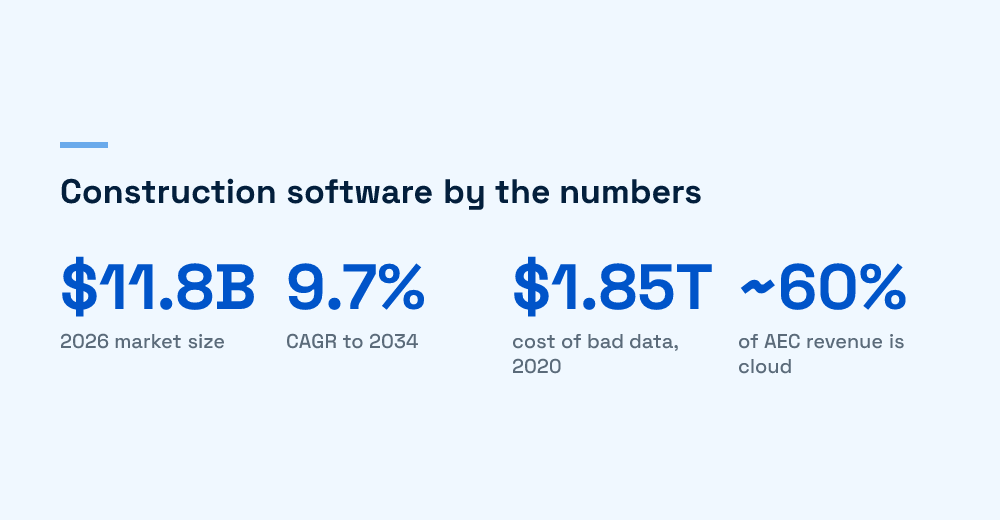
- The construction software market is roughly $11.8B in 2026 and is forecast to reach $24.7B by 2034 at a 9.7% CAGR, so the question is no longer whether to adopt but how to integrate.
- Bad, disconnected data cost the global construction industry an estimated $1.85 trillion in 2020, including $88.7B in rework, which is 14% of all rework performed that year.
- The job site breaks generic SaaS assumptions: no reliable connectivity, ruggedized hardware, gloved hands, and safety-critical work mean offline-first and field-tested UX are baseline, not extras.
- Buy the platform for design, BIM, and project management; build the integration and field-capture layer, which is where off-the-shelf tools consistently stop.
- AI is only as useful as the data it can reach, so interoperability across design, field, and back-office is the prerequisite, not a later phase.
Pick almost any construction software buyer’s guide and you get the same thing: a ranked list of vendors, a feature grid, a star rating. It’s useful for a shortlist and useless for the decision that actually costs money, which is how the tools fit together and which parts survive contact with a real job site. That’s the gap this guide fills. We build application-layer software for teams whose systems have to work where the work happens, so this is the buyer’s and builder’s view, not another listicle.
Here’s the short version. In 2026 the construction software market sits around $11.8 billion and is forecast to reach $24.7 billion by 2034. The platforms are mature. The failure mode has moved from “we don’t have software” to “our software doesn’t talk, and half of it doesn’t work in the field.” Fix the integration and field layer and the stack starts paying for itself. Skip it and you buy expensive silos. The rest of this guide walks the stack layer by layer, links down to the deep-dive on each theme, and ends on the one decision that shapes the whole budget: what to buy, what to build, and what to simply connect.
Why the job site is the hardest deployment environment in software
The job site is the most hostile place to ship software that most teams will ever target. Connectivity is intermittent or absent. The hardware is gloved-hands, dusty, drop-tested, and often years old. The user is standing in the rain, and a wrong tap can have safety consequences. Generic SaaS is designed for a desk, a stable connection, and a mouse. Almost every assumption it makes is wrong here.
This matters because the cost of getting it wrong is enormous and measurable. Autodesk and FMI estimated that bad data cost the global construction industry $1.85 trillion in 2020, including $88.7 billion in rework, which was 14% of all rework that year. Most of that “bad data” isn’t wrong at the source. It’s data that never made it from the field back to the office, or arrived too late to act on. That’s a connectivity and integration problem wearing a data costume.
So the framing for the rest of this guide is simple. Design and back-office software can live in the cloud and be judged on features. Anything that touches the field has to be judged on whether it works when the network doesn’t. Those are two different buying decisions, and treating them as one is where most construction software rollouts quietly fail.
We’ve watched this play out on client projects. A firm buys a best-in-class project management platform, rolls it out to the office, and declares victory. Six months later the site teams are still on WhatsApp and paper because the app spins forever in the parking garage and the daily log won’t save on a bad signal. The software was never the problem. The deployment target was. A tool the crew can’t trust in the field gets replaced by the crew, quietly, with whatever works, and now you’re paying for a platform and running a shadow process beside it.
The AEC stack, layer by layer
The AEC stack has three layers, and every buying decision maps to one of them. Design and BIM produce the model and the drawings. Field capture records what’s actually being built, in as-built reality. Project management and back-office handle schedule, cost, procurement, and finance. Value is created when data moves cleanly between all three. Value is destroyed when it doesn’t.
Each layer has a different centre of gravity. Design and BIM are model-heavy, precision-first, and run on serious hardware. Field capture is device-constrained, connectivity-constrained, and has to be fast under bad conditions. Project management and back-office are records-heavy, integration-hungry, and care about audit trails more than pixels. A tool built for one layer rarely does well in another, which is why the “single platform for everything” pitch tends to be strong in one layer and thin in the rest.
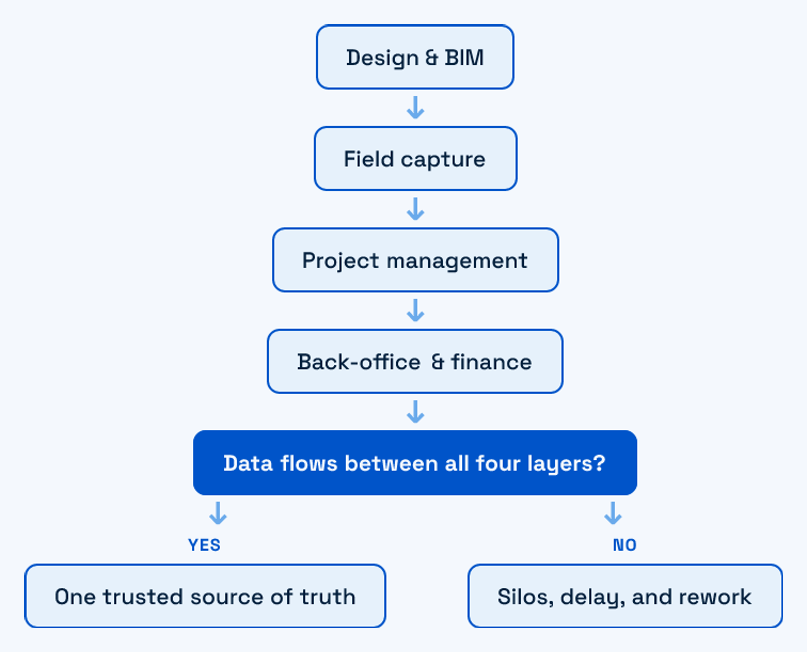
Most teams already own tools in each layer. What they rarely own is the flow between them. The BIM model updates but the field team works off a printout from three revisions ago. The site logs a defect on a phone that never reaches the cost system. Each tool is fine on its own. The gaps between them are where the $1.85 trillion lives.
Why interoperability is the real head term
Interoperability isn’t a nice-to-have in an AI-driven stack, it’s the precondition. AI is only as good as the data it can reach, and a model that can’t see the field can’t reason about the project. Cloud adoption has made this easier at the platform level, with cloud solutions holding close to 60% of AEC software revenue, but cloud hosting and connected data are not the same thing. You can run ten cloud tools that never exchange a record.
The payoff for closing those gaps is well documented. McKinsey research on construction has repeatedly put the productivity upside of digitising and connecting these workflows in the double digits, and firms with genuinely integrated stacks report faster reporting, cleaner cost data, and fewer disputes. The reason so few firms capture it isn’t ignorance, it’s that integration is unglamorous work that no vendor is incentivised to do for you, because a connected stack makes their tool easier to replace.
The market: who’s winning the build-out
The money is flowing toward two things: AI and consolidation. AI captured roughly 77% of construction-tech venture investment in 2025, up from 35% a year earlier, and the incumbents are racing to make their platforms interoperable so they become the system of record. For a full read on the startup-versus-incumbent fight, our spoke on construction AI startups versus big tech in the $500B market breaks down where the leverage sits and why the platform layer is consolidating faster than the field layer.
The practical takeaway for a buyer: the platform layer is a mature, crowded market where you should buy, not build. The opportunity, and the differentiation, has moved to the edges the big platforms underserve. Our construction software market analysis maps where those gaps are, and most of them are exactly the field and integration gaps this guide keeps returning to.
There’s a strategic reason this matters for buyers, not just builders. The consolidation happening at the platform layer means the incumbents want to be your system of record and your integration hub at once. That’s convenient until you need to move data somewhere they don’t sell a connector for, and then you discover the platform is open in the directions that suit the vendor and closed in the ones that suit you. Owning your integration layer, even a thin one, is what keeps a platform decision reversible. It’s cheap insurance against being locked into a single vendor’s roadmap.
BIM and the ROI question
BIM is the largest single segment of the construction technology market and the anchor of most stacks, so the real question isn’t whether to use it but which delivery model earns its cost. Cloud-native BIM promises collaboration and version control; established platforms like BIM 360 and ACC promise depth and ecosystem. The ROI depends less on the tool and more on whether the model reaches the people building from it.
We compared the two delivery models in detail in cloud-powered BIM versus Autodesk BIM 360, which is the section to read before you commit a multi-year license. And because the pricing on these platforms is famously hard to model, our Autodesk BIM 360 and ACC pricing breakdown lays out the per-seat and per-project math so you can size the commitment before signing.
Where BIM ROI actually leaks
- Model-to-field gap: the model is current in the office and stale on site.
- Seat sprawl: licenses bought for people who never open the tool.
- No round-trip: as-built conditions never flow back into the model.
The pattern across all three leaks is the same one from the stack section: the model is authored well and then stranded. BIM earns its ROI in coordination and clash detection during design, but the second-largest return, keeping the field building from current information, only lands if the model actually reaches the site and the site can push reality back. That round-trip is a field-and-integration problem, not a modelling one, which is why two firms on identical BIM licenses can see completely different returns.
Reality capture: LiDAR, photogrammetry, and browser 3D
Reality capture is how the as-built world gets back into the digital model, and it’s the fastest-moving corner of the stack. LiDAR and photogrammetry each have a place: LiDAR for accuracy and low light, photogrammetry for cost and visual context. Choosing between them is a project-by-project call, not a standard. Our comparison of LiDAR versus photogrammetry for site scanning walks through when each wins.
Capturing the data is only half the job. Someone has to view it, and that increasingly happens in a browser rather than heavy desktop software, so a project manager can spin a point cloud on a tablet without a workstation. We wrote a hands-on guide to building browser-based 3D viewers with Three.js for teams who need the model to open on the devices people actually carry. At enterprise scale the question shifts to platforms, which we cover in our comparison of enterprise visualization platforms for large-scale construction.
The reality-capture decision in one line
Capture with the sensor that fits the site, store in an open format, and view on the hardware the team already holds. The trap is buying a capture pipeline that only renders on a machine nobody brings to the trailer.
Reality capture is also where the browser-versus-desktop choice gets expensive if you get it wrong. A point cloud that only opens in a heavy desktop viewer means the model stays with the two people who have the workstation and the license, while the site walks the job with drawings. Moving the viewer into the browser, running on WebGL, is what turns a specialist deliverable into something a superintendent can actually check against the wall in front of them. That’s a build decision, and it’s usually worth it.
Connectivity: what 5G actually changes on site
5G is real and it changes the ceiling for what’s possible on a connected site, from live video to real-time model streaming. It does not change the floor. A private 5G network on a large project is a genuine upgrade; a public signal on a remote or shielded site is still unreliable, and a basement pour has no bars regardless of the carrier’s map. We unpack the realistic gains in what 5G actually changes on construction sites.
The engineering lesson is the one that shapes everything downstream: design for the worst connection on the project, not the best. Faster networks raise your best case. Offline-first protects your worst case, and the worst case is where safety-critical and cost-critical data gets lost.
There’s a budgeting trap here worth naming. It’s tempting to treat connectivity as an infrastructure line item that will eventually solve the software problem, so you defer the offline work and wait for better networks. That bet rarely pays off, because the sites that most need reliable data capture, the remote infrastructure jobs and the dense urban builds with shielded floors, are exactly the ones where the signal stays bad the longest. Software that assumes the network improves is software that fails where it matters most. The cheaper and more durable investment is to make the field layer indifferent to connectivity, then let better networks be a bonus on top.
Building for the field: offline-first and job-site hardware
This is the layer the big platforms underserve, and it’s where we spend most of our client work. Offline access isn’t a bonus on a job site, it’s a baseline requirement, because the tool has to keep working through a dead zone and sync cleanly when the signal returns. That sounds simple and it is not. Offline-first means real conflict resolution, local storage limits, and sync logic that survives a half-completed upload. We wrote the full pattern in our technical guide to building construction apps that work offline.
Hardware is the other half. The software has to run on a five-year-old rugged tablet, respond to gloved hands, stay readable in direct sun, and survive a drop. Those are constraints most SaaS teams never design for, and they’re the difference between a tool the crew uses and one they route around. Our guide to building construction software that works on job-site hardware covers the real device targets and the UX decisions that follow from them.
What field-first design changes
- Tap targets and contrast: sized for gloves and glare, not a desk monitor.
- Offline by default: the app assumes no network and treats connectivity as a bonus.
- Forgiving sync: a lost signal mid-save can never lose a safety report.
The reason this layer stays a build-or-heavily-extend job is that the constraints are yours, not the vendor’s. Your device fleet, your worst site, your specific inspection and safety forms, your integration to the platform you already bought. A general field app is built for the average of every customer, and the average site has better connectivity and newer hardware than the one that’s actually hurting you. Getting offline-first right is also genuinely hard engineering, which is why so many teams underestimate it and ship something that corrupts data the first time two people edit the same record on a dead network. That’s the exact failure mode we’re brought in to fix.
AI on site: documentation, worker support, and safety
AI on the job site earns its keep in three concrete places today, not in a general-purpose assistant. First, documentation: turning site notes, photos, and voice into structured records. Our list of ChatGPT prompts that streamline construction documentation is the fastest way to see the pattern in action. Second, worker support: answering procedural and safety questions in the moment, which we cover in AI chatbots for construction worker site support.
Third, and highest-stakes, safety. Computer-vision systems watching a site can catch hazards a supervisor can’t be everywhere to see. We looked at how smart cameras support safety and compliance and where the claims hold up versus where they oversell. The through-line for all three: AI is only as good as the data it can reach, which loops straight back to interoperability. A safety model blind to the schedule, or a documentation assistant that can’t see the model, is guessing.
This is the part most AI-on-site pitches skip. The demo is a chatbot answering a question in a clean office; the reality is a model that needs the drawings, the schedule, the RFIs, and the field logs to say anything useful, and half of those live in systems that don’t expose their data. So the honest sequencing is unglamorous: connect the stack first, then add AI on top of a foundation it can actually read. Teams that reverse that order buy an assistant that sounds confident and knows almost nothing about their project. The integration work you’d skip is the work that makes the AI worth having.
Where off-the-shelf stops and custom software starts
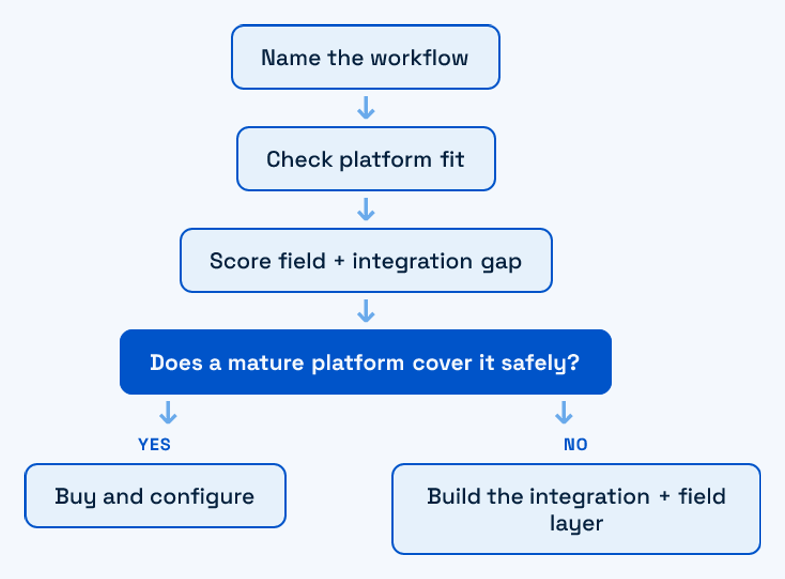
Here’s the original contribution, the line we’d draw for any AEC team asking build-versus-buy. Buy the platform. Build the seams. Off-the-shelf construction software is excellent at the horizontal layers, design, BIM, project management, finance, because those workflows are similar across every firm. It’s consistently weak at two things: the integration between your specific tools, and the field-capture layer that has to work on your specific sites and hardware. Those are the parts nobody can sell you as a standard product, because they’re specific to you.
The decision guide is short. If a mature platform covers a workflow that lives mostly in the office, buy it and configure it, because custom-building a BIM tool or a general ledger is a waste of capital. If a workflow crosses two systems that don’t talk, or lives on the job site where connectivity and hardware are hostile, that’s where custom work returns real ROI.
A worked example makes the line concrete. Say a contractor runs Autodesk for BIM, a separate cost system for finance, and a field app for daily logs. Nobody should rebuild any of those three. The pain is that a defect logged on site takes days to reach the cost impact, and the model never learns what was actually built. The right build isn’t a fourth platform, it’s the integration layer between the three, plus a field-capture flow that works offline and syncs to all of them. That’s a fraction of the cost of replacing a platform and it targets the exact place the money is leaking. Buy the boxes, build the wiring. This mirrors how we think about legacy systems generally: don’t rebuild what works, build the layer that closes the gap. Our take on modular architecture decisions applies the same restraint on the backend side.
A quick buy-versus-build test
- Buy when the workflow is office-based, standard across firms, and well-served by a mature platform.
- Build when it crosses systems that won’t integrate, or has to survive the field.
- Integrate first when you already own the tools but the data doesn’t move between them.
| Stack layer | Default move | Why |
|---|---|---|
| Design and BIM | Buy | Mature, standard, deep ecosystems |
| Project management and finance | Buy and configure | Horizontal workflows, well-served |
| Integration between tools | Build | Specific to your stack, nobody sells it |
| Field capture and offline | Build or heavily extend | Hardware and connectivity are yours alone |
Start with the layer that breaks
If your construction software works in the office and falls apart the moment it leaves the network, you don’t have a tooling problem, you have an integration-and-field problem. That’s the layer we build: the offline-first field apps, the sync logic, and the connections that make the platforms you already bought actually work together. If that’s the situation you’re in, start with a conversation, no pitch. Tell us where the stack breaks and we’ll tell you honestly whether it’s a buy, a build, or an integration job.
Frequently Asked Questions
What is a construction software stack?
A construction software stack is the set of tools a firm uses across three layers: design and BIM, field capture, and project management or back-office. The value comes less from any single tool and more from whether data moves cleanly between the three layers. Disconnected tools create silos, and disconnected data was estimated to cost the industry $1.85 trillion in 2020.
Should we buy or build construction software?
Buy the horizontal, office-based layers: design, BIM, project management, and finance are mature markets where custom-building wastes capital. Build the integration between your specific tools and the field-capture layer that has to survive real job-site connectivity and hardware. Those two are specific to your firm and are where custom work returns real ROI.
Why do generic apps fail on construction sites?
Generic SaaS assumes a stable connection, a desk, and a mouse. Job sites have intermittent or no connectivity, gloved hands, glare, aging rugged hardware, and safety-critical tasks. Software that isn’t offline-first and field-tested tends to lose data in dead zones or get routed around by crews, which is why offline capability and hardware-aware UX are baseline requirements, not extras.
How big is the construction software market in 2026?
The construction software market is roughly $11.8 billion in 2026 and is forecast to reach about $24.7 billion by 2034, a compound annual growth rate near 9.7%. Cloud solutions account for close to 60% of AEC software revenue, and AI attracted roughly 77% of construction-tech venture investment in 2025.
Does 5G solve construction connectivity problems?
5G raises the ceiling for connected sites, enabling live video and real-time model streaming, but it doesn’t remove dead zones on remote, shielded, or below-grade work. The engineering rule is to design for the worst connection on the project, not the best. Faster networks help the best case; offline-first design protects the worst case, where cost-critical and safety-critical data is otherwise lost.