
RAG Implementation Checklist: 12 Things to Validate Before Going Live on Enterprise Documents
Huzefa Motiwala May 11, 2026
Moving a Retrieval-Augmented Generation (RAG) system from prototype to production requires careful validation. Skipping these steps can lead to major issues such as inaccurate answers, slow performance, or security risks. This checklist highlights 12 critical areas to address before deployment:
- Data Preparation: Validate chunking strategies on real documents and ensure embeddings handle domain-specific terms accurately.
- Retrieval Quality: Test retrieval metrics like Precision@5 and Context Recall using representative queries.
- Handling Edge Cases: Ensure the system properly handles queries with no relevant content, avoiding hallucinations.
- Generation Accuracy: Maintain over 95% citation accuracy and minimize unsupported claims.
- Performance: Meet latency targets (e.g., p95 retrieval under 150ms) and optimize for high query loads.
- Cost Management: Calculate costs per query and optimize retrieval to stay within budget.
- Security: Enforce strict access controls and log retrieval activity.
- Monitoring: Set up alerts for quality drops or latency spikes.
- Reindexing Pipeline: Ensure document updates are handled efficiently without downtime.
- Error Handling: Manage ingestion errors and maintain index integrity.
- Feedback Integration: Leverage user feedback and automated tools to refine system performance.
- Deployment Gates: Block deployment if key thresholds (e.g., faithfulness, latency, cost) are not met.
Bottom line: Address these areas to ensure your RAG system is accurate, fast, secure, and scalable before rolling it out.
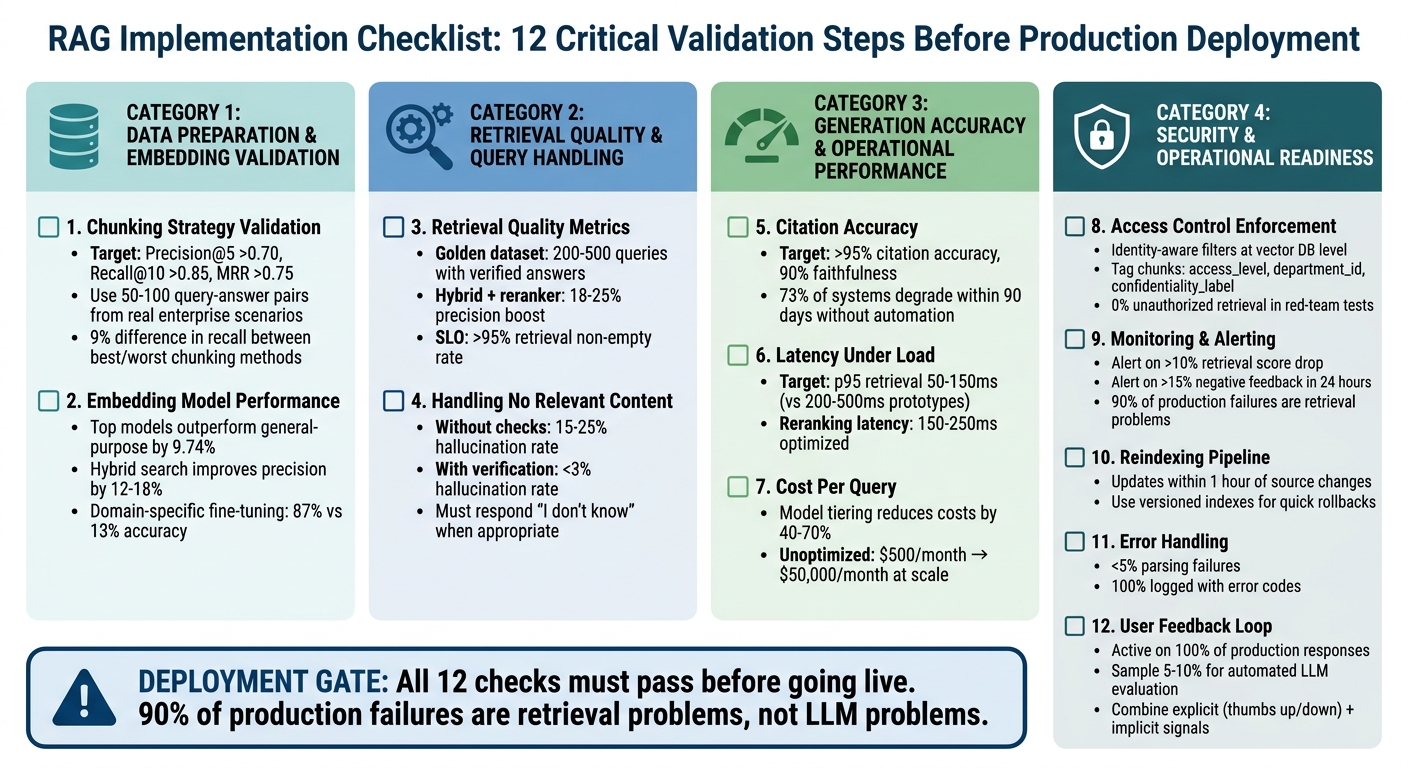
RAG Implementation Checklist: 12 Critical Validation Steps Before Production Deployment
How to Build a Scalable RAG System for AI Apps (Full Architecture)
sbb-itb-51b9a02
Data Preparation and Embedding Validation
When it comes to data preparation, how you chunk and embed documents sets the stage for everything that follows. If your document is poorly chunked, no embedding model can fix it. Testing these layers with real-world enterprise documents is essential to account for the complexities of genuine content [12].
1. Chunking Strategy Validation on Real Document Samples
The first step is creating a golden dataset of 50–100 query-answer pairs based on real enterprise scenarios [10][5]. This dataset serves as a practical benchmark for evaluating chunking strategies. For instance, NVIDIA‘s 2024 benchmarks revealed a 9% difference in recall between the best and worst chunking methods on the same datasets [8]. This underscores how critical the chunking approach is to retrieval quality.
Test your chunking strategy on the types of documents you’ll encounter in production, such as multi-column PDFs, tables, Word documents with embedded images, and technical manuals. Tables should always be treated as single units – splitting them mid-row can lead to errors like hallucinated numbers in LLM outputs [7][8]. Additionally, manually review text extracted from complex PDFs to ensure that headers, footers, and other formatting artifacts don’t interfere with your chunks [9].
"The shape of that fragment determines everything downstream. Your embedding model cannot fix a bad chunk. Your re-ranker cannot resurface a chunk that was never retrieved." – Priyansh Bhardwaj, Towards Data Science [12]
Set benchmarks for production performance, such as Precision@5 > 0.70, Recall@10 > 0.85, and Mean Reciprocal Rank (MRR) > 0.75 [5]. Use frameworks like RAGAS to measure metrics like Context Precision (percentage of relevant chunks retrieved) and Context Recall (whether all necessary information for an answer is included) [10][12]. A February 2026 study of 50 academic papers found that recursive 512-token splitting achieved 69% accuracy, outperforming semantic chunking by 15 percentage points due to its ability to preserve context [10].
For most enterprise use cases, adopt a small-to-big (parent-child) strategy. Retrieve small chunks (128–256 tokens) for precise matching, while passing larger parent chunks (512–1,024 tokens) to the LLM to maintain surrounding context [9][5]. Add 10–20% overlap (roughly 50–100 tokens) at chunk boundaries to ensure semantic consistency across splits [8][10]. Include metadata – like source ID, section title, and access levels – with each chunk during ingestion to enable hybrid retrieval and precise citations [10][11].
Once chunking is optimized, the focus shifts to ensuring the embedding model can handle domain-specific language.
2. Embedding Model Performance on Domain-Specific Terminology
After finalizing your chunking strategy, it’s time to validate that the embedding model accurately captures the nuances of your domain. General-purpose models often miss subtle but critical distinctions. For example, in medicine, "myocardial infarction" and "heart attack" are synonyms, but a generic model might fail to recognize this equivalence [10]. Use the golden dataset from the chunking phase to test the embedding model’s ability to interpret domain-specific terminology.
Evaluate cosine similarity thresholds on your actual document corpus. Technical content often requires lower thresholds (0.65–0.72) compared to narrative text (0.78–0.85) because of shared vocabulary among technical terms [5]. Benchmarks show that top-tier embedding models outperform general-purpose ones by 9.74% in retrieval tasks [10]. However, the best choice depends on your domain and budget.
Hybrid search – which combines semantic vector search with keyword-based BM25 retrieval – can improve precision by 12–18% over purely vector-based methods [5]. This hybrid approach is particularly valuable for enterprise use cases requiring exact matches, such as product codes, legal references, or employee IDs. Use Reciprocal Rank Fusion (RRF) to merge results from both methods [10][13][14].
For highly specialized industries like legal, medical, or financial services, consider fine-tuning an embedding model on your enterprise’s data. A 2025 study on clinical decision support found that adaptive chunking paired with domain-specific retrieval achieved 87% accuracy, compared to just 13% for fixed-size chunking on the same dataset [10]. Lastly, explicitly pin your embedding model version to avoid unexpected changes from provider updates, which could degrade quality and require re-embedding your entire document set [10][9].
Retrieval Quality and Query Handling
Once the data preparation is solid, the focus shifts to ensuring reliable and accurate retrieval for all types of queries. This is where many production RAG systems stumble. A prototype that works seamlessly with just twenty documents often struggles when scaled to twenty thousand [2].
3. Retrieval Quality Metrics on Representative Query Set
Start by creating a golden dataset of 200–500 queries with verified answers [18]. This dataset should represent the full range of potential use cases, including simple lookups, complex multi-hop questions, and queries requiring synthesis across multiple sources. Use this dataset for regression testing every time you tweak chunking strategies, embeddings, or retrieval logic.
Key metrics to track include:
- Context Recall: Ensures all necessary information is retrieved.
- Context Precision: Measures how relevant the retrieved chunks are.
- MRR (Mean Reciprocal Rank) and nDCG (Normalized Discounted Cumulative Gain).
The 2024 Stanford RAG Evaluation report highlights that hybrid dense + BM25 retrieval, combined with rerankers, delivers the best accuracy improvements for enterprise RAG systems – provided metadata is clean [18]. Specifically, hybrid retrieval can boost precision@5 by 18–25% compared to vector-only approaches. Adding a cross-encoder reranker to the top 100–200 candidates further increases precision@5 by 22–35% [18].
Set thresholds based on the risk level of your domain. For example, an internal engineering wiki might accept a Context Precision score above 0.6, while medical or legal systems typically require scores exceeding 0.8 [16]. Also, keep an eye on the retrieval non-empty rate – the percentage of queries returning at least one result. Aim for a service-level objective (SLO) of >95% for queries expected to have answers [16]. If you notice spikes in empty retrievals, it could signal gaps in your knowledge base or changes in query patterns [16]. Finally, ensure the system can handle situations where no relevant documents are found.
4. Handling Documents with No Relevant Content
It’s not just about retrieving the right content – it’s also about managing cases where no relevant content exists. Explicitly test for null retrievals by including queries with no matching documents and confirm that the system responds appropriately, without fabricating answers [18]. Systems without faithfulness checks often show hallucination rates of 15–25%, but adding a verification layer can reduce this to under 3% [15].
To handle low-confidence results, use relevance thresholding with node post-processors to filter out irrelevant chunks before they reach the LLM. Additionally, establish strict prompt guidelines that instruct the model to respond with "I don’t know" when no valid information is available. For critical queries, you can introduce a secondary LLM-as-judge layer to ensure every claim in the response is tied to the retrieved context. While this adds a latency of 300–500ms and costs about $0.002 per query, it helps maintain over 95% citation accuracy [19].
Also, watch out for semantic gravity wells – documents that are frequently retrieved but offer little actionable value. These often contain keywords that match many queries but fail to provide meaningful insights. To address this, consider removing such documents from the index or lowering their ranking using metadata filters [15].
Generation Accuracy and Operational Performance
Once retrieval is validated, the next step is ensuring the system generates accurate answers and can handle the demands of real-world usage. This is where the difference between a functional prototype and a fully operational production system becomes clear.
5. Citation Accuracy and Hallucination Rate on Ground-Truth Q&A Pairs
To test accuracy, create a dataset of 100–300 verified question-answer pairs. These pairs should come from actual user logs and support tickets, not hypothetical examples [20][21]. Each pair must include the correct answer along with the document chunks that support it. This dataset will act as a regression suite for every deployment.
Key metrics to track include Faithfulness (ensuring claims are supported by retrieved context) and Citation Precision (confirming that cited chunks back up the claims). High-performing enterprise RAG systems aim for over 95% citation accuracy and 90% faithfulness [19]. In contrast, systems lacking faithfulness checks typically show hallucination rates between 15% and 25% [15].
Automated tools like RAGAS or DeepEval can be used to evaluate responses. These tools should also account for "abstention" cases, where the system correctly responds with "I don’t know" when the context is missing [21].
"If you cannot explain whether a bad answer came from retrieval or generation, you cannot fix it. You can only tweak prompts and hope." – Apptension [21]
To maintain quality, set CI/CD gates to block deployments if faithfulness falls below your threshold or unsupported claims increase [21]. Without automated evaluation pipelines, studies show that 73% of RAG systems experience performance degradation within 90 days [15]. Once accuracy is confirmed, the next challenge is ensuring the system can handle production-level traffic.
6. Latency Under Concurrent Query Load
For production systems, it’s crucial to measure p50, p95, and p99 latencies during retrieval, reranking, and generation under concurrent query loads [23][22]. Targets for production systems include a p95 retrieval latency of 50–150 ms, compared to the 200–500 ms seen in basic prototypes [15].
To reduce latency and costs, implement multi-layer caching [23]. Use asynchronous API servers like FastAPI with thread pools to handle high concurrency without overloading resources [23].
Cross-encoder rerankers can add up to 800 ms in latency [15]. To mitigate this, adopt a two-stage approach: use a fast model like FlashRank for initial candidate filtering, then apply a precise cross-encoder to the top results. This method can lower reranking latency to 150–250 ms while maintaining accuracy [15].
"The gap between a RAG prototype and a production RAG system is not incremental. It is architectural." – Groovy Web [15]
Set alerts for when p95 retrieval latency exceeds 500 ms. This is often a sign that vector indexes need optimization or horizontal scaling [23]. Also, ensure that monitoring and logging are handled asynchronously to avoid adding extra latency to user requests [22].
7. Cost Per Query at Projected Scale
Beyond performance, understanding and managing costs is critical for a sustainable system. Calculate the full cost per query by accounting for all layers: document ingestion, storage, retrieval, optional reranking, and answer generation [24]. For example, embedding 50 million tokens might cost $10, but generation costs will rise with query volume and context size [24].
In 2026, running the same RAG workload on a premium model is significantly more expensive than using a budget-friendly alternative [24]. To cut costs, consider model tiering: route simple FAQ queries to cheaper models while reserving premium models for more complex tasks [24]. This approach can reduce expenses by 40–70% without compromising quality [23].
Minimize recurring token costs by retrieving only the necessary chunks [24]. Move static logic from system prompts into application code to avoid sending repetitive instructions with every query [24].
"If you only budget for embedding cost, you are not budgeting for RAG. You are budgeting for the cheapest part." – AI Cost Check [24]
At scale, costs can quickly escalate. For instance, a system that costs $500 per month for low query volumes can skyrocket to $50,000 per month at 100,000 daily queries if the retrieval layer isn’t optimized [25]. Additionally, track "Retrieved Input Tokens" separately from user-query tokens to spot inefficiencies as the document corpus grows [24].
Security and Operational Readiness
Once performance and cost are validated, the next step is ensuring security and operational stability. A RAG system that performs well but mishandles sensitive data or acts unpredictably under real-world conditions is not ready for production.
8. Access Control Enforcement for Sensitive Document Subsets
Strengthen your metadata tagging by applying identity-aware access controls directly at the vector database level. During ingestion, tag each document chunk with attributes like access_level, department_id, or confidentiality_label [10][5]. These tags should mirror permissions from source systems such as SharePoint, Confluence, or Google Drive to maintain consistent enterprise security policies [5][26].
When retrieving data, enforce identity-aware filters at the vector database level to block unauthorized documents before they reach the LLM. This precaution minimizes the risk of sensitive information leaks [10][26]. Additionally, maintaining detailed audit logs is crucial. These logs should capture details such as who accessed what, which chunks were retrieved, and whether any access restrictions were applied [26]. For highly sensitive data, like payroll or M&A documents, instruct the LLM to deny queries or trigger a specialized workflow [26]. Attach a unique source_id and version marker to each chunk to ensure traceability of document versions used in responses [10][26].
"A RAG chatbot that can ‘see’ everything is a data exposure path with a friendly UI." – Intrinsec [26]
These measures work hand-in-hand with earlier validation steps to protect enterprise content from unauthorized exposure.
9. Monitoring and Alerting Setup for Retrieval Quality Degradation
Once access controls are in place, focus on monitoring system performance to catch quality issues early. Monitor the retriever and generator separately to pinpoint potential failure points [10][2]. Key metrics to track include Context Precision, Context Recall, Faithfulness, and Answer Relevance [10][2]. For regulated industries, aim for a Faithfulness score of at least 90% [6].
Conduct automated evaluations on 5–10% of production queries to identify quality drift [5][6]. Use reference-free metrics through tools like RAGAS or DeepEval, which leverage "LLM-as-a-judge" methods to evaluate queries without needing ground-truth labels [10][6].
Set alerts to notify when retrieval scores drop by more than 10% or when negative user feedback exceeds 15% within 24 hours [5]. Additionally, monitor for response latency exceeding 10 seconds at the 95th percentile (p95) [5]. Implement structured logging with trace IDs to connect user queries, retrieved chunks, reranked results, and final LLM prompts, enabling efficient debugging [1][5].
"90% of production failures are retrieval problems, not LLM problems." – Zartis Team [6]
Incorporate thumbs-up/down feedback systems to quickly identify retrieval issues, as clusters of negative feedback often surface problems faster than automated metrics [5][6]. Regularly track retrieval scores – sudden declines could signal index staleness or shifts in query patterns [6].
10. Reindexing Pipeline for Document Updates
After establishing monitoring, ensure the document index can be updated without disrupting live services. Separate the Offline Indexing Pipeline (used for preparing knowledge) from the Online Query Pipeline (used for serving answers) [1][27]. Use the same embedding model version for both indexing and querying to maintain compatibility [2][27].
Adopt versioned indexes to avoid full reindexing and allow for quick rollbacks if a new index negatively impacts performance [2][4]. Use "upsert" operations to update vectors and metadata incrementally, reducing costs and speeding up reindexing [27]. Cache embeddings for unchanged documents to streamline the process [2].
"When you change the embedding model, you need to reindex everything. If that is not planned, you stay locked into an inferior model out of fear of migration cost." – Valendra [2]
Test new indexes against a "golden set" of questions using automated evaluation tools like RAGAS. Block deployment if key metrics like faithfulness or recall show regression [2][4]. Practice one-command promotions of verified bundles regularly to ensure the team can quickly revert a failing index update under pressure [4].
11. Error Handling for Malformed or Unsupported Document Formats
To maintain index integrity, anticipate and manage document ingestion errors. Implement schema validation and automated drift monitoring to identify issues like malformed chunks, missing metadata, or pipeline inconsistencies [2][4]. Log errors for corrupted or unsupported formats without halting the ingestion process.
Store metadata – such as source, date, and author – alongside embeddings to enable precise filtering and traceability during updates [1][2]. Version all components, including model weights, preprocessing code, prompts, and hyperparameters, to prevent unpredictable failures during rollbacks [4]. This approach ensures that problematic documents can be isolated and logged while the system continues processing the rest without interruption.
Continuous Improvement and Feedback Integration
A RAG system is never truly "done." Even after clearing all pre-deployment checks, real-world usage will reveal unexpected edge cases and evolving user needs. The key to long-term success lies in having robust mechanisms to learn from production traffic and refine the system continuously.
User Feedback Loop for Continuous Improvement
Technical validations are just one side of the coin. To truly improve your RAG system, you need to incorporate direct user feedback. One effective approach is embedding simple feedback tools right into the interface. For example, adding a thumbs-up/thumbs-down button or a "Was this helpful?" prompt allows users to share their satisfaction without disrupting their workflow [17][19]. Additionally, a flagging option for errors – like hallucinations or outdated citations – can trigger expert reviews and help with ground-truth labeling.
Both explicit feedback (e.g., thumbs-up/down) and implicit signals (like follow-up questions or low click-through rates on citations) provide valuable insights into how well responses meet user needs [17].
"The combination of automated scoring and user signals gives you a complete picture. Automated scoring runs on every sampled response with consistent criteria. User feedback provides ground truth on actual helpfulness." – CallSphere Team [17]
To further enhance accuracy, you can use a secondary LLM to evaluate 5–10% of production queries for faithfulness and relevance. By correlating these scores with user feedback, you can adjust alert thresholds when user satisfaction (CSAT) declines – even if technical metrics remain stable [17][19]. This creates a feedback loop that balances system performance with user expectations.
Slice and Analyze Feedback
Instead of relying solely on global averages, break down feedback by specific slices like document type (e.g., PDFs versus tables), user segments, or query categories. This approach helps uncover localized issues that broader metrics might miss [28]. For instance, if factual errors repeatedly appear in financial data, it could indicate a retrieval or chunking problem.
To further strengthen your pipeline, review a random sample of flagged responses weekly to identify recurring patterns. Additionally, create a "gold standard" dataset of 200–500 representative queries from real production logs, tagged with user corrections. This dataset can serve as a critical regression test before implementing any pipeline updates [5][15].
| Feedback Type | Mechanism | Primary Use Case |
|---|---|---|
| Explicit | Thumbs Up/Down | Measuring user satisfaction and spotting outliers |
| Explicit | Flag/Report Button | Identifying hallucinations or outdated citations |
| Implicit | Follow-up Rate | Detecting insufficient or unclear responses |
| Implicit | Citation CTR | Validating source accuracy and usefulness |
| Automated | LLM-as-Judge | Monitoring faithfulness and relevance at scale |
Conclusion and Deployment Gates
Once all individual validations are complete, the final step before going live is ensuring that deployment gates are met. Production systems require strict compliance with these criteria. As ActiveWizards aptly states, "The chasm between a Jupyter notebook demo and a secure, scalable, and reliable production RAG system is vast. A prototype ignores the hard parts: data freshness, accuracy evaluation, security, observability, and cost management" [1].
Every validation check must hit its target threshold before deployment proceeds. Critical thresholds – such as faithfulness dropping below 0.85 or high hallucination rates on out-of-bounds queries – are absolute deal-breakers. If any of these fail, deployment must be halted immediately [5][10]. With retrieval issues accounting for 90% of production failures, these checks are non-negotiable [6].
Here’s a quick summary of the key criteria that must be satisfied before deployment:
| Validation Check | Minimum Pass Criteria |
|---|---|
| Chunking Strategy | >70% accuracy on semantic unit preservation [10] |
| Embedding Performance | >85% precision on domain-specific terms [29] |
| Retrieval Quality | Precision@5 >0.70; Recall@10 >0.85; MRR >0.75 [5] |
| Handling No Content | 0% hallucination rate; 100% "I don’t know" responses [10] |
| Citation Accuracy | Faithfulness >0.90; 100% of claims map to valid sources [5][6] |
| Latency | P95 <1.2s; TTFT <800ms [2] |
| Cost Per Query | Within 10% of budget; cache hit rate >15% [5] |
| Access Control | 0% unauthorized retrieval in red-team tests [10] |
| Monitoring & Alerting | Alerts active for >10% drop in retrieval scores or >15% negative user feedback [5] |
| Reindexing Pipeline | Updates within 1 hour of source changes [5] |
| Error Handling | <5% parsing failures; 100% logged with error codes [5] |
| User Feedback Loop | Active on 100% of production responses [5] |
Deployment should only proceed when every criterion is fully met.
Alignment between engineering teams and stakeholders is key. Domain experts need to confirm that the system matches the established golden set benchmarks [3][5]. Automated evaluation pipelines, such as those built with frameworks like RAGAS, should be in place to block releases if performance metrics show any regression [2][10]. Additionally, Day 2 operations must be defined – this includes determining who gets notified if negative feedback exceeds 15% within a 24-hour window and assigning responsibility for ongoing quality reviews and drift detection [5].
If a critical check fails, deployment must pause. Troubleshooting should focus on specific layers – start with chunking, move to embedding, and then re-ranking layers to pinpoint and resolve the issue [2]. For any criteria marked "Not Applicable" – like skipping multimodal validation in a text-only system – document these exceptions with stakeholder approval to ensure nothing critical is overlooked [1][30]. Deployment should only proceed when all critical gates are green.
FAQs
What’s the fastest way to build a “golden dataset” for RAG evaluation?
The fastest route to building a "golden dataset" for RAG evaluation starts with a well-chosen set of representative queries and verified Q&A pairs. Carefully review and annotate relevant documents to make sure they provide accurate retrieval and evidence for answers. Prioritize real-world enterprise queries and confirm that the retrieved documents include the correct supporting information. This curated dataset serves as a dependable benchmark for assessing retrieval accuracy, hallucination rates, and answer quality in enterprise settings.
How do I tell if a bad answer is a retrieval problem or a generation problem?
When an answer from an LLM misses the mark, figuring out whether the problem lies in retrieval or generation is crucial. One effective way to do this is by using the "bisection test." Here’s how it works:
- First, manually supply the LLM with the ideal context – this means providing the correct chunks of information directly to the model.
- If the model generates the correct answer with this ideal context, the issue likely stems from retrieval, chunking, or indexing. These are the steps responsible for finding and organizing the right information before passing it to the model.
- However, if the answer is still wrong despite having the right context, the problem is tied to generation. This could involve issues with the prompt design or the model’s ability to stay accurate and consistent.
For deeper troubleshooting, tools like tracing can help pinpoint where exactly the pipeline is failing. This kind of debugging provides a clearer view of how data flows through the system and where things might be going off track.
When should I reindex, and how can I do it without downtime?
Reindexing becomes necessary when documents in your knowledge base are updated, added, or removed. To keep things running smoothly and avoid downtime, incremental indexing is the way to go. Instead of rebuilding the entire index, this method updates only the data that has changed. The result? Your system stays up and running, your index remains up-to-date, and you save on both latency and compute costs – all while avoiding unnecessary service disruptions.








Leave a Reply