Blog12 min read
Feature Flag Rollout for Legacy Systems: The Implementation Pattern That Lets You Ship Without Freezing
By Huzefa Motiwala · Co-Founder & Chief Product Officer

You do not need a full rewrite to ship in a legacy system. I’d use feature flags to split deployment from exposure, route traffic between old and new code with a dispatcher, start at 0%, then ramp through internal users, 1%-5%, 10%, 25%, 50%, and 100% only after the numbers look clean.
Here’s the short version:
- I keep all flags in one registry
- I evaluate flags at safe choke points like controllers or top-level service methods
- I send requests to legacy or modern paths with one dispatcher
- I use consistent hashing so the same user stays on the same path
- I default to the legacy path on any flag error
- I track error rate, p95 latency, fallback rate, and business impact by path
- I define rollback rules before rollout starts
- I remove release flags fast so dual-path code does not pile up
A few points stand out from the article:
- A local cache with a 30-second TTL can keep flag checks light
- 20 boolean flags = 1,048,576 possible paths
- Release flags should have an expiry date
- Cleanup should start within 30 days after a stable 100% rollout
- Shadow mode helps check high-risk flows before users see the new path
If I had to sum it up in one line: ship the new path beside the old one, shift traffic in small steps, and make rollback a flag flip instead of a fire drill.
Build a Flag Architecture That Works in Tangled Code
Choose the Right Flag Types and a Central Registry
Start simple with two flag types: release toggles and ops toggles.
Release toggles let you ship new code in the dark, then open it up bit by bit. Ops toggles work like kill switches. If a path starts breaking, you can cut traffic to it without doing a redeploy. Hold off on permission and experiment flags until your routing pattern stops shifting around.
From day one, put every flag in one central registry. A single PostgreSQL table is enough to get this going. What matters is that each flag includes the metadata you’ll need for ownership, rollout control, and cleanup later.
| Field | Description |
|---|---|
key |
Unique identifier (e.g., use-new-checkout) |
description |
What the flag controls, in plain language |
owner |
Named person or team responsible for cleanup |
created_date |
Creation date in MM/DD/YYYY format |
expiry_date |
Target removal date in MM/DD/YYYY format |
enabled |
Global boolean - true or false |
rollout_percentage |
Integer 0-100 for gradual traffic shifting |
allowed_user_ids |
Approved internal user IDs for staged rollout |
environment |
Scope: Production, Staging, etc. |
dependencies |
Other flags that must be on for this one to work |
Make expiry_date required. If a flag has no deadline, it tends to stick around and turn into debt.
That registry is what turns rollout, rollback, and cleanup into a repeatable process instead of a scramble.
Use Thin Evaluation APIs at Safe Choke Points
Keep the evaluation API small and steady. In Node.js, that can be isEnabled(flagKey, context). In Python, feature_enabled(flag_name, context). The context object should carry targeting data like user ID, segment, and rollout attributes.
Check flags once at API handlers, controllers, or top-level service methods, then pass the result down. That pattern keeps the decision in one place. If you scatter if/else checks across the codebase, the flag logic gets messy fast. It becomes hard to audit, and even worse, hard to rip out later.
A controller-level check gives you one clean switch for a path. The same flag spread across several service methods gives you several chances to mess it up.
Design for Targeting, Caching, and Low Runtime Overhead
Treat the registry as the source of truth, then refresh a local in-memory cache on a short interval. For percentage rollouts, use consistent hashing - for example, md5(flagKey + userId) - instead of Math.random(). That way, the same user stays in the same bucket from one request to the next.
In February 2026, OneUptime documented a migration strategy that used Google Cloud Firestore as a central flag registry. Their setup used a Python-based service with a 30-second local cache TTL and consistent MD5 hashing for percentage-based traffic routing. That let them send 10% of traffic to a new microservice while still falling back to the monolith if the microservice returned a 500-level error. [3]
Wrap flag checks in try/catch and default to the legacy path if something goes wrong. [5]
"A single flag evaluation should have negligible performance impact - measured in microseconds, not milliseconds." - Modernization Intel [2]
With that flag layer in place, the next move is routing legacy and modern logic through a dispatcher before touching the legacy system itself.
Add Dual Paths Without Refactoring the Legacy System First
Use a Dispatcher Pattern to Route Between Legacy and Modern Logic
A dispatcher lets you send each request to either the legacy path or the modern path without touching the legacy function. That’s the whole win here. You leave the old code alone, build the new path next to it, read the flag once from a central registry, and let the dispatcher decide where the request goes.
At that point, rollout stops looking like a risky rewrite and starts looking like traffic control.
One smart step before sending any live traffic to the new path: deploy the dispatcher with 100% of requests still going to the legacy path. That gives you proof that the routing layer itself is stable before the modern path ever reaches a live user. [6]
Node.js Patterns for Express or Service-Layer Routing
In Express, a middleware-level dispatcher or proxy keeps the routing decision in one place. Here’s a minimal pattern:
// featureRouter.js const { createHash } = require('crypto'); const { isEnabled, getRolloutPercentage } = require('./flagClient'); function getUserBucket(userId, flagKey) { const hash = createHash('md5').update(flagKey + userId).digest('hex'); return parseInt(hash.slice(0, 8), 16) % 100; } async function checkoutDispatcher(req, res, next) { const userId = req.user?.id; const context = { userId, environment: process.env.NODE_ENV }; try { const flagOn = await isEnabled('use-new-checkout', context); const rolloutPct = await getRolloutPercentage('use-new-checkout', context); const bucket = getUserBucket(userId, 'use-new-checkout'); if (flagOn && bucket < rolloutPct) { return newCheckoutHandler(req, res, next); } } catch (err) { console.error('Flag evaluation error, falling back', err); } return legacyCheckoutHandler(req, res, next); } The hash keeps each user on the same path during rollout. That matters more than it may seem. If a user bounces between old and new checkout on different requests, things get messy fast.
Python Patterns for Django, Flask, or FastAPI
In Python apps, a decorator is a clean way to keep routing logic out of the view function. This pattern works across Django and Flask:
# feature_router.py import functools import hashlib import logging import os from flag_client import feature_enabled, get_rollout_percentage logger = logging.getLogger(__name__) def feature_routed(flag_name: str, modern_fn=None): def decorator(legacy_fn): @functools.wraps(legacy_fn) def wrapper(request, *args, **kwargs): user_id = getattr(request.user, 'id', None) context = {"user_id": user_id, "environment": os.getenv("ENVIRONMENT")} try: flag_on = feature_enabled(flag_name, context) if flag_on and user_id and modern_fn: rollout_pct = get_rollout_percentage(flag_name, context) bucket = int( hashlib.md5(f"{flag_name}{user_id}".encode()).hexdigest()[:8], 16 ) % 100 if bucket < rollout_pct: return modern_fn(request, *args, **kwargs) except Exception: logger.exception("Flag evaluation failed, falling back") return legacy_fn(request, *args, **kwargs) return wrapper return decorator # views.py @feature_routed('use-new-checkout', modern_fn=modern_checkout) def checkout(request): # legacy checkout logic - untouched ... The decorator keeps routing logic out of the view. That makes the old endpoint easier to leave as-is while you layer in the new behavior around it.
For sensitive workflows, shadow mode gives you an extra safety check. You mirror requests to the modern path, compare its output with the legacy result, and still return only the legacy result to users. This gives you a verification stage before any user sees the new path. Mirrored traffic helps confirm that the modern path behaves as expected until the mismatch rate reaches zero. [6]
GitHub used their open-source "Scientist" library to rewrite their core permissions system this way. [6] For high-risk flows like payment processing or permission checks, proxy-based routing is often the safer choice.
Also, separate routing from side effects. A routed read should not trigger writes, emails, or charges unless those actions are behind their own flags too.
With routing in place, you can start shifting traffic in stages, watch both paths closely, and keep rollback instant.
How To Build Feature Flags Like A Senior Dev In 20 Minutes
Run the Rollout: Sequencing, Monitoring, and Rollback
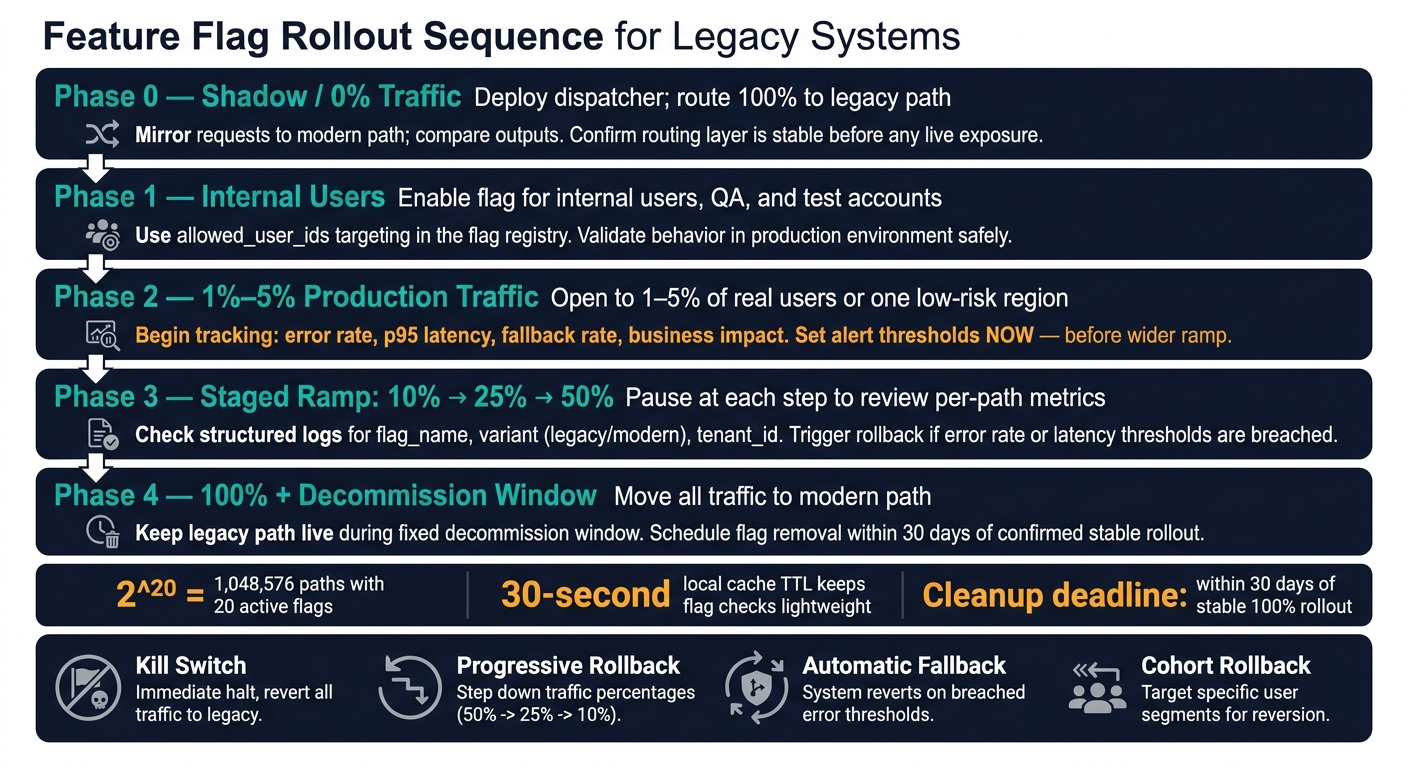
Feature Flag Rollout Sequence for Legacy Systems
Follow a Controlled Migration Sequence From Internal Users to 100%
Once routing is set, rollout turns into traffic control. The goal is simple: move users to the modern path in small steps that you can reverse fast.
A steady sequence usually looks like this:
- Phase 0: Deploy at 0% and compare outputs against the legacy path.
- Phase 1: Enable for internal users, QA, and test accounts.
- Phase 2: Open to 1%-5% of production traffic or one low-risk region.
- Phase 3: Ramp to 10%, 25%, then 50%, pausing at each step to check metrics.
- Phase 4: Move to 100% traffic, then keep the legacy path live for a fixed decommission window.
If high-value accounts are in scope, start with lower-risk segments. Spell those cohorts out in your targeting rules before rollout begins [1][2].
Instrument Every Flag With Per-Path Technical and Business Metrics
You need path-level visibility, not just a top-line dashboard. Track error rate, p95 latency, fallback rate, and the business metric affected by the flag for each path [1][2][3].
Structured logs are what make that split possible. Every log line that touches a flagged path should include flag_name, variant (legacy or modern), and tenant_id [1][3]. If those fields are missing, you can’t break dashboards out by path, which makes incident triage a mess.
Set alert thresholds before rollout starts, not in the middle of an outage. Then use those signals to trigger the rollback thresholds below.
Prepare Rollback for Application Code, Data Changes, and Background Jobs
Not every failure looks the same, so rollback shouldn’t be one-size-fits-all.
| Rollback Mode | Mechanism | Best Use Case |
|---|---|---|
| Kill Switch | Immediate boolean flip to false |
Critical system failure or security breach |
| Progressive Rollback | Decrementing percentage (e.g., 100% → 10%) | Performance degradation or subtle logic bugs |
| Automatic Fallback | Try/catch around the modern path | Intermittent network issues or microservice timeouts |
| Cohort Rollback | Remove specific segments from the allowlist | Issues affecting only specific tenants or regions |
When something fails, return the legacy result. Also, define numeric rollback thresholds before rollout starts. Rules like "error rate above X% for Y minutes" or "p95 latency regression above Z%" give the team something concrete to act on [1].
Code rollback alone won’t save you if the rollout changes state. Data writes and background jobs are usually the hardest part. Flipping the flag doesn’t undo side effects.
That means background jobs should be idempotent, and shadow runs for state-changing work should use safe replays so you don’t trigger duplicate processing or corrupt data. For schema changes, keep the legacy path readable from the new schema during the overlap window. Until cleanup is done, both paths stay tied to the same state.
Control Flag Debt and the Cost of Running Two Code Paths at Once
Define a Lifecycle for Every Flag From Creation to Removal
Once a flag ships, the work changes. It’s no longer just about rollout. Now it’s about getting that flag out of the codebase before it turns into baggage.
Every release or migration flag should move through five clear stages: Proposed (defined in the registry), Active (internal testing), Ramping (percentage rollout), Stable (100% exposure), and Retired (code removed) [4][1]. Only operational flags, such as kill switches, can stay open-ended. Everything else needs a deadline [4][2].
The registry should track the flag’s stage, owner, and cleanup deadline [4][2]. For release flags, set that cleanup deadline within 30 days of a confirmed stable rollout [4]. Then schedule removal in the first sprint after the rollout reaches stable [2]. If that ticket keeps sliding, the flag is already turning into debt.
This part should be automatic, not optional. Add a CI check that fails the build when a flag passes its expiration date or ships without the required metadata [4][2].
Measure the Real Overhead of Dual Paths and Set a Limit
Running two paths at once costs more than it looks like on paper. You’re not just keeping old and new logic alive. You’re adding review work, test work, monitoring work, and more places for bugs to hide.
Every active flag adds test cases, monitoring, and branch-specific failure modes. With N boolean flags, a system has 2^N possible code paths. 20 active flags create over 1 million potential paths [4]. That growth is exponential, which is why flag counts need to stay low. Keep active flag counts under 50, and treat cleanup with the same urgency as creation [4].
| Metric | Single Path | Dual Path With Flags |
|---|---|---|
| Observability Needs | Standard monitoring | High (path-level, cohort signals) |
| Engineering Overhead | Low (single logic flow) | High (test matrices, cognitive load) |
| Technical Debt | Static (legacy rot) | Dynamic (stale flag accumulation) |
Use dual paths only as a migration bridge.
Conclusion: The Implementation Pattern That Keeps Legacy Delivery Moving
After rollout and rollback are stable, cleanup is the last step that keeps this pattern workable. Use a central registry, evaluate at choke points, route with a dispatcher, roll out in stages, monitor each path on its own, define rollback thresholds before exposure, and remove flags as soon as the new path is stable.
Let flags pile up, and you haven’t solved the old legacy problem. You’ve just built a new one.
FAQs
How do I choose safe choke points for flag evaluation?
Choose low-risk, well-defined modules or API endpoints where you can control and watch traffic closely. In many cases, a facade or routing layer is the safest place to evaluate flags. It can send requests to legacy or modern paths without scattering flag logic across the system.
Those choke points also need monitoring, clear error tracking, and a plain rollback or kill switch. Start with small cohorts or low-risk areas. Then expand only after the system stays stable.
When should I use shadow mode instead of a live rollout?
Use shadow mode when you need to compare a new implementation with the legacy system without affecting users.
Here’s how it works: the new code gets copies of live production requests, but users never see its responses. That lets your team check output quality, spot decision drift, and watch performance under actual traffic.
This approach works well for tough migrations and high-risk paths, especially things like:
- Transactional flows
- Pricing engines
- Validation logic
It gives you a way to test the new path in production before moving to a full rollout.
How do I clean up release flags without breaking production?
Use a disciplined process: give each flag a clear owner and an expiration date, automate lifecycle checks in CI and code reviews, and make cleanup part of the definition of done.
Review flag age and usage on a regular basis. Then remove retired flags, dead code, configs, tests, and related documentation once the rollout is stable. That keeps technical debt from piling up without putting production stability at risk.
Related Blog Posts
- Scaling MVPs Without Rebuilding Frameworks
- How We Modernize Frontends Without Rewriting Them (And Why Rewrites Fail 60% of the Time)
- The Hidden Cost of ‘Move Fast and Break Things’ When Your System Already Has 200K Users
- Strangler Fig in Practice: The Mistakes Teams Make in the First Three Months That Undo the Whole Plan