Blog24 min read
Document AI Audit Template: How to Evaluate Whether a Vendor’s Pipeline Will Survive Your Edge Cases
By Huzefa Motiwala · Co-Founder & Chief Product Officer

Most Document AI tools fail when faced with messy, real-world documents. While vendor demos often showcase near-perfect accuracy, production environments expose weaknesses like poor OCR on low-quality scans, misreading complex layouts, and silent data corruption. This guide helps you rigorously test vendors to avoid these pitfalls.
Key Takeaways:
- Avoid trusting demos. Vendors use clean, ideal samples that don’t reflect your document challenges.
- Test edge cases. Use a mix of standard (80%) and problematic (20%) documents like skewed scans, handwritten notes, and multi-page tables.
- Measure performance. Look beyond single accuracy metrics - test field-level precision, citation correctness, and failure handling.
- Check transparency. Ensure vendors disclose confidence scores and log failures properly.
- Prioritize security. Confirm strict data privacy controls, deletion policies, and compliance with regulations.
- Evaluate contracts. Negotiate clear SLAs, data-use restrictions, and liability protections.
By following this template, you can identify reliable vendors, reduce hidden costs, and ensure your Document AI system performs under real-world conditions.
Evaluating AI Vendors: The Red Flags, Questions, and Evidence You Need
Building a Test Document Set for Vendor Evaluation
The success of your vendor evaluation hinges on the quality of the documents you use during testing.
Pull Documents from Your Own Internal Corpus
Start by using real production files instead of vendor-provided samples or synthetic test documents. Why? Because your actual files include all the quirks, inconsistencies, and formatting issues that show up in your workflows. These are the same challenges the vendor’s system will need to handle in real-world scenarios.
Focus on files flagged in your exception logs. These are the documents that trigger errors in your current system, making them perfect for identifying weaknesses in a vendor’s pipeline. They’ll help you uncover the edge cases that disrupt your workflows the most [8][9].
"A vendor can sound credible in a demo and still fail when the first batch includes low-quality scans, multi-page invoices, credits, or supplier-specific line-item quirks." - David Harding [8]
Your test set should address four key categories of document challenges:
| Document Issue Category | Specific Examples | Why It Matters |
|---|---|---|
| Image Quality | Skewed mobile photos, low-contrast faxes, blurred scans | Tests the system’s ability to handle pre-processing and reduce noise [9][1] |
| Layout | Cross-page tables, multi-column contracts, dense line items | Evaluates layout-aware extraction and reading order handling [8][10] |
| Content | Handwritten initials, stamps, signatures, margin notes | Assesses the ability to separate noise from machine-readable text [9][1] |
| Logic | Credits, mixed-invoice PDFs, conflicting totals | Highlights gaps in semantic understanding and business rule application [8][9] |
In addition, include a few intentionally flawed documents - like unreadable scans, missing pages, or files with conflicting data. These will test whether the system can fail gracefully and maintain auditability instead of silently producing incorrect results [9].
Once you’ve gathered your documents, organize them to reflect the range of challenges your production environment typically faces.
Mix Standard and Edge Case Documents in the Right Ratio
Aim for an 80/20 split - 80% standard documents and 20% edge cases. This ratio mirrors what you’re likely to encounter in a real production setting [4]. If the vendor knows they’re being stress-tested, they might perform well on edge cases alone. However, embedding those edge cases within an otherwise normal batch paints a more realistic picture of their system’s performance.
It’s also important to score various document types separately. For instance, a vendor might achieve 99% accuracy on standard invoices but drop to 85% on multi-page contracts or ID documents [1]. Aggregating these scores can mask critical weaknesses. Breaking down results by document type gives you a much clearer view of where risks lie.
How Many Documents to Use to Reflect Production Conditions
Once you’ve established your 80/20 mix, use a sample size that’s large enough to provide meaningful insights. Testing with 500-1,000 documents is a reasonable range [3]. This ensures you identify potential vulnerabilities before committing to full-scale deployment.
Measuring Core Accuracy Metrics
Once your test document set is ready, the next step is figuring out what to measure - and how to measure it. Vendors often provide a single accuracy figure, but that number rarely gives you the full picture needed to assess performance in a production environment.
"Accuracy is not a single number. It is at least four different metrics, and vendors love to quote whichever one looks best." - Floowed [12]
How to Test Extraction Accuracy
To get a clear understanding of extraction accuracy, focus on four levels: character, field, document, and STP rates. These metrics capture both the raw quality of OCR and how ready the system is for real-world use [12]. Don’t stop at character-level accuracy - while 99% raw accuracy may sound impressive, it can hide critical errors at the field level that could disrupt downstream workflows [12].
For documents with complex tables, use TEDS to evaluate structural accuracy and ROAcc to ensure the text flows correctly. Even small structural errors can have a big impact on downstream analytics [2].
It’s also essential to test with your most challenging documents - not just clean, ideal samples. This approach reveals how the system performs under real-world conditions [12][13]. The table below outlines realistic accuracy benchmarks by document type for 2026:
| Document Type | Expected Field-Level Accuracy | Primary Failure Mode |
|---|---|---|
| Standard Digital PDF | 98-99% | Schema/mapping errors [12] |
| Scanned (Good Quality) | 90-95% | OCR character confusion (e.g., 8 vs. 3) [12] |
| Phone Photo | 75-90% | Perspective distortion, glare [12] |
| Handwritten | 70-85% | Model hallucination, stroke misread [12] |
It’s critical to evaluate each document type separately. A vendor claiming a 97% average accuracy might actually be achieving 99% on clean PDFs but only 76% on phone photos. Aggregating scores like this can mask potential risks.
Once extraction accuracy is tested, the next step is verifying that each field’s extraction is correctly linked to its source through citation correctness.
How to Verify Citation Correctness
Extraction accuracy measures what the system pulls, but citation correctness confirms where it was pulled from - especially important in regulated industries [14].
Every extracted field should come with a bounding box reference: the page number and coordinates (x, y, width, height) that pinpoint exactly where the value was found in the source document [13]. To assess this, calculate Intersection over Union (IOU), which measures how much the predicted bounding box overlaps with the ground truth. Low IOU scores indicate the system is referencing the wrong area, even if the extracted value appears correct [13][9].
For text verification, use a three-tiered matching strategy:
- Exact match: For identifiers and amounts where precision is critical.
- Tolerance match: For values that may involve rounding, allowing a margin of 1%.
- Semantic match: For names or addresses where abbreviations or slight variations are common [14].
This layered approach catches errors that simple pass/fail checks might overlook.
"The aggregate number is a security blanket. The segmented breakdown is a spotlight." - The Mindful AI [14]
After verifying extraction and citation accuracy, it’s time to test how the system handles documents with missing data.
How to Test Null Document Handling
Accuracy isn’t just about what the system extracts - it’s also about how it deals with missing data. Test whether the system correctly returns a null value when no data is present, rather than fabricating information [15].
The key metric here is precision on true negatives: how often the system correctly identifies cases where no value exists. A false positive, where the system invents or misattributes data, is far more damaging than a missed extraction because it can silently corrupt downstream systems like ERPs or CRMs [15]. For critical fields such as tax IDs or payment amounts, ensure the system applies high confidence thresholds to avoid these errors [15].
Ask vendors directly how their system behaves when confidence falls below a certain threshold. Does it flag the document for human review, or does it let the data pass through unchecked? A system that identifies its own uncertainty and acts on it is far more reliable in production.
"The behavior matters as much as the numbers. Ask how their model handles documents that fall below a certain confidence threshold. Do they route them to review? Return a null value?" - Artificio [15]
Testing Failure Mode Transparency
Extracting data is only part of the equation; how errors are reported is equally important. A system that fails quietly is far riskier than one that fails noisily because unnoticed errors can lead to corrupted downstream processes before anyone realizes there’s a problem.
"The most dangerous production failure in document AI isn’t a crash. It’s a pipeline that processes every document successfully… and is systematically wrong on a specific document class for six weeks before anyone notices." - Tian Pan, Engineer-Founder [17]
How to Test for Uncertainty Disclosure
To evaluate how well a system handles uncertainty, introduce challenging documents like rotated scans, low-quality faxes, watermarked forms, or pages with handwritten notes. This helps determine if the system provides field-level confidence scores (values between 0 and 1) for each extracted field, rather than a single score for the entire document [17][19]. For example, a document-level score of 0.91 might hide that the tax ID field scored only 0.43 - critical information for production environments.
Accuracy is important, but calibration matters too. A model that is wrong 8% of the time but flags those errors is operationally more efficient than one that’s wrong 5% of the time but consistently overconfident [18]. Ask vendors to demonstrate how their confidence scores align with actual correctness for your document types.
"A vendor whose model is wrong 8% of the time but knows when it’s likely wrong is operationally far cheaper than one that’s wrong 5% of the time and confident on the wrong outputs." - Tian Pan, Engineer-Founder [18]
Additionally, review system logs to see how uncertainties are tracked and managed.
What to Look for in System Logs
System logs should go beyond a simple pass/fail for each document. Look for details like time-stamped decision paths, the model version used, retry attempts, and a trace ID that links the document across ingestion, processing, and output [10][16].
Two log metrics require special attention. First, the rejection rate (percentage of extractions below confidence thresholds). Ideally, this rate stays between 5-10% in a stable pipeline [17]. A sudden jump to 30% might indicate the system is encountering a document type it wasn’t trained for. Second, check for a dead-letter queue (DLQ) - a log of documents that failed processing after retries. A missing DLQ means the vendor lacks a systematic way to analyze recurring failures [17].
Also, ensure that human-in-the-loop (HITL) overrides are logged. These logs should detail who made manual corrections, when, and why. Without this, there’s no way to audit disputed extractions [16].
| Metric | What It Tells You |
|---|---|
| Field-Level Confidence Score | Pinpoints uncertainty in specific fields rather than masking it with an overall score |
| Rejection Rate | Indicates whether the pipeline recognizes its own limitations |
| Dead-Letter Queue (DLQ) | Identifies patterns in unresolved failures |
| Human Override Log | Provides an audit trail for manual corrections |
| Schema Validation Error | Ensures the system flags data that breaks business rules |
These logs are essential for verifying and understanding failures uncovered during testing.
10 Failure Scenarios to Include in Your Test Checklist
During evaluation, test the vendor’s pipeline with these scenarios. The goal is to see whether the system flags issues transparently or processes flawed documents as if nothing is wrong [17][19]:
- Column order collapse: Multi-column contracts misread as one continuous text stream.
- Table flattening: Complex tables with merged or nested cells lose their structure.
- Rotated/skewed scans: Slightly angled scans disrupt bounding box accuracy.
- Silent semantic errors: Correct data types extracted but placed in the wrong fields (e.g., subtotal recorded as line-item amount).
- Context truncation: Long documents split poorly, causing records to span multiple processing windows.
- Watermark interference: Background patterns or "CONFIDENTIAL" stamps create misreads.
- Handwritten annotations: Models misinterpret handwritten entries as noise.
- Mixed-language boundaries: Errors occur when a document switches languages mid-paragraph.
- Conflicting business logic: Invoices where line items don’t add up or tax calculations are invalid.
- Multi-document PDFs: A single file with multiple documents tests the system’s ability to split and classify correctly.
For each scenario, the system should respond with a low confidence score, refusal, null value, or validation error - not a misleading HTTP 200 status with incorrect outputs [17][18].
Evaluating Performance and Data Privacy
After examining extraction accuracy and failure transparency, it’s time to dive into two other critical aspects: data safety and performance. These elements - privacy compliance and operational readiness - shouldn’t be treated as separate concerns. Instead, they must be assessed together to ensure the system meets both regulatory and production needs.
Data Handling and Privacy Compliance Questions to Ask
A vendor’s SOC 2 Type II certification is a starting point, but it’s far from the full picture.
"SOC 2 Type II is the minimum bar, not the answer. It confirms the vendor has documented controls and follows them. It says nothing specific about how AI model training is isolated from customer data." - LucidFlow [21]
To dig deeper, ask pointed questions. For instance, where is your data stored - both at rest and during inference? These locations often differ, and cross-border transfers could violate data sovereignty laws. Request a Data Processing Addendum (DPA) that explicitly addresses GDPR Article 28 obligations, and insist on an up-to-date subprocessor list. This will clarify which LLM providers (e.g., OpenAI, Anthropic) interact with your data and whether they enforce strict zero-retention policies.
Additionally, demand a data-use matrix. This document should clearly outline how data is separated into categories like operational logs, fraud detection, and model improvement. Be wary of vague terms like "service improvement" or "anonymized use", as these could indicate weak data controls.
"The phrase ‘we do not store your data longer than necessary’ is not a control; it is marketing." - Maya Chen, Senior Privacy Engineer [11]
Here’s a quick breakdown of the key areas to evaluate:
| Control Area | Enterprise Requirement | Red Flag |
|---|---|---|
| Data Retention | Configurable, artifact-specific timelines; clear purging | Vague policies like "as needed" or unclear backups |
| Model Training | Default no-training; explicit opt-in; contractual terms | Ambiguous "anonymized use" or "service improvement" |
| Data Residency | Regional pinning (e.g., US-only); documented routing | Broad terms like "global infrastructure" |
| Encryption | AES-256 at rest; TLS 1.3 in transit; CMK support | Gaps in encrypting derived logs or text |
| Auditability | Immutable logs; SIEM export; traceable data fields | Editable admin logs; no access history |
Once you’ve confirmed strong privacy practices, shift your focus to performance testing.
How to Load Test for Production Readiness
Vendor demos are often polished and run under ideal conditions. Your real-world environment? Not so much. To get a clearer picture, simulate heavy loads using tools like Apache JMeter. This approach helps uncover issues like queueing delays or retry penalties that might only appear during traffic spikes.
When analyzing results, avoid relying on averages - they can mask critical bottlenecks. Instead, measure p50, p90, and p95 latency to understand how the system performs in worst-case scenarios. For example, while a system might handle 5,000 pages per hour in a controlled test, it could falter under simultaneous multi-user bursts [9]. Keep an eye on the exception rate, too. Reducing exceptions by even 2% can often deliver more value than minor gains in extraction accuracy, especially for high-volume teams [9].
Don’t forget to include "poison" documents - like unreadable scans or files with conflicting values - in your tests. These scenarios help ensure the system fails safely, preserving auditability rather than passing bad data downstream [9][10].
Once performance testing is complete, verify that secure data-handling practices are in place.
Verifying Secure Deletion and Upload Tracking
A deletion API alone isn’t enough. When a document is deleted, the request must extend beyond the primary database to include search indexes, caches, observability logs (e.g., Datadog or Splunk), and annotation queues [11]. To confirm this, ask for deletion runbooks and sample audit logs to verify that all traces of the document are removed.
On the upload side, ensure the vendor’s API is idempotent. This means that sending the same document twice - or simulating a network timeout and retry - should not create duplicate records in your downstream systems. Test this behavior in a sandbox environment. Considering that 84% of security leaders in the US, UK, and Germany reported API security incidents within the past year [20], upload tracking and idempotency controls are non-negotiable for production deployments.
Assessing Customization and Retraining Capabilities
After confirming a vendor’s performance and privacy standards, it’s time to ask the big question: can their system improve when working with your documents? A system that works well initially but can’t adapt to unique challenges will eventually hold you back. This is where customization and retraining come into play, ensuring continuous improvement.
How to Evaluate the Retraining Process
The retraining process reveals a lot about a vendor’s capability. One key question to ask: how does feedback from human reviewers feed back into the model? Effective systems use human-in-the-loop (HITL) corrections and detailed logging to refine performance on those tricky edge cases [22][16].
"Every human correction becomes a training signal, driving measurable improvement in the system’s ability to handle specific document types and edge cases." - iMerit [16]
To ensure accountability, all corrections should be logged with timestamps, reviewer IDs, and reason codes. This creates a clear lineage for training data [22]. Additionally, consider making it a contractual obligation for the vendor to address edge-case failures within 10 business days [22].
Another important feature to look for is canary deployments. These allow retrained models to be tested on specific document types - like invoices - before being rolled out across the board. This approach minimizes risks by catching potential regressions early [22].
Of course, retraining is only part of the equation. Effective API support is critical for deploying these improvements into your workflows.
API and Integration Support Requirements
A reliable API is the backbone of integrating the vendor’s system with your existing workflows. Beyond standard REST API functionality, prioritize features like idempotent endpoints, consistent versioning, and stable webhooks. Vendors often gloss over these details during demos, but inconsistencies or immature SDKs can lead to hidden costs down the line [25][26].
It’s also essential to have a test harness that automatically runs whenever the model updates. This safeguards against "silent updates", which can disrupt governed extraction processes without warning [22].
"Silent updates are one of the most dangerous anti-patterns in governed extraction. If a vendor changes the model behind the API without a version pin or changelog, your validation evidence becomes stale overnight." - Avery Collins, Senior SEO Content Strategist [22]
When assessing costs, focus on metrics like cost per successfully extracted page or cost per human review escalation. These provide a clearer picture of the true cost, as retries, storage, and manual corrections can significantly inflate expenses [7][26].
A well-integrated API ensures that retraining and customization efforts flow seamlessly into your operations.
Testing Fine-Tuning for Domain-Specific Documents
Generic accuracy metrics won’t tell you how a model will handle your specific document needs. For critical workflows, aim for performance thresholds like ≥99.5% accuracy on invoice totals or ≥95% clause recall in contracts [25][27].
To genuinely evaluate fine-tuning, use a hidden holdout set - documents the vendor hasn’t seen before. This prevents overfitting to your demo set and shows how well the model generalizes [26][27]. Break down results by document type (e.g., invoices vs. contracts) and quality (clean PDFs vs. mobile photos) to pinpoint problem areas [25][26].
The level of customization you need depends on your document complexity. Here’s a quick breakdown:
| Customization Method | Technical Effort | Best Use Case |
|---|---|---|
| Prompt/Rule Tweaks | Low | Simple field extraction or formatting tweaks [25] |
| Uptraining/Fine-tuning | Medium | Adapting a general model to industry-specific layouts [24] |
| Human-in-the-Loop | High (Ongoing) | Handling handwriting, messy scans, or continuous learning [16] |
| Custom Model Building | Very High | Dense legal clauses or highly specialized documents [27] |
Lastly, ask for specific examples of how the vendor’s system has improved based on past deployments. If their answers are vague, it could indicate a lack of real AI capabilities.
"If a vendor cannot provide examples of how their AI solution has evolved and improved through learning from previous deployments, it may indicate a lack of genuine AI capabilities." - Weaver [23]
Reviewing Contracts for Production Readiness and Vendor Risk
Technical capability alone doesn’t guarantee production readiness. A well-structured contract is just as critical to protect against hidden risks. Even the most impressive vendor evaluation can fall short if the contract includes weak SLA terms, ambiguous data-use clauses, or liability limits that leave you vulnerable in serious situations. Just like technical metrics, clear and enforceable contractual terms help measure vendor risk.
Here’s a closer look at the key contract elements to ensure production readiness.
SLA Terms to Require in Any Vendor Contract
Many enterprise AI contracts promise 99.5% uptime, which translates to roughly 43 hours of downtime each year [29]. For high-stakes workflows, this might not cut it. If your annual spend exceeds $500,000, you may be able to negotiate up to 99.9% uptime with financial penalties for non-compliance [29].
But uptime alone doesn’t tell the whole story. As VendorBenchmark highlights:
"The platform can be ‘up’ while delivering degraded inference quality, elevated latency, or reduced throughput - none of which standard uptime SLAs capture." [29]
To address these gaps, negotiate additional terms such as:
- P95 latency under 3 seconds
- Clear throughput limits
- Model version pinning for 12-18 months, with at least 180 days’ notice before deprecation
- Accuracy thresholds tied to a defined test set, with remediation steps if performance dips below expectations
For example, include a clause like: "If accuracy falls below [X]% for any rolling 30-day period, the vendor will investigate, provide root cause analysis, implement a remediation plan, or allow termination without penalty." [30]
Contract Red Flags to Watch For
Certain contract terms can be warning signs that a vendor hasn’t fully accounted for production risks. Below is a table summarizing some common pitfalls and what to negotiate instead:
| Red Flag | Favorable Negotiated Term |
|---|---|
| "Vendor may use data for any lawful purpose" | Limited license solely for providing services to the customer [30] |
| Automatic consent to model training | Explicit opt-in only; default exclusion for all model improvements [11][30] |
| Liability capped at 12 months of fees, no carve-outs | Liability carve-outs for data breaches and IP indemnification [33][30] |
| Unspecified accuracy metrics | Defined accuracy thresholds measured against ground truth data [30] |
| No mention of subprocessors | Named subprocessor list with notice-and-objection rights [33][28] |
One particularly overlooked risk is how training data clauses can sneak into contracts. 44% of companies found such clauses post-signing without prior negotiation [29]. Standard terms often allow vendors to use your data - including prompts, outputs, and logs - for "service improvement" unless explicitly excluded. If the contract doesn’t clearly state that your data is excluded from training, assume it isn’t.
Spotting these red flags early can help you negotiate stronger protections.
How to Negotiate Favorable Contract Terms
To safeguard your production environment, focus on securing concrete protections. Here are a few critical points to include in your negotiations:
- Explicit training exclusion language: Vague "no training" clauses won’t cut it. Insist on specific wording like: "Customer Data shall not be used for training, fine-tuning, evaluation, benchmarking, or model development" [33]. This restriction should apply to all subprocessors as well.
- Exit and transition support: Build in provisions for smooth transitions before signing. This includes data return in standard formats, a deletion certificate, and at least 90 days of transition assistance [32][30]. Additionally, negotiate a regulatory exit clause to terminate without penalty if new laws make the service non-compliant [31].
- Defined resolution timeframes: Don’t settle for vague acknowledgments of issues. Specify time-to-resolution windows for high-severity incidents to ensure timely fixes.
Scoring Vendors and Making the Final Call
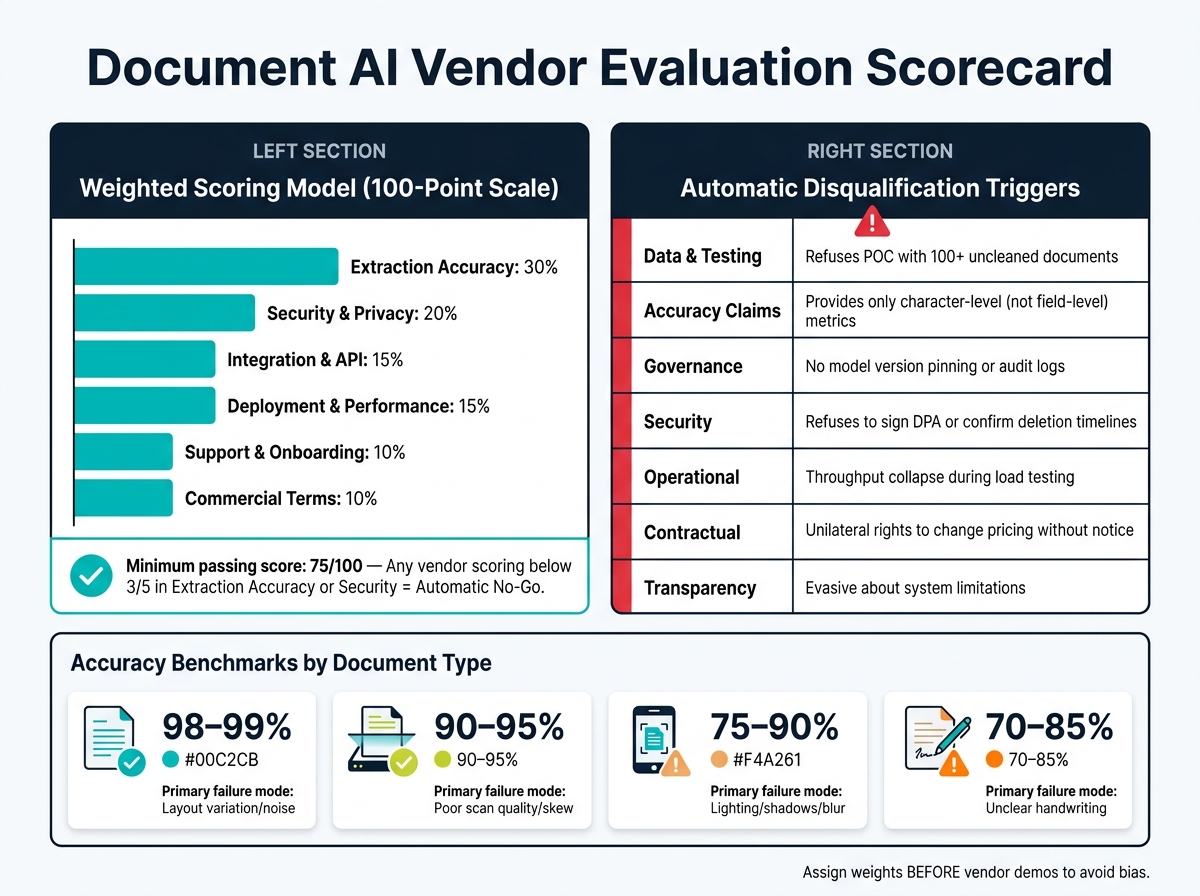
Document AI Vendor Evaluation Scorecard: Weighted Criteria & Benchmarks
After completing technical, privacy, and contractual reviews, it’s time to compare vendors systematically. Without a structured scoring method, flashy demos can overshadow how well a product actually performs.
"The best scorecards are built before vendor outreach begins. If you draft criteria after demos, you will almost always overweight whichever product presented best, not whichever product fits best." - Scan.directory [34]
How to Calculate a Weighted Score Across All Criteria
To streamline your evaluation, consolidate the review process into a single, measurable score. A 100-point weighted model works well for keeping assessments objective and defensible. The key here is to assign weights before meeting vendors to avoid bias. Here’s a sample distribution:
| Category | Weight | Key Evidence to Collect |
|---|---|---|
| Extraction Accuracy | 30% | Field-level precision/recall using your challenge document set |
| Security & Privacy | 20% | SOC 2 report, signed DPA, and data residency confirmation |
| Integration & API | 15% | Sandbox test results, SDK quality, and webhook stability |
| Deployment & Performance | 15% | Load test logs, p95 latency, and sustained throughput |
| Support & Onboarding | 10% | Reference calls, documented SLAs, and implementation guidance |
| Commercial Terms | 10% | 3-year TCO, overage pricing, and exit/migration costs |
This approach ensures vendors are measured against your specific production needs, not just their ability to deliver a polished pitch.
Score each subcategory on a 1-5 scale, with clear evidence thresholds. For example, a "5" in extraction accuracy might require over 98% field-level accuracy on your benchmark set. This dual focus - asking both "can they do it?" and "can they do it consistently with your inputs?" - keeps the evaluation rooted in actual performance, not just features.
Also, normalize all costs, including implementation labor and manual review, into a 3-year Total Cost of Ownership (TCO). Sometimes, lower per-page rates can lead to higher overall expenses when exception-handling is factored in.
Vendor Responses That Should Trigger Disqualification
Certain vendor behaviors during evaluation aren’t just concerning - they signal the vendor may not be ready for enterprise use. These should lead to immediate disqualification:
| Red Flag Category | Specific Disqualification Trigger |
|---|---|
| Data & Testing | Refusal to run a POC with 100+ samples of your uncleaned documents [5] |
| Accuracy Claims | Only providing character-level accuracy instead of field-level metrics [35] |
| Governance | No model version pinning, rollback capability, or searchable audit logs [10][36] |
| Security | Refusal to sign a DPA or confirm data deletion timelines [8][5] |
| Operational | Throughput collapse or major latency spikes during load testing [10][36] |
| Contractual | Unilateral rights to change pricing or terms without notice [6] |
| Transparency | Evasive about what the system cannot handle well [5] |
A vendor unwilling to clearly explain its limitations is likely to cause headaches in production. As Tian Pan, an engineer-founder, warns:
"The vendor’s status page is green, your monitoring shows zero 5xx errors, and your product is silently regressing. The most dangerous gap in current AI procurement is exactly this." - Tian Pan, Engineer-Founder [18]
These red flags emphasize the need for clear, consistent performance before moving forward.
Setting Go/No-Go Thresholds for Procurement Approval
Establish a minimum total score of 75 out of 100 for a vendor to proceed to contract negotiation. Beyond the total score, enforce category-level rules: any vendor scoring below a "3" in Extraction Accuracy or Security should be an automatic No-Go, no matter how strong their other scores are. A solid integration or favorable commercial terms cannot compensate for weak security.
If two vendors score within 5 points of each other, use risk factors like data residency, exit rights, and model version pinning as tie-breakers - not feature counts [34]. Before finalizing, conduct a shadow period to validate metrics without risking live operations. Finally, document final scores, evidence, and any category-level concerns in a summary for review by your legal, security, and finance teams alongside the contract.
Conclusion: What a Rigorous Vendor Evaluation Actually Buys You
Taking the time to conduct a thorough vendor evaluation does more than just help you choose the right tool - it shields your business from costly surprises down the road. While vendor demos are designed to dazzle, your unique edge cases often reveal the cracks in their performance. And it’s exactly in that gap where production failures tend to emerge.
Skipping this process can lead to hidden costs that go far beyond the subscription fee. Think about the hours spent on manual reviews, the extra effort for reconciliation, or even the headache of switching platforms if a vendor flunks a security review months after deployment. As Jordan Mercer, Senior SEO Editor & Procurement Content Strategist, explains:
"A vendor with a lower unit price can become more expensive once you account for exception handling, manual review, retraining, and integration drag." - Jordan Mercer [6]
What this evaluation framework ultimately delivers is predictability. You’ll know your total cost of ownership (TCO) over 36 months before signing the contract. You’ll understand how the system handles real-world challenges - like a faded receipt or a misaligned multi-column document - before it has the chance to corrupt critical data. Instead of relying on a vendor’s polished demo, you’ll have concrete proof that their system works for your specific needs.
It’s worth noting that while 72% of finance leaders are now using AI tools [8], not all of them got there through careful evaluation. Many are still grappling with the consequences of skipping this step. On the other hand, companies that conducted structured pilots using real-world test cases, verified the system’s reliability, and secured clear exit strategies are the ones scaling smoothly without constant rework. These are the businesses avoiding operational risks and achieving long-term reliability.
"Evaluating document extraction is not about chasing a single leaderboard score. It is about proving that your system will keep working on the next million documents you have not seen yet." - Sid and Ritvik, Pulse AI [2]
FAQs
What’s the fastest way to build an edge-case test set from our real documents?
To assemble a focused edge-case test set quickly, start with your existing document collection. Look for examples that represent tricky scenarios, such as documents with unusual formats, intricate layouts, or irregularities in the data. You can gather these cases manually or use semi-automated tools to speed up the process. By doing this, you’ll create a test set that aligns with the challenges you’re likely to face, rather than relying on polished or idealized samples.
How do we choose go/no-go thresholds for accuracy, confidence, and rejection rate?
Defining clear success criteria is essential to ensure your system meets the needs of your specific use case. Start by identifying measurable benchmarks, such as minimum accuracy levels - for instance, aiming for 95% accuracy on critical fields. Additionally, set acceptable confidence score thresholds and determine tolerable rejection rates to manage performance expectations.
Your system should also be capable of flagging low-confidence outputs or unfamiliar cases for manual review. This ensures that errors or edge cases are caught before they can cause issues. To maintain effectiveness, regularly assess the system’s performance using real-world data. Adjust thresholds as needed to strike the right balance between automation and risk management, especially when dealing with less common or more complex scenarios.
What contract terms best protect us from silent model updates and data-use creep?
To guard against unexpected model updates and potential misuse of data, it’s important to include specific contract clauses addressing data rights, non-training commitments, and breach notifications. The agreement should also outline model version control and data segregation to ensure there are no unauthorized updates or secondary uses of your data. These steps are key to protecting your information and ensuring transparency in how vendors operate.
Related Blog Posts
- AI for Tender Reviews: How to Let Models Catch Scope Gaps Before Your Engineers Do
- You Can Audit 100K Lines of Code in 48 Hours Now. Here’s What Most Teams Get Wrong When They Try
- Why Enterprise Document AI Fails at the Extraction Layer, Not the Model Layer
- LLM-Based Document Processing vs Traditional OCR: When Each Actually Belongs in Your Stack