
AI Prompts for SaaS Product Managers: From Feature Spec to Edge Case Coverage in One Workflow
Taher Pardawala June 6, 2026
SaaS product managers face challenges like lengthy documentation, overlooked details, and constant clarifications with teams. AI prompts can streamline their workflow, saving hours and improving clarity.
Key takeaways:
- AI helps convert rough ideas into structured PRDs with clear goals, user stories, and acceptance criteria.
- Prompts assist in identifying edge cases, creating user-friendly release notes, and analyzing user flows for friction points.
- Tools like prioritization frameworks ensure alignment with business goals.
This guide outlines step-by-step AI-driven methods for tasks like PRD creation, user story generation, edge case analysis, and more, enabling efficient and focused product management.
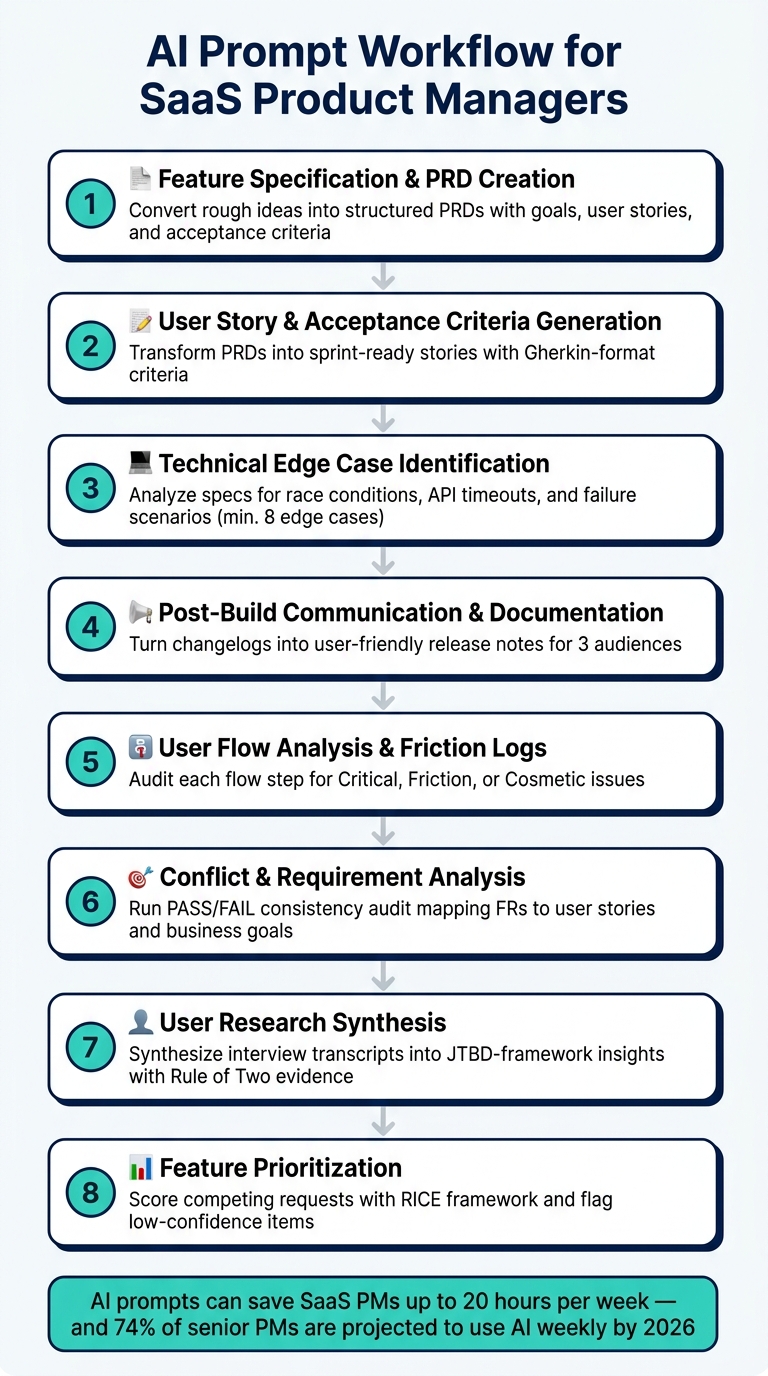
AI Prompt Workflow for SaaS Product Managers: 8-Step Guide
1. Feature Specification and PRD Creation
Prompt: Rough Idea to Structured PRD
What it does: Converts a brief 2–3 sentence feature description into a fully-structured PRD (Product Requirements Document) tailored to meet engineering and design needs.
Context to provide: Include key details about your feature idea, the target user persona, the main problem it addresses, the tech stack involved, and any hard constraints like timelines, budgets, or out-of-scope elements.
Copy-paste prompt:
You are a Senior Product Manager at a B2B SaaS company. Convert this rough feature idea into a structured PRD. Use this exact structure: 1. Problem Statement (from the user's perspective) 2. Goals & Success Metrics (specific, measurable KPIs like conversion rate or time-to-task) 3. User Stories (INVEST format: Independent, Negotiable, Valuable, Estimable, Small, Testable) 4. Acceptance Criteria (Given-When-Then format for each story) 5. Technical Context (relevant data entities, APIs, or infrastructure dependencies) 6. Out of Scope (explicit list with brief rationale for each item) 7. Open Questions (flag anything uncertain as [NEEDS INPUT] instead of guessing) Feature idea: [paste your 2–3 sentence description here] Target persona: [e.g., "Operations manager at a mid-market logistics company"] Core problem: [e.g., "Users can't track shipment status without leaving the platform"] Tech stack: [e.g., "React frontend, Node.js API, PostgreSQL"] Hard constraints: [e.g., "No mobile support in V1, must ship within 6 weeks"] Do not fabricate metrics or technical details; insert [NEEDS INPUT] where specifics are missing. The [NEEDS INPUT] convention is a standout feature here. Instead of filling gaps with guesses or unverified details, it ensures the document remains accurate and transparent. Each placeholder serves as a clear action item that must be clarified before moving forward with engineering.
"The best PRDs I’ve seen in 2026 are half the length of what we used to write but twice as clear. AI handles the structure, the PM handles the strategy." – Inktrail [6]
One practical tip: Treat the AI’s initial draft as just that – a draft. After generating the first version, run a follow-up prompt asking the AI to assess the document from the perspective of a skeptical tech lead. This second pass helps identify vague metrics, missing API details, or areas where assumptions might lead to misunderstandings. Addressing these gaps early ensures a smoother sprint planning process.
This method lays the groundwork for creating user stories with well-defined acceptance criteria in the next stage.
sbb-itb-51b9a02
AI Prompts for Product Teams: How to harness the power of Product Management AI with Janna Bastow
2. User Story and Acceptance Criteria Generation
This step takes your structured PRD and transforms it into sprint-ready user stories, complete with clear acceptance criteria.
Prompt: PRD to User Stories with Acceptance Criteria
What it does: Converts a finalized PRD into a set of user stories that are easy to execute within a sprint. Each story includes structured acceptance criteria written in Gherkin format, ensuring clarity for developers and QA teams.
Context to provide: Share the entire PRD (not fragments), specify the target persona, outline role-based access levels (if applicable), and define a story size limit to align with your sprint cadence.
Copy-paste prompt:
You are a Senior Product Manager translating your PRD into concise, sprint-ready user stories. Use this structure for each story: 1. User Story: "As a [persona], I want [action], so that [benefit]" 2. Acceptance Criteria: Each criterion is written in Gherkin format (Given/When/Then) for clarity 3. Edge Cases: List a minimum of two "angry path" scenarios (e.g., API timeout, unauthorized access) 4. Definition of Done: Specific conditions that confirm the story is complete 5. Story Size: Flag if the story cannot be completed in 1–3 days and suggest how to split it Constraints: - Generate 5–9 stories ordered by user value, not technical dependency - Ensure each story reflects a single, distinct outcome - Insert [NEEDS INPUT] for any missing technical detail rather than guessing - Categorize each story as: "Already Decided", "Validate with Team", or "Open Question" PRD: [paste full PRD here] Target persona: [e.g., "Account admin at a mid-market SaaS company"] Role-based access: [e.g., "Admin, Editor, Viewer - each with different permissions"] Sprint length: [e.g., "2-week sprints, stories must be completable in 1–3 days"] "The advantage of a structured format is that it reduces guesswork during implementation. The developer reads the criterion and knows exactly what to build. QA reads it and knows exactly what to test. No ambiguity." [7]
Organizing user stories into categories like "Already Decided", "Validate with Team", and "Open Question" makes the refinement process smoother and helps cut down on meeting time. [7]
To ensure the output is tailored and actionable, always provide the complete PRD. This avoids vague or overly generic user stories.
Next, we’ll dive into identifying edge cases to make your feature more robust.
3. Technical Edge Case Identification
Prompt: Feature Spec to Edge Case Analysis
What it does: This prompt analyzes a completed feature spec to identify potential failure scenarios that could easily be overlooked. These include tricky issues like race conditions, API timeouts, session expirations during actions, and other problematic "hell paths" that tend to surface only in production environments.
After laying the groundwork with detailed user stories, this step sharpens the focus on technical pitfalls. It builds on that foundation to reveal nuanced failure points that might otherwise be missed.
Context to provide: To make the most of this prompt, include the full feature description, your tech stack (e.g., React, Redis, PostgreSQL), any known performance targets or SLA requirements, and the user flow that the feature interacts with.
Copy-paste prompt:
As a QA-minded Senior Engineer reviewing the feature spec, your task is to identify edge cases the team has not addressed. Review the spec by focusing on these categories: | Category | Focus Areas | |-----------------|--------------------------------------------------------------------| | Input | Empty/null values, boundary values, max lengths, invalid formats | | State | Race conditions, stale data, partial completion, offline states | | User Behavior | Rapid clicks, back button navigation, abandoned flows | | Error Handling | API timeouts, server errors, validation errors, rate limits | | Security | Authentication expiry, authorization changes, input sanitization | For each identified edge case: 1. Name the scenario clearly 2. Describe the failure mode (what breaks and how) 3. Assign a severity level (Critical, High, Medium, or Low) 4. Suggest one testable acceptance criterion in Given/When/Then format Constraints: - List at least 8 edge cases - Mark any spec assumptions that conflict with your tech stack's limitations - Mark each case as: "Likely in Production", "Possible Under Load", or "Low Probability but High Impact" - Insert [NEEDS CLARIFICATION] where the spec is too vague to assess Feature description: [paste feature spec here] Tech stack: [e.g., "React frontend, Node.js API, PostgreSQL, Redis for caching"] Performance targets: [e.g., "API response under 300ms, 99.9% uptime SLA"] User flow: [describe the step-by-step flow this feature is part of] This systematic approach ensures your feature is robust against unexpected issues before development even begins.
"AI is tireless at generating scenarios." – Atticus Li, Experimentation and Growth Leader [8]
Providing specific technical details, like your tech stack, is crucial here. For instance, mentioning Redis enables the AI to identify cache-related failures like invalidation issues or memory exhaustion – problems that might otherwise go unnoticed [5][11].
Severity ratings are equally important. When the AI generates a long list of edge cases, tagging each with Critical, High, Medium, or Low severity allows you to prioritize efficiently. Start by addressing the most critical issues and then focus on those that are feasible to implement. This way, the list stays actionable rather than overwhelming [1].
Next, we’ll look at how AI can transform technical logs into clear, concise release notes.
4. Post-Build Communication and Documentation
Once feature testing is solidly wrapped up, the focus shifts to transforming technical details into user-friendly communication. This stage prioritizes how users experience the product, moving from raw technical data to clear and actionable post-build documentation.
Prompt: Technical Changelog to Release Notes
Purpose: This prompt helps you take a raw technical changelog – like commit logs, pull request (PR) titles, or Jira tickets – and turn it into user-focused release notes. The goal? Highlight the benefits for users instead of just listing technical changes.
For example, instead of saying, "Improved query performance", the release notes might say, "Segments load faster." This shift ensures your notes are engaging and relevant to users, rather than being overlooked.
What to include: To get the best results, provide the AI with:
- The output of your
git log --onelineor a list of merged PR titles (PR titles often convey more user-relevant details than commit messages [12]). - Details about your target audiences (e.g., end users, developers, or internal support teams).
- Your product’s tone of voice (e.g., straightforward, professional).
- Any information about feature availability across plans (e.g., a feature available only on the Pro plan).
Here’s a copy-paste prompt you can use to quickly turn a technical changelog into polished release notes.
Copy-paste prompt:
You are a Product Marketing Manager writing release notes for a SaaS product. Inputs provided: - Commit log / PR titles: [paste git log --oneline or PR list here] - Target audiences: [e.g., "end users, internal support team, developer API users"] - Product tone: [e.g., "simple and direct"] - Plan availability: [e.g., "Feature X is Pro plan only"] Instructions: 1. Filter out merge commits, CI changes, dependency bumps, and internal refactors. Group remaining changes into three categories: New, Improved, Fixed. 2. Write a "For Users" section: lead with the user benefit, not the technical change. Keep each line ≤ 15 words. Use active voice and present tense (e.g., "Adds search to settings", not "Search was added"). 3. Write a "For Developers" section: include API changes, deprecations, and any breaking changes. Prefix breaking changes with "Breaking:" and include a one-line migration note. 4. Flag changes with security, breaking, or pricing keywords for human review before publishing. 5. Do not use marketing superlatives like "game-changing" or "blazingly fast." 6. Do not include internal ticket IDs in customer-facing output. Output format: - Customer Announcement (end users): benefit-led bullets - Developer Changelog (technical team): API changes, deprecations, migrations - Internal Briefing (support/sales): bugs fixed, known issues, talking points This structured approach ensures that your release communication is consistent and tailored to different audiences, saving you from rewriting the same information multiple times for various teams or communication channels [13].
5. User Flow Analysis and Friction Logs
Prompt: Generating a Friction Log for a Described User Flow
Purpose: A friction log is a detailed record that pinpoints where users might struggle while navigating your product. This prompt helps AI adopt a critical lens, focusing on both the smooth "happy path" and potential stumbling blocks – like API timeouts, unclear labels, or dead ends. By completing the workflow from feature specification to edge-case analysis, it highlights challenges in user flow and ensures a more seamless experience.
"Your bias is a bug. If you are not using AI to find the 12 ways your app will fail, your users will find them for you." – Elena, AI Product Leader [9]
To make this analysis effective, it’s crucial to provide the AI with a clear understanding of your product, the user persona, and what success looks like. This ensures the output is tailored and relevant to your specific context.
What to Provide:
- Detailed User Flow: Break down the process step by step (e.g., "User clicks ‘Invite Team Member’ → enters email → selects role → sends invite").
- Target Persona: Define the user (e.g., "a non-technical team admin at a 50-person company").
- Technical Constraints: Highlight any known limitations (e.g., "email delivery can take up to 60 seconds").
- Success Metric: Clarify the goal (e.g., "user completes onboarding and invites at least one teammate").
- Supporting Data: Include support tickets or Slack threads if available to provide real-world context.
Copy-Paste Prompt:
You are a Critical UX Auditor reviewing a SaaS product flow. Inputs provided: - Product description: [brief description of what the product does] - Target persona: [e.g., "a non-technical team admin at a 50-person company"] - User flow to audit: [describe each step of the flow in sequence] - Success metric: [e.g., "user completes onboarding and invites at least one teammate"] - Known technical constraints: [e.g., "email delivery can take up to 60 seconds"] Instructions: 1. Analyze each step. For each step, list friction points (confusion, delay, error, expectation gap), then rank them as Critical, Friction, or Cosmetic. 2. Identify the single most likely "drop-off" step and explain why. 3. List at least 5 edge cases or "hell path" scenarios (e.g., slow network, invalid input, session timeout mid-flow, empty states). 4. Challenge assumptions - identify any assumptions in this flow that may not be validated. Output format: - Step-by-step friction table (Step | Friction Type | Severity | Recommended Fix) - Top drop-off risk: one concise paragraph - Hell path edge cases: ranked list - Unvalidated assumptions: bullet list 6. Conflict and Requirement Analysis
Prompt: Identifying Conflicting Requirements in a Feature Spec
This step ensures that every feature requirement aligns seamlessly with business goals, building on the earlier technical edge case analysis. It acts as a safeguard against inconsistencies that might creep into Product Requirement Documents (PRDs) during revisions.
Purpose: During the editing process, PRDs can accidentally introduce non-goals as functional requirements. This prompt leverages AI to act as a "consistency auditor", systematically mapping user stories to functional requirements, functional requirements to business goals, and flagging any misalignments or conflicts.
"Ask the model to flag any claim in one section contradicted by a claim in another. Specs drift internally during editing – a non-goal becomes a goal two sections later – and consistency prompting catches drift before review does." – SurePrompts Team [10]
This process should be run as a separate pass once your PRD draft is complete.
What to Provide:
To perform this analysis effectively, you’ll need to supply the following:
- The complete PRD or feature specification (paste the full text).
- A detailed list of business goals and non-goals.
- Any known technical constraints or dependencies.
- User stories, along with their acceptance criteria.
Copy-Paste Prompt:
You are a Critical Product Reviewer performing a consistency audit on a feature specification. Inputs provided: - Full PRD or feature spec: [paste full text] - Stated business goals: [list goals] - Stated non-goals: [list non-goals] - Known technical constraints: [list constraints] Instructions: 1. Map every Functional Requirement (FR) to a specific User Story (US). Mark any FR without a corresponding US as FAIL. 2. Map every US to a stated business goal. Flag any US with no clear goal alignment as FAIL. 3. Check if any non-goal has crept into the functional requirements. Mark each instance. 4. Categorize all detected issues as: - Contradiction (e.g., REQ-A conflicts with REQ-B) - Gap (missing logic for a specific scenario) - Wrong Assumption (logic based on incorrect technical or user data) - Scope Creep (acceptance criteria that exceed the story's stated goal) 5. Rank each issue by severity: High, Medium, or Low. 6. For every FAIL or flagged item, suggest a specific proposed fix. Output format: - PASS/FAIL alignment table (FR | US | Business Goal | Status) - Inconsistencies to resolve: ranked list with proposed fix for each - Non-goal violations: bullet list - Scope creep flags: bullet list The PASS/FAIL table is a critical tool to ensure clarity and alignment before handing the document off to engineering. As wwwazzz, Senior Product Manager PRD Generator, explains:
"Any FAIL is surfaced under Inconsistencies to resolve with a proposed fix before the final PRD is rendered." [2]
This consistency check serves as a final safeguard, reinforcing strategic alignment and catching potential issues before they can disrupt the development process.
7. User Research Synthesis
Summarizing User Research Notes into Actionable Product Insights
Turning user research into practical insights requires precision. Unstructured notes can sometimes distort the bigger picture, especially when a single opinion overshadows recurring patterns. That’s why every insight must be firmly grounded in actual user quotes. As Aarav Garg, COO of Omi AI, aptly explains:
"If you can’t cite a timestamp, you don’t have an insight yet. You have a feeling." [16]
This approach leans heavily on the Jobs-to-be-Done (JTBD) framework, which organizes findings around users’ functional, emotional, and social motivations. Instead of focusing on surface-level complaints, it prioritizes pain points based on their emotional intensity. This distinction helps identify what’s truly driving user dissatisfaction (like churn) versus what’s just a mild annoyance. [15]
How to Approach User Research Synthesis
The goal of this synthesis step is to ensure that product improvements are guided by authentic user challenges, supported by evidence. Here’s what you’ll need to provide and how the process works:
What You Need to Provide:
- Complete Interview Transcripts: The full text of user interviews.
- Participant Metadata: Information such as roles, company size, and industries of participants.
- Research Objectives: A clear statement, such as “Why do users abandon onboarding after step 2?”
- Product Constraints: Any known limitations or non-negotiables for the product.
The more context you provide upfront, the more focused and actionable the insights will be. [17]
How to Structure the Synthesis:
- Identify Recurring Themes: Look for the top five themes across the user feedback. For each theme:
- Assign a clear, reusable label.
- Include 1–2 verbatim quotes with timestamps to support the theme.
- Assess signal strength using three dimensions: frequency (how often it’s mentioned), critical path (does it block key actions like activation or retention?), and severity (is it annoying, costly, or a dealbreaker?).
- Apply the JTBD Framework: For each theme, complete this statement: "[Segment] is trying to [core job], but struggles with [barrier], which makes them feel [emotional consequence]." Use real evidence from the transcripts to back this up.
- Distinguish Observations from Interpretations:
- Label direct user quotes or behaviors as "Observation."
- Mark any inferred reasoning or conclusions as "Interpretation."
- Highlight Contradictions: Spot areas where different user groups (e.g., enterprise users vs. SMBs) have conflicting views about the same issue.
- Flag Surprises: Note any unexpected behaviors or workarounds that go against initial assumptions about user behavior.
- Generate "How Might We" Questions: Based on the top pain points, create three actionable "How Might We" (HMW) questions to guide the product team’s next steps.
Keeping the Process Grounded
To maintain credibility and ensure the team trusts the findings, enforce the Rule of Two: every insight should be backed by at least two quotes or one quote paired with observed behavior. [16] This ensures that insights are well-supported and directly traceable to user input.
8. Feature Prioritization
Prioritization Rationale for Competing Feature Requests
Once you’ve gathered insights from user research, the next challenge is deciding which features to tackle first. When your backlog is overflowing, having a clear process for prioritizing features is crucial for keeping your team on the same page. Without it, decisions often default to informal methods – like focusing on the most recent or frequently mentioned requests – rather than being grounded in data. In fact, 68% of product managers report that poorly aligned priorities are the main reason for wasted effort [18].
One way to bring structure to this process is by using AI prompts in combination with frameworks like RICE (Reach, Impact, Confidence, Effort). These tools help you evaluate feature requests more objectively. However, even structured frameworks have their challenges. As aitoolsguidebook.com points out:
"Prioritization frameworks get gamed the moment the highest-paid person in the room wants a feature on the list." – aitoolsguidebook.com [19]
To avoid bias, it’s critical to focus on the underlying customer problem rather than just the feature idea itself. Remember, there are often multiple ways to solve the same issue, each with varying potential returns on investment.
What to Provide for Effective Prioritization
To get meaningful results from prioritization frameworks, ensure you supply the following details:
- The feature request and the list of competing requests it’s being compared against
- Key business metrics to target (e.g., trial-to-paid conversion, Net Revenue Retention)
- Supporting data like usage trends, support ticket volumes, or churn signals tied to the problem
- Engineering constraints or current sprint capacity that could affect delivery timelines
Example AI Prompt for Prioritization
Here’s a ready-to-use prompt to guide your team:
"You are a senior product strategist. I need a prioritization rationale for the following feature request: [feature description]. It is competing against these other requests: [list competing requests]. Score each using the RICE framework. For each, provide: a one-sentence problem statement, the directly affected business metric, a weekly cost of delay estimate, and a Confidence Score (1–5). Flag any item where Confidence is below 3 as ‘needs validation.’ Output a ranked list with a one-paragraph rationale for the top recommendation."
Conclusion
These eight AI prompts take SaaS product managers from a rough feature idea all the way to a prioritized, edge case–validated spec. By following this streamlined process, your team can jump straight into efficient implementation. Using AI prompts in your workflow could save as much as 20 hours of work each week [20]. Plus, by 2026, 74% of senior product managers are projected to use AI tools weekly for core tasks – up from less than 30% in 2023 [14]. This shift reflects how AI is reshaping SaaS product management strategies.
The structured nature of these prompts helps uncover assumptions and ensures clarity before development begins. As shown in the earlier examples, tailoring the prompts to your specific business metrics, user personas, and team frameworks elevates them beyond generic drafts. Instead, they become actionable first versions your team can review and refine. This approach equips you to seamlessly integrate AI into your product management workflow.
"The best PM use of AI is not faster document production. It is faster movement from messy context to a reviewable draft, with the assumptions visible enough for the team to challenge." – MyLingBlog [21]
Think of these prompts as adaptable templates. You can customize them with your product’s terminology, add context specific to your growth stage, or even end a prompt with "push back on me" to test your assumptions [3]. Remember, AI is a tool to inform your decisions – not to make them for you.
"AI does not replace product thinking. It amplifies it." – Valerio Zanini, Author of AI for Product Managers [4]
Start with the prompt that addresses your biggest current challenge – whether it’s drafting PRDs, synthesizing research, or justifying prioritization decisions. Use real-world context from your current project, and watch how even small time savings across your team can add up quickly.
FAQs
What details should I include so AI doesn’t guess in my PRD?
To ensure your PRD avoids any guesswork or fabricated details from AI, it’s crucial to provide clear and specific context. Start with a 150–250 word product context block that outlines the essentials:
- Industry and target audience: Clearly state the sector you’re operating in and who the product is for. This helps the AI understand the environment and user needs.
- Technical constraints: Mention any known limitations, such as platform dependencies, performance requirements, or compatibility issues.
- Team terminology: Include any unique terms or jargon your team uses to avoid confusion.
Next, define the problem you’re solving, the desired behavior of the product, and what is in-scope versus out-of-scope. This ensures the AI focuses only on what matters.
For any unknowns, instruct the AI to use placeholders like [TBD with eng]. Make it explicitly clear that the AI is not allowed to invent technical details, assumptions, or logic. This approach keeps the PRD grounded in reality and aligned with your team’s needs.
How do I validate AI-generated user stories and acceptance criteria?
Validating AI-generated user stories and acceptance criteria requires a clear and structured approach. Here’s how you can do it effectively:
- Check for Testability: Ensure the acceptance criteria can be tested. They should follow the Given/When/Then format to make scenarios clear and actionable. Avoid vague words like "fast" or "efficient" that can lead to misinterpretation.
- Manually Review Edge Cases: Look for situations that might not have been accounted for, such as empty states, permission errors, or unexpected user inputs. These edge cases can often reveal gaps in the story.
- Collaborate with Engineering: Bring the engineering team into the review process. This helps clarify any assumptions, align on technical feasibility, and refine the story further.
- Use the INVEST Framework: Evaluate each story against the INVEST criteria (Independent, Negotiable, Valuable, Estimable, Small, Testable). If a story feels too broad or complex, break it down into smaller, more manageable pieces.
Taking these steps ensures that user stories are clear, actionable, and ready to be added to the backlog.
How can I use AI to find edge cases before development starts?
To uncover potential edge cases early, start by feeding your user story, happy-path criteria, and system context into the AI. Then, craft a structured prompt that encourages the AI to explore various dimensions, such as:
- Boundary values: What happens at the limits of expected input ranges?
- Invalid inputs: How does the system respond to unexpected or incorrect data?
- Concurrent access: Are there risks when multiple users or systems interact simultaneously?
- Failure modes: How does the system behave when things go wrong (e.g., network outages, hardware failures)?
- Permission variations: Does the system handle different user roles and access levels correctly?
Once the AI generates its findings, review and prioritize them based on their potential risk impact. Focus on addressing the most critical technical or user-facing risks first. Remember, the AI’s output is a starting point – a draft that will need refinement and further analysis to align with your project’s specific needs.





Leave a Reply