Blog16 min read
AI Prompts for Code Review: How to Get Genuinely Useful Feedback From an LLM on Someone Else’s Code
By Taher Pardawala · Co-Founder & Chief Executive Officer
AI can make code reviews faster, more consistent, and better at catching bugs - if you know how to ask. A vague "review this code" prompt won’t cut it. To get actionable feedback from an LLM, you need precise, context-rich prompts. Here’s the key:
- Provide Context: Include the
git diff, programming language, framework, PR description, and specific constraints (e.g., security or performance goals). - Add Codebase Details: Share relevant files, nearby functions, and configurations to help the AI understand dependencies.
- Focus the Scope: Assign a role (e.g., Security Engineer) and limit tasks to one area like vulnerabilities or performance.
- Define Output Format: Ask for structured feedback (e.g.,
file:line, severity, description, fix suggestion) to make results actionable.
This guide includes ready-to-use templates for seven scenarios like finding security flaws, spotting performance issues, or matching code to PR intent. By structuring prompts and output, you can reduce review time and improve quality without overwhelming the AI.
The AI Code Review Prompt You NEED
What to Put in a Code Review Prompt Before You Ask Anything
The quality of an AI code review depends heavily on how you structure your prompt. A well-crafted prompt sets the stage for meaningful feedback, ensuring the AI delivers actionable insights. Most reviews fail not because the AI lacks capability, but because it isn’t given enough information to work effectively.
The Minimum Context Every Prompt Needs
For a code review prompt to work, it must include the following:
- Git diff: The specific changes being reviewed.
- Programming language and version: Helps the AI tailor its analysis.
- Relevant frameworks: For example, FastAPI, React, or Django.
- PR description: A summary of what the code is intended to do.
- Specific constraints: These might include security requirements or performance goals.
Leaving any of these out forces the AI to make assumptions, which often leads to inaccurate suggestions. For instance, without the PR description, the AI can only evaluate syntax and patterns, not the intent behind the code. Similarly, omitting the programming language or framework version may result in recommendations that don’t align with your tech stack.
"The more AI knows about your project, the better it reviews." - Suifeng023, Software Engineer [1]
Another tip: assign the AI a specific role, such as Senior Backend Engineer or Security Specialist. This helps shape the tone and depth of the feedback. Combine that with a focused scope - like addressing only security or performance concerns - and you’ll get more precise, relevant results. Once this basic context is in place, the next step is to expand the AI’s understanding of the broader codebase.
How to Add Codebase Context Around the Change
Providing just the git diff isn’t enough. The AI needs to understand how the changes interact with the rest of the codebase. Including the full content of modified files allows the AI to trace execution paths and catch issues like null-dereferences or broken callers that aren’t apparent from the diff alone [3].
Beyond the modified files, consider adding:
- Nearby functions: Helps the AI understand dependencies and interactions.
- Interfaces: Shows how the changed code connects to other parts of the system.
- Relevant configuration files: For example,
package.jsonor database schemas.
If the changes involve database queries or API routes, include the related schema or authentication middleware details. Providing this context prevents the AI from making incorrect assumptions about dependencies it can’t see. Once you’ve established a comprehensive understanding, you can focus on structuring the output for clarity.
How to Define the Output Format Upfront
One of the easiest ways to improve your results is to define the output format before asking your question. Without clear instructions, the AI might return lengthy, unstructured feedback that treats minor typos as seriously as critical bugs. A defined format ensures the feedback is concise, prioritized, and actionable.
Here’s what to include in the output:
- Location: Specify the exact
file:linefor each issue. - Description: Clearly explain the problem.
- Suggested fix: Include a code snippet or solution.
- Severity: Categorize the issue as Critical, High, Medium, or Low.
- Verdict: Provide a one-line summary like
ship,fix-before-ship, orhold.
Including file:line references is especially important. If the AI can’t point to a specific line, the issue is likely a hallucination [8].
"Only report issues you are confident about (>80% sure it is a real problem). Do not flood the review with noise." - affaan-m, ECC Maintainer [7]
To keep the review focused, instruct the AI to ignore non-critical style issues and concentrate on logic, security, and performance. These guidelines not only improve the quality of feedback but also make it easier to integrate into your workflow. Templates for implementing these strategies will be covered in the next section.
Copy-Paste Prompt Templates for 7 Code Review Scenarios
Once you’ve nailed down your context strategy, it’s time to put it into action. Below are templates tailored for different code review scenarios. Each one includes a breakdown of what context to provide and why it’s essential for an effective review.
"When you ask an LLM to check 200 things, it checks 200 things poorly. When you ask it to check 20 things, it checks 20 things well." - Hasan Öztürk, Software Architect [10]
These templates are designed to help you achieve precise, actionable feedback from AI.
Prompt Template: Finding Security Vulnerabilities
What to include: Specify the type of code (e.g., authentication, payment), the sensitivity of the data involved (like PII or financial records), deployment environment (public-facing vs. internal), trust boundaries, user roles, and any external dependencies (e.g., APIs or SDKs). Without deployment context, the AI might give generic advice. Adding an "attacker" mindset sharpens its focus on security risks rather than superficial issues [10].
You are a Senior Security Engineer performing a focused security review. <context> Language: [e.g., Python 3.11 / FastAPI] Code type: [e.g., user authentication endpoint] Data sensitivity: [e.g., handles PII and session tokens] Deployment: [e.g., public-facing API] Trust boundaries: [e.g., unauthenticated users can reach this route] External dependencies: [e.g., PyJWT 2.6, bcrypt 4.0] </context> <task> Review the following diff for security vulnerabilities only. Think like an attacker. Focus on: injection flaws, insecure defaults, missing input validation, broken auth, and sensitive data exposure. Ignore style and performance. </task> <constraints> - Only report issues you are >80% confident are real problems; do not fabricate findings. - Label each finding: BLOCKER, WARNING, or NIT. - Format: file:line | severity | description | suggested fix. - If no issues are found, say "No security issues found." </constraints> <diff> [paste git diff here] </diff> Prompt Template: Checking for Edge Cases the Author Missed
What to include: Include details about existing test coverage, expected invariants (e.g., what must always hold true), and specific negative scenarios like null inputs, empty lists, or network timeouts. Without this, the AI might only catch surface-level edge cases rather than those that could cause real-world failures.
You are a Senior QA Engineer specializing in boundary and failure-mode testing. <context> Language: [e.g., TypeScript / Node.js 20] Framework: [e.g., Express 4.18] Current test coverage: [e.g., 74% line coverage, no concurrency tests] Known invariants: [e.g., userId is always a non-empty string, cart total >= 0] </context> <task> Review the diff below and identify edge cases the author likely did not test. Focus on: null/undefined inputs, empty collections, integer overflow, concurrent access, network timeouts, and invalid state transitions. For each gap, write one specific test case the code currently fails, described as: input → expected behavior → actual (broken) behavior. </task> <constraints> - Label severity: BLOCKER, WARNING, or NIT. - If coverage appears complete, say "No untested edge cases found." </constraints> <diff> [paste git diff here] </diff> Prompt Template: Spotting Performance Regressions
What to include: Provide workload details like current vs. target execution times, data volume (e.g., "processes 80,000 records per batch"), concurrency levels, and any profiler output. Without these specifics, the AI might flag irrelevant issues that don’t apply to your scale [11].
You are a Performance Engineer reviewing a change for production regressions. <context> Language: [e.g., Java 21 / Spring Boot 3] Workload: [e.g., 80,000 records per batch job, runs every 15 minutes] Current p95 latency: [e.g., 340ms] Target p95 latency: [e.g., <500ms] Concurrency: [e.g., 12 parallel worker threads] </context> <task> Examine the diff for performance regressions: check for inefficient algorithms, redundant database round-trips, and excessive memory allocations. Also flag blocking I/O on async threads and missing indexes on queried columns. </task> <constraints> - Estimate the impact of each issue at the stated workload scale. - Label each finding using: BLOCKER, WARNING, or NIT. - Format: file:line | severity | description | suggested fix. - If no regressions are found, say "No performance regressions found." </constraints> <diff> [paste git diff here] </diff> Prompt Template: Checking Whether the Code Matches the PR Description
What to include: Include the full PR description, acceptance criteria, and the complete git diff. This allows the AI to identify discrepancies between what the PR claims to do and what the code actually does [4].
"PR review prompts work best when you give Claude the git diff plus the PR description. Claude checks whether the code actually does what the description claims - a misalignment that human reviewers often miss because they read the description first." - Build Fast with AI [4]
You are a Staff Engineer verifying that a PR implementation matches its stated intent. <context> Repository purpose: [e.g., e-commerce checkout service] Base branch: [e.g., main] </context> <task> Compare the PR description and acceptance criteria against the diff. Answer: Does this code actually do what the PR claims? Flag any: missing functionality, unintended side effects, backward compatibility breaks, or error handling gaps that contradict the PR's stated goals. Provide a final verdict: MATCHES INTENT | PARTIAL MATCH | DOES NOT MATCH. </task> <constraints> - Focus only on the changed code. Do not critique surrounding unchanged code. - Never fabricate issues. If everything aligns, say "Implementation matches PR intent." </constraints> <pr_description> [paste full PR description and acceptance criteria here] </pr_description> <diff> [paste git diff here] </diff> Prompt Template: Identifying Coupling and Abstraction Problems
What to include: Provide details on module structure, key interfaces, architectural conventions (e.g., SOLID principles), and dependency maps. This context helps the AI spot hidden coupling and abstraction issues that might not be obvious from the diff alone [3][5].
Include a rule for patterns: if a pattern appears more than 10 times, it’s considered established; 3-10 times, emerging; fewer than 3 times, not established. This prevents the AI from incorrectly flagging deliberate design choices.
You are a Principal Engineer performing an architecture and design quality review. <context> Language: [e.g., Go 1.22] Module structure: [e.g., /internal/domain, /internal/infra, /api/handlers] Architectural convention: [e.g., Clean Architecture - domain layer must not import infra] Key interfaces: [paste relevant interface definitions] Pattern rule: >10 occurrences = established; 3-10 = emerging; <3 = not established. </context> <task> Review the diff and surrounding file context for coupling and abstraction problems. Focus on: tight coupling between modules, leaky abstractions, duplicated responsibilities, violations of the stated architectural convention, and "fan-in" greater than 5 (modules with too many dependents). </task> <constraints> - Label severity: BLOCKER, WARNING, or NIT. - Offer actionable suggestions for each problem. </constraints> <diff> [paste git diff here] </diff> How to Get Specific, Actionable Feedback Instead of General Observations
When it comes to getting useful feedback from AI, the secret lies in how you frame your prompts. Broad, generic prompts often lead to vague, unhelpful responses, while precise instructions result in feedback that’s actually actionable.
"Generic ‘review this code’ gives generic feedback." - aitoolsguidebook.com [8]
Asking for Precise Code References and Targeted Fixes
To get meaningful insights, it’s essential to guide the AI with clear, detailed instructions. A simple yet powerful addition to any code review prompt is: "Provide file:line for every finding." This ensures that every piece of feedback is tied to a specific location in the code, making it easier to verify and address.
For even sharper results, ask the AI to focus on one issue at a time and quote exact lines of code. Setting a high confidence threshold (e.g., 80% or more) filters out uncertain findings, leaving you with reliable insights. Research backs this up: a structured, three-step prompt process - starting with intent extraction, followed by bug hunting, and ending with a fix proposal - can uncover 70% of actual bugs, compared to just 30% when using a single, unfocused "review this code" prompt [6].
Once you’ve gathered this precise feedback, organizing it effectively is the next step.
Structuring the Output So Feedback Is Easy to Act On
Actionable feedback is all about clarity and organization. Use a structured format to turn observations into immediate next steps. Here’s a framework you can follow:
- Location (
file:line): Pinpoints exactly where the issue is. - Impact: Explains why the issue matters in a concise way.
- Evidence: Includes a code snippet that highlights the problem.
- Suggested Fix: Provides a before-and-after example to show how to resolve the issue.
- Verdict: Offers a simple decision -
ship,fix-before-ship, orhold- to streamline the review process.
| Output Field | What to Ask For | Why It Matters |
|---|---|---|
| Location | file:line citation |
Ensures findings are verifiable and avoids errors. |
| Evidence | Exact code snippet | Confirms the issue is real and not imagined. |
| Impact | One-sentence explanation | Helps prioritize fixes effectively. |
| Suggested Fix | Before/after code snippet | Makes the next steps immediately clear. |
| Verdict | ship / fix-before-ship / hold |
Simplifies the decision-making process. |
Additionally, instruct the AI to include a "verified" section listing what it checked and confirmed as correct. This prevents human reviewers from wasting time re-checking areas the AI has already validated [12]. By following these steps, you’ll turn generic observations into feedback that’s clear, actionable, and easy to implement.
A Step-by-Step Workflow for Using AI in Code Reviews
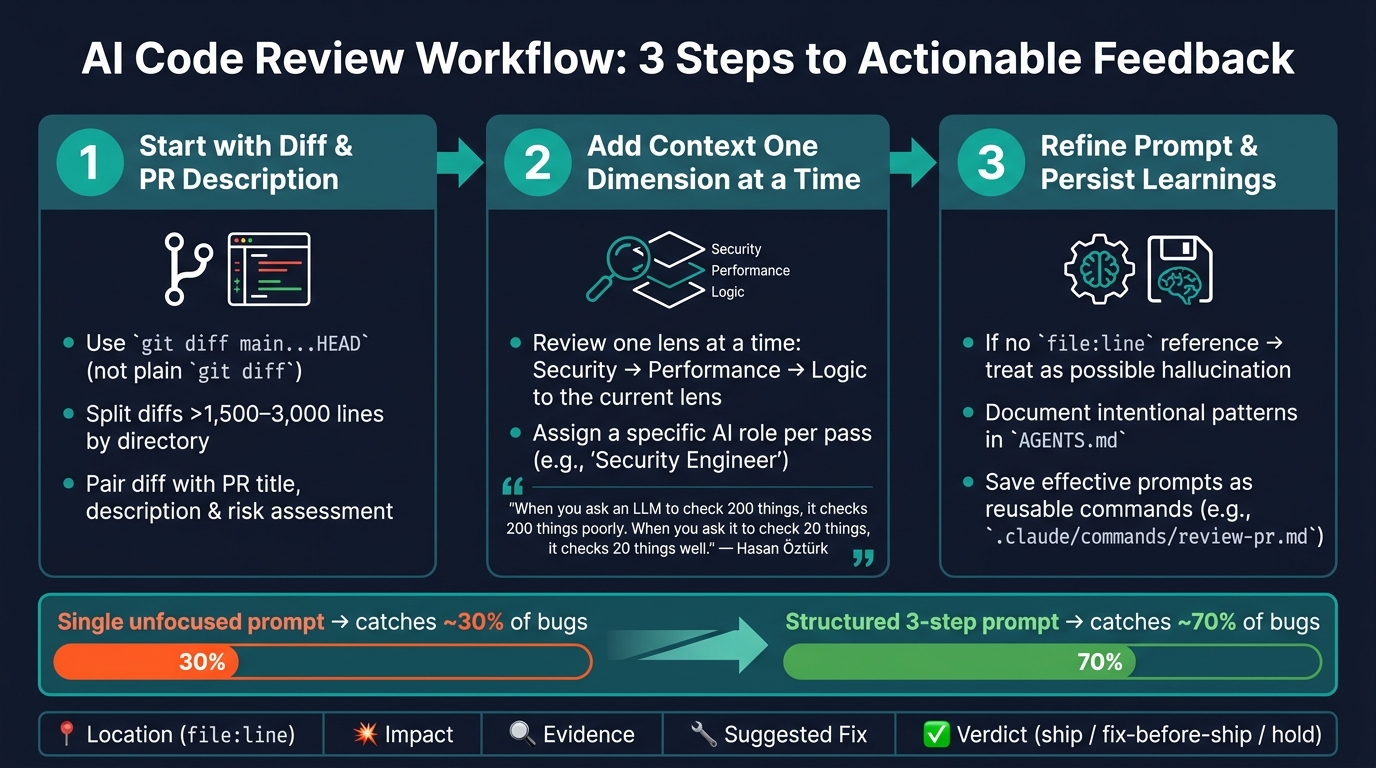
AI Code Review Workflow: 3-Step Process for Actionable Feedback
Using AI effectively in code reviews requires more than just a well-crafted prompt. What truly makes a difference is having a consistent, repeatable process. This workflow outlines how to go from raw code changes (diffs) to actionable insights without overwhelming the AI.
Step 1: Start with the Diff and PR Description
The first step is to clearly define the scope of the changes. Use git diff main...HEAD instead of a simple git diff to target only the commits in the pull request (PR). If the diff is too large - typically exceeding 1,500-3,000 lines - split it by directory. Large diffs can dilute the AI’s ability to focus on specific issues.
Pair this diff with the PR title, description, and a risk assessment. This combination helps the AI identify discrepancies between what the author intended to change and what the code actually does. With a focused diff and a clear description, you’re ready to gradually add more context.
Step 2: Add Context One Dimension at a Time
When reviewing, tackle one area at a time - start with security, then move on to performance, and finally logic. Hasan Öztürk, a software architect, explains this approach well:
"When you ask an LLM to check 200 things, it checks 200 things poorly. When you ask it to check 20 things, it checks 20 things well." [10]
To keep the review focused, include only the context relevant to the specific area you’re examining. For example, if the code involves database queries, provide the schema and index details. If it’s related to authentication, share token storage patterns. This selective context ensures the prompts remain concise and fit within the AI’s token limit.
Assign the AI a specific role for each pass - like "Security Engineer" for security reviews or "Chaos Engineer" for reliability checks. This helps tailor the feedback to the perspective you’re seeking, rather than relying on a generic "senior developer" persona.
Step 3: Refine the Prompt When the Output Misses the Mark
After running targeted prompts, evaluate the AI’s feedback. If the results seem vague, it’s often because the prompt lacked necessary context - not because the prompt itself was flawed. For example, if the AI flags an issue but doesn’t provide a file:line reference, treat it as a possible hallucination and ask for specific code references to verify the claim [2].
When the AI consistently flags intentional patterns as issues, document these patterns in a shared context file (e.g., AGENTS.md). This serves as a team memory, reducing repetitive false positives in future reviews [9][12]. Over time, you can save effective prompt structures as reusable commands (e.g., .claude/commands/review-pr.md) to ensure consistency across the team.
| Review Step | Action | Goal |
|---|---|---|
| Scope the diff | Use git diff main...HEAD |
Focus on PR-specific changes |
| Load intent | Combine PR description and risk assessment | Align AI feedback with the PR’s purpose |
| Apply one lens | Review security, performance, or logic separately | Improve the quality of insights |
| Add selective context | Provide schema, auth patterns, or environment variables as needed | Avoid hallucinations |
| Refine and persist | Address vague findings and update AGENTS.md |
Enhance future reviews |
Conclusion: What Makes an AI Code Review Actually Useful
For an AI code review to truly deliver value, it all starts with well-crafted, detailed prompts. While a single-shot prompt can identify around 30% of real bugs, a more structured approach can boost that number to about 70% [6]. The key lies in providing the AI with the right context - what the code is supposed to do, the constraints within the codebase, and the type of feedback you’re looking for. Without this clarity, the AI might focus on surface-level style issues instead of delivering meaningful, actionable feedback.
"The goal is not to replace reviewers. The goal is to make every review sharper, faster, and more consistent." - Upqbot [13]
To make the most of these tools, refine your process with tested templates. Start with these examples, tailor them to fit your specific technology stack, and build your team’s architectural guidelines into a dedicated file (like CLAUDE.md or AGENTS.md). This ensures the AI consistently aligns with your team’s unique needs. As Tech Lead Qudrat Ullah explains, "The fix turned out to be less about buying a better tool and more about moving the team’s memory into a place the AI could actually read" [12].
FAQs
How do I review a huge PR diff without hitting token limits?
To tackle a large pull request diff without running into token limits, start by concentrating on the core logic files. Break the review into manageable chunks by focusing on one module or layer at a time. Leverage tools designed to handle chunking or combine pull requests into a single, context-aware file for easier navigation.
For a more effective review, use targeted prompts - such as those focused on security or performance concerns. You can also try hierarchical prompting: begin with a broad, high-level overview, then dive deeper into specific, affected files for a more detailed analysis.
What should I do when the AI flags an issue but can’t cite file:line?
If the AI points out a potential issue but doesn’t reference a specific file or line, it might either be making an unsupported assumption or missing critical context. In such cases, ask it to back up its claim by using tools like grep, glob, or file-read functions to pinpoint the problem. If it still can’t provide clear evidence, direct it to either perform a more thorough search or explicitly state that no issue exists.
How can my team teach the AI our existing codebase patterns?
To help AI understand your codebase’s patterns, start by creating context-rich prompts that align with your specific practices. A good way to do this is by adding a CLAUDE.md file to your repository. This file should outline key details such as your coding style, naming conventions, and the test runners you use.
For more intricate systems, make sure to include rules for how layers interact and highlight any patterns that should be avoided. You can also use system prompts to enforce these guidelines. When reviewing code changes, share representative code snippets alongside your diffs. This allows the AI to detect and flag any deviations from your standards.
To make these practices consistent and easier to implement, consider using reusable review command files within your repository. These files can streamline the process and ensure everyone adheres to the same guidelines.