
Pharma Secondary Sales Data Extraction: The Exact Pipeline Architecture and Where It Typically Breaks
Huzefa Motiwala May 16, 2026
Pharma secondary sales data extraction is a complex process due to fragmented data sources, inconsistent document formats, and varying distributor workflows. It involves transforming messy, unstructured data like invoices and sales statements into clean, analytics-ready datasets. The challenges include reconciling product codes, handling regional formatting quirks, and managing extraction errors caused by structural inconsistencies in PDFs and Excel files.
To build a reliable pipeline, you need six key stages: ingestion, classification, extraction, validation, reconciliation, and export. Each step addresses specific pain points, from standardizing inputs to ensuring data matches business rules. Common failure points include misaligned templates, OCR errors, and mismatched product details, which can cause significant downstream issues if not caught early.
Key takeaways:
- Document variability: Inconsistent layouts and formats cause most extraction failures.
- Pipeline stages: A structured process minimizes errors and ensures data quality.
- Error handling: Confidence scoring and human review are critical for resolving low-confidence records.
- Monitoring: Tracking metrics like field completion rates and reconciliation match rates helps detect issues before they escalate.
The goal? A scalable system that handles messy data efficiently while maintaining high accuracy and compliance standards.
Document Variability in Pharma Secondary Sales Data
Common Document Types and How They Are Structured
Pharma secondary sales data comes in a variety of formats, often with unpredictable structures. These documents, critical for the pharmaceutical supply chain, vary widely in their content and layout.
- Wholesaler Invoices: These are a primary source for drug-specific records in the U.S. They typically include details like NDCs (National Drug Codes), package sizes, pricing, and rebate information.
- Stock and Sales Statements: These documents provide a snapshot of inventory, including opening stock, receipts from primary sales, closing stock, and calculated secondary sales figures.
- Credit Memos and Adjustment Documents: Covering returns, shortages, and rebills, these often show up as separate files or as additional pages appended to standard invoice PDFs.
- Stockist Invoices: More common in international supply chains, these documents include pharma-specific fields such as batch numbers, expiry dates, and pricing structures. Their format often differs significantly from U.S. wholesaler invoices.
Understanding these document types and their structures is crucial, as inconsistencies and deviations can lead to data extraction failures.
Where and How Pharma Documents Break Extraction Logic
The majority of data extraction issues are caused by flawed assumptions about document structures, rather than problems with OCR or scan quality.
Complex layouts pose significant challenges for extraction systems. For example, multi-row line items are a common issue. When a product description exceeds 60 characters, it often wraps to the next row. Systems that treat each row as a separate record can create phantom line items or distort subtotals, leading to a 1.5% failure rate in production workflows [6]. Nested table structures are another headache. If tax splits or freight charges are embedded within a single cell, the hierarchy required for ERP systems can be lost. This type of failure occurs in 3–4% of cases involving tables with three or more nested levels [6].
"Matching logic looks straightforward on paper, but it breaks down when one wholesaler puts the NDC in the description, another splits pack size into a separate column, and a third appends credit pages after the original invoice pages." – David Harding [1]
Regional numeric conventions add another layer of complexity. For instance, a parser designed for U.S. number formats might misinterpret Indian Lakh-formatted figures. A value like "12,00,000" (representing 1,200,000 in the Indian system) could be parsed incorrectly. Similarly, round-rupee suffixes like "4200/-" and outdated time-format artifacts such as "00:80" in price columns can trigger non-numeric ingestion errors.
The table below outlines common failure modes for each document type:
| Document Type | Failure Modes |
|---|---|
| Wholesaler Invoice | NDC buried in description; transposed unit price and quantity [1][6] |
| Stock & Sales Statement | Column shifts; missing closing stock; goods-in-transit mismatches [2] |
| Credit Memo / Adjustment | Appended pages misclassified; negative values misinterpreted [1][6] |
| Multi-Invoice PDF Batch | Boundary failures; vendor data "bleeding" between sequential invoices [6] |
| Stockist Invoice (International) | Multi-row descriptions; regional notation artifacts; NDCs absent or non-standard [1][6] |
These structural inconsistencies not only lead to isolated errors but also jeopardize the scalability of data extraction workflows. For example, when tax rates are present but the base amount is unclear – especially in documents with complex discount structures – extraction can fail in 8% of cases [6]. In high-volume operations handling thousands of documents each month, even a small failure rate of 1–2% can result in significant reconciliation gaps by the end of the month.
sbb-itb-51b9a02
Pipeline Architecture for PDF and Excel Data Extraction
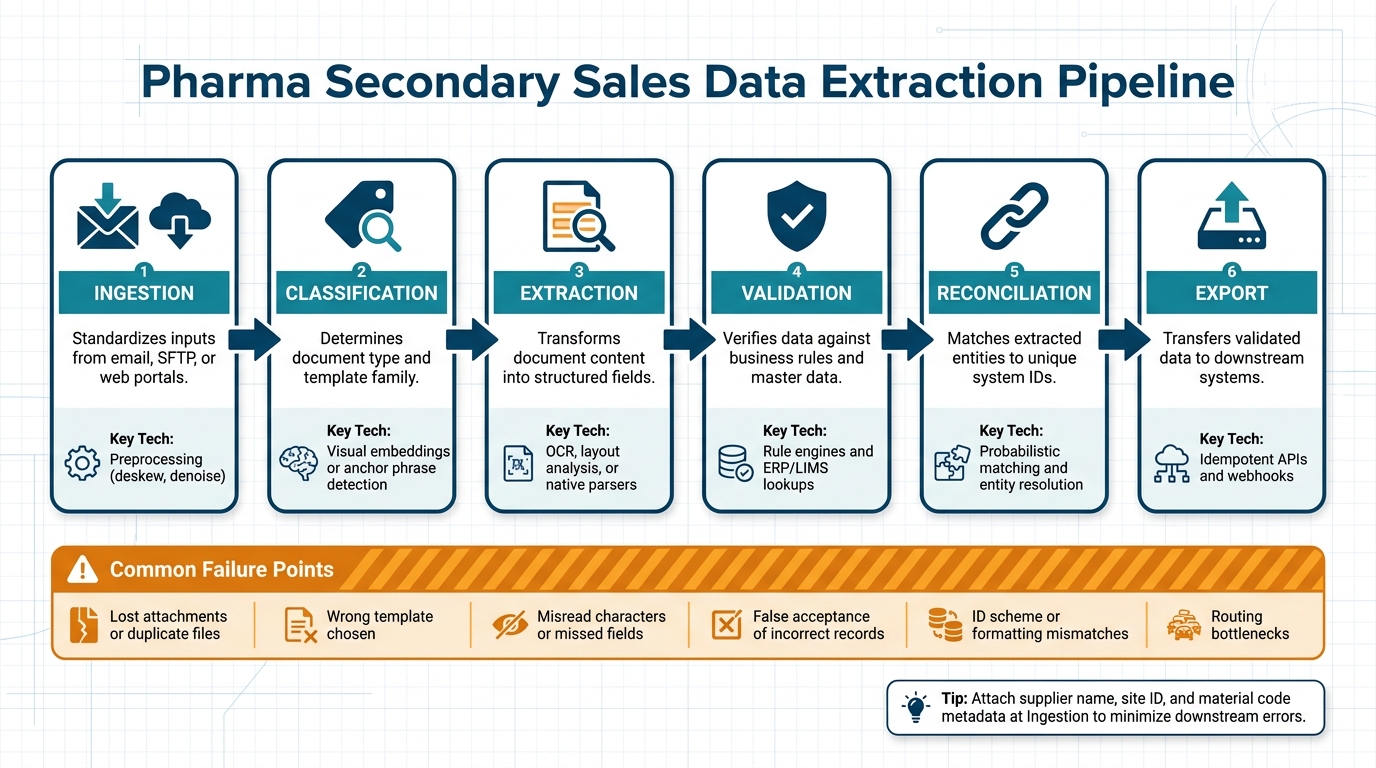
Pharma Secondary Sales Data Extraction Pipeline: 6 Key Stages
The Stages of a Pharma Data Extraction Pipeline
A well-structured pharma data extraction pipeline consists of six key stages: Ingestion, Classification, Extraction, Validation, Reconciliation, and Export. Each stage plays a vital role in addressing the variability of document formats and ensuring the accuracy of the extracted data.
| Stage | What It Does | Key Technology |
|---|---|---|
| Ingestion | Standardizes inputs from sources like email, SFTP, or web portals | Preprocessing (e.g., deskew, denoise) |
| Classification | Determines document type and template family | Visual embeddings or anchor phrase detection |
| Extraction | Transforms document content into structured fields | OCR, layout analysis, or native parsers |
| Validation | Verifies data against business rules and master data | Rule engines and ERP/LIMS lookups |
| Reconciliation | Matches extracted entities to unique system IDs | Probabilistic matching and entity resolution |
| Export | Transfers validated data to downstream systems | Idempotent APIs and webhooks |
It’s crucial to attach metadata – such as supplier name, site ID, and material code – during the Ingestion phase. Doing so early minimizes errors, prevents misclassification, and provides valuable context for downstream processing. This approach directly improves both data quality and analytics accuracy.
"In pharma intake, the most valuable metric is often not OCR accuracy by itself, but the percentage of documents that enter the system with the correct lot, supplier, and site metadata on the first pass." – Avery Thompson, Senior Technical Content Strategist
How to Design for Inconsistent Tabular Data
One common mistake in designing extraction systems is relying on a single model to handle every distributor format. Instead, start by classifying the document family to ensure the correct parser is applied before extraction begins.
For better reliability, use ensemble techniques like visual embeddings, text fingerprints, and logo detection. When a document variant doesn’t match any existing template, structural diffing can compare it to a baseline layout. This method flags changes – like a shifted "Total" column or an added tax row – before incorrect data propagates through the system.
Normalization is equally important. Extracted data should be converted into standard formats (e.g., ISO-8601 for dates, consistent currency strings, and uniform units) before validation rules are applied. Skipping this step can result in false positives that overwhelm human reviewers with unnecessary tasks.
"If a document can fail in three places, instrument all three places. Most ‘OCR problems’ are actually routing, schema, or master-data problems." – Daniel Mercer, Senior Technical Editor
Carefully implementing these strategies ensures the pipeline is prepared to handle the unique challenges of both PDF and Excel formats.
PDF vs. Excel: How Processing Logic Differs
Once the extraction model is tailored for specific templates, the processing logic must adapt to the distinct characteristics of PDFs and Excel files.
PDFs require reconstructing structure from visual layouts. Digitally generated PDFs often allow direct text-layer parsing, while scanned PDFs need OCR and computer vision to accurately identify rows and columns. Always prioritize checking for a native text layer first, as OCR is resource-intensive and prone to character-level errors.
Excel files, on the other hand, avoid OCR but come with their own complexities. Issues like merged headers, hidden rows, formula-driven cells, and inconsistently named tabs demand careful handling. For example, in pharma distributor reports, leading zeros in NDCs or batch numbers can be silently removed when spreadsheet parsers misinterpret numeric columns.
| Feature | PDF Processing | Excel Processing |
|---|---|---|
| Primary Technology | OCR and computer vision | Programmatic parsing (native/XML) |
| Data Access | Spatial detection-based extraction | Direct access to cell values and metadata |
| Key Challenges | Skew, noise, and loss of spatial context | Hidden rows, merged cells, tab inconsistencies |
| Pre-processing | Deskewing, denoising, contrast enhancement | Schema mapping and tab normalization |
| Data Integrity Risk | Character misreads (e.g., "8" vs. "B") | Silent removal of leading zeros |
For both formats, implementing field-level confidence scoring helps human reviewers focus on uncertain fields rather than rechecking entire documents. This precise focus ensures smoother validation and reconciliation in later stages, creating a more efficient and reliable pipeline.
Validation and Reconciliation: Making Extracted Data Usable
Validation Checks for Extracted Sales Figures
Once data is extracted, it’s essential to confirm its internal consistency. By leveraging the structured data from the pipeline, validation ensures the results are both accurate and dependable. One key method is cross-field arithmetic validation. This involves checking that the quantity multiplied by the unit price matches the line total and that all line totals add up to the invoice subtotal before tax. This approach is especially effective at catching "silent errors", such as when numbers are misassigned – like swapping unit price and quantity [6].
In the pharmaceutical space, drug-level validation is equally critical. Every National Drug Code (NDC) and pack size must align with the internal product catalog or master data to avoid false discrepancies. For example, a "box of 30" might be invoiced as "30 units", creating misleading sales data [1]. Tools like the RxNorm API from the National Library of Medicine can help by standardizing brand names, generics, and regional variants (e.g., "Humira" vs. "adalimumab") under a single RxNorm Concept Unique Identifier (CUI) [9].
Pricing validation is another key step. Automatically flagging prices that fall outside expected ranges can prevent costly errors [1] [10]. Additionally, duplicate detection – using a combination of vendor ID, invoice number, and invoice date – helps identify both exact duplicates and near-duplicates caused by split shipments or resubmitted invoices [10].
"Designing for failure visibility is more important than headline accuracy. A system that flags its own uncertainty is safer than one that is confidently wrong." – Number7ai [6]
Once the individual records pass validation, the focus shifts to reconciling data across multiple distributor formats.
Reconciling Data Across Multiple Distributor Formats
After confirming the integrity of individual records, the next challenge is aligning data from different distributors. While validation ensures internal consistency, reconciliation ensures that the same product, outlet, and transaction are represented consistently, regardless of how the data comes in.
A normalization layer is crucial before applying any matching logic. This step standardizes data by enforcing ISO-8601 date formats, unifying numeric formats, converting pack sizes to a common unit, and ensuring each line item corresponds to a single row. Skipping this step is a common reason reconciliation processes fail at scale [1] [8].
The table below outlines key reconciliation dimensions, their sources of truth, common conflicts, and suggested resolutions:
| Reconciliation Dimension | Source of Truth | Common Conflict / Resolution |
|---|---|---|
| Product Identity | NDC, RxNorm CUI, Wholesaler Item Code | Brand vs. generic naming; resolve via RxNorm CUI mapping [1] [9] |
| Quantity / Pack Size | Material Master, PO, Receiving Record | "Each" vs. "Box" discrepancies; resolve via pack-size normalization [1] |
| Pricing | GPO Contract, WAC Reference | Tier mismatches or surcharges; resolve via contract price validation [1] |
| Entity / Outlet | DEA Number, Facility ID, ERP | Trade name vs. legal entity name; resolve via deterministic ID-first matching [6] [1] |
| Transaction | Invoice Number, PO Number, Date | Duplicate invoices or split shipments; resolve via hash-based deduplication [10] |
For matching products and entities, start with deterministic rules like exact NDC or Tax ID matches. Use probabilistic logic only when exact matches fail, such as when dealing with spelling variations in distributor names or addresses [8]. Attach source file and page references to every reconciled row to maintain traceability. This is especially important in regulated industries, where an audit trail is a must [1] [10].
To ensure financial accuracy, the three-way matching process is the gold standard. This method aligns the extracted invoice with the original purchase order and the goods receipt confirmation, helping to catch overbilling, unauthorized charges, and quantity mismatches before they can affect the ledger [10] [11].
Error Handling and Human Review for Low-Confidence Records
Even the best validation and reconciliation systems will encounter records they can’t resolve automatically. What really matters is how these exceptions are handled afterward.
How Confidence Scoring Triggers Manual Review
After thorough validation and reconciliation, records with low confidence scores need special attention. Each field extracted from distributor reports or stockist invoices is assigned a confidence score. These scores operate at multiple levels – character, field, and page – making it easier to pinpoint where the extraction process struggled. It could be something like a blurry NDC on a faxed invoice, a misread currency field (e.g., "$1O0.00" instead of "$100.00"), or a mismatched product code in the master data [12][7].
A three-tier routing system is a practical way to manage these records based on their confidence scores:
| Confidence Tier | Threshold | Action |
|---|---|---|
| Auto-approve | >95% | Send directly to ERP/analytics |
| Spot-check | 70%–95% | Route to a lightweight queue for field-specific verification |
| Manual Review | <70% | Full human review against the original document image |
The 95% auto-approval threshold is a common industry benchmark [12][10]. It’s better to start cautiously by routing more records to spot-check and then gradually relax the thresholds after monitoring error rates over several weeks [10]. Allowing incorrect data into the ERP system due to an overly high threshold can be far costlier than temporarily increasing the review workload.
In addition to confidence scores, deterministic business rules can flag errors. For example, if a line item’s quantity multiplied by its unit price doesn’t match the total, or if an expiry date is earlier than the invoice date, those records will be flagged regardless of their confidence score [10][4]. Routing flagged records to the right team is also crucial – pricing discrepancies should go to finance, while missing NDCs should be directed to procurement. Sending everything to a general queue only creates bottlenecks and overwhelms reviewers [10].
"In pharmaceutical quality, manual review is not a failure of automation; it is part of the control strategy." – Avery Thompson, Senior Technical Content Strategist, OCRDirect [7]
These steps lay the groundwork for a human review process that integrates seamlessly into the overall pipeline.
Building a Review Workflow That Feeds Back Into the Pipeline
Flagged records aren’t just about correcting errors – they’re also an opportunity to improve the extraction process over time. The review queue should log corrections as structured data, including the original value, the correction, and the rationale behind it. This allows the pipeline to learn and adapt [7][5].
For example, in February 2026, a team at Fractal Analytics developed an invoice processing system for a U.S. healthcare client. By replacing a RAG-based system (which had a 91% accuracy rate) with a fine-tuned LLaMA 3.2 model and a three-tier validation layer, they achieved 99% field-level accuracy across 10,000 invoices monthly. When a vendor changed its invoice format, the team used the review queue to collect samples and retrain the model, restoring accuracy within a week [13].
The design of the review interface plays a big role in how quickly errors can be fixed. Reviewers should see the original document image alongside the extracted fields, with low-confidence values clearly highlighted. This setup speeds up corrections and minimizes approval errors [12][10].
"A reviewer’s correction should feed back into the workflow as labeled data or rule updates." – OCRDirect [5]
Over time, corrections should also help build distributor-specific template libraries – collections of known quirks in supplier layouts. For instance, if a regional distributor consistently formats pack sizes as "30s" instead of "30 units", this pattern should be turned into a parsing rule rather than repeatedly flagged for manual review [7][5]. Tracking correction rates by distributor and field type helps identify whether a source needs a dedicated parser update or if the issue is just a one-off anomaly.
Monitoring Data Quality and Catching Extraction Drift
Fixing errors after review is a reactive approach, but proactively identifying problems can stop bad data from ever reaching the review stage. This requires continuous monitoring to ensure both the pipeline’s execution and the accuracy of its output. To do this effectively, teams need to track specific metrics that can signal extraction drift early.
"A pipeline completing successfully tells you the scheduler ran. It does not tell you the data is correct." – Sai S, ForageAI [14]
This distinction is key. By 2026, 34% of document processing failures occur after the extraction phase has technically succeeded [15]. In other words, the process may appear to have worked, but the data itself is still incorrect.
Key Metrics for Tracking Extraction Quality
No single metric can capture all potential issues. Instead, effective monitoring relies on tracking multiple indicators, each designed to highlight a specific type of failure.
- Field Completion Rate: This is often the first sign of trouble. For instance, if a required field – like a lot number – drops from its typical 95% completion rate by even 5–10 percentage points, it could mean a distributor has updated their template [14].
- OCR Confidence Trends: These can reveal more subtle problems. Even if data is extracted, a decline in confidence scores across batches might indicate issues like lower scan quality or shifts in document layouts [16].
- Reconciliation Match Rate: This is crucial in industries like pharma. If identifiers (e.g., lot numbers or product codes) don’t match with ERP or master data on the first try, it could signal changes in formatting or ID schemes upstream [5].
- Review Queue Size: A sudden surge in flagged records often points to widespread template changes rather than isolated anomalies.
| Metric | What It Catches | How to Track It |
|---|---|---|
| Field Completion Rate | Template restructuring | Per-field null rate per run [14] |
| OCR Confidence Trend | Document quality/layout drift | Batch-level percentile monitoring [16] |
| Reconciliation Match Rate | ID scheme or formatting changes | Match rate against ERP/master data [5] |
| Review Queue Size | Widespread template drift | Rolling queue volume by source [14] |
Setting Alert Thresholds to Catch Drift Early
Static thresholds, such as flagging when accuracy falls below 90%, often lead to false alarms. A smarter approach is using a rolling baseline over 7 to 14 days to detect meaningful deviations [14].
For example:
- Trigger an alert if a source’s record volume drops by more than 20% or increases by 30% compared to its rolling average.
- If the field completion rate falls by 5–10 percentage points from its baseline, initiate a review.
- For confidence scores, monitor the 50th percentile. A drop from 0.75 to 0.65 across a batch suggests the model is encountering unfamiliar document layouts [17].
Another effective method is canary validation. This involves keeping a reference set of 10–20 records with known values and processing them in every cycle [14]. This approach can catch semantic inversion – a serious issue where field labels stay the same, but their meanings change (e.g., extracting "discounted price" instead of "list price" due to changes in a PDF’s structure) [14].
However, too many alerts can overwhelm teams. Channels receiving over 50 alerts per week often see a 15% drop in responsiveness [14]. To combat this, segment alerts by source, document type, and field type. This helps ensure relevant issues are routed to the right team without creating unnecessary noise.
"The aggregate number is a security blanket. The segmented breakdown is a spotlight." – The Mindful AI [19]
Conclusion: What a Production-Ready Pharma Extraction Pipeline Requires
After diving into the challenges of data extraction and error management, let’s boil down the essentials for crafting a pharma extraction pipeline that’s ready for real-world operations.
Key Points for Building a Reliable Extraction Pipeline
Think of a pharma secondary sales extraction pipeline as more than just a data tool – it’s a control system. Every layer has a purpose, and skipping steps can create gaps that snowball into bigger issues.
Start with a controlled intake process and early classification. Treating every file as a generic PDF strips away vital context before extraction even begins [5]. After that, focus your extraction calls – handle metadata, identifiers, and line items separately instead of lumping everything into one broad pass. This approach minimizes the risk of missing critical data fields [20]. Standardize outputs into formats like ISO-8601 dates, consistent units, and preserved leading zeros to make sure the data plays nicely with downstream systems [7][8].
Validation and reconciliation aren’t optional – they’re essential safeguards. These steps catch issues like price discrepancies, mismatched quantities, or changes in ID formats before they make their way into reporting. And while automation is powerful, human review is still crucial. When confidence levels dip, the system should route these cases to people, ensuring attention is directed where it’s needed most [5].
Lastly, an immutable audit trail is non-negotiable. In FDA-regulated environments, compliance with 21 CFR Part 11 means the pipeline must log who accessed a document, when edits were made, and which model version performed the extraction [3]. Without this, even the most accurate pipeline can fail an audit.
"The problem is the audit trail: the system can’t demonstrate who accessed the document, when edits were made, or whether the electronic signature meets 21 CFR Part 11 requirements." – Artificio [3]
These measures form the backbone of a reliable, defensible pipeline.
How to Evaluate Your Current System and Plan Next Steps
Start small. Focus on a single, stable document type – Supplier Certificates of Analysis (COAs) are a great choice. They’re high-volume, structurally consistent, and directly impact quality decisions [5][7]. Automating one document type effectively will reveal weaknesses in your classification logic, validation rules, and review workflows before scaling to more complex formats like handwritten records or multi-distributor invoices.
Evaluate your system by tracking how many documents correctly capture key metadata – like lot numbers, supplier names, and site details – on the first pass [5]. A low success rate here points to upstream issues in intake and classification, not the extraction model itself.
Next, scrutinize your validation layer. Good rules should be simple enough to explain in one sentence to a non-technical reviewer. If they aren’t, they probably shouldn’t act as release gates [18]. Also, ensure your monitoring tracks more than just pipeline completion. Metrics like field-level null rates and reconciliation match rates give a clearer picture of data quality rather than just system performance.
Here’s a quick diagnostic checklist for evaluating your pipeline:
| Pipeline Layer | Control Objective | Typical Failure Mode |
|---|---|---|
| Capture | Reliable intake of all files | Lost attachments or duplicate files [5] |
| Classification | Select correct extraction logic | Wrong template chosen for a document variant [5] |
| Extraction | Create structured records | Misread characters or missed fields [5] |
| Validation | Protect data quality and compliance | False acceptance of incorrect records [5] |
| Routing | Speed resolution and escalation | Manual bottlenecks and review backlogs [5] |
Maintaining high-quality secondary sales data is an ongoing effort. Document formats evolve, templates change, and models drift over time. Teams that prioritize continuous monitoring and feedback treat these tasks as part of daily operations, not just something to address when problems arise.
FAQs
How do we handle new distributor template changes without breaking the pipeline?
To address changes in distributor templates, rely on AI-powered, document-type-based extraction rather than vendor-specific templates. This approach minimizes maintenance efforts and adjusts seamlessly to format updates.
Build a modular pipeline that allows individual components to be updated without interrupting the entire system. Add features like validation, reconciliation, and human-in-the-loop workflows to handle variability and correct errors effectively. These strategies help maintain a flexible and reliable system, ensuring the pipeline remains functional and efficient over time.
What validation rules catch the most costly invoice extraction errors?
The most effective ways to validate data include using confidence scoring and applying business rule checks. These methods involve comparing extracted sales figures to expected ranges and historical trends to ensure accuracy. Incorporating multi-layer validation workflows with a human-in-the-loop review is essential for handling low-confidence results and avoiding expensive mistakes. Additionally, regular monitoring plays a key role in maintaining data quality over time and detecting extraction drift as early as possible.
How do we reconcile products when NDCs are missing or inconsistent?
To manage products lacking reliable NDCs, start by using schema mapping to align data fields across different formats. This ensures consistency when integrating information. Validate sales figures by comparing them to historical data, and rely on alternative identifiers like SKUs or product descriptions to fill in gaps where NDCs are unavailable.
Develop workflows that can compare and merge data from various formats. For cases where confidence in the data is low, incorporate error-handling mechanisms to flag these for human review. This approach ensures accuracy while minimizing errors.
Finally, maintain a system to monitor extraction quality regularly. This allows you to adapt to changes in document formats or patterns of missing data, ensuring your processes remain effective over time.
Related Blog Posts
- 5 Things That Break First When a Startup Scales Past $2M ARR
- Why Enterprise Document AI Fails at the Extraction Layer, Not the Model Layer
- LLM-Based Document Processing vs Traditional OCR: When Each Actually Belongs in Your Stack
- Document AI Audit Template: How to Evaluate Whether a Vendor’s Pipeline Will Survive Your Edge Cases







Leave a Reply