Blog15 min read
When Incremental Modernisation Is the Wrong Call: The Case for Bounded Rewrites
By Huzefa Motiwala · Co-Founder & Chief Product Officer

Sometimes the safer move is to stop patching and replace one broken part on purpose. If a legacy system has deep coupling, fragile tests, slow delivery, and release risk that keeps growing, I’d choose a bounded rewrite over endless small fixes.
Here’s the core idea in plain English:
- Incremental modernization fails when each small change breaks something else.
- A bounded rewrite replaces one high-risk subsystem at a time, not the whole app.
- Feature flags let me send traffic to old or new code without a hard cutover.
- The safe rollout path is usually: dark launch → internal users → shadow mode → canary → 100% traffic → legacy shutdown.
- I’d only move forward with written rollback rules, like:
- Error rate: more than 2% above baseline for 5 minutes
- P95 latency: more than 200 ms slower than legacy
- Data mismatch: zero tolerance for payments, pricing, or regulated fields
- Conversion drop: more than 5%
- Even after 100% rollout, I’d keep the flag in place until the old path sees zero traffic for 30 days.
- And I’d remove the flag fast. Old flags can turn into dangerous dead code. Knight Capital lost $460 million in 45 minutes after a dead flag path came back to life.
If you want the short version: rewrite less, isolate more, route traffic with care, and delete the old path fast.
A simple way to think about the three options:
| Approach | Best use case | Risk level | Time to value |
|---|---|---|---|
| Incremental modernization | Architecture still works, code is messy | Low | Days to weeks |
| Bounded rewrite | One broken subsystem is blocking growth | Medium | 3-6 months per module |
| Full rewrite | Entire app or stack is no longer usable | High | Months to years |
I’d use this article as a guide for one job: moving users from a legacy path to a new one without breaking production.
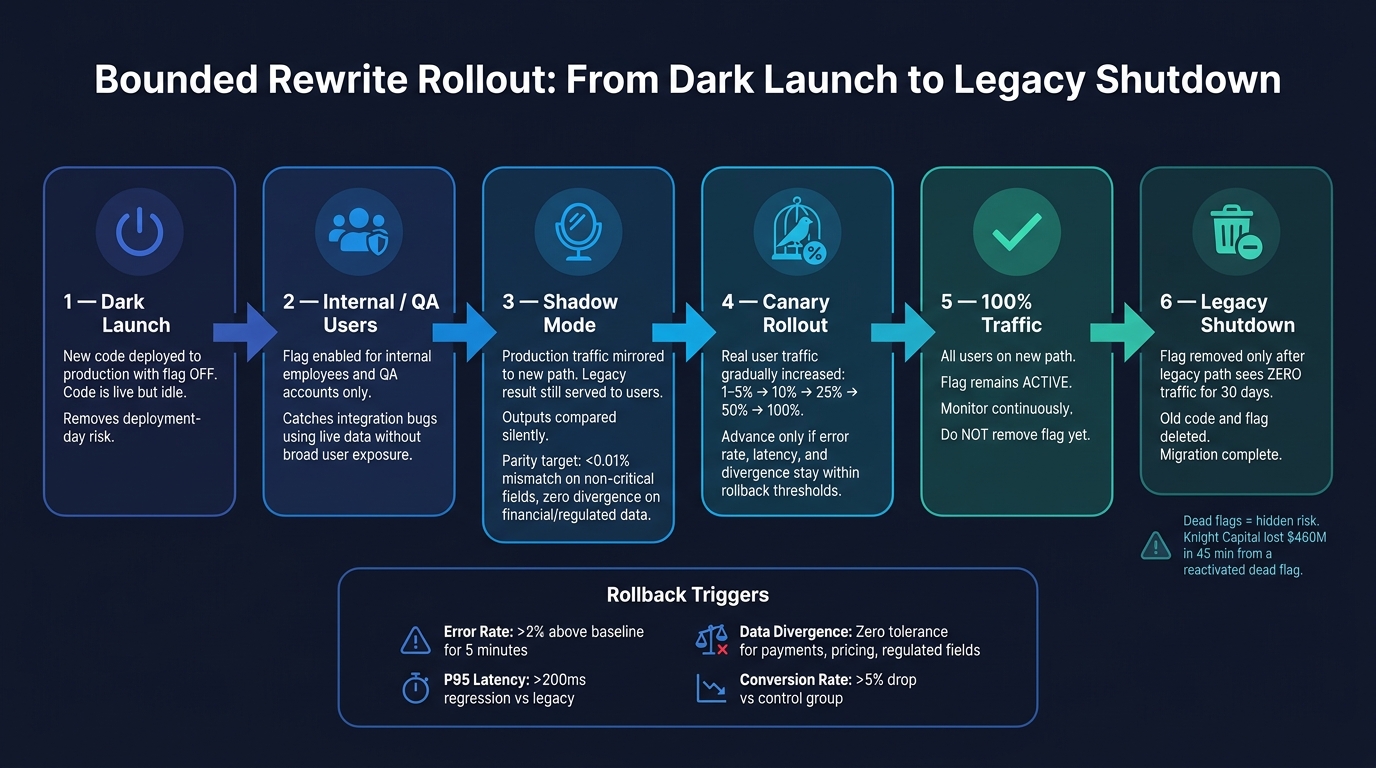
Bounded Rewrite Rollout: From Dark Launch to Legacy Shutdown
Rewrite legacy 🏚️ system without PAIN! 🏘️ (Strangler Fig pattern)
1. Why Incremental Modernization Breaks Down in Some Legacy Systems
Incremental modernization works only as long as the underlying architecture can still carry the load. Once the architecture itself becomes the problem, each new change ends up dodging the same weak base. Over time, those workarounds pile up faster than the system gets better.
1.1 Warning Signs That Incremental Change Is Adding Risk
One of the clearest signs is cascading failures. You update one module, and suddenly something unrelated breaks. That’s what high coupling looks like in practice, and it turns every patch into a bit of a guessing game.
Another red flag is unstable state flow. If a system depends on global state, shared caches, or deeply nested state passing, behavior gets hard to track. A small tweak in one place can ripple out in ways no one expected.
You see the same pattern in the data layer too. When the database becomes the glue between modules, isolating one subsystem gets messy. You can’t change it cleanly without touching the schema, and once you touch the schema, every module that reads from it is at risk. Add undocumented dependencies, and now the team is working inside a high-debt legacy system where avoiding breakage takes more time than shipping new features.
In high-debt systems, most engineering time shifts from new work to maintenance, and release risk rises with every change [1].
That’s usually the point where another round of patching stops helping. What these systems need is a controlled way to move users from old paths to new ones. Otherwise, each fix can make the blast radius larger, not smaller.
1.2 Why Bounded Rewrites Beat Endless Patching
A bounded rewrite swaps out one subsystem behind stable contracts while the rest of the platform stays live. It sits between two extremes: it’s narrower than a full rewrite, but it goes deeper than plain refactoring.
That middle ground matters. Full rewrites often run over schedule and budget because they throw away working domain knowledge [1]. A bounded rewrite avoids that trap by drawing a clean line around one business capability, like billing or search, and replacing only that part while the rest of the system keeps running.
This approach is often called the Strangler Fig pattern.
"The most important reason to consider a strangler fig application over a cut-over rewrite is reduced risk." - Martin Fowler [1]
The big win here is containment. If something goes wrong, rollback is faster because the change is boxed in. Feature flags make that boundary usable in production by routing traffic to the new path without exposing the rest of the system. From there, the focus shifts to making that boundary safe enough to handle live traffic day to day.
2. How to Decide Between Incremental Modernization and a Bounded Rewrite
Choose a rewrite when the system’s problems come from the architecture itself, not from a handful of isolated bugs.
2.1 Technical and Business Criteria for Choosing a Rewrite
On the technical side, the clearest sign is simple: the defects are built into the architecture, not just buried in the code. If your Technical Debt Ratio is above 5%, patching usually stops being a workable long-term move [1]. Other strong signals include an unsupported or end-of-life stack, unpatched security issues, technology that no longer matches current load patterns, and a tightly coupled codebase where a change in one area keeps breaking unrelated modules [5][2][1].
The business side is just as plain. If a small feature request that should take a few days turns into a multi-week project, delivery has slowed from days to weeks [5]. If the stack makes hiring harder, candidates may slow down or drop out of the process [5][2]. And if the company is spending 60-80% of its IT budget on maintenance, or developers spend less than 40% of their time building new features, the system is taking too much and giving too little room to grow [1].
A useful scoring method is to look at four dimensions:
- Codebase Health
- Business Risk
- Team Capability
- Timeline Pressure
Timeline pressure matters because delayed releases add delivery risk. If the total score is above 65, a rewrite usually makes more sense than continued refactoring [6].
These criteria matter because feature flags only help when there’s a subsystem narrow enough to route in a safe way.
2.2 Incremental Modernization vs. Bounded Rewrite vs. Full Rewrite: A Comparison
Once you decide a rewrite may be needed, the next question is more specific: can the legacy system support a clean boundary, or are you dealing with something much bigger?
| Incremental Modernization | Bounded Rewrite | Full Rewrite | |
|---|---|---|---|
| Scope | Component or page level | Specific business context or module | Entire application |
| Risk | Low; predictable | Medium; controlled via proxy or coexistence | Higher risk; success depends on execution |
| Time to Value | Days to weeks [1] | 3-6 months per module [1] | Months to years [1] |
| Cost | Spread across regular workflows | Phased investment, dual-path period | High upfront; phased investment |
| Best Fit | Sound architecture, messy implementation | Broken module blocking growth, viable core | Dead stack, total pivot, or small MVP |
Full rewrites come with the highest failure risk and the broadest range of cost overruns [1]. That’s why it makes sense to keep the rewrite bounded when you can.
Once the boundary is set, the next job is routing traffic through it without putting users through a hard cutover.
3. Feature Flag Architecture for Legacy Systems Without Clean Boundaries
Legacy systems almost never give you neat separation lines. The safest setup is to route traffic through a decision layer, evaluate each flag once per request, and hide legacy I/O behind thin adapters. The first call you need to make is simple: where does the flag decision live?
3.1 Flag Design That Works Inside Tangled Code Paths
A common mistake is sprinkling raw flag checks all through business logic. An if (flags.isEnabled("new-checkout")) tucked inside a payment controller is tough to test, tough to remove, and easy to miss later. A better move is to centralize the decision in a routing layer that returns the implementation, not the flag key. That way, the rest of the code never deals with flag plumbing at all.
The other big rule is request-scoped evaluation. Check the flag once at the edge of the request, then pass that decision down the call stack. One request stays on one path. No mid-request drift, no weird split behavior.
At I/O boundaries, put thin adapters around databases, SDKs, and APIs. Wrap the legacy call in a small adapter layer, then use the flag to switch between the old adapter and the new one. This gives you a clean seam without rewriting core business logic. Keep kill switches for immediate shutdowns, and make sure each one has an owner and a runbook.
That setup fits neatly into middleware, factories, and service wrappers.
3.2 Code-Level Patterns in Node.js and Python
Use wrappers and factories to route around the legacy module.
In Node.js (Express), middleware is a natural place to evaluate flags. The middleware checks user context, like session data, headers, or a user ID, and attaches the routing decision to the request object before the controller runs. The controller then calls a factory that returns either the legacy service or the modern service based on that decision. The legacy module stays untouched.
// middleware/featureRouter.js function featureRouter(flagService) { return async (req, res, next) => { req.useModernCheckout = await flagService.isEnabled('modern-checkout', { userId: req.user?.id, }); next(); }; } // controllers/checkoutController.js function checkoutFactory(req) { return req.useModernCheckout ? require('../services/modernCheckoutService') : require('../services/legacyCheckoutService'); } async function handleCheckout(req, res) { const service = checkoutFactory(req); const result = await service.processOrder(req.body); res.json(result); } In Python (Flask), the same pattern works with a service wrapper. The wrapper takes the flag state at construction time through dependency injection, which keeps the underlying service unaware of the flag system.
# feature_decisions.py class CheckoutDecisions: def __init__(self, flag_client, user_context): self._flag_client = flag_client self._user_context = user_context def should_use_modern_checkout(self) -> bool: return self._flag_client.is_enabled('modern-checkout', self._user_context) # checkout_router.py def get_checkout_service(decisions: CheckoutDecisions): if decisions.should_use_modern_checkout(): return ModernCheckoutService() return LegacyCheckoutService() Use semantic method names so call sites still read cleanly after the flag is gone.
For safety-critical paths like payments or permissions, a shadow read pattern adds one more safety check. Both paths run, but only the legacy result goes back to the user. Any mismatch between the two outputs gets logged for comparison. GitHub used this approach with their open-source Scientist library when rewriting their core permissions system. They ran both the old and new logic in production, always returning the legacy result, until the new path was proven to match. [8]
Once routing is in place, the next problem is just as common: flags that never get removed.
3.3 Flag Lifecycle Management and Debt Control
Migration flags that stick around too long turn into hidden technical debt. Old or repurposed flags can trigger catastrophic failures, so every flag needs a short lifespan and one clear owner.
The fix starts the moment the flag is created, not months later when it starts causing pain. Each flag should get three things up front:
- An owner
- An expiration date
- A flag type that sets its expected lifespan
A naming convention also helps separate temporary release toggles, long-lived operational kill switches, and experiment flags.
CI/CD enforcement is the last guardrail. Add a linter that scans the codebase for flag references and fails the build if a flag is past its expiration date. Some teams also add time-bomb tests: automated tests that fail on purpose once a flag outlives its assigned lifespan. That forces removal before the flag turns into permanent clutter.
With ownership and expiry defined early, teams can roll out changes without letting temporary flags harden into permanent code.
4. How to Move Users from Legacy to Modern Paths Without Breaking Things
With the routing layer in place, the next step is moving people over in stages.
4.1 The Rollout Sequence from Dark Launch to Full Cutover
Handle each stage like a gate with clear exit rules, not just another date on the release calendar. Start with a dark launch: ship the new code to production with the flag turned off. The code is live, but idle, which removes deployment-day risk [7][3].
After that looks stable, turn the flag on for internal employees or QA accounts. This gives you a chance to catch integration bugs in production while using live data, but without sending broad user traffic yet [7][3].
Next comes shadow mode. Before any real users see the new path, mirror production traffic to it and keep serving the legacy result. That way, you can compare outputs safely. The new path gets tested under real conditions, while users still get the old response. For high-stakes data, use change data capture (CDC) so the new system mirrors production reads without writing to the new system [8].
Only when shadow mode shows parity should you move to a canary rollout [9][4][3]. In many teams, parity means a mismatch rate below 0.01% on non-critical fields and zero divergence on financial or regulated data. Once you hit that mark, begin with 1% to 5% of real users, then move through 10%, 25%, 50%, and 100% as long as error rate, latency, and divergence stay inside the allowed limits [7][9][8].
It also helps to start with internal users or the lowest-risk customer segment before moving high-value accounts onto the modern path [7][3].
Every stage should move forward only after its metrics stay inside the prewritten rollback limits.
And here’s the part teams often gloss over: 100% traffic is not the end. The flag should stay active until the legacy path has seen zero traffic for a set window, usually 30 days [7][10][3].
4.2 Monitoring, Alerting, and Rollback Rules Per Flag
Each migration flag needs written metrics and rollback rules before traffic moves. Treat every flag like its own release, with its own stop conditions. The core metrics usually fall into three buckets: technical metrics like error rate and P95 latency, business metrics like conversion rate and support ticket volume, and data integrity metrics like mismatch rate between legacy and modern outputs [7][3].
Rollback triggers should be numeric and documented. No guesswork. No “we’ll know it when we see it.” Use thresholds like these [3][9][10]:
| Signal | Rollback Threshold |
|---|---|
| Error rate | >2% increase over legacy baseline for 5 minutes |
| P95 latency | Regression of >200 ms versus the legacy path |
| Data divergence | Any mismatch in payment, pricing, or regulated fields |
| Conversion rate | >5% drop compared to the control group |
Each flag also needs a named owner. The rollback procedure should answer three plain questions:
- How do you disable the flag in under two minutes without a new deployment?
- What should the team check first when an alert fires?
- Who gets paged?
Every flag needs a no-deploy kill switch [7].
The Knight Capital incident in August 2012 shows what can happen when teams skip this discipline. A deployment error reactivated an 8-year-old dead-code flag called "Power Peg" on a single server. The runaway order loop it triggered cost the firm $460 million in 45 minutes and led to bankruptcy [8].
"If you cannot explain your rollback criteria in one paragraph to a release manager and one paragraph to a product owner, the criteria are too vague to trust in production." - Jordan Mitchell, Senior SEO Content Strategist [3]
For flags tied to high-stakes paths, progressive rollback is often safer than a simple on/off flip. For example, dropping from 25% back to 10% first can tell you whether the problem is tied to traffic volume or a certain user segment before you cut traffic to zero [3].
5. Running Two Code Paths Without Letting Them Become Permanent
5.1 The Overhead of Running Dual Code Paths
Running the legacy path and the new path at the same time adds cost in almost every direction. It takes more time, more money, and more attention - and the longer both paths stay live, the more that drag builds.
Cloud spend goes up because you’re paying for two environments plus a routing layer [8].
Testing and operations get heavier too. Alerts multiply, test coverage grows, and data sync becomes harder because every change has to work across both paths [8].
Ownership also gets split in a way that’s hard to carry for long. One team keeps the legacy path stable, another owns the new implementation, and a third manages the flag platform [3]. That setup can make sense during a rewrite. But only while the rewrite is actively moving. After that, it starts to feel like paying two mortgages on one house.
5.2 Decommissioning Plan and Key Takeaways
Once traffic is moving cleanly, the job changes. It’s no longer about migration. It’s about removal.
Decommission the legacy path with written exit criteria. Technical exit means zero traffic routed to the old path. Operational exit means metrics stay within budget for a defined window [3].
This is the trade: short-term dual-run cost in exchange for lower run-rate spend, less on-call load, and faster delivery.
Use feature flags to handle the migration, then remove the flags and the old path as soon as cutover is done.
FAQs
How do I know a bounded rewrite is the right move?
A bounded rewrite makes sense when the current system no longer fits the business, carries high technical debt, or costs too much to keep running with confidence. At that point, small fixes stop helping enough.
It’s also worth looking at when the system has turned into a tangled mess: tight coupling, duplicated logic, and an architecture that no longer holds up. When that starts blocking new features, scale, or safer changes, a bounded rewrite is often the right call.
What should I rewrite first in a legacy system?
Start by getting a clear picture of the system as it exists today. Map the codebase, spot the areas with the biggest upside and the lowest risk, and take a hard look at technical debt.
From there, focus on high-value, manageable components first - like heavily used modules or parts of the system that tend to break. Before you change anything, add characterization tests. That gives you a safety net, cuts risk, and sets up the next migration steps on firmer ground.
How long should a migration flag stay in production?
Ideally, a migration flag should stay in production for 1 to 4 weeks. The point is to keep it temporary, so your team doesn’t pile up flag debt and can clean things up soon after the migration or modernization is done.
During rollout, watch error rates, latency, and divergence closely. If something goes wrong, you can roll the flag back fast, often in less than an hour.
Related Blog Posts
- Everyone Told Us ‘Don’t Touch That Code.’ We Touched It. Here’s What Happened.
- How We Modernize Frontends Without Rewriting Them (And Why Rewrites Fail 60% of the Time)
- The $1M ARR Refactor Trigger: When Your Codebase Needs to Grow Up
- The Hidden Cost of ‘Move Fast and Break Things’ When Your System Already Has 200K Users