
Three.js vs WebGPU in 2026: What Changed for Large-Scale Construction Viewers
Huzefa Motiwala March 31, 2026
WebGPU has transformed 3D rendering for construction platforms in 2026. With universal browser support since late 2025, WebGPU offers a faster, more efficient alternative to WebGL. Tools like Three.js have integrated WebGPU, simplifying development while delivering significant performance improvements. Native WebGPU, on the other hand, provides unmatched control for handling massive datasets and complex tasks.
Here’s what you need to know:
- Three.js WebGPU: Easy to use, great for rapid development, and ideal for models under 500MB. The new WebGPURenderer in Three.js r171+ brings modern GPU performance with WebGL fallback.
- Native WebGPU: Offers unparalleled control and performance for large-scale datasets and advanced simulations but requires deep technical expertise.
Key improvements in 2026:
- 100× performance gains in handling LiDAR point clouds and millions of particles.
- Compute shaders for tasks like collision detection and real-time filtering.
- Reduced memory overhead and enhanced instancing for large models.
Quick Comparison:
| Feature | Three.js WebGPU | Native WebGPU |
|---|---|---|
| Ease of Use | High | Low |
| Performance | Moderate for large datasets | High for massive datasets |
| Best For | Models <500MB, prototyping | Large models >500MB, simulations |
| Shader Development | TSL simplifies shaders | Full control, requires expertise |
For most construction platforms, Three.js provides a practical balance of performance and simplicity. However, native WebGPU is the better choice for specialized, high-performance needs. Choose based on your project size and technical requirements.
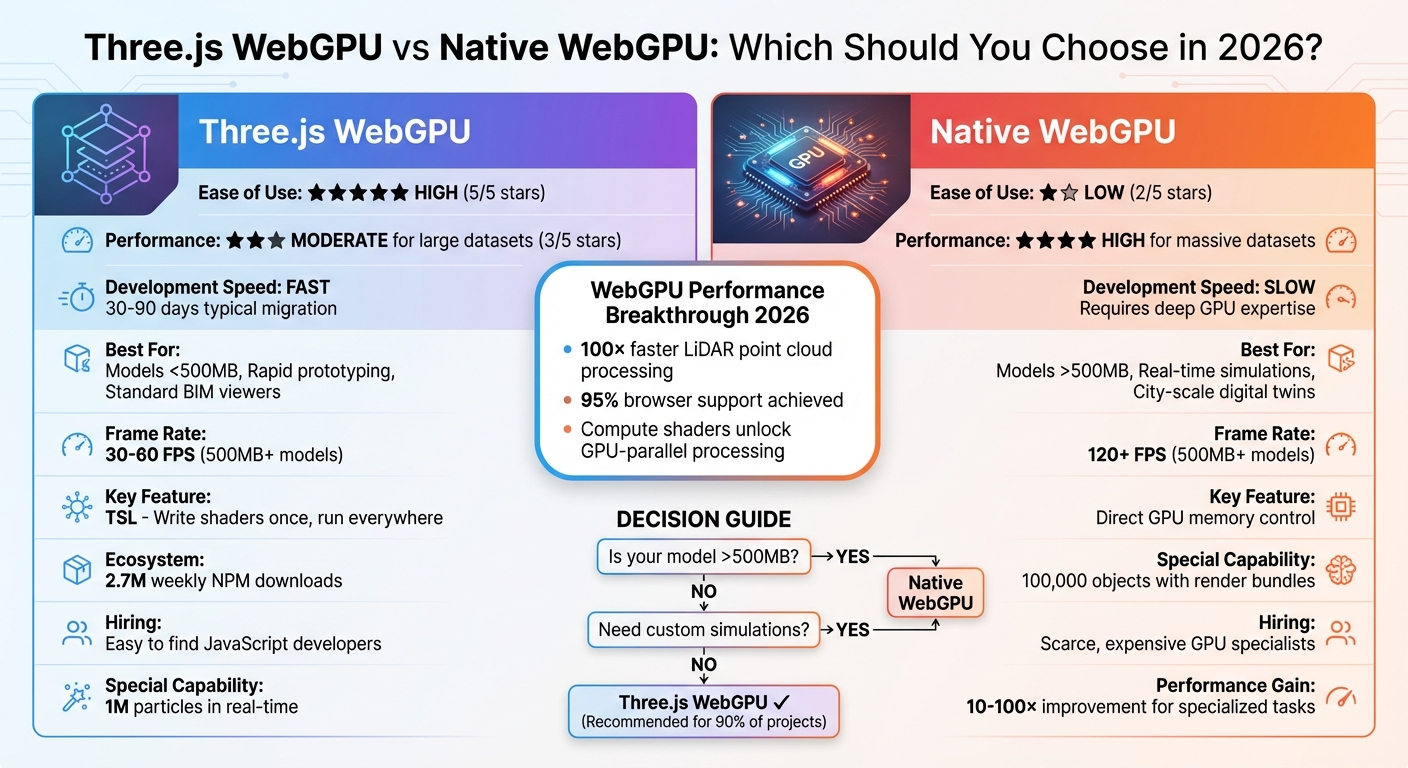
Three.js WebGPU vs Native WebGPU Performance Comparison for Construction Platforms 2026
Embracing WebGPU and WebXR With Three.js – Mr.doob, JSNation 2024
sbb-itb-51b9a02
What’s New in Three.js for Construction Viewers
In September 2025, Three.js reached a major milestone with the release of r171, introducing a production-ready WebGPU renderer. Thanks to its zero-configuration import system (import { WebGPURenderer } from 'three/webgpu'), developers can now easily tap into WebGPU’s capabilities [3][2]. By March 2026, Three.js was downloaded 2.7 million times weekly on NPM, a figure that eclipses its nearest competitor by a staggering 270 times [2]. This thriving ecosystem offers unmatched tools, active community support, and quick issue resolution, making it a powerhouse for construction-focused 3D applications. Below, we explore how these updates are transforming performance and simplifying workflows for construction viewers.
WebGPURenderer Performance Improvements
The introduction of WebGPURenderer has revolutionized how large-scale 3D construction data is processed. Take Segments.ai, for example – a 3D segmentation platform that transitioned its LiDAR point cloud labeling tool from WebGL to WebGPU between 2025 and 2026. This shift resulted in a 100× performance boost, enabling seamless interaction with datasets containing millions of points [2].
Performance isn’t the only area seeing improvements. Three.js r171 brought TSL (Three Shader Language), a game-changer for shader development. With TSL, developers can write shaders once and deploy them across both WGSL and GLSL platforms. This is especially valuable for construction applications that require custom materials, such as realistic concrete textures, reflective glass, or intricate steel finishes, all without maintaining separate shader codebases.
"TSL is the future of shaders in Three.js. Write once, run everywhere" [3]
Another standout feature is the addition of compute shaders, which unlock GPU-parallel processing for tasks like collision detection, real-time lighting, and large-scale data filtering. Construction platforms can now handle particle systems with over 1,000,000 units, a massive leap from the 50,000-unit limit typical in WebGL [3]. On top of that, the March 2026 release (r184) improved memory management by eliminating per-frame object allocations. Previously, rendering 1,000 meshes at 60fps could generate 240,000 to 500,000+ unnecessary objects per second, overloading the garbage collector. This optimization ensures smoother performance for complex construction models [7].
Ecosystem and Tooling Maturity
The Three.js ecosystem has grown into a robust platform for construction applications. For instance, React Three Fiber (R3F) now supports WebGPU through an asynchronous gl prop factory. This allows React-based construction dashboards to integrate high-performance rendering seamlessly, without requiring major architectural changes [3].
Post-processing has also seen major upgrades. TSL-native effects like Bloom and GaussianBlur, combined with improved bindGroup caching, make it easier than ever to achieve high-quality visualizations for architectural rendering [6][3]. Tools like BatchedMesh and enhanced instancing further optimize performance by reducing draw calls, which is critical when working with models containing thousands of repetitive elements like bolts, beams, or windows [8][1].
Adding to these advancements, AI-assisted "vibe coding" has emerged as a valuable tool for developers. AI models, trained on extensive Three.js documentation and examples, can now generate functional 3D code from natural language prompts. This innovation dramatically speeds up prototyping and shortens development timelines for construction tech teams [2]. Together, these tools simplify the creation of production-ready construction viewers, cutting down on both time and complexity.
Native WebGPU: Low-Level Performance for Heavy Workloads
While Three.js simplifies development, native WebGPU provides unmatched control for handling heavy workloads in construction platforms. Imagine it like choosing between an automatic car and a manual racing vehicle – you sacrifice ease of use for precision and speed. For teams managing construction models larger than 500MB or running real-time structural simulations, native WebGPU’s low-level design becomes a necessity [1].
One of its standout features is direct memory management. Developers can allocate and organize GPU memory exactly as needed, streamlining data transfers for massive datasets. In contrast, Three.js introduces abstraction layers that can lead to memory inefficiencies in large scenes [1]. WebGPU also supports multi-threaded command generation, letting rendering instructions run across multiple CPU cores, bypassing JavaScript’s single-threaded limitations [4].
Another powerful tool is render bundles (GPURenderBundles). These allow developers to pre-record commands like pipelines, bind groups, and draw calls during initialization, then replay them with a single call in the render loop. This method enables efficient rendering of 100,000 objects by moving validation work outside the critical rendering path [9]. Coupled with indirect drawing (drawIndexedIndirect), the GPU decides what to render based on buffer data, eliminating CPU-to-GPU synchronization delays [9].
"The move from WebGL to WebGPU is a move from ‘telling the GPU what to do’ to ‘setting up a system where the GPU tells itself what to do.’" – Loke.dev [9]
Direct GPU Control for Complex Tasks
WebGPU’s explicit control over rendering pipelines makes it ideal for handling intricate construction datasets. Unlike WebGL’s stateful, single-threaded approach, WebGPU aligns with modern graphics APIs like Vulkan, Metal, and Direct3D 12 [5]. This shift lets developers fine-tune how data flows between the CPU and GPU.
For construction platforms, this means lower CPU overhead and better hardware utilization. WebGPU can deliver up to a 10× improvement in draw-call-heavy scenarios compared to older architectures [2]. This advantage is crucial when working with BIM models containing hundreds of thousands of individual components – beams, columns, HVAC systems, and more. Using storage buffers, developers can pack large amounts of transform matrices into a single buffer and access them via instance_index, significantly reducing the overhead of binding objects individually [9].
However, this level of control comes with added complexity. Developers must manage resource lifecycles explicitly – functions like storageBuffer.destroy() are essential to avoid memory leaks. While this adds to the challenge, the payoff is immense for platforms that need to handle massive models in real-time [3][1].
Compute Shaders for Data Processing
Compute shaders enable general-purpose GPU computation, offloading heavy tasks from the JavaScript main thread. This is especially useful in construction workflows for tasks like collision detection, site analysis, and structural simulations, which can run in parallel across thousands of GPU cores [11][12].
The performance benefits are striking. For instance, a particle system updating 10,000 particles in 30ms per frame on a CPU can scale to 100,000 particles updating in under 2ms with WebGPU compute shaders – a 150× improvement [4]. This capability also supports real-time filtering of massive BIM datasets, allowing multiple data streams to be processed simultaneously without slowing down [1].
Compute shaders also unlock advanced techniques like compute skinning, where mesh vertex transformations are handled during the compute stage. The results are stored in a buffer for reuse across multiple render passes, eliminating redundant calculations. This is particularly valuable for animated construction sequences that show assembly processes [10]. Additionally, compute shaders can unpack 8-bit or 16-bit integer data (common in glTF models) into 32-bit formats for rendering, offering flexibility beyond standard vertex pipelines [10].
One key optimization is double-buffering with staging buffers. This lets the CPU read results from one batch while the GPU processes the next, boosting throughput by about 1.7× on modern hardware like the M2 MacBook Pro [13]. Avoid using await mapAsync() between dispatches, as this can stall the GPU pipeline, leaving the GPU idle for up to 60% of the time [13].
Performance Comparison: Three.js WebGPU vs Native WebGPU
Construction Scenario Benchmarks
When working with complex construction datasets, GPU management plays a key role in achieving smooth rendering. Comparing Three.js WebGPU with native WebGPU under these conditions highlights some stark differences. For example, tests conducted in early 2025 showed that rendering 20,000 non-instanced cubes with Three.js WebGPU resulted in a frame rate drop to 15 FPS. In contrast, WebGL maintained a steady 60 FPS. This performance dip in Three.js WebGPU stems from the overhead of binding Uniform Buffer Objects (UBOs) for each unique object [14].
Native WebGPU, on the other hand, eliminates this bottleneck. By March 2026, platforms that transitioned from WebGL to WebGPU reported significant improvements. LiDAR point cloud datasets containing millions of points, which previously struggled with sluggish navigation, were now handled with real-time, fluid interactivity. A standout example is the "Waves of Connection" installation at Expo 2025 Osaka, where Three.js WebGPU rendered 1 million particles in real-time on a 98-inch 4K display, delivering multi-person body tracking with no noticeable lag [2].
The main difference lies in CPU-to-GPU overhead. Three.js simplifies development but incurs performance costs when managing thousands of unique objects. Native WebGPU, however, uses GPURenderBundles, allowing 100,000 objects to be replayed efficiently in a single call. This approach shifts validation tasks from the render loop to initialization, making it ideal for handling large construction models like hospital campuses or airport terminals exceeding 500MB [1].
That said, Three.js remains a strong choice for smaller-scale projects or rapid prototyping. For models under 200MB, particularly those involving repetitive elements, tools like InstancedMesh or BatchedMesh in Three.js can cut draw calls by over 90%, all without requiring advanced GPU programming skills [15].
Performance Metrics Table
| Metric | Three.js WebGPU | Native WebGPU |
|---|---|---|
| Draw Call Efficiency | Moderate – limited by UBO overhead for unique objects [14] | High – uses Render Bundles and Indirect Drawing [9] |
| Memory Usage | Higher due to object metadata and methods [7] | Optimized with direct buffer control [1] |
| Max Non-Instanced Objects | ~10,000–20,000 before frame drops | 100,000+ with proper bundling [9] |
| Development Speed | Fast – high-level abstraction, one-line renderer swap [3] | Slow – requires deep pipeline and shader knowledge [1] |
| Compute Shader Integration | Simplified via TSL and renderer.computeAsync [3] |
Full control for multi-pass physics and culling [9] |
| Typical Frame Rate (500MB+ models) | 30–60 FPS with instancing optimizations [1] | 120+ FPS with custom memory streaming [1] |
| Best Use Case | Models <500MB, rapid prototyping, standard hardware [1] | Massive datasets (>500MB), custom high-performance systems [1] |
Choosing Between Three.js and Native WebGPU
When deciding between Three.js and native WebGPU, the choice boils down to your project’s specific needs. Three.js is ideal for quick development and benefits from a robust ecosystem, while native WebGPU is the go-to for performance-intensive, custom solutions. For most construction tech companies, Three.js provides the quickest way to deliver results, simplifying GPU programming so teams can focus on features rather than low-level graphics. Its popularity ensures extensive documentation, community support, and pre-built tools tailored to construction workflows.
On the other hand, native WebGPU shines when handling specialized tasks. If your platform requires processing massive datasets (over 500MB) or performing intricate, real-time simulations, the fine-grained GPU control of WebGPU can make a significant difference [1]. However, this approach demands advanced graphics programming skills and typically involves longer development times. Think of it this way: Three.js is like using a modern web framework, while native WebGPU is akin to writing assembly code.
"Three.js is no longer just for fancy websites… it started powering applications that process millions of data points in real-time – far beyond what anyone expected."
– Jocelyn Lecamus, CEO of Utsubo [2]
For standard tasks like BIM viewers, configurators, or models under 500MB, Three.js offers excellent performance with minimal engineering effort [1].
Three.js for Faster Development and Ecosystem Support
Three.js is all about reducing development time while offering a rich ecosystem. Tools like Drei provide pre-built components for common 3D interactions, and the Three Shader Language (TSL) enables developers to write shaders in JavaScript that automatically compile to both WGSL (WebGPU) and GLSL (WebGL) [3][4]. This cross-browser compatibility eliminates the need for separate codebases, streamlining development.
Take the example of Segments.ai, which leveraged Three.js to achieve specialized performance without requiring deep graphics expertise. Their shift to WebGPU resulted in a 100× performance boost for LiDAR point cloud operations, allowing smooth interaction with millions of 3D points [2].
Another advantage? Finding JavaScript developers with Three.js experience is relatively easy and cost-effective. In contrast, engineers skilled in WGSL shader programming and GPU memory management are harder to find and more expensive [1]. While Three.js simplifies development, some projects will still need the raw power that native WebGPU provides.
Native WebGPU for Custom High-Performance Systems
Native WebGPU is the best choice for projects that push the limits of high-level frameworks. If your platform involves rendering city-scale digital twins, real-time structural stress simulations, or manipulating construction models over 500MB, native WebGPU’s direct GPU control is invaluable [1].
This performance boost comes from bypassing JavaScript’s single-threaded limitations. Native WebGPU allows advanced optimizations like streaming geometry directly to GPU memory, implementing custom occlusion culling, and using compute shaders for parallel physics processing [1][4]. These techniques ensure smooth performance even with massive datasets that might overwhelm frameworks like Three.js.
However, this power comes with added complexity. Developers must write custom loaders, manage render pipelines manually, and handle low-level GPU states – tasks that Three.js abstracts away. Basic features like shadow mapping and post-processing effects, which are built into Three.js, require custom implementation in native WebGPU [1]. As noted in the Three.js Roadmap:
"If your application runs well on WebGL, the engineering effort required to migrate typically outweighs the benefits. Migration makes sense when you’re hitting concrete performance walls that WebGPU specifically solves."
– Three.js Roadmap [4]
Native WebGPU is best reserved for scenarios where performance is the key differentiator – such as creating proprietary rendering engines for specialized simulations or handling datasets that truly exceed 500MB. For most other use cases, Three.js delivers more than enough power with far less complexity.
Migration Strategies for Construction Platforms
With the performance boosts offered by Three.js and native WebGPU, having a clear migration strategy is essential for modernizing construction platforms. Moving from WebGL to WebGPU can significantly enhance your platform without causing disruptions. If you follow a structured plan, most teams can complete the migration in 30 to 90 days [16]. Thanks to Three.js r171+, the process is more straightforward, as it includes zero-configuration WebGPU imports and automatic fallbacks to WebGL 2 for older devices [3].
Start by auditing your current system. Identify any custom GLSL shaders, post-processing effects, and third-party libraries that need updating. Additionally, evaluate the size of your models – are they under 200MB or over 500MB? This will help you decide whether to stick with Three.js or switch to native WebGPU [1]. If your application performs well on WebGL and isn’t facing performance limits, the migration may not be urgent [3]. These initial steps are crucial for a smooth renderer update and shader conversion process.
Assessing and Transitioning WebGL Viewers
To begin, update to Three.js r171+ to access the WebGPURenderer, which includes an automatic WebGL 2 fallback. This allows you to offer WebGPU while maintaining compatibility with older devices [3]. Switching renderers is simple – replace WebGLRenderer with WebGPURenderer. However, WebGPU initialization is asynchronous, so remember to include await renderer.init() before rendering to avoid display issues [3].
When converting custom GLSL shaders, use Three Shader Language (TSL). This node-based system compiles to both WGSL (for WebGPU) and GLSL (for WebGL fallback) [3]. If shader migration proves difficult, you can temporarily maintain separate code paths using renderer.isWebGPURenderer. Additionally, actively manage memory by disposing of geometries, materials, and textures with .dispose() and destroying storage buffers with .destroy() [3].
Phased Migration Approach
A phased migration reduces risk and ensures a smoother transition. Here’s a suggested timeline:
- Weeks 1–2: Add capability detection to check for
navigator.gpusupport and place WebGPU code behind feature flags [16]. - Weeks 3–6: Develop a minimal prototype with a WebGL or WASM fallback. Set GPU allocation limits to prevent crashes on less powerful hardware [16].
- Months 2–3: Conduct A/B testing on a small user segment to measure latency improvements and CPU offloading before rolling out to a broader audience [16].
For platforms managing large BIM models, compute shaders can be a game-changer. They can shift resource-intensive tasks like collision detection, LiDAR point cloud filtering, and physics simulations from the CPU to the GPU [1]. This shift can lead to performance gains of 10× to 100× for operations that previously slowed down the main thread [2]. To ensure reliability, integrate CI/CD tests for major GPU and driver combinations (Intel, AMD, Apple) using headless renderers. This helps catch potential issues before they reach production [16].
Conclusion
By 2026, Three.js with its WebGPURenderer will meet the needs of about 90% of construction tech platforms. It delivers noticeable performance boosts compared to WebGL, all while keeping its JavaScript API familiar and offering automatic WebGL 2 fallback. Plus, it taps into a vast ecosystem of tools and resources [1][2]. The addition of TSL simplifies shader development, ensuring compatibility across both WebGPU and WebGL environments [3]. This combination of performance and usability makes it a strong contender for most projects, though comparisons with native WebGPU capabilities remain important.
For platforms dealing with large-scale challenges – like models exceeding 500MB, real-time processing of millions of LiDAR points, or advanced memory management needs – native WebGPU becomes the go-to choice. Its direct GPU control and compute shader functionality can yield performance boosts of 10× to 100× for specialized tasks such as physics simulations or point cloud segmentation [1][2].
For teams in construction tech planning new projects in 2026, Three.js and its WebGPURenderer offer a quicker path to development, lower hiring costs, and production-ready tools. This approach accelerates time-to-market, with the flexibility to address bottlenecks later using compute shaders or custom pipelines. With 95% browser support [3], now is an excellent time to modernize 3D viewers.
Ultimately, the choice between Three.js and native WebGPU depends on your specific workload. Three.js shines in general-purpose visualization, while native WebGPU is ideal for performance-critical edge cases. This reflects a broader industry trend – balancing rapid development with tailored, high-performance rendering solutions. The benchmark findings underline how each option caters to different performance and scalability needs, allowing teams to make informed decisions based on their unique project requirements.
FAQs
What’s the simplest way to choose between Three.js WebGPU and native WebGPU?
When deciding between the two, think about what your project demands. Three.js with WebGPU offers a more user-friendly, higher-level API, which makes it perfect for quicker development and deployment. On the other hand, native WebGPU gives you direct GPU access, allowing for maximum performance and advanced features like compute shaders. However, it comes with a steeper learning curve and requires more technical expertise. Your choice will depend on what matters most – ease of use or the ability to handle complex tasks like large datasets and real-time collaboration.
How do I keep WebGL fallback while shipping WebGPU in production?
To ensure smooth rendering in production when using WebGPU, it’s a good idea to set up a WebGL fallback. You can do this by checking for WebGPU support at runtime. Specifically, use feature detection – like verifying the presence of navigator.gpu – to decide whether to initialize the WebGPU renderer. If WebGPU isn’t supported, you can automatically fall back to WebGL. This method allows you to take advantage of WebGPU on compatible browsers while still providing a dependable experience with WebGL for those that don’t support it.
What’s the biggest performance bottleneck in Three.js WebGPU for huge scenes?
When working with large scenes in Three.js using WebGPU, performance often hits a snag due to CPU-to-GPU overhead. This slowdown is mainly caused by an excessive number of draw calls. WebGPU’s validation checks – covering bind groups, resource states, and draw parameters – add further strain, making rendering slower as the scene complexity grows. Another issue is the frequent creation of bind groups, which compounds the performance hit.
To address these challenges, one key optimization is reducing the validation overhead. For instance, using render bundles can help streamline draw calls, making the process more efficient and better suited for managing complex scenes.








Leave a Reply