
The Red-Yellow-Green System: How We Decide What to Fix, What to Keep, and What to Kill in Any Codebase
Huzefa Motiwala March 11, 2026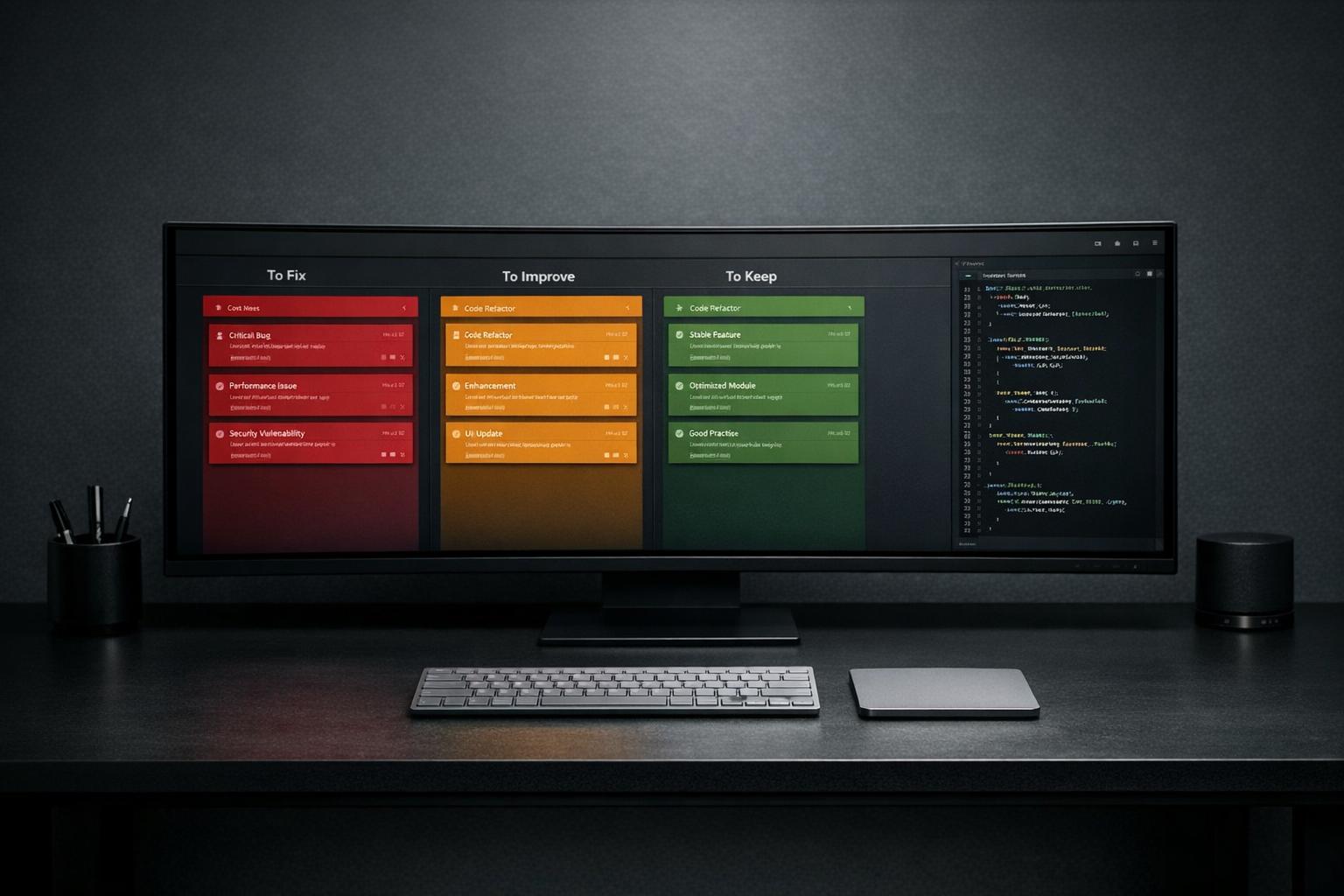
The Red-Yellow-Green system helps engineering teams prioritize code issues effectively. Here’s how it works:
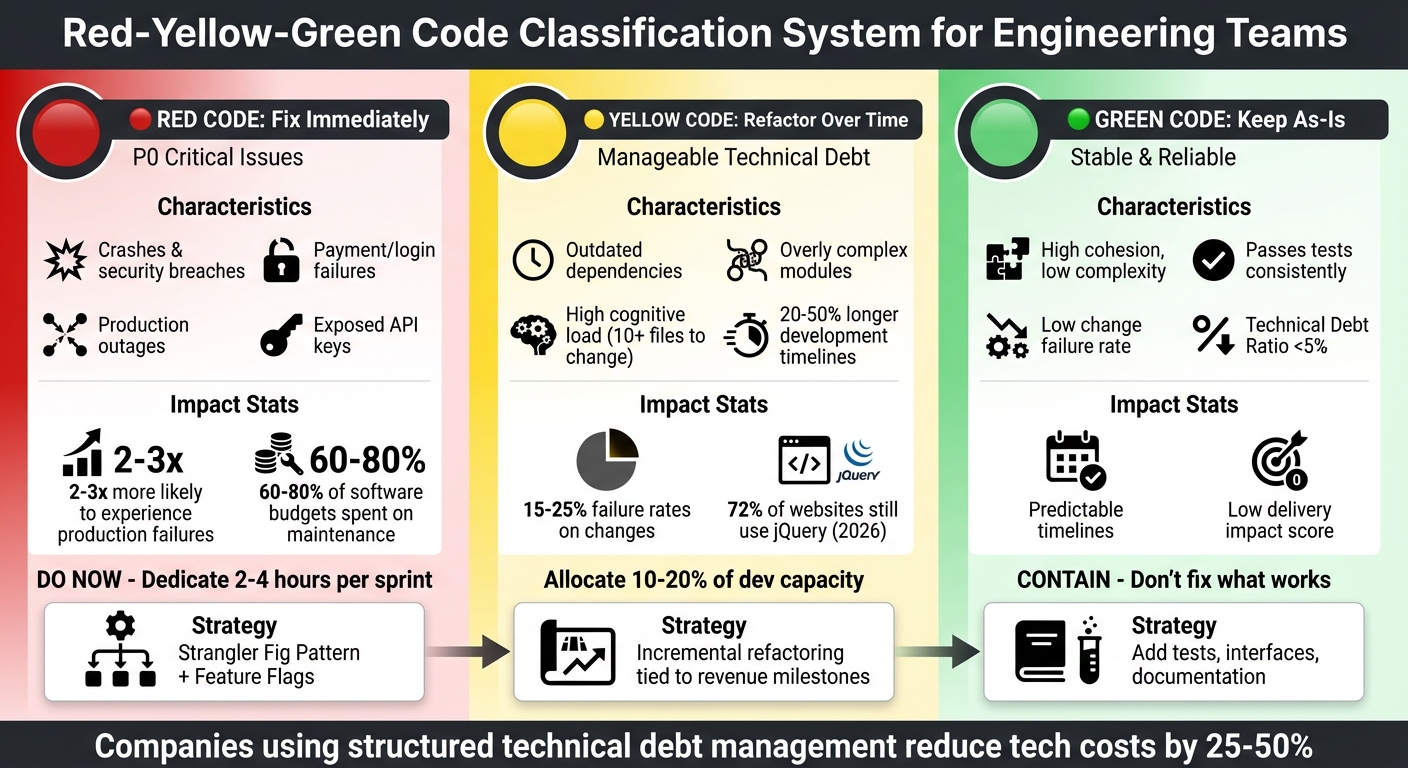
- Red Code: Critical issues that need immediate attention (e.g., crashes, security vulnerabilities, payment failures). These are high-priority and directly impact business operations.
- Yellow Code: Non-urgent technical debt that slows progress (e.g., outdated dependencies, overly complex modules). These require gradual refactoring to prevent future problems.
- Green Code: Stable, reliable parts of the codebase that don’t need changes. Focus here is on maintenance and protection.
This framework avoids risky large-scale rewrites by categorizing and addressing technical debt step-by-step. Using tools like AI-powered code analysis, teams can identify high-impact areas, create a roadmap, and execute changes efficiently. The goal? Allocate resources wisely, maintain stability, and support growth without unnecessary disruptions.
Red-Yellow-Green Code Classification System for Engineering Teams
Red Code: What to Fix Immediately
What Red Code Looks Like
Red code refers to P0 (Critical) severity issues – the kind of problems that make your application or essential workflows completely unusable. We’re talking about repeated crashes, data loss, security breaches, or payment failures without any workaround [2]. These are the issues that directly threaten your business, impacting revenue and customer trust.
The most obvious signs of Red code are financial and operational roadblocks. For instance, payment systems that fail, sign-up processes that break, or login systems that lock users out. Even slow checkout pages – those taking over 30 seconds to load during peak times – can fall into this category [2]. Security concerns like exposed API keys, hardcoded credentials, or exploitable authentication systems demand immediate attention. Performance issues that lead to production outages as your user base grows are equally critical. Here’s a sobering fact: systems weighed down by technical debt are 2 to 3 times more likely to experience production failures [5]. On top of that, organizations often spend 60% to 80% of their software budgets on maintenance rather than innovation [5].
To catch these hidden but critical issues, AI-powered code analysis can be a game-changer.
Using AI Agents to Find Critical Issues
Traditional manual code reviews often miss the hidden risks, especially in complex systems with interdependent services. This is where AI steps in. AI agents can map your entire system, highlighting architectural weaknesses and fragile components that human reviewers might miss.
What makes AI-powered detection effective is its ability to analyze context, not just surface-level code quality. For example, AlterSquare uses AI agents to scan codebases for high-risk patterns like security vulnerabilities, exposed secrets, or frequently modified modules that lack proper test coverage. With large context engines (capable of processing 200,000 tokens at once), these tools can analyze entire service architectures, identifying how changes in one module could trigger system-wide failures. The result? A System Health Report that turns technical debt into a clear, data-driven prioritization task. This report feeds directly into the Traffic Light Roadmap, helping teams focus on the most critical fixes.
Once you’ve identified the Red code, the next step is addressing it without introducing new risks.
How to Fix Red Code Without Adding Risk
Start by targeting the areas with the highest return on investment: modules with poor health that are frequently updated [6]. These are the hotspots where technical debt and complexity create ongoing problems. Fixing these first can significantly reduce risk while improving development speed.
Use a prioritization quadrant to separate quick, low-risk fixes from more complex, high-risk overhauls [1]. Focus on low-risk, high-impact changes initially – like adding missing database indexes or fixing obvious security flaws. These quick wins build team momentum and credibility before tackling larger challenges.
For high-risk Red code, such as replacing a core authentication system or migrating a critical database, adopt the Strangler Fig pattern [1]. This approach allows you to migrate functionality incrementally instead of attempting a risky "big bang" rewrite. Use feature flags to enable quick rollbacks if something goes wrong. Dedicate specific time (2–4 hours per sprint) to these "DO NOW" fixes, ensuring they don’t get overshadowed by new feature development [1].
"Win small. Win often. Then go big." – CodeIntelligently [1]
To prevent Red code from reappearing, implement automated quality gates in your Pull Requests. These gates can block any changes that would degrade system health [6]. Standardize your bug triage process with clear templates, including steps to reproduce, expected vs. actual outcomes, and supporting evidence like logs or traces. Every Red code issue should have a designated owner, a clear severity level, and actionable next steps [2]. No room for ambiguity.
sbb-itb-51b9a02
Yellow Code: What to Refactor Over Time
Common Examples of Yellow Code
Once you’ve tackled critical Red code, it’s time to focus on Yellow code – manageable technical debt that slows down progress but isn’t an immediate crisis.
Yellow code acts like a "delivery tax", subtly dragging down development speed. It’s the kind of debt that causes development timelines to consistently run 20–50% longer than expected [8]. One common sign? Outdated dependencies – like when libraries lag a full major version behind. For instance, in 2026, jQuery still powers 72% of websites despite more modern performance standards [7].
Another telltale sign is increased cognitive load. If implementing a change means touching over 10 files and results in failure rates of 15–25%, you’re likely dealing with Yellow code [8]. While these inefficiencies aren’t showstoppers, they steadily chip away at your team’s productivity.
When to Refactor vs. Rewrite
For Yellow code, incremental refactoring is usually the smarter choice. Unlike full rewrites – which fail to meet business goals 60% of the time [3] – refactoring allows you to chip away at problems while keeping the system running and delivering value.
| Factor | Refactoring (Yellow Code Strategy) | Rewriting (Red Code Strategy) |
|---|---|---|
| Risk | Low to Medium; gradual changes limit issues | High; 60% of rewrites miss objectives [3] |
| Time | Integrated into regular sprints | Long-term; months or years [7] |
| Cost | Lower; spread out over time | High; requires a dedicated budget [1] |
| Business Value | Immediate wins from incremental updates | Delayed; benefits only after completion [7] |
For larger Yellow code issues, a phased migration strategy works best. You can gradually replace outdated modules without disrupting the system [7]. Smaller, isolated pieces of Yellow code – like an old UI component – can often be refactored piece by piece. For example, Heap Engineering modernized its UI by isolating a single "RadioButton" component using ESLint’s no-restricted-imports rule and Chromatic for automated visual regression testing [7].
"The most reliable path from legacy to modern architecture is incremental migration rather than a complete rewrite." – Mark Knichel, Engineering Manager, Vercel [7]
Tying Refactoring to Revenue Milestones
To make refactoring efforts meaningful, tie them to measurable business milestones. Use clear growth or revenue targets as triggers for upgrading temporary fixes [8]. For instance, document in an Architecture Decision Record (ADR) that a workaround will be revisited when your product hits $1M ARR or surpasses 7,500 active users [8]. This ensures that technical improvements align with business goals, not just engineering priorities.
Framing technical debt in financial terms can also help secure stakeholder support. Calculate the cost of lost developer productivity due to workarounds. For example, if a fragile module adds two weeks to every payment feature, that could cost up to $180,000 per quarter [8]. On a broader scale, CIOs estimate that 10–20% of budgets meant for new products are instead spent on technical debt [10].
Set aside 10–20% of development capacity specifically for addressing technical debt [7]. This isn’t about loosely defined "20% time" for side projects – it’s about targeting high-impact, low-effort fixes. Use tools like an Impact-Effort Matrix to prioritize tasks and fold 2–4 hours of refactoring into regular sprints [8]. This steady approach prevents Yellow code from spiraling into critical Red code, while also tying technical improvements to business growth. It’s a sustainable way to keep your system stable and ready for scaling.
Green Code: What to Keep As-Is
What Makes Code Green
Green code is the solid ground your system relies on. Unlike Red and Yellow code, which require immediate attention, Green code represents the sections that are stable and ready to support growth. It’s reliable, easy to maintain, and aligned with your business needs – the kind of code that consistently passes tests, handles user demand without hiccups, and stays trouble-free during updates [11].
From a technical standpoint, Green code stands out with high cohesion (modules that focus on one task), low complexity (simple, clear logic), and small, well-defined functions that avoid sprawling "God Functions" or overwhelming "Brain Classes" [6]. It also keeps the cognitive load low – engineers typically only need to access a few files to implement changes [8].
On the business side, Green code has a low "Delivery Impact Score," meaning development timelines are predictable, and a low "Change Failure Rate," where updates rarely cause production issues [8]. A Technical Debt Ratio under 5% is another sign of healthy code [7]. If your users are happy and performance issues aren’t driving them away, the code is doing its job – there’s no need to mess with it [12].
How to Maintain Green Code Over Time
Even if Green code isn’t the prettiest, stability is the priority. Focus on containing it rather than refactoring [1]. This means reinforcing it with strong tests, clear interfaces, and up-to-date documentation to ensure it stays reliable.
Automated PR quality gates are a great tool to catch potential issues before they’re merged, helping Green code avoid slipping into Yellow [6]. Keep an eye on your "Average Code Health" metric across the codebase to track overall stability [6]. Use version-controlled configuration files (e.g., code-health-rules.json) to enforce consistent coding standards for the whole team [6].
Before making changes to stable code, assess the remediation risk on a 1–10 scale, considering factors like system dependencies, data risks, and rollback complexity. If the risk is high but the business impact is minimal, it’s often better to contain the code instead of altering it [1].
"Don’t fix it. Contain it. Put guardrails around it (tests, interfaces, documentation) and move on. Revisit only if the impact increases." – CodeIntelligently [1]
With this approach, Green code remains a reliable base for scaling and modernizing your system.
Building on Green Code for Scale
When extending Green code, the goal is to protect its stability. Strategies like the Strangler Fig Pattern allow you to develop new features alongside the existing system, gradually shifting traffic to the new setup without disrupting the old [7][9]. For internal updates, such as replacing a database layer, Branch by Abstraction creates a buffer that lets you make changes without affecting other components [9].
Practical examples highlight how this works. For instance, in July 2024, Airbnb upgraded from React 16 to React 18 using techniques like module aliasing, environment targeting, and A/B testing in production. This allowed them to achieve a full rollout with zero rollbacks while maintaining system stability [7].
Feature flags are another essential tool. They let you control traffic between legacy and updated implementations, enabling gradual rollouts and providing the ability to instantly roll back if something goes wrong [7][8]. Additionally, documenting key decisions in Architecture Decision Records (ADRs) with "remediation triggers" ensures you know when stable components need revisiting. For example, you might plan to switch to WebSockets once user numbers exceed 10,000 [8].
"The most reliable path from legacy to modern architecture is incremental migration rather than a complete rewrite." – Mark Knichel, Engineer, Vercel [7]
How to Apply the Red-Yellow-Green System
Step 1: Run an AI-Powered Codebase Scan
The first step in applying the Red-Yellow-Green system is running a comprehensive AI-powered scan of your codebase. This scan identifies components categorized as Red (critical issues), Yellow (areas needing improvement), and Green (stable and well-structured). AI agents analyze semantic dependencies across repositories, tracing call stacks from API gateways to security configurations. This approach ensures even deeply rooted problems in complex architectures are uncovered – issues that a simple text search would likely miss [14].
These scans are capable of detecting zero-day vulnerabilities, P0 bugs, active security breaches, architectural flaws, overly complex logic, and the areas of your codebase that are well-structured and low in complexity [13][15][2][16].
For example, in October 2025, Google DeepMind‘s CodeMender agent scanned the libwebp image compression library, applying security annotations that neutralized a known heap buffer overflow vulnerability (CVE-2023-4863). Over six months, CodeMender contributed 72 security fixes to open-source projects, some spanning over 4.5 million lines of code [15]. This demonstrates the depth and precision an AI-powered scan can achieve, especially when using multi-repository indexing to map service boundaries and API contracts across your architecture [14].
For larger codebases – think 100,000+ files – the scan might take hours or even days. For projects where privacy is a concern, you can run these scans locally, ensuring no code leaves your environment [16]. Once the scan is complete, you’ll have a clear, actionable view of the critical issues lurking in your codebase.
Step 2: Create a Traffic Light Roadmap
After gathering insights from the AI scan, the next step is to create a Traffic Light Roadmap. This roadmap transforms raw data into a strategic plan, helping you decide what needs immediate attention, what can be addressed over time, and what can be left as-is. This process ensures technical issues are aligned with business priorities.
One way to prioritize tasks is by using a framework like RICE scoring – (Reach × Impact × Confidence) / Effort. Additionally, the 20/80 rule can be helpful: focus on the 20% of files that cause 80% of your defects [2][4]. Companies that actively manage technical debt using this method can cut their tech spending by as much as 25–50% [4]. To keep technical debt under control, tie refactoring work to specific milestones, dedicating a portion of each sprint to platform improvements [4].
"We’ll refactor later – famous last words right before another feature gets delayed, another developer rage-quits, or your app crashes in production." – Alex Vasylenko, CEO, The Frontend Company [4]
With a prioritized roadmap in hand, you’re ready to move on to execution.
Step 3: Execute Changes with Your Engineering Team
The roadmap’s Red, Yellow, and Green categories guide the execution phase. Start by addressing Red issues – these are critical and need immediate attention. Tackle them in small batches, use feature flags for internal testing, and run tests and CI checks frequently to ensure stability before rolling out changes to users [4][17].
For Yellow code, focus on incremental refactoring to avoid unnecessary disruptions to stable parts of the system. Establish a triage process with clear ownership by involving a Product Owner, Engineering Lead, and QA Lead in daily or semi-weekly meetings. This helps prioritize tasks and manage trade-offs. Use standardized bug templates that include reproduction steps, expected versus actual results, and supporting evidence like logs or screenshots. These templates reduce back-and-forth communication and speed up resolution [2].
To streamline workflows, set limits on work-in-progress and automate task movements once pull requests are merged [2]. Track cycle times – from commit to deployment – to identify bottlenecks and improve efficiency [18]. While AI tools can speed up execution, maintain human oversight through code reviews, type-checking, and integration verifications [17].
"AI can think, not just a script generator." – Yuchen Qiao, Software Engineer, Atlassian [17]
AI-Driven Code Refactoring: Improving Legacy Codebases Automatically – Jorrik Klijnsma
Conclusion
The Red-Yellow-Green system offers a clear, practical way to manage your codebase effectively. By categorizing code into Red (critical issues that jeopardize stability and revenue), Yellow (technical debt that hampers progress), and Green (stable, reliable components), you can make smarter decisions about where to focus your engineering efforts.
Consider this: engineering teams typically spend 42% of their time managing technical debt, with about 87% of budgets often allocated to maintaining existing systems rather than building new features [4]. Companies that adopt structured frameworks for managing technical debt can reduce tech costs by 25% to 50% – all while maintaining their team size [4]. This opens up resources to fuel growth and innovation. These numbers highlight the importance of a systematic approach.
"Technical debt isn’t ‘bad code.’ It’s the delta between the current state of your system and the state it needs to be in to support your current and near-future business goals." – CodeIntelligently [8]
Start by using AI tools to identify Red, Yellow, and Green areas in your codebase. Develop a Traffic Light Roadmap tied to your business goals, and tackle issues in manageable batches. Keep in mind that 80% of bugs often stem from just 20% of files [4], so focusing on high-impact areas will yield the best results.
This system isn’t about creating a flawless codebase – it’s about finding the right balance between risk, stability, and growth. With this approach, your team can deliver faster, keep the codebase healthy, and scale the business confidently, all while maintaining the flexibility to innovate.
FAQs
How do we label code Red, Yellow, or Green fast?
To label code as Red, Yellow, or Green, teams rely on specific criteria to evaluate factors like stability, maintainability, and risk. Here’s how it typically breaks down:
- Red: Indicates critical issues that demand immediate action.
- Yellow: Highlights concerns that need attention but aren’t urgent.
- Green: Represents stable and scalable components.
This quick assessment process allows teams to prioritize fixes, schedule refactoring, and keep the codebase in good shape without wasting time.
What metrics prove Yellow debt is costing us money?
Metrics that highlight the cost of Yellow debt include complexity, coverage gaps, high churn, and dependencies. These issues amplify maintenance challenges and refactoring risks, ultimately driving up costs and creating inefficiencies within the codebase.
How do we keep Green code from turning Yellow?
To keep Green code from shifting to Yellow, make proactive monitoring and regular maintenance your priorities. Implement practices like code reviews, automated testing, and continuous integration to spot and fix issues early, ensuring your code remains stable and scalable.
Establish clear performance metrics and review them regularly to catch potential risks before they escalate. Consistent refactoring and promptly addressing technical debt are crucial for maintaining code quality, helping to prevent performance dips or the buildup of unmanageable debt.








Leave a Reply