
When to Migrate Off Bubble (or Any No-Code Tool): The Decision Framework That Saves Founders 6 Months of Guessing
Huzefa Motiwala March 21, 2026
If you’re a founder using a no-code platform like Bubble, the key question isn’t if you’ll need to migrate to custom code, but when. Move too soon, and you risk wasting $40,000–$150,000 on a product that hasn’t proven itself. Wait too long, and you’ll face performance issues, growing costs, and lost revenue.
Here’s the short answer: You should start planning your migration when your monthly recurring revenue (MRR) hits $5,000–$15,000. At this stage, you’ll have enough revenue to justify the cost and enough user data to identify platform limitations holding you back.
Key Indicators That It’s Time to Migrate:
- Performance Issues: Pages take over 3 seconds to load, or database size exceeds 30,000–50,000 records.
- Compliance Gaps: Losing enterprise deals due to lack of SOC 2 compliance or robust data security.
- Feature Limitations: Core features blocked by platform constraints like API timeouts or missing integrations.
- Rising Costs: Platform fees and workarounds exceed 10% of your revenue.
- Workflow Complexity: Visual workflows become unmanageable, requiring constant debugging.
Migration Costs:
- Partial Migration: $8,000–$25,000 (4–8 weeks)
- Full Rebuild: $40,000–$150,000 (20–30 weeks)
- Custom Hosting: ~$240/year vs. Bubble’s $4,188/year for Growth-tier pricing.
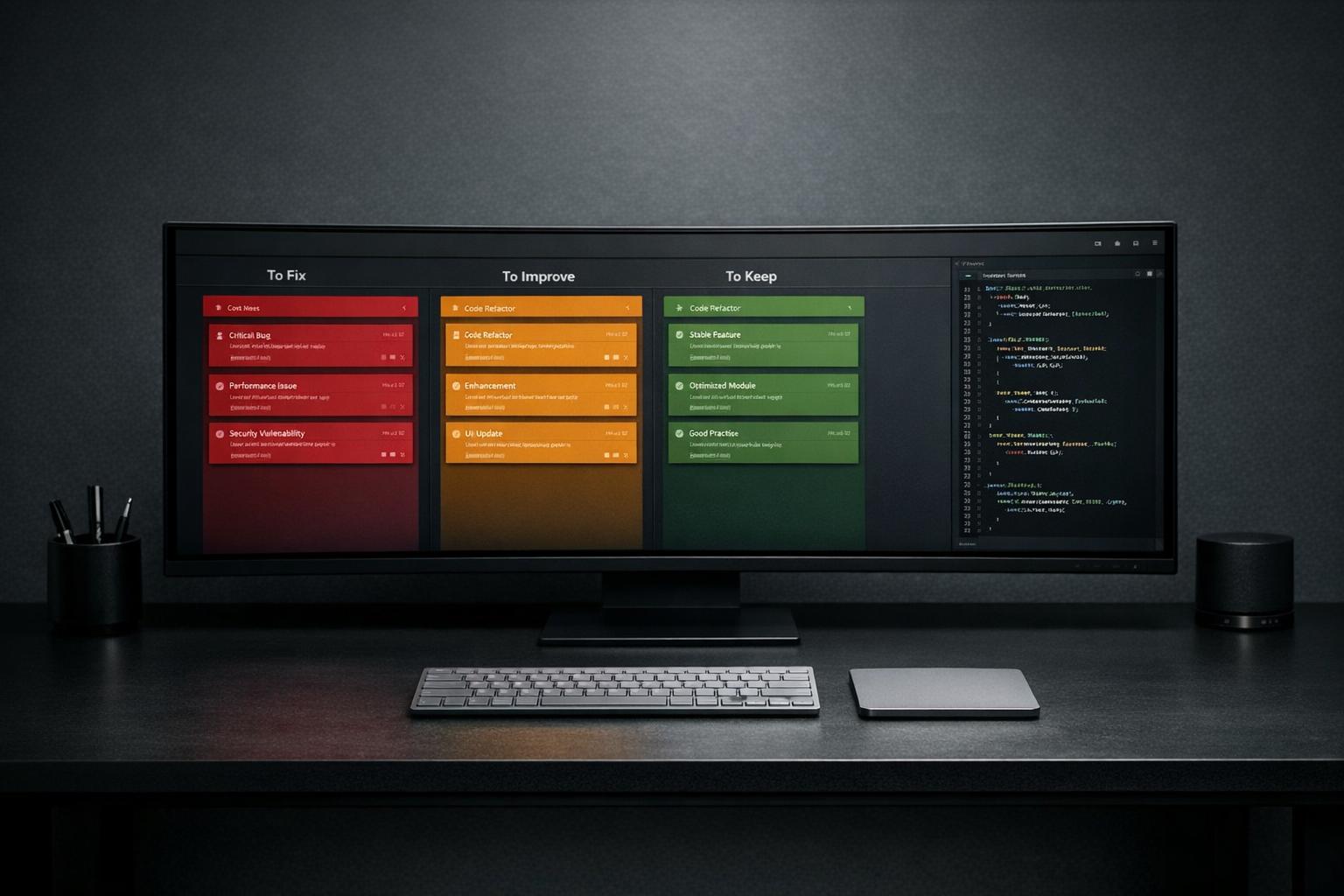
Pro Tip: Before committing to a full migration, conduct a technical audit. Focus on migrating the 20% of your app causing 80% of the issues.
This decision framework helps you avoid costly mistakes, ensuring you transition at the right time without disrupting your business.
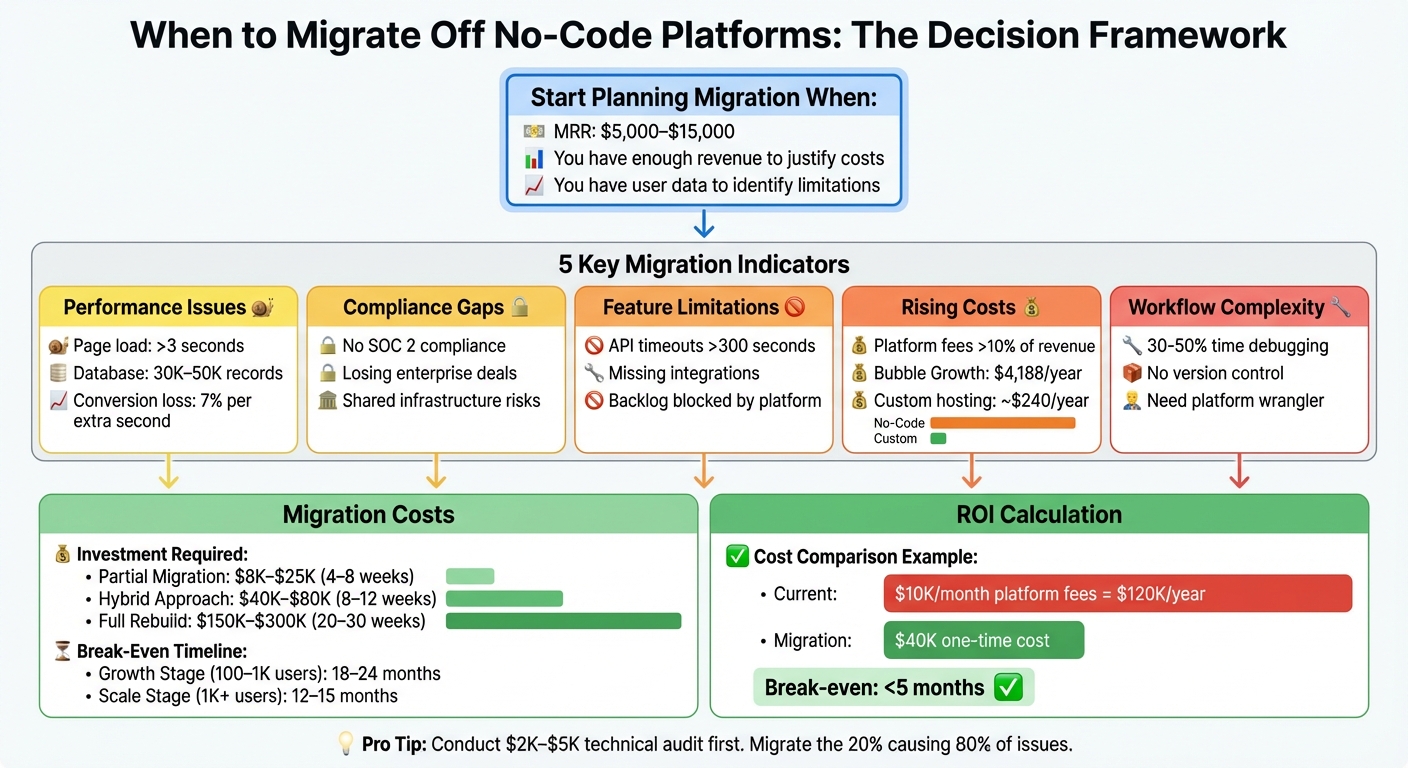
No-Code Migration Decision Framework: When to Migrate Based on MRR and Key Indicators
Should You Migrate from No-Code to AI Code? 5 Key Factors #migration #nocode #bubble
sbb-itb-51b9a02
5 Indicators That Signal Migration Readiness
Not all performance or scalability issues call for migration. However, when your no-code platform starts to hinder growth, it’s time to evaluate. Below are five clear signs that your current setup may no longer meet your needs.
Indicator 1: User Growth Overwhelms Platform Limits
When your user base grows beyond what the platform can handle, performance issues become unavoidable. For instance, Bubble apps often slow down when databases exceed 30,000–50,000 records or when backend processes take longer than 300 seconds to execute [4]. Sunday Ogbonna, Founder & Lead Engineer at Buldtech, highlights this issue:
"A Bubble app that loads in 2 seconds with 100 records in the database loads in 8-12 seconds with 10,000 records." [8]
This kind of delay can hurt conversions. Research shows that every extra second of page load time cuts conversions by 7%, and a 1-second delay can slash conversions by up to 20% [1][5]. Other limitations, like list fields capped at 10,000 items and API response times of 3–10+ seconds for dynamic content (e.g., Stripe or OpenAI), add to the problem, especially since Bubble lacks native caching [4]. If your pages consistently take over 3 seconds to load despite optimizations, it’s a sign the platform is holding you back [8]. Compliance needs can also exacerbate these challenges.
Indicator 2: Compliance Demands Custom Infrastructure
When enterprise clients require robust security measures, no-code platforms often fall short. Matthew Turley, Technical Partner, explains:
"When bigger customers start asking about data security, SOC 2 compliance, or where their data lives, Bubble’s shared infrastructure becomes a liability." [1]
Privacy rules in no-code platforms can be fragile, with a single misstep potentially exposing sensitive data. They also lack key features like detailed audit logs, custom encryption, and granular access controls – essential for regulated industries. If you’re losing deals because the platform can’t pass technical due diligence, migration becomes critical. Similarly, if platform limitations are stalling your product roadmap, it’s time to reconsider.
Indicator 3: Core Features Are Blocked by Platform Constraints
A backlog full of features labeled "waiting for platform support" is a red flag. Many no-code platforms struggle with deeper integrations, such as real-time webhooks, custom API endpoints, OAuth flows, or bi-directional syncs with systems lacking pre-built connectors [3]. Data processing can also hit a wall when workflows fail or time out while updating thousands of rows [4][2]. Matthew Turley puts it succinctly:
"If your team spends more time debugging automations than building features, you’ve hit this wall." [3]
When workarounds and third-party automations dominate your operations, core functionality is effectively blocked. Beyond technical limitations, escalating costs often drive the decision to migrate.
Indicator 4: Platform Costs Outweigh Development ROI
Migration becomes financially viable when platform fees surpass the value they deliver. For example, Bubble’s Growth plan costs $349/month ($4,188/year) [8], with workload unit add-ons priced at $0.30 per 1,000 units [7]. As your app scales, these costs can spiral, particularly with high-traffic features like real-time feeds or bulk data processing. If your combined platform fees and tool stack exceed 10% of your monthly revenue, you’re essentially "renting" infrastructure rather than owning it [4].
For many founders, migration makes sense when monthly recurring revenue (MRR) is between $5,000 and $15,000 [3]. At this stage, a partial migration of core logic typically costs $8,000–$25,000, while a complete rewrite can range from $40,000 to $150,000 [3]. If you’re spending $10,000/month on platform fees and workarounds, custom development starts to look like the better investment [7]. Operational complexity often adds to this tipping point.
Indicator 5: Workflow Complexity Outpaces No-Code Capabilities
As your business grows, visual workflows often struggle to handle advanced logic. When you require multiple API integrations, complex conditional logic, or background processes longer than 5 minutes, no-code platforms can become a roadblock [4]. The lack of professional development tools – like Git-style version control, pull requests, granular commit histories, or native unit-test runners – makes collaboration and quality assurance harder as your team expands [2].
If you’ve hired a "platform wrangler" just to manage workarounds for no-code limitations, that’s a clear sign you’re wasting resources on patching issues instead of building your product [5]. At this point, the platform is no longer supporting your growth.
| Limitation Category | Sign | Technical Threshold |
|---|---|---|
| Data Handling | List display/search failure | >10,000 items [4] |
| Workflow Execution | Onboarding/sync timeouts | >300 seconds [4] |
| Database Scale | Latency/slowdown | 30,000–50,000 records [4][5] |
| Integrations | Fragility/high cost | >3 Zapier/Make steps [8] |
| Performance | User attrition/bounce | >3 second page load [8] |
Calculating Migration ROI: When the Numbers Make Sense
After identifying the challenges of no-code limitations, it’s time to assess whether migrating makes financial sense.
Comparing Upfront Migration Costs vs. Ongoing Platform Fees
Crunching the numbers on migration is simpler than it seems but often overlooked. Start by tallying up your current no-code expenses. This includes not only the platform subscription but also add-ons like workload units (e.g., Bubble charges $0.30 per 1,000 units [7]), subscriptions for automation tools such as Zapier or Make (ranging from $50 to $200/month [8][11]), and freelancer fees for patching platform limitations.
Then, estimate these costs at 2–5x your current scale. Sunday Ogbonna, Founder & Lead Engineer at Buldtech, highlights the potential savings:
"At Growth-tier pricing, you are paying $4,188/year. A custom build on a $20/month VPS costs roughly $240/year in hosting after the initial build. Within 12–18 months, the custom build pays for itself in reduced platform fees alone." [8]
Migration costs vary widely based on complexity. Expect to pay:
- $8,000–$25,000 for a core logic migration
- $40,000–$80,000 for a hybrid API approach (8–12 weeks)
- $150,000–$300,000 for a full re-platform (20–30 weeks) [3][10]
Compare these one-time expenses against your projected annual platform fees. For example, if you’re spending $10,000/month on Bubble workload units and workarounds (totaling $120,000/year), a $40,000 migration could break even in less than five months [7].
Don’t forget to budget for the "double bubble" period – running both systems simultaneously during the transition. This overlap typically lasts 2–3 months and can result in up to a 7% conversion loss [12][14]. Factoring these into your calculations will help you see when migration costs are offset by savings.
Finding Your Break-Even Point
Once you’ve mapped out your costs, the next step is identifying your break-even point – the moment when savings from reduced platform fees exceed your migration investment. For most founders, this point often aligns with monthly recurring revenue (MRR) of $5,000 to $15,000 [3]. At this level, you’ll have the financial resources to fund the migration and enough user data to pinpoint system inefficiencies.
Matthew Turley, Technical Partner, advises:
"Compare your projected Bubble costs at 2x and 5x your current scale versus the cost to run custom infrastructure. The crossover point exists – know where it is." [1]
For businesses in the early validation stage (0–100 users), it might make more sense to stick with no-code solutions, as the break-even point may never materialize [8]. However, for companies in the growth stage (100–1,000 users), the break-even point typically arrives within 18–24 months. At scale (1,000+ users), this timeframe shortens to 12–15 months [8]. After migrating, maintaining custom infrastructure costs around $500–$600/month (about five hours of developer support [6]), which is often far less than escalating workload fees tied to user growth.
Before diving into a full rebuild, consider spending $2,000–$5,000 on a technical architecture review [1][3]. This evaluation can help determine whether you need to migrate your entire system or just the 20% causing the most issues. Many founders discover that targeting the most problematic areas delivers most of the benefits at a fraction of the cost.
Pre-Migration Audit: Assessing Your No-Code App
Before diving into a migration process, it’s crucial to take stock of what you’re moving. A detailed audit helps you avoid unexpected challenges and gives you a clear understanding of the workload ahead.
Documenting Features, Workflows, and Dependencies
Start by cataloging every feature, integration, and workflow in your app. This includes all core functionalities, user-facing features, and the business logic embedded within your no-code platform’s visual editor [6][9]. Pay extra attention to any "hidden logic", such as deeply nested conditions or workflows that might not be immediately visible [13][9]. In complex no-code setups, developers often spend 30–50% of their time troubleshooting these visual logic bugs instead of building new features [6]. Identifying these issues early can save you from costly delays later.
Next, list every third-party integration your app relies on – APIs like OpenAI and Twilio, payment processors, and analytics tools [6][9]. Don’t forget to catalog active plugins, noting which are essential for core functionality and which could be replaced with native code [6]. When documenting features, group them by their importance to revenue or user retention. This allows you to prioritize the migration of high-impact features first, focusing on the 20% of functionalities that drive 80% of your app’s value [9]. Once you’ve mapped your app’s features and integrations, you can move on to securing and preparing your data for migration.
Preparing Data for Export and Migration
With your features and dependencies fully documented, shift your focus to your data. Data is a critical component of any migration. Bubble provides data export options like CSV files or the Data API, but these methods don’t always capture the full complexity of your data [6]. For databases with more than 50,000–100,000 rows, the Data API is a better choice than CSV exports, as it helps maintain data integrity and handles large volumes more effectively [16].
Before migration, audit your data for quality issues. Look for duplicate records, broken references, and missing fields to avoid transferring messy or incomplete data [17]. Cleaning and standardizing data early can prevent last-minute issues during the transition [13]. Additionally, create a detailed map of your current Bubble "Things" (tables) and their fields. This will help you automate the setup of well-organized tables in your new database, such as PostgreSQL or Supabase [16][17].
Keep in mind that Bubble doesn’t allow password hashes to be exported for security reasons [18]. To address this, plan to implement a temporary solution like magic login links or a forced password reset workflow for users during the transition [18]. File migration also requires separate handling – files stored in Bubble’s File Manager need to be streamed to external storage solutions like AWS S3 [16].
Identifying Current Performance Issues
Understanding your app’s current performance problems is key to planning a migration that improves upon them. Start by measuring bottlenecks in your app. Look for pages that consistently take 3–5 seconds to load, as these are prime candidates for optimization during migration [1][8]. Performance often suffers as data volume grows – a Bubble app might load in 2 seconds with 100 records but slow to 8–12 seconds with 10,000 records [8].
Use monitoring tools to track metrics like Time to First Byte (TTFB) and Core Web Vitals. This helps you differentiate between network-related issues and platform limitations [5]. Check if your app is hitting specific platform limits, such as Bubble’s processing cap of roughly 100 rows per second or API rate limits that could disrupt integrations [15]. Be on the lookout for workarounds within your app’s architecture, such as duplicating data across tables to bypass privacy rules or flattening relationships to avoid slow nested queries [2].
Before proceeding with the migration, ensure you’ve fully utilized native optimizations like pagination and lazy loading [8]. A comprehensive technical audit and architecture mapping usually takes about one week and is an essential step at the beginning of a 2–6 week migration timeline [13].
Migration Execution: Moving Off No-Code Without Breaking Production
Once you’ve completed a thorough pre-migration audit, it’s time to move forward with a careful, step-by-step transition. A common pitfall is treating migration like flipping a switch – turning off the old system and instantly activating the new one. This approach can lead to unnecessary risks, including downtime, data loss, or broken features that frustrate users.
Using Phased Migration to Reduce Risk
Rather than rebuilding your entire app all at once, break the migration into manageable stages. Start by focusing on the components that are causing the most trouble – these are often core business logic, performance-critical workflows, or features that have outgrown the no-code platform’s capabilities. By tackling these first, you can reduce risk while maintaining functionality for less critical features on the no-code platform [3].
This phased strategy typically takes 4–8 weeks and costs between $8,000 and $25,000. In contrast, a full rewrite can stretch to 6 months and cost anywhere from $40,000 to $150,000 [3]. To stay organized, sort your app’s features into three categories: Core (essential for launch), Enhancement (improvements over the no-code version), and Future (features to add post-migration) [15]. Focus on migrating Core features first – they often account for 80% of your app’s value.
For instance, when FINN transitioned from Bubble in July 2025, they prioritized migrating their checkout flow and product catalog, as these directly impacted revenue. Internal admin tools, which were less critical, stayed on Bubble until the primary features were stable [15]. After migrating the key components, the next step is to run both systems simultaneously to ensure a smooth transition.
Running Parallel Systems During Transition
The safest way to migrate is by operating both the old and new systems in parallel until you’re confident the new one is solid. This process involves four stages: Old Mode (the no-code platform handles everything), Shadow Mode (both systems run, but the no-code platform remains the source of truth while the new system logs discrepancies), Reverse Shadow Mode (the new system takes over with the no-code platform as a backup), and finally New Mode (the new system is fully operational) [19].
During Shadow Mode, sync your data between the two platforms using APIs or webhooks to ensure consistency [3]. Gradually shift traffic to the new system using load balancers – start with 5%, then increase to 25%, and eventually 50%, all while closely monitoring performance. Always have a rollback plan ready. If major issues arise during Reverse Shadow Mode, you should be able to instantly redirect traffic back to the no-code platform [19][20]. Perform the final cutover by updating your DNS settings only after confirming full feature parity and ensuring both systems deliver identical results.
Post-Migration Monitoring and Fixes
After the cutover, continuous monitoring becomes a top priority. Deploy Application Performance Monitoring (APM) tools immediately to track key metrics like response times, error rates, and resource usage [3]. Be on the lookout for problems that might only emerge under live conditions, such as memory leaks, database connection bottlenecks, or API rate limits.
It’s not just about technical metrics, though. Keep an eye on business metrics like conversion rates, user retention, and feature adoption to make sure the migration is delivering real benefits. For example, FINN saw their page load times drop from 15 seconds to under a second post-migration, which significantly reduced cart abandonment rates from 60% to 25%. This improvement helped them grow their annual recurring revenue (ARR) from $4M to $12M [15].
Set up automated validation frameworks to continuously check for data integrity and schema alignment, catching issues before they escalate [20]. Plan for at least two weeks of intensive monitoring and bug fixes after launch, as this is when unexpected edge cases and workflow quirks are most likely to surface.
"Run the old and new systems side by side until you’re confident the migration works." – Matthew Turley, Technical Co-founder [3]
Conclusion: Using Data to Time Your Migration
A smooth migration relies on solid data to avoid costly delays and wasted resources. Measurable indicators are key. Founders who act on a vague feeling that "it’s time" often make costly mistakes – migrating too early can lead to overspending on unnecessary redevelopment, while waiting too long can result in performance issues that harm conversions and customer trust.
This framework provides clear benchmarks: platform fees exceeding $10,000 per month or 10% of revenue, page load times over 3–5 seconds, database sizes nearing 30,000–50,000 records, and development teams spending 30–50% of their time debugging rather than building [4][6][7]. These thresholds serve as a practical guide for planning your migration strategy.
Migration isn’t about abandoning no-code entirely – it’s about ensuring your technical infrastructure matches your business’s current stage. Stick with Bubble while validating product-market fit and if your MRR is under $5,000. Begin planning when your MRR reaches the $5,000–$15,000 range, giving you the revenue to fund the transition while your product remains simple enough to rebuild efficiently [3]. Let your data – such as conversion rates and API latency – determine the right timing and approach for migration. Monitor your metrics, calculate ROI, and make the move when the numbers make sense, allowing you to graduate from no-code on your own terms rather than in a moment of urgency.
FAQs
What should I migrate first if I can’t rebuild everything at once?
If rebuilding everything at once feels overwhelming, start with your data foundation. Begin by focusing on your data schema – this includes users and option sets – before moving on to features and the UI. A phased migration approach works best: evaluate your app, define clear requirements, and tackle core logic and data structures step by step. This method helps ensure a smoother transition with minimal disruption.
How do I estimate my break-even point for migrating to custom code?
To figure out your break-even point, start by comparing your current Bubble expenses – such as monthly subscription fees, scalability challenges, and performance drawbacks – with the upfront and ongoing costs of building a custom solution. If Bubble’s total costs, including inefficiencies, surpass the combined expenses of migration and maintenance, that’s a clear signal it might be time to make the switch. Take a close look at both options to ensure the decision supports your business growth and financial objectives.
How can I migrate users and logins if passwords can’t be exported?
If exporting passwords isn’t an option, you can still migrate user data securely by prompting users to reset or create new passwords. In some cases, hashed passwords can be imported if the systems are compatible. Otherwise, users will need to set new passwords during their first login. Here’s how to handle the process:
- Export user data: Exclude passwords from the export to maintain security.
- Import data into the new system: Ensure all other user information is transferred accurately.
- Notify users: Inform them about the migration and prompt them to reset or create new passwords for continued access.
This approach ensures both data security and a smooth transition for users.






Leave a Reply