

When it comes to modernizing software systems, frontends are consistently more challenging than backends. Why? Because frontend updates are user-facing, meaning every change is immediately visible, and any mistakes directly impact user experience. Backends, on the other hand, operate behind the scenes, often shielded by stable API contracts.
Here’s why legacy frontends are harder to modernize:
- User Visibility: Frontend changes are instantly noticeable, increasing the risk of disrupting user experience.
- Technical Complexity: Frontends often have tightly coupled components, shared global styles, and outdated frameworks like jQuery or AngularJS, making updates risky and resource-intensive.
- Dual Runtime Issues: Gradual migrations may require running old and new frameworks simultaneously, which can hurt performance and complicate development.
- Business Impact: Poor frontend performance affects SEO, accessibility, and revenue. Metrics like Google’s Core Web Vitals (e.g., INP ≤ 200 ms, LCP ≤ 2.5 seconds) directly influence conversions and rankings.
- Developer Productivity: Legacy systems slow down teams. Developers using modern tools complete tasks up to 55.8% faster.
To tackle these challenges, incremental modernization strategies like the outside-in approach, micro-frontends, and feature flags are key. These methods allow for gradual updates while minimizing risk and ensuring a smoother transition. However, robust testing, communication with stakeholders, and a clear focus on business goals are critical to success.
Modernizing your frontend isn’t just a technical task – it’s essential for staying competitive in today’s fast-evolving digital landscape.
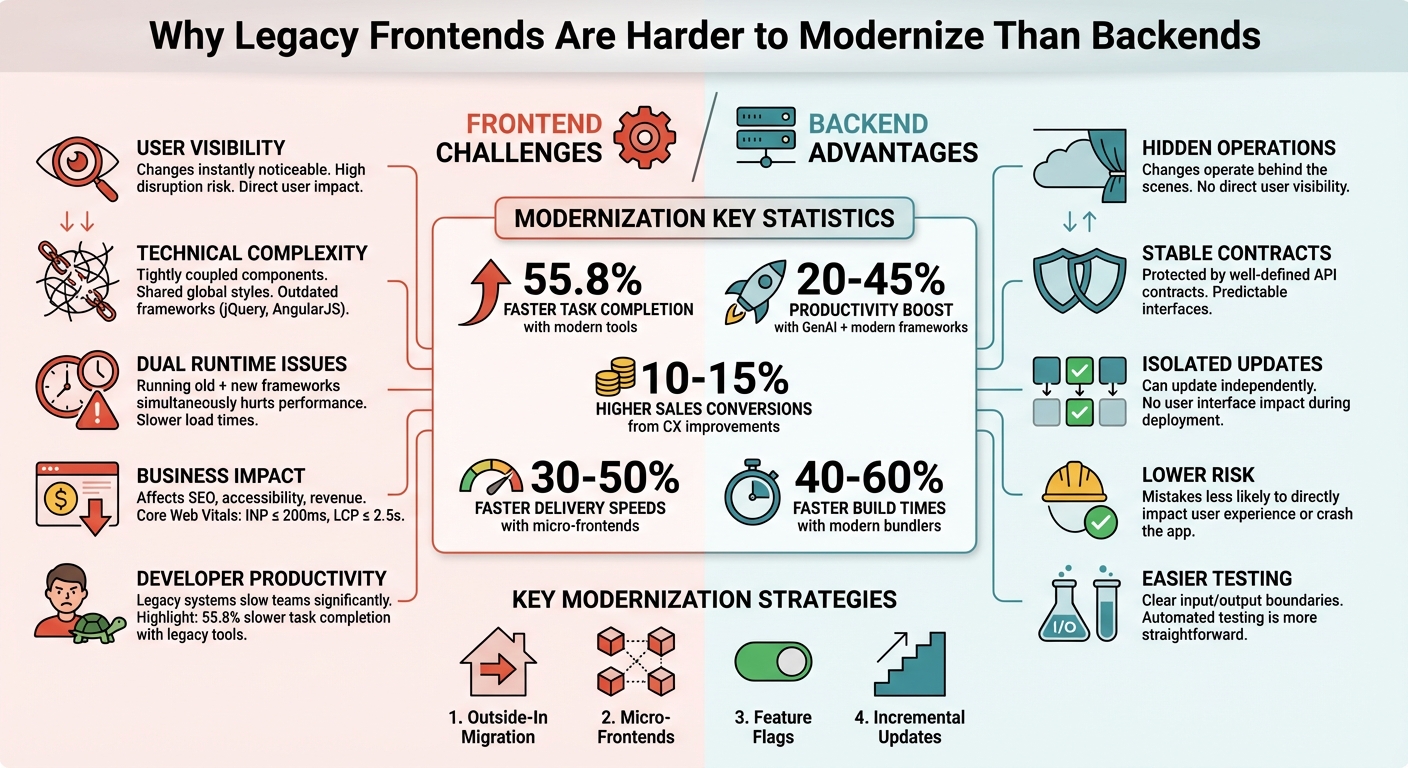
Frontend vs Backend Modernization Challenges Comparison
New Adventures in Legacy System Modernization
sbb-itb-51b9a02
Main Technical Challenges in Legacy Frontend Modernization
Modernizing legacy frontends comes with its own set of hurdles. Issues like shared styles, global variables, and outdated frameworks can negatively affect performance, design uniformity, and user experience.
Outdated Frameworks and Deprecated Technologies
AngularJS officially reached its end-of-life on December 31, 2021, and Internet Explorer 11 support ended on June 15, 2022[1]. Despite this, many enterprise applications still rely on these outdated platforms, creating security vulnerabilities due to unpatched issues. Adding to the challenge, experienced developers for older technologies like AngularJS or jQuery are becoming increasingly scarce.
Performance concerns are another major issue. Legacy stacks often fail to meet modern web standards, such as Google’s Core Web Vitals. For example, the Interaction to Next Paint (INP) metric, which replaced First Input Delay in March 2024, is a common stumbling block for older systems[1]. This can result in lower search rankings and fewer user conversions. Furthermore, legacy frontends typically lack the modularity and clean APIs required to integrate modern tools, such as generative AI.
Rajat Singhal, Co-Founder & CTO of Legacyleap, put it succinctly:
"The longer organizations hold on to end-of-life frameworks, the more expensive it becomes to sustain them." [1]
Tightly Coupled UI Components and State Management
Unlike backend services that rely on well-defined API contracts, legacy frontends often feature tightly interwoven components. Business logic is frequently embedded within UI controllers, making updates risky and prone to unintended side effects[1].
During modernization efforts, running multiple frameworks simultaneously – like React alongside AngularJS – can complicate matters further. Developers may need to implement custom event buses to synchronize state between the systems, leading to a fragmented and difficult-to-scale architecture[2][3].
Inconsistent Design Systems and Visual Styles
The challenges of tightly coupled components often spill over into design. Gradual migrations can result in design inconsistencies, as global styles from the legacy system can interfere with new components, disrupting layouts[3]. Additionally, new developers may unknowingly replicate outdated design patterns, further delaying the migration process.
For example, in 2017, a German real estate platform introduced a shared CSS framework to unify its legacy and modern systems. This approach enabled a smooth, six-month phased rollout without major disruptions[2]. Without such a unified design system, users are likely to encounter jarring shifts in visual styles as they navigate between old and new interfaces[2][3].
User Disruption Risks During Migration
Unlike backend updates, frontend changes are immediately visible to users. Even minor issues – like a broken button, slow page load, or unexpected layout shifts – can severely impact user experience.
In late 2018, a U.S.-based international airline modernized a critical AngularJS application by transitioning to React. Due to high delivery pressure and insufficient automated testing in the legacy code, the team opted for a "big bang" rewrite. Although they achieved feature parity within four months, the project highlighted the risks involved, particularly with larger codebases[2].
Technical Debt and Slower Development Speed
Legacy code often becomes a resource drain, slowing down innovation. Developers using modern toolchains can complete JavaScript tasks 55.8% faster[1]. Additionally, McKinsey reported a 20–45% productivity boost when generative AI is paired with up-to-date frameworks[1].
However, legacy codebases are often poorly documented and lack automated tests. When the original developers leave, the reasoning behind past decisions is lost, making even minor updates risky and time-consuming[3]. As Frontend Mastery points out:
"As long as we have at least one user on the old stack, it means we can’t delete the old code, and need to maintain a split brain between the old and new." [3]
Every month spent maintaining outdated frontend systems widens the gap between companies stuck in the past and those that have embraced modernization.
Practical Approaches for Incremental Frontend Modernization
Modernizing a legacy frontend doesn’t mean you need to start from scratch. The best way forward is incremental migration, where updates happen gradually while the system stays operational. Mark Knichel from Vercel summarizes it perfectly:
"The most reliable path from legacy to modern architecture is incremental migration rather than a complete rewrite." [8]
Here’s how you can transition from outdated systems to a more modern, efficient frontend.
Using an Outside-In Migration Strategy
The outside-in method begins by creating a modern application shell that handles routing, authentication, and navigation for your entire system. This shell gradually integrates new pages and features while keeping the legacy and modern applications running side by side. A routing layer, like a reverse proxy or stitching mechanism, ensures users won’t notice the transition [8].
Start with pages that are low-risk but high-impact – ones that change frequently. For instance, in 2025, ValueLabs helped a U.S. client migrate their benefits platform from BackboneJs to ReactJs using this approach. The result? A 30–40% improvement in system performance and faster development cycles [9].
This method follows the Strangler Fig pattern, where new features slowly replace the old system over time. To avoid jarring inconsistencies, batch related pages together and use feature flags to route traffic selectively [8].
Implementing Micro-Frontend Architectures
Micro-frontends break down your monolithic UI into independent, domain-specific modules, like "product search" or "checkout." Each module operates autonomously, allowing teams to work independently without stepping on each other’s toes [10]. This modularity also allows for using different frameworks (React, Angular, Vue) for different parts of the app.
The application shell acts as the glue, managing global tasks like routing and authentication while loading modules as needed [10]. Tools like Module Federation in Webpack 5 simplify code and dependency sharing between these independent builds [10][6].
For example, a fundraising platform adopted a hybrid React and legacy Vue architecture, leading to a 45% increase in revenue compared to its older system [4]. The micro-frontend approach enabled faster feature rollouts without waiting for a complete system overhaul.
To maintain a seamless user experience during the transition, ensure elements like headers and footers remain consistent across old and new modules [11]. Use browser features like CustomEvent for communication between modules instead of relying on complex global state management. This reduces coordination overhead and keeps teams focused on their specific tasks [10][7].
While micro-frontends handle modularization, feature flags add an extra layer of safety during updates.
Using Feature Flags for Gradual Rollouts
Feature flags act as a safety net during modernization. They allow you to release new features to a small audience first, test the changes, and roll back instantly if needed [12][8]. This approach lets both legacy and modern systems run simultaneously, making it possible to compare results without disrupting users [12].
Malte Ubl, CTO of Vercel, highlights the benefits:
"Incremental migrations minimize risk, improve the time to validating the business value of a change, and eliminate planned downtime." [12]
Feature flags separate code deployment from feature releases. You can push new code to production but leave it behind a flag until it’s ready for users. This is especially helpful in page-by-page migrations, where flags can direct users to the new application based on specific settings [8].
By implementing automated KPIs or "fitness functions", you can measure how the new experience performs against the legacy baseline in real time [2]. This ensures your changes are actually improving the user experience.
Integrating Modern Component Libraries with Legacy Code
You can embed modern components into existing pages using tools like iframes, Web Components, or custom event buses [8][10]. This approach allows for targeted updates without disrupting the entire system.
For example, you might wrap a new React component in a Web Component and drop it into a legacy AngularJS page. This ensures strong isolation, so CSS and JavaScript from one component don’t interfere with others [10][7]. While this method offers precise control, it requires more planning than a page-by-page migration [8].
When running multiple frameworks on the same page, watch for performance issues. For instance, loading both React and AngularJS simultaneously can slow things down. Monorepos can help by sharing design tokens and code between legacy and modern apps, ensuring visual consistency throughout the migration [8].
Focus on non-critical UI elements like dashboards or settings pages first. These are lower-risk and give your team time to get comfortable with the new stack before tackling core functionality. Start with frequently updated components to reduce technical debt early in the process [8].
| Migration Strategy | Best For | Primary Benefit |
|---|---|---|
| Page-by-Page | Rapid delivery of new stacks | Simple rollout [8] |
| Component-by-Component | Applications with no clear page boundaries | Finer-grained control [8] |
| Micro-Frontends | Large teams working on independent modules | Faster releases [10] |
| Feature Flags | Risk-averse organizations | Safe rollbacks [12] |
Addressing Organizational Challenges in Frontend Modernization
Tackling frontend modernization isn’t just about solving technical problems; it’s also about getting the organization on the same page. Without alignment across teams, processes, and priorities, even the most well-thought-out migration plans can hit roadblocks. Challenges like resistance from stakeholders, skill gaps, or outdated testing tools can stall progress.
Communicating Modernization Benefits to Stakeholders
To gain leadership buy-in, focus on the business impact – cost savings, risk reduction, and staying competitive. Legacy systems are expensive to maintain, especially as finding skilled talent becomes harder. They also pose security and compliance risks, which can grow over time [1].
Modernization becomes even more compelling when tied to AI readiness. Legacy frontends often lack the APIs and telemetry needed to support AI-driven features, like adaptive interfaces or AI copilots. As Rajat Singhal and Kevin Anderson from Legacyleap explain:
"Every month spent maintaining a legacy UI adds cost and friction…" [1]
Instead of requesting a multi-year budget, propose starting with a small-scale proof of concept (PoC). For instance, in 2024, Nike completed an AI PoC in just three weeks by using a sandbox environment and synthetic data to bypass legacy integration delays [13]. A well-defined PoC (lasting 3–4 weeks) can quickly show value, minimize disruption, and provide measurable results [3].
The benefits of modernization go beyond cost savings. Companies using modern frameworks often see a 20–45% boost in productivity with GenAI tools. Those focusing on customer experience (CX) improvements can see sales conversions rise by 10–15% [1][14].
Building Teams with Modern Frontend Expertise
Once stakeholders are on board, the next step is assembling the right team. Maintaining legacy frameworks like jQuery or AngularJS is becoming more difficult and costly, while developers skilled in modern frameworks like React, Vue, and Angular are easier to find [1]. This talent shift makes modernization not just a technical upgrade but a way to attract and retain top talent.
To ease the transition, consider using the Strangler Fig pattern, which allows teams to gradually adopt new technologies while keeping legacy systems running [4][2]. A great example is a U.S.-based airline that, in 2018, partnered with Thoughtworks to replace a critical AngularJS application. They formed a 10-person team in January, and by April, they had delivered a React-based MVP with feature parity [2].
AI tools can also help bridge skill gaps. For instance, developers using GitHub Copilot completed JavaScript tasks 55.8% faster [1]. AI can assist by generating documentation for outdated UIs, interpreting legacy code, and even writing tests – reducing the workload for your team.
Another strategy is forming UI Guilds or specialized teams to manage component libraries. These teams can help standardize practices, cut down on duplicate work, and maintain UX consistency throughout the migration [2]. Tools like Bit and Module Federation can simplify this process, but they require upfront learning time, so plan accordingly [6].
Setting Up Automated Testing Infrastructure
A skilled team is only half the battle – robust testing is equally important for a smooth migration. Automated testing ensures that both legacy and modern systems function correctly, catching issues early. Transitioning from older tools like Selenium to modern options such as Playwright or Cypress can significantly speed up regression testing, reducing cycles from days to just hours [1].
Fitness functions are another useful tool for monitoring key UI metrics, like Core Web Vitals. For example, in 2017, a German real estate platform used A/B testing and fitness functions to prove that running both React and AngularJS simultaneously wouldn’t impact performance. This gave stakeholders the confidence to approve a six-month phased rollout [2].
Automated testing also helps enforce modern coding standards. Custom ESLint rules and automated code mods can prevent outdated patterns from creeping into new code [3].
| Challenge | Legacy Approach | Modern Approach |
|---|---|---|
| Governance | Manual review boards, top-down rules | Embedded in platform, automated contracts [5] |
| Testing | Selenium, multi-day regression cycles | Playwright/Cypress, faster cycles [1] |
| Team Structure | Functional silos | Cross-functional, domain-aligned teams [5] |
| Deployment | Single pipeline bottlenecks | Independent pipelines for micro-frontends [5] |
Measuring Success and Planning for Long-Term Scalability
Modernizing your frontend isn’t just about adopting new tools – it’s about setting clear goals and planning for future growth. Without proper metrics and a forward-thinking strategy, it’s easy to repeat old mistakes.
Setting Key Performance Indicators (KPIs)
To track the success of your frontend modernization, focus on three key areas: performance, development efficiency, and business outcomes.
Start with performance metrics like Core Web Vitals, which are critical for user engagement and SEO. As of March 2024, Interaction to Next Paint (INP) replaced First Input Delay (FID). Aim for these benchmarks:
- INP ≤ 200 ms
- Largest Contentful Paint (LCP) ≤ 2.5 seconds
- Cumulative Layout Shift (CLS) ≤ 0.1 [1][15].
On the development side, efficiency is just as important. Teams using modern bundlers like Vite or Rspack have reported 40% to 60% faster build times [1]. Additionally, if you’re moving to micro-frontends, track deployment frequency. Companies adopting this approach have boosted delivery speeds by 30% to 50% without increasing team size [14].
Finally, measure business impact. Modernization efforts focused on user experience have led to 10% to 15% higher sales conversions [14]. Accessibility is another key metric – ensuring compliance with WCAG 2.2 standards can reduce legal risks and make your platform usable by a broader audience [1].
These metrics not only guide your progress but also help identify areas that need more attention.
Running Technical Audits and Risk Assessments
Before diving into updates, run a thorough technical audit. Use tools to identify outdated patterns like AngularJS scopes or jQuery handlers, and locate unused code that bloats your bundle size [1]. This gives you a clear starting point and helps prioritize updates based on both technical challenges and business impact.
During the migration process, it’s crucial to test for coexistence. For example, in 2017, a German real estate platform used A/B testing to run both React and AngularJS simultaneously for a small group of users. By monitoring CPU load and network performance, they ensured KPIs remained stable before committing to a full rollout [2].
Automated testing is your safety net. Use visual diff tools and regression tests with platforms like Playwright or Chromatic to catch issues between the old and new versions [1][16]. Custom ESLint rules can also help prevent developers from accidentally reintroducing outdated patterns [3]. To stay flexible, implement feature flags for every modernized component, allowing you to quickly roll back changes if needed [1][3].
Preparing for Future Technologies and Requirements
Once you’ve stabilized your current performance, it’s time to think ahead. The goal is to build a frontend that can handle future demands without constant rewrites.
Start by designing your architecture to support emerging technologies like AI-powered features and WebAssembly [1]. Modular APIs and event-driven telemetry can make it easier to integrate AI tools, such as copilots or adaptive interfaces, down the line [13][1].
Invest in design systems with semantic tokens early on. These tokens help AI tools recognize patterns in your code, speeding up future updates and ensuring consistency across teams [13]. For global scalability, explore edge-native rendering, which goes beyond traditional server-side rendering to improve performance worldwide [1].
As Yena Lee, Director of AI Strategy at Rangle.io, puts it:
"Modernizing your front-end tech stack for AI isn’t a risk – it’s a strategy to future-proof your business." [13]
Finally, set performance budgets and use automated fitness functions to maintain the metrics you’ve worked hard to improve [1][2]. This ensures that your frontend not only meets today’s needs but is ready for tomorrow’s challenges.
Conclusion: Connecting Frontend Modernization to Business Goals
Frontend modernization isn’t just about keeping up with technology – it’s an investment that directly ties to your business’s success. Outdated frontends often come with tightly coupled systems, aging frameworks, and a high risk of disrupting users. On the flip side, the rewards of modernization are clear. Companies leveraging modern frameworks report 20% to 45% productivity gains through AI adoption, and streamlined toolchains can slash build times by 40% to 60% [1].
Think of modernization as an ongoing journey rather than a one-time fix. The Strangler Fig pattern, for example, allows for a gradual overhaul of legacy systems, avoiding the risks of a complete rewrite. As John Lawrimore from Dialexa explains:
MFE [Micro Frontend architecture] allows modernization to become a continuous practice rather than a reactionary hardship, indefinitely preventing the system from returning to an outdated state [4].
Stay focused on metrics that align with your business goals. Meeting Core Web Vitals is a must – aim for INP ≤ 200 ms and LCP ≤ 2.5 seconds, as these have a direct impact on SEO rankings and conversion rates [1]. Beyond that, monitor deployment frequency, developer velocity, and user retention while working to reduce technical debt. These KPIs not only demonstrate the tangible benefits of modernization but also help keep your team aligned with broader business objectives.
The time to act is now. The costs of technical debt have evolved into real operational and financial challenges [1]. By adopting incremental migration strategies, you can make steady progress while strengthening your competitive edge. Start small, focus on measurable improvements, and build momentum. Whether you’re gearing up for AI integration, enhancing the user experience, or attracting developers proficient in modern frameworks, every step forward adds to your long-term success.
Your frontend is the gateway to your product. Make sure it’s ready for the future.
FAQs
Why are changes to the frontend more noticeable to users than backend updates?
Frontend updates tend to stand out more because they directly affect the user interface (UI) and the overall user experience (UX). These updates change elements like layouts, colors, buttons, and responsiveness – essentially, everything users see and interact with – making the changes immediately obvious.
On the other hand, backend updates focus on behind-the-scenes improvements, such as database tweaks or server performance upgrades. While these upgrades enhance functionality, they typically go unnoticed by users. Because frontend updates are so visible, they require extra attention to ensure that the experience remains smooth and consistent during and after the changes.
What steps can businesses take to reduce risks when modernizing their frontend systems?
To minimize risks during frontend modernization, a phased approach is key. This method allows businesses to roll out updates gradually, ensuring operations remain smooth throughout the process. A great example of this is the "Strangler Fig" pattern, which lets teams replace outdated components piece by piece. This way, you can maintain stability while moving forward with updates.
Another effective strategy is implementing micro frontends. By isolating different sections of your application, you can make updates to specific parts without risking the functionality of the entire system. This modular approach not only reduces risk but also makes the process more manageable.
Automation tools can be a game-changer here. They take care of repetitive tasks like dependency mapping, testing, and validation, which not only saves time but also cuts down on errors. Automation ensures you’re working smarter, not harder, during the transition.
Finally, don’t overlook design consistency. Keeping the look and feel uniform across the application is critical to maintaining a seamless user experience. Plus, aligning these updates with your long-term product goals ensures the modernization effort supports your broader vision.
By combining modular techniques like micro frontends, leveraging automation, and focusing on careful planning, businesses can modernize their frontend systems while keeping risks and disruptions to a minimum.
Why is the outside-in approach ideal for upgrading legacy frontends?
The outside-in approach is a smart way to modernize legacy frontends because it allows for a step-by-step transition to modern architecture without disrupting users. Instead of tearing down the entire system, this method introduces new components – like a single-page application (SPA) – into the existing setup and gradually expands their functionality. This avoids the headaches of a complete overhaul and keeps things running smoothly for both users and development teams.
Taking an incremental route lets teams replace outdated parts in smaller, manageable steps. It also helps maintain a consistent design and gives space to test new features as they roll out. Plus, this approach pairs well with modular methods like micro frontends, which allow for independent updates and make scaling easier in the long run. The result? Less downtime, fewer risks, and a smoother integration with legacy backends.







Leave a Reply