
Google Antigravity vs Cursor: Can an Agent-First IDE Actually Handle Legacy Codebases?
Taher Pardawala March 7, 2026
Yes, but it depends on your needs. Google Antigravity and Cursor are two advanced AI-powered tools designed to modernize legacy codebases, but they approach the challenge differently.
- Antigravity: Operates like an autonomous engineering team. It excels at large-scale, automated refactoring with its massive 1-million-token context window, making it ideal for tackling undocumented, fragile systems. However, it requires oversight due to security concerns and limited enterprise validation.
- Cursor: Functions as a developer-focused IDE. It prioritizes precision and control, with human-approved edits and features like shadow workspaces for safe testing. Cursor is better suited for incremental updates and production-critical environments.
Key Takeaways:
- Antigravity is best for large-scale architectural overhauls and deep dependency analysis.
- Cursor is ideal for precise, developer-controlled changes in sensitive systems.
- Both tools reduce the risks of working with legacy systems but differ in their level of automation and control.
Here’s how they compare:
| Feature | Google Antigravity | Cursor |
|---|---|---|
| Automation Level | High (autonomous agents) | Moderate (developer-led) |
| Context Window | 1M+ tokens | 128K tokens |
| Security | Limited enterprise use | SOC 2 certified |
| Best For | Large-scale refactoring | Incremental updates |
| Risk Mitigation | Verifiable artifacts | Shadow workspace |
Antigravity is powerful for sweeping changes, while Cursor shines in maintaining stability. Choose based on your goals: automation or precision.
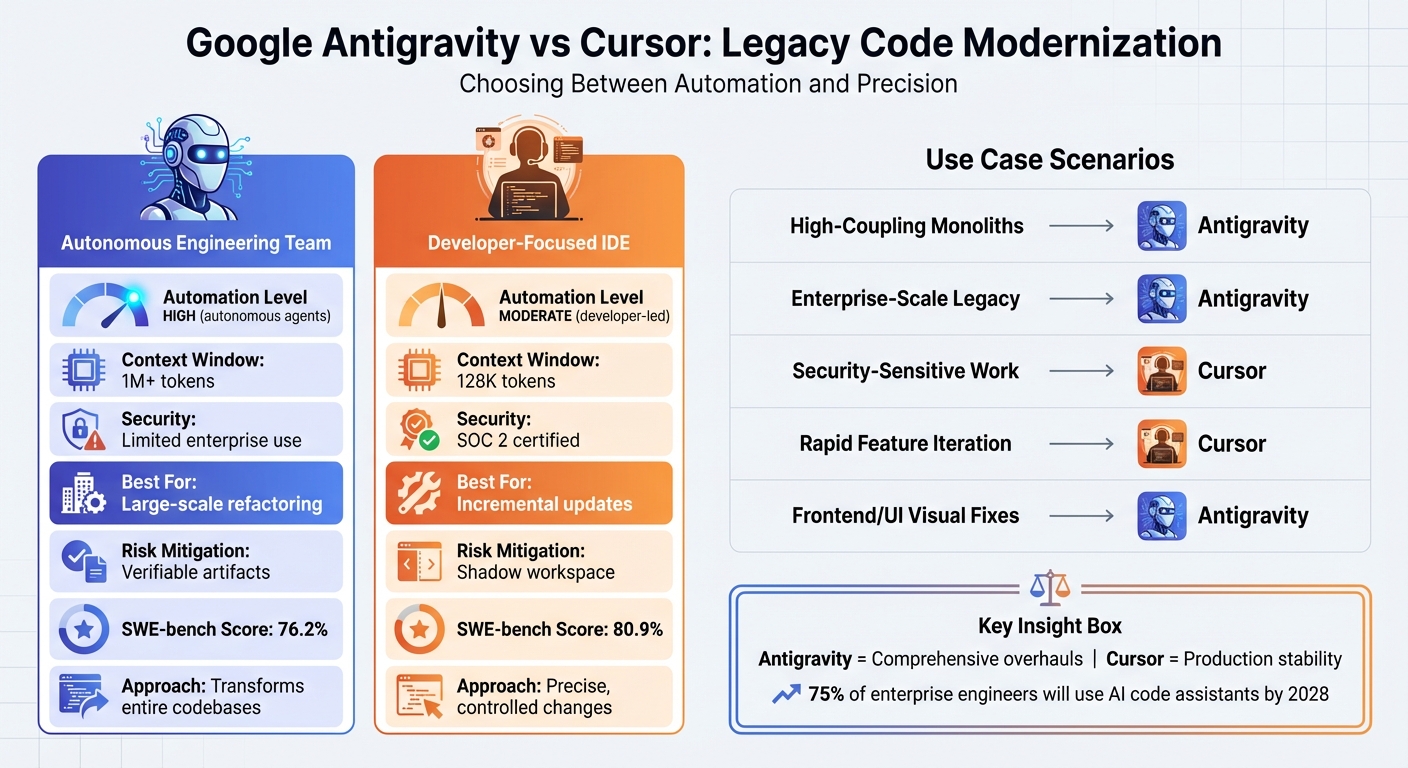
Google Antigravity vs Cursor: Feature Comparison for Legacy Code Modernization
Working Effectively with Legacy Code and AI Coding Assistant – Michael Feathers
Google Antigravity: Features and Legacy Code Handling
Google Antigravity functions as more than just an assistant – it operates as an independent engineering team, specifically designed to handle fragile, undocumented legacy codebases. At its core is a Planner agent that breaks large-scale legacy migrations into smaller, manageable tasks. These tasks are then assigned to specialized "Role-Based Experts", which are agents focused on specific areas like refactoring, testing, debugging, or infrastructure. Developers, acting as "Mission Controllers", oversee the process, coordinating these agents to ensure smooth migrations. For example, while one agent refactors a backend API, another might simultaneously update the corresponding frontend components, all tracked through a "Manager View" interface.
One standout feature for tackling legacy systems is its persistent workspace memory. By storing architectural decisions and project context in a .gemini/antigravity/brain/ directory, the platform maintains a continuous understanding of the system. Coupled with Gemini 3’s massive 1-million+ token context window, Antigravity can keep entire undocumented codebases in active memory, enabling it to grasp intricate dependency graphs that traditional tools would struggle with [11].
Automated Codebase Scanning and Analysis
Antigravity’s scanning system uses a concept Google calls "Progressive Disclosure", powered by its Skills framework. Instead of loading the entire codebase at once – which could lead to context overload – the platform works with modular, file-based units called Skills (SKILL.md). These units load procedural knowledge only when required. For instance, a "Librarian Skill" connects the AI to internal documentation or wikis, helping it avoid fabricating generic code patterns [12].
The platform’s capabilities are reflected in its performance benchmarks: it scored 76.2% on SWE-bench Verified and 54.2% on Terminal-Bench 2.0, showcasing its ability to resolve GitHub issues and execute terminal commands effectively [9]. Using a reasoning graph powered by Gemini Flash and Gemini Pro 2.0, Antigravity maps dependencies and identifies areas of tech debt [7][11]. This produces a detailed map of dependencies, tech debt hotspots, and architectural patterns – even in poorly documented codebases. To ensure accuracy, the system generates "Verifiable Artifacts", such as task lists, implementation plans, screenshots, and browser recordings, which developers can review [3]. These insights directly inform its refactoring and integration strategies.
Refactoring and Integration Capabilities
When working with delicate systems, Antigravity switches to Planning Mode. It carefully analyzes schemas and dependencies before making any changes, producing a Structured Implementation Plan for developer approval [13]. This deliberate approach minimizes the risks typically associated with modifying legacy systems.
Antigravity operates across three key surfaces simultaneously: the Editor for making code changes, the Terminal for running builds and tests, and a Browser Sub-Agent for visually verifying UI updates and end-to-end workflows. The Browser Sub-Agent, powered by Gemini 2.5’s vision capabilities, can launch servers, navigate pages, and capture screenshots to validate UI changes with precision [15][16].
"Antigravity is designed as an ‘agent-first’ platform. It presupposes that the AI is not just a tool for writing code but an autonomous actor capable of planning, executing, validating, and iterating on complex engineering tasks with minimal human intervention."
– Romin Irani, Google Cloud Developer Advocate [14]
For integration tasks, the platform suggests and implements adapter layers to protect core legacy logic while maintaining compatibility with older interfaces [4].
Risk Mitigation in Fragile Systems
Antigravity is built with a strong focus on risk mitigation, particularly for fragile systems. It employs tiered execution policies and a Code Archaeology feature, which analyzes git history and pull requests to minimize risks [13][14][17]. This feature provides historical context for legacy code, reducing the chances of accidentally removing critical "load-bearing" logic.
After completing modifications, the platform enters Auditor Mode to write unit tests, update mocks, and run thorough regression tests. In one evaluation, Antigravity performed over 150 checks to ensure new changes didn’t disrupt existing functionality [4]. Its "Gravity Mode" successfully completed 72% of tasks on the first attempt during benchmark testing across 50 real-world tasks [17].
The platform also uses a Rules system to enforce safety protocols. These passive constraints are added to system prompts, allowing developers to set rules like "Always use TypeScript strict mode" or "safe-db-migration" to prevent unsafe behaviors, such as writing raw SQL directly into terminals [11].
Cursor: Features and Legacy Code Handling
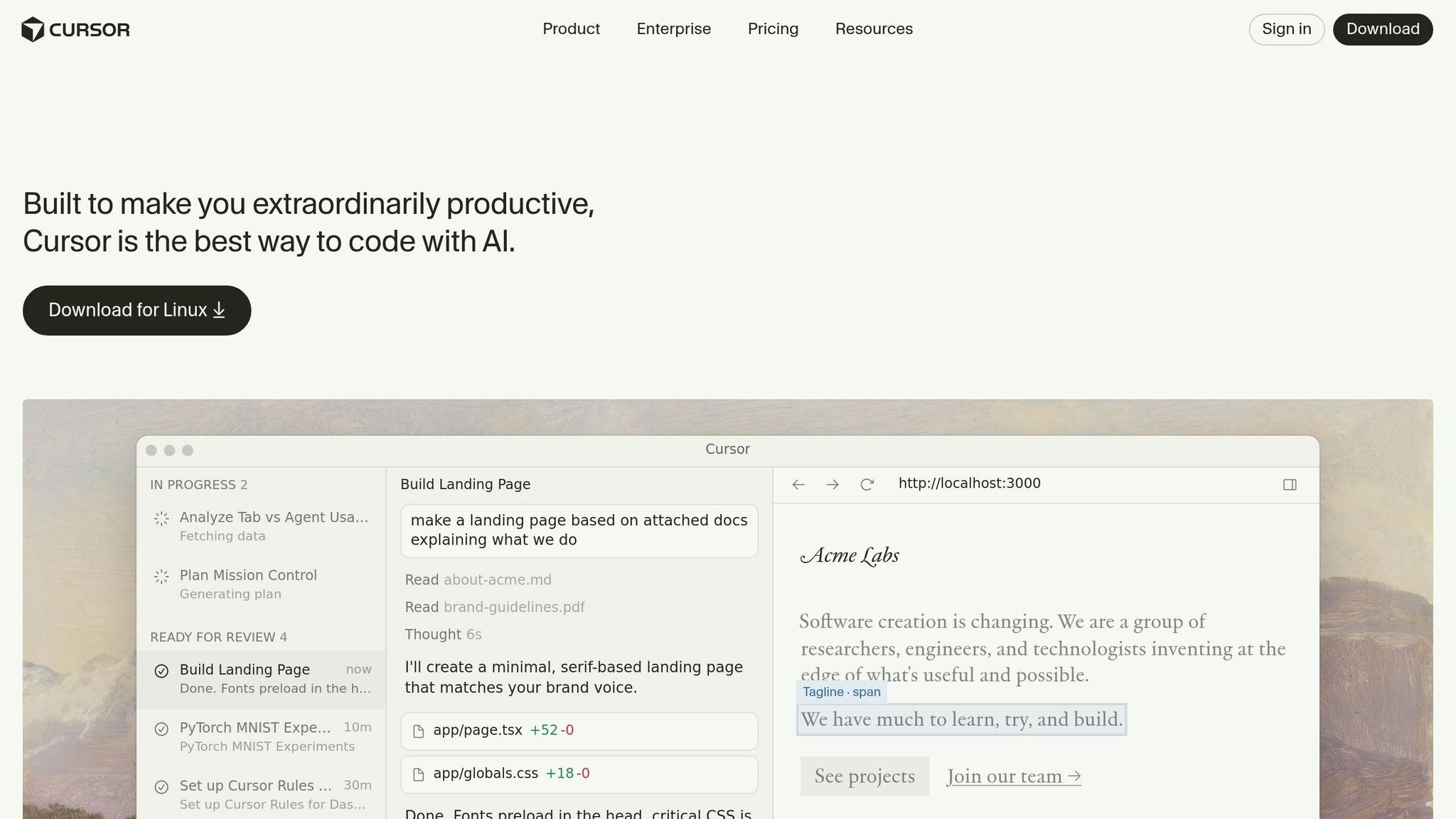
Cursor serves as an Augmented Human Intelligence IDE, designed to keep developers in control while utilizing powerful autonomous agents for tackling complex legacy code modernization. Unlike fully automated systems, Cursor’s agents work discreetly in the background, handling tasks like refactoring modules, migrating frameworks, and updating deprecated dependencies. It supports up to eight independent agents through Git worktrees, enabling parallel modernization workflows [21][1].
At its core, Cursor uses a Merkle tree representation and a semantic index of the entire codebase, allowing quick searches and context retrieval – even in massive, undocumented systems [1]. This indexing system updates every 10 minutes, making it efficient for incremental updates in large-scale projects [25]. To ensure stability, Cursor maintains a shadow workspace for linting and speculative edits, with changes only applied when developers explicitly approve them [1]. For more extensive migrations, agents can operate in the cloud, delivering results as Pull Requests without interrupting local development environments [18][1]. This architecture enables detailed, context-rich code analysis.
Context-Aware Code Understanding
Cursor employs a RAG (Retrieval-Augmented Generation) pipeline with a context window of up to 128,000 tokens, enabling it to extract critical code snippets even in poorly documented systems [1][23]. This capability is particularly useful for legacy systems where the only documentation is the code itself.
Before making changes, Cursor’s Plan Mode (activated with Shift+Tab) requires the agent to analyze the codebase, ask clarifying questions, and draft a detailed implementation plan in Markdown format [18][20]. These plans are stored in .cursor/plans/, allowing team members to review, edit, and approve them before execution. Between January and April 2025, the Salesforce Einstein Activity Capture (EAC) team used this workflow to modernize legacy repositories inherited from the RelateIQ acquisition. This reduced the time spent on unit test development from 26 engineer days to just 4 days per module – an 85% productivity increase [19].
"Cursor revolutionized the team’s approach by systematically analyzing existing code coverage reports and pinpointing areas for improvement across the distributed repositories."
– Rachna Singh, Senior Director of Software Engineering, Salesforce [19]
The team tackled repositories with under 10% test coverage written in Java, Scala, and Kotlin. Using Cursor to identify coverage gaps, they achieved the required 80% coverage across 76 repositories [19].
Collaborative Refactoring and Modernization
Cursor also supports collaborative refactoring, leveraging shared project rules and multi-agent judging systems. Teams can create Markdown-based rule files in .cursor/rules/ to enforce consistent coding patterns, architectural standards, and specific workflows [18][1]. For instance, rules like "Always use functional components" or "Prefer specific libraries" ensure agents adhere to established patterns, even in undocumented codebases.
For complex refactoring, Cursor deploys multiple agents in isolated Git worktrees, with a Judge agent selecting the most stable implementation [18][1]. This system has been used internally to optimize a video renderer by migrating logic to Rust and implementing custom kernels, achieving identical visual outputs autonomously over several hours [24].
Cursor’s Cloud Agents manage long-running tasks without disrupting local environments. These agents work directly with GitHub or GitLab repositories, submitting pull requests upon task completion [24][1]. By late 2025, Cursor agents were generating close to one billion lines of code daily, highlighting its widespread use in large-scale modernization projects [21].
Error Detection and Stability Features
In addition to refactoring, Cursor focuses on maintaining stability by proactively identifying errors. Before making changes, it generates characterization tests that document current behavior, flagging any behavioral shifts caused by updates [22]. This approach helped the Salesforce team uncover existing production bugs, such as a health check logic error, while generating tests for legacy modules [19].
BugBot operates as a background agent, monitoring code changes during builds or pull request creation. It identifies issues like off-by-one errors and potential regressions before they’re committed [18][1]. Powered by its "Composer" model, which is 4x faster than comparable models like Gemini Flash 2.5, Cursor handles multi-file dependencies with high accuracy [21]. It scored 80.9% on SWE-Bench Verified using Claude Opus 4.5, showcasing its ability to resolve real-world GitHub issues in legacy codebases [1].
For incremental modernization, Cursor supports a bottom-up approach. For example, when converting JavaScript to TypeScript, it starts with models, moves to services, and finally updates controllers, identifying hidden type errors incrementally without disrupting the system [22]. Developers can also use "Ask mode", a read-only exploration feature, to map critical user flows and build a mental model before modifying legacy code [22].
Google Antigravity vs Cursor: Direct Comparison on Legacy Code Management
When it comes to modernizing legacy systems, Google Antigravity and Cursor take different approaches to tackling complex codebases. Antigravity uses autonomous agents to handle scanning, planning, and execution, while Cursor, an AI-augmented fork of VS Code, keeps developers in the driver’s seat with inline edits and chat interfaces.
Antigravity’s standout feature is its massive 1-million-token context window, powered by Gemini, which can process around 3,000–4,000 pages of code simultaneously [2]. On the other hand, Cursor employs semantic indexing through vector-based search. While effective, this method faces challenges with very large monorepos and can consume over 100 GB of RAM during extended sessions [2].
"Cursor behaves like a copilot; Antigravity functions like an engineering team." – JMS Technologies [7]
Performance benchmarks further highlight their differences. Antigravity has shown strong results on SWE-bench Verified, solving real-world GitHub issues efficiently [26]. For example, on a 200,000-line project, Antigravity completed indexing in just 3–5 minutes compared to Cursor’s 10–15 minutes [26]. Despite this, Cursor has delivered meaningful productivity boosts, with NVIDIA reporting a 3× increase in code output and Coinbase achieving full engineer adoption by early 2025 [27].
These contrasts underline their distinct approaches to scanning and analyzing legacy codebases.
Codebase Scanning and Analysis
The tools diverge significantly in their methods for understanding and mapping legacy systems. Antigravity excels in identifying architectural patterns and utilities, even in poorly documented or ambiguously named code, thanks to its expansive context window [26]. Cursor, however, leans more on developers to provide specific file contexts or use targeted commands for edits [26].
| Feature | Google Antigravity | Cursor |
|---|---|---|
| Context Handling | Advanced | Advanced |
| Security Scanning | Comprehensive | Moderate |
| Tech Debt Detection | High Precision | Moderate Precision |
| Performance on Large Repos | Excellent | Excellent (high RAM usage) |
Antigravity also stands out with its "Artifacts" system, which provides verifiable trails, including task lists, implementation plans, and browser recordings, to explain its actions [10]. Cursor, in contrast, uses traditional diff-based reviews, leaving developers as the final decision-makers for all changes [6]. This difference becomes particularly important in fragile systems, where understanding the rationale behind a change is as critical as the change itself.
The differences extend further when it comes to refactoring workflows and handling risks.
Refactoring and Risk Management
Antigravity and Cursor cater to different refactoring needs. Antigravity shines in large-scale architectural transformations, such as migrating frameworks or extracting bounded contexts from monoliths, thanks to its multi-agent orchestration [7]. Cursor, however, is better suited for smaller, incremental refactors where developers maintain tight control over each change [6].
| Workflow Aspect | Google Antigravity | Cursor |
|---|---|---|
| Refactoring Accuracy | High (architectural) | Moderate (incremental) |
| Change Reviewability | Artifact-based | Diff-based |
| Sandboxing | Robust | Moderate |
| Error Recovery | Excellent | Good |
The tools also take different approaches to risk mitigation. Antigravity’s Artifact system offers a transparent audit trail, including implementation plans and screenshots, allowing developers to review agent actions before finalization [8]. Cursor, on the other hand, uses a shadow workspace to test speculative edits and linting without impacting actual files. Additionally, its BugBot feature detects logic flaws, such as off-by-one errors, before commits [1].
"Antigravity transforms entire codebases and architectural structures." – JMS Technologies [7]
Despite its potential for large-scale transformations, Antigravity currently faces limitations in production environments. As of early 2026, Google has restricted its use for internal production work due to security and reliability concerns [2]. Meanwhile, Cursor has achieved SOC 2 Type II and GDPR compliance, making it a strong option for enterprise deployments [2].
sbb-itb-51b9a02
Performance on Fragile, Undocumented Codebases
Working with fragile legacy systems often requires tools that can grasp the broader context without disrupting what’s already functioning. Antigravity’s impressive 2-million-token context window enables it to process entire codebases at once, minimizing the risk of introducing errors caused by misunderstood logic – a common issue with smaller context windows [1]. This feature becomes especially critical when dealing with older systems like COBOL or Java 7, where documentation is either sparse or completely missing [7]. This capability highlights a key difference in approach when compared to Cursor’s more tightly controlled methodology.
In December 2025, developer Josh English used Antigravity to refactor a complex AI framework. During the process, a new streaming implementation caused disruptions in a legacy server. Antigravity quickly pinpointed the issue and created a thin adapter layer to safeguard the core system, successfully passing over 150 regression checks [4]. Beyond resolving the immediate problem, it aligned outdated documentation with the actual implementation, revealing and addressing years of accumulated technical debt [4].
On the other hand, Cursor’s approach emphasizes precision and developer oversight. Its BugBot tool excels at catching specific issues like null pointers and off-by-one errors during the build process [1]. For example, at Salesforce, this method proved highly effective – engineers reduced time spent on legacy code coverage by 85%, with every AI-generated test subjected to mandatory human review [2].
This comparison raises an important question: which agent-first IDE is better suited for managing fragile legacy systems? The answer largely depends on the level of autonomy you’re comfortable delegating. Antigravity operates like an independent contractor, managing workflows on its own and delivering verifiable artifacts – such as plans, screenshots, and recordings – for auditing purposes [3]. Cursor, in contrast, functions more like a conductor, requiring developers to review every change to ensure tight control over production environments. Antigravity shines when transforming undocumented, monolithic systems, while Cursor provides a safer, more controlled approach with precise, human-verified edits [7].
Strengths, Limitations, and Best Use Cases
When tackling the complexities of legacy modernization, the tools at hand each bring distinct strengths to the table. Google Antigravity stands out for its ability to transform entire systems. With a massive 1- to 2-million token context window, it can process entire repositories and uncover architectural details that other tools might overlook [1][15]. Its autonomous "Manager Model" makes it particularly effective for large-scale structural changes, like transitioning from an MVC framework to a modular monolith [15][7]. However, Antigravity has yet to achieve enterprise validation – Google itself reportedly prevents its developers from using it in internal production environments [2]. On top of that, security concerns have been flagged: in December 2025, researchers at PromptArmor showed how malicious webpages could exploit Antigravity’s agents to extract credentials from .env files [28][15]. Other drawbacks include issues like excessive battery usage, input delays, and frequent rate limits after handling just a few complex tasks [5][15].
Cursor, on the other hand, shines in precision-focused and fast coding workflows. Its "Shadow Workspace" feature catches syntax issues before making changes, and its SOC 2 certification with zero data retention provides a more secure option for enterprise environments [28][2]. Scoring 77.2% on SWE-bench Verified highlights its engineering efficiency [15]. However, Cursor does come with its own limitations: it can consume over 100 GB of RAM in large monorepos and struggles with performance when working on files longer than 500 lines [2]. Additionally, since it operates as a standalone VS Code fork, teams using JetBrains must fully transition their IDE to leverage it [2].
"Cursor behaves like a copilot. Antigravity behaves like an engineering team." – JMS Technologies Inc. [7]
Deciding between these tools depends on how much automation versus control you need. Antigravity’s multi-step automation excels in exploratory projects or large-scale transformations where a deep understanding of the entire codebase is crucial [7][1]. This makes it invaluable for stabilizing legacy systems through comprehensive architectural analysis. Meanwhile, Cursor’s approach – requiring developers to review and approve every change – makes it ideal for precise refactoring in critical areas like payment systems or authentication, where stability and accuracy are non-negotiable.
Here’s a quick breakdown of which scenarios align best with each tool’s capabilities:
Workflow Matching: Which Tool for Which Scenario
| Scenario | Recommended Tool | Key Reason |
|---|---|---|
| High-Coupling Monoliths | Google Antigravity | Excels in architectural refactoring with its large context window [7][1] |
| Enterprise-Scale Legacy | Google Antigravity | Handles large-scale code analysis through global reasoning [7][1] |
| Security-Sensitive Work | Cursor | SOC 2 certified with zero data retention [28][2] |
| Rapid Feature Iteration | Cursor | Low latency and fast "Centaur" workflow [7][15] |
| Frontend/UI Visual Fixes | Google Antigravity | Vision-native agents can analyze and verify UI pixel accuracy [1][15] |
Conclusion: Choosing the Right Tool for Legacy System Stabilization
Google Antigravity and Cursor cater to different needs when it comes to modernizing legacy systems. Antigravity handles large-scale architectural changes autonomously, while Cursor focuses on precise, incremental improvements. The right choice depends on whether you prioritize sweeping overhauls or a more controlled approach to stability.
For high-risk environments, Antigravity shines when dealing with massive, undocumented codebases that require extensive restructuring – like migrating frameworks, extracting bounded contexts, or untangling tightly coupled systems. With a context window of up to 2 million tokens [1], it can analyze entire repositories and recommend multi-step architectural changes that would otherwise take weeks to plan. However, it’s important to note that Antigravity is not yet validated for enterprise production. Google limits its use internally, and a December 2025 vulnerability [28] highlights potential credential risks. It’s most effective for supervised, non-sensitive modernization experiments where changes can be reviewed before implementation.
On the other hand, Cursor is ideal for production-critical systems. It offers SOC 2 Type II certification, zero-data-retention options, and a human-in-the-loop approval process, making it a strong choice for sensitive areas like payment processing or authentication modules. It also significantly reduces the time needed to generate legacy tests, which is a key advantage for incremental modernization. However, Cursor struggles with memory consumption in very large monorepos and isn’t designed for large-scale architectural transformations.
CTOs and founders should weigh automation against control. Antigravity is best for comprehensive system overhauls, while Cursor excels in maintaining precision and stability. A hybrid approach could be the most effective strategy: use Cursor for daily development and compliance tasks, while piloting Antigravity for targeted architectural research. Implement strict guardrails, such as manual approvals for agent actions, and ensure your team is standardized on VS Code, as both tools currently depend on it.
While agent-first IDE adoption is growing rapidly, maturity remains a critical factor. With projections showing that 75% of enterprise engineers will use AI code assistants by 2028 [2], the tools you choose today will shape how your team navigates legacy system modernization in the years to come.
FAQs
Which tool is safer for production legacy systems?
Google Antigravity is often the preferred option for legacy systems because it prioritizes traceability and generates auditable artifacts, which are crucial for maintaining stability and ensuring compliance. Its seamless integration with existing Google tools makes it particularly useful for managing fragile or undocumented codebases. On the other hand, while Cursor offers faster performance, it leans toward being more experimental, which could pose risks in sensitive or high-stakes environments. For those prioritizing stability and minimizing risks, Antigravity stands out as the safer choice.
How do these IDEs reduce refactoring risk in undocumented code?
These IDEs tackle the challenges of refactoring undocumented code by relying on agent-first, autonomous workflows. Google Antigravity uses agents to manage tasks asynchronously, allowing developers to examine artifacts and test results without making direct changes to delicate code. Similarly, Cursor streamlines code analysis and transformations, helping to minimize errors. Both tools prioritize agent-driven updates, combining automated testing, validation, and incremental changes to ensure a safer and more systematic refactoring process.
What guardrails should my team set before using agent-first IDEs?
To make the most of agent-first IDEs while keeping things safe, it’s important to follow a few key practices. Start by setting clear objectives for what you want the agent to achieve. Always double-check the quality of the code they generate to ensure it meets your standards. Limit their ability to act autonomously, especially when working with older, fragile, or undocumented systems, as this can prevent unexpected disruptions.
Operate these agents in secure environments to protect your systems and data. Additionally, maintain detailed logs of their activities. This not only provides accountability but also helps you track and understand their actions. By sticking to these steps, you can reduce risks and keep agents functioning within their intended limits.





Leave a Reply